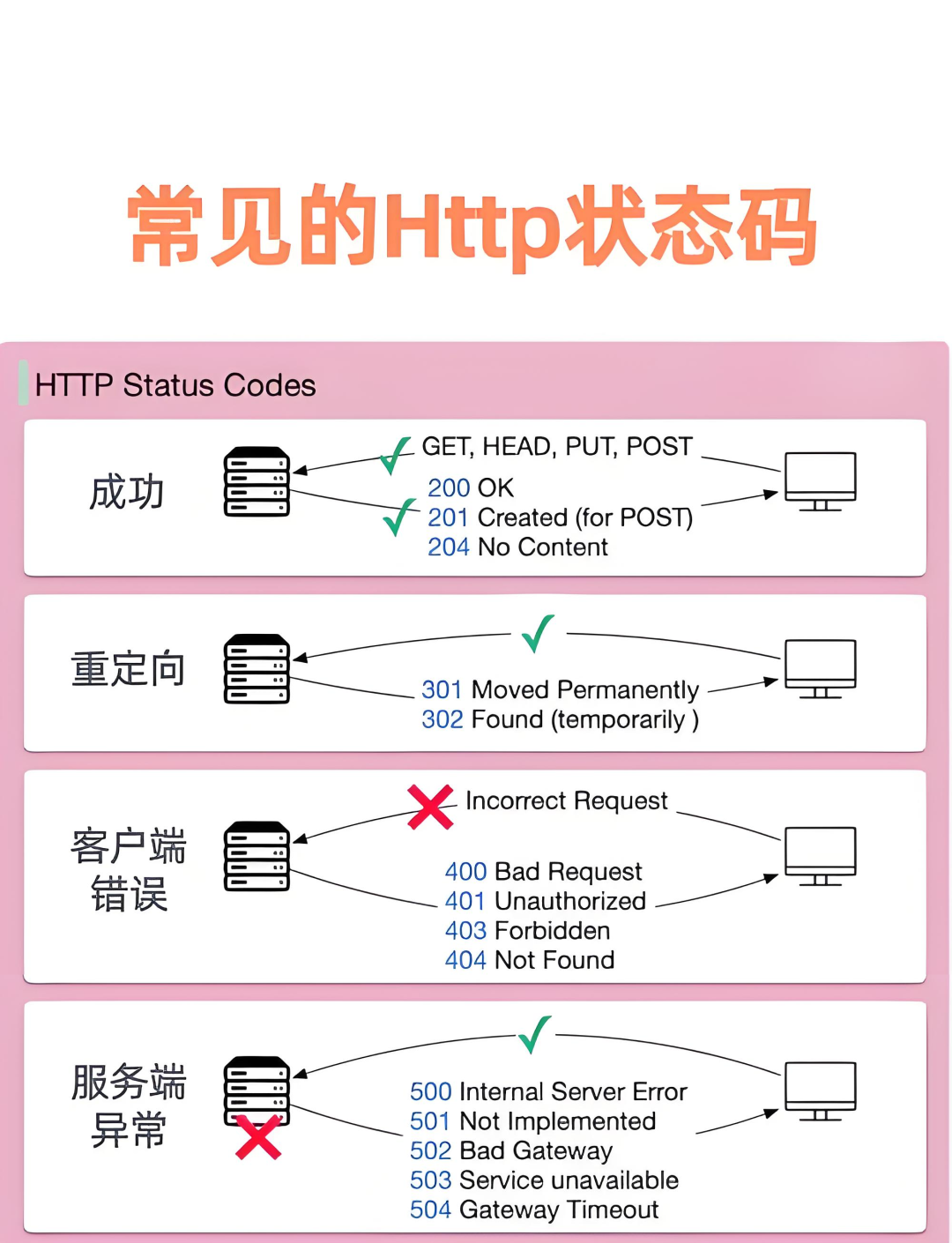
01Introduction
When you hit enter in the address bar, the browser acts like a chatty person, immediately starting an encrypted chat with the server.
The three-digit number returned by the server is actually a series of codes.
Today, we will decode these codes all at once, ensuring that by the end, you can quickly understand what went wrong with the system.
Why is it important to understand these numbers?
| Role | Actions |
|---|---|
| Frontend Developer | Automatically redirect users to the login page with 401 |
| Backend Developer | Use 201 to inform the frontend that “the baby has been born” |
| DevOps Engineer | Immediately cut traffic upon receiving 503 |
| Product Manager | Gently advise against overusing the API with 429 |
2xx
4xx
5xx
Received status code
What type?
Continue to slack off
Blame it on the frontend
DevOps scapegoat online
Quick Reference Table for Five Categories of Status Codes
| Category | Range | Code Meaning | Highlight |
|---|---|---|---|
| Informational | 100-199 | Server says “I’m listening” | 100 Continue |
| Success | 200-299 | All OK | 200 OK、201 Created |
| Redirection | 300-399 | Try a different approach | 301、304 |
| Client Error | 400-499 | You messed up | 400、401、429 |
| Server Error | 500-599 | I messed up | 500、503 |
Highlight Moments: Codes You Encounter Daily
100 Continue —— First ask if you can send a large file
POST /upload HTTP/1.1
Content-Length: 10000000
Expect: 100-continue

HTTP/1.1 **100 Continue**
Notes:
- 1. The client first sends a header to probe, avoiding sending 10 MB unnecessarily.
- 2. The server responds with 100, indicating “go ahead”.
- 3. If the server responds with 417 Expectation Failed, the client stops immediately.
201 Created —— Baby born successfully
POST /projects
Content-Type: application/json

{"name":"New Project"}

HTTP/1.1 **201 Created**
Location: /projects/123
Notes:
- 1.
<span>Location</span>must be included to inform the frontend where the baby is. - 2. It’s best to return the new object in the response body to avoid the frontend needing to GET it again.
304 Not Modified —— Cache savior
GET /logo.png
If-Modified-Since: Tue, 20 Aug 2025 08:00:00 GMT

HTTP/1.1 **304 Not Modified**
Notes:
- 1. The client asks with a timestamp, “Has it changed?”
- 2. If it hasn’t changed, it responds with 304, avoiding resending the image,saving 80% bandwidth.
429 Too Many Requests —— Rate limiting warning
HTTP/1.1 **429 Too Many Requests**
Retry-After: 60
X-RateLimit-Limit: 100
Notes:
- 1.
<span>Retry-After</span>tells the client how many seconds to wait before retrying. - 2.
<span>X-RateLimit-*</span>allows the frontend to display remaining requests in real-time for a smoother experience.
503 Service Unavailable —— Under maintenance
HTTP/1.1 **503 Service Unavailable**
Retry-After: 300
{
  "error": "under_maintenance",
  "message": "System upgrade, please return in 5 minutes"
}
Notes:
- 1. Never respond with 404, as that indicates the resource is not found, not that the service is down.
- 2. Provide a reasonable time for
<span>Retry-After</span><code><span>, so users are not left waiting blindly.</span>
Golden Rule: Don’t use 200 to hide errors
{ "status": 200, "error": "Incorrect password" } ❌Correct approach:
HTTP/1.1 **401 Unauthorized**
{ "error": "Invalid credentials" }        ✅
Cross-Functional Collaboration: Code Practice
Frontend Axios Interceptor
axios.interceptors.response.use(
res => res,
err => {
    const { status, headers } = err.response || {};
    switch (status) {
      case 401:
        // 1. Clear local token
        // 2. Redirect to login page
        store.dispatch('logout');
        break;
      case 429:
        // 3. Notify “API is too popular, try again in X seconds”
        showToast(`Too many requests, retry after ${headers['retry-after']} seconds`);
        break;
      default:
        showToast('The system is having a hiccup');
    }
    return Promise.reject(err);
  }
);
Notes:
- 1. Handle everything in the interceptor for cleaner business code.
- 2. Clear token on 401 to prevent repeated pop-ups.
- 3. Use
<span>Retry-After</span>for countdown on 429 for a better user experience.
Backend Flask Demo
@app.post("/projects")
def create_project():
    data = request.get_json(silent=True) or {}
    if not data:
        return {"error": "Where's the JSON?"}, **400**          # Syntax error
    if Project.exists(data.get("name")):
        return {"error": "Name is taken"}, **422**        # Semantic error
    p = Project.create(data)
    return p.to_dict(), **201**, {"Location": f"/projects/{p.id}"}
Notes:
- 1. 422 is more precise than 400, indicating a business validation failure to the frontend.
- 2. 201 must include
<span>Location</span>, as per REST standards.
Nginx Rate Limiting & Error Pages
# Rate limiting: 10 requests per second, burst 20
limit_req_zone $binary_remote_addr zone=api:10m rate=10r/s;
server {
    location /api/ {
        limit_req zone=api burst=20;
        proxy_pass http://backend;
    }

    # Graceful error pages
    error_page 404 /404.html;
    error_page 500 502 503 504 /50x.html;
}
Notes:
- 1.
<span>burst=20</span>allows for sudden spikes, ensuring a smooth user experience. - 2. Uniformly beautify error pages to avoid users seeing the naked default Nginx page.
Knowledge Mind Map: Memorize Status Codes with One Image
HTTP Status Codes
1xx Information
2xx Success
3xx Redirection
4xx You messed up
5xx I messed up
100 Continue
200 OK
201 Created
301 Moved Permanently
304 Not Modified
401 Unauthorized
429 Too Many Requests
503 Service Unavailable
This concludes the sharing. I hope the above content is helpful to you!
Recommended Articles:
100 Java Interview Questions Explained Source File