Introduction
With the popularity of the Internet of Things and portable devices, low-power design has become increasingly important. This article provides a detailed analysis of key technologies for low-power design in microcontrollers from a practical application perspective, helping you master this core skill.
1. Basic Concept of Power Consumption
Power consumption is like the “appetite” of a device. For battery-powered devices, reducing power consumption means extending battery life. Power consumption mainly comes from the following aspects:
1. Static Power Consumption
- Standby current of CPU and memory
- Losses from internal pull-up and pull-down resistors
- Static current of power management chips
2. Dynamic Power Consumption
- Consumption during CPU operations
- Losses from clock oscillation
- Current consumption when peripherals are active
2. Key Strategies for Low-Power Design
1. Reasonable Use of Sleep Modes
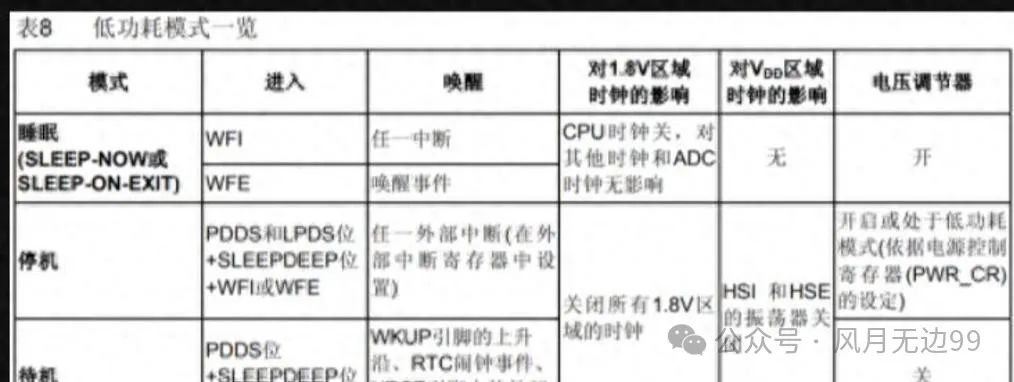
Microcontrollers generally have several power-saving modes:
- Sleep Mode: Stops the CPU while peripherals continue to operate
- Stop Mode: Turns off most clocks but retains RAM data
- Standby Mode: Almost all functions are turned off, resulting in the lowest power consumption
Recommendation: Choose the appropriate mode based on the required wake-up response time. Use sleep mode for quick responses and standby mode when response time is not critical.
2. Reduce Operating Frequency
The higher the CPU frequency, the greater the power consumption. A practical tip is to dynamically adjust the frequency based on task load:
// Simple dynamic frequency adjustment example
void adjust_frequency(void) {
    if(heavy_task_pending) {
        SystemClock_Config(72MHz);  // High frequency for heavy tasks
    } else {
        SystemClock_Config(8MHz);   // Low frequency for light tasks
    }
}
3. Peripheral Management
Key Principle: Use as Needed, Turn Off Promptly
// Peripheral usage example
void adc_sample(void) {
    ADC_Enable();         // Turn on ADC
    delay_ms(1);         // Wait for stability
    value = ADC_Read();  // Sample
    ADC_Disable();       // Turn off immediately
}
4. Optimize IO Port Configuration
Improper IO port configuration can lead to unexpected power consumption. Here are some important principles:
- Floating pins should be configured as analog inputs
- Output high when using pull-up, output low when using pull-down
- Input pin levels should be stable to avoid frequent toggling
3. Practical Application Cases
Solar-Powered Weather Station
This is a typical low-power application scenario:
- Works by waking up at scheduled intervals
- Uses a time-sharing strategy for sensors
- Turns off all non-essential peripherals during sleep
- Wakes up periodically via RTC to collect data
Key code example:
void main(void) {
    while(1) {
        if(sampling_needed()) {
            wake_up_sensors();
            collect_data();
            send_data();
            enter_stop_mode();  // Enter stop mode
        }
    }
}

void RTC_IRQHandler(void) {
    // RTC interrupt wake-up handling
    if(RTC_GetITStatus(RTC_IT_SEC)) {
        RTC_ClearITPendingBit(RTC_IT_SEC);
        wake_up_flag = 1;
    }
}
Would you like me to explain or break down the code?
4. Debugging Tips
Debugging low-power systems requires special attention:
- Use a multimeter to monitor current
- Test power consumption by module
- Record current values under various operating states
- Check for unexpected leakage paths
Note: During debugging, disable all pull-up resistors on debugging interfaces, as they can affect power consumption test results.
5. Common Issues and Solutions
- Unable to Wake Up After Sleep
- Check wake-up source configuration
- Confirm power stability
- Verify clock configuration
- Power Consumption Fluctuates
- Investigate oscillating IO ports
- Check for leakage in external components
- Confirm power supply ripple
Practical Recommendations
- Start testing with a minimal system
- Establish a complete power consumption testing record
- Use an oscilloscope to observe current waveforms
- Conduct long-term tests in actual application environments
Low-power design requires collaboration between software and hardware. Only by mastering these key technical points can one design truly practical low-power systems.