

From September 15 to 21, 2025, it is the National Cybersecurity Awareness Week, with the theme“Cybersecurity for the People, Cybersecurity Relies on the People – Safeguarding High-Quality Development with High-Level Security”.Let us pay attention to cybersecurity together, enhance cybersecurity awareness, improve cybersecurity skills, and work together to build a national cybersecurity barrier.
In the last issue, we strengthened our password defenses; today we will discuss a ubiquitous risk – public Wi-Fi.
Libraries, cafes, airports… Free Wi-Fi allows us to be online anytime, anywhere. But did you know? This cup of “free coffee” may hide the “ears” of eavesdropping.
Connecting Incorrectly, Regret Later
Keep the public network usage guidelines handy!
01
What are the risks of public Wi-Fi?
Hackers can easily:
Set up a fake hotspot with a name similar to the official one.
After you connect to the public network, eavesdrop on all data transmitted from your device (such as account numbers, passwords, chat records).

02
The Four ‘No’ Principles for Secure Connections
(1) Do not connect to “unknown” networks
Prioritize networks that are officially informed and require a password to access. Be cautious of completely open networks with strange names (like Free_Wi-Fi).
(2) Do not perform “sensitive” operations
It is strictly forbidden to log in to accounts, send and receive important emails, or make online payments over public Wi-Fi. You can browse information and read news.
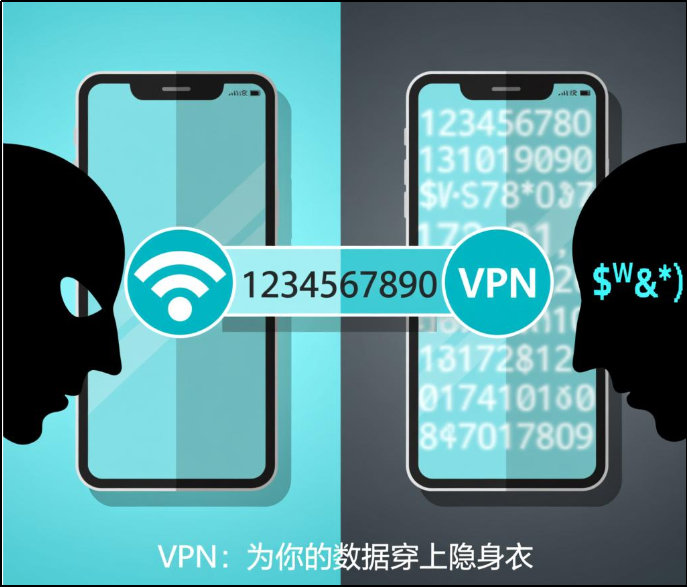
(3) Don’t forget the VPN
When you need to access campus resources (library databases, academic systems) or handle sensitive matters off-campus, you must first connect to the school VPN! It will encrypt a secure channel for you.
(4) Disable “automatic connection”
In the Wi-Fi settings of your phone and computer, turn off the option to “automatically connect to open networks” to keep control of your connections.
03
Today’s Security Self-Check
Immediately open your phone:
[Settings] → [WLAN] → [Advanced Settings] → turn off “Always Scan” or “Automatically Connect to Open Networks”.

Security Tips:
On campus,
please prioritize connecting to the official school wireless network,
which is the most secure.
Source | Cyberspace Administration
Editor | Yang Yujie
Review | Zhang Meng