GPU Architecture and Programming
We all know that GPUs are essential components for AI training, serving to accelerate parallel computations. This section will take the <span>NVIDIA Pascal GPU</span> architecture as an example to briefly introduce the logical architecture of GPUs and program the GPU using CUDA’s C/C++ interface. We will vividly compare the functionalities and strengths of CPUs and GPUs through the summation of a large matrix, understanding the powerful parallel computing capabilities of GPUs.
GPU Architecture
The following diagram is the architecture diagram of the <span>NVIDIA Pascal GPU</span> GP100 GPU. The entire GPU system is hierarchically divided into Engine -> GPC -> TPC -> SM -> Warp -> Core, where SM (Streaming Multiprocessor) is the smallest hardware unit that can independently schedule tasks and provide complete cooperative resources. The Core is the smallest unit for actual computation, equivalent to the ALU in a CPU. The Core in a GPU has integer/floating-point computation units, double-precision floating-point units, and special function computation units, with the number of each unit varying across different GPUs.
The Giga Thread Engine manages all workloads, scheduling and managing all thread tasks. GPC and TPC manage a portion of the available resources hierarchically, with all GPC units sharing L2 cache. Additionally, the GPU has an external high-speed cache, which is the video memory.
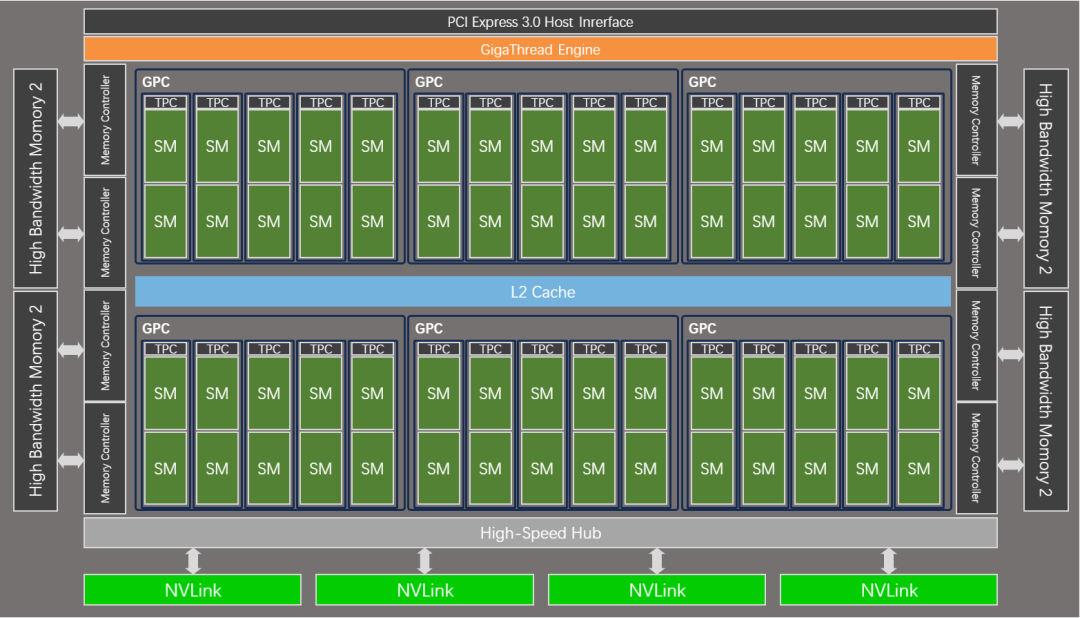
Theoretically, this GPU can execute 3840 thread computation tasks in parallel in the same cycle, 1920 double-precision computations, and 960 special function computation tasks.
Parallel Execution Scheduling
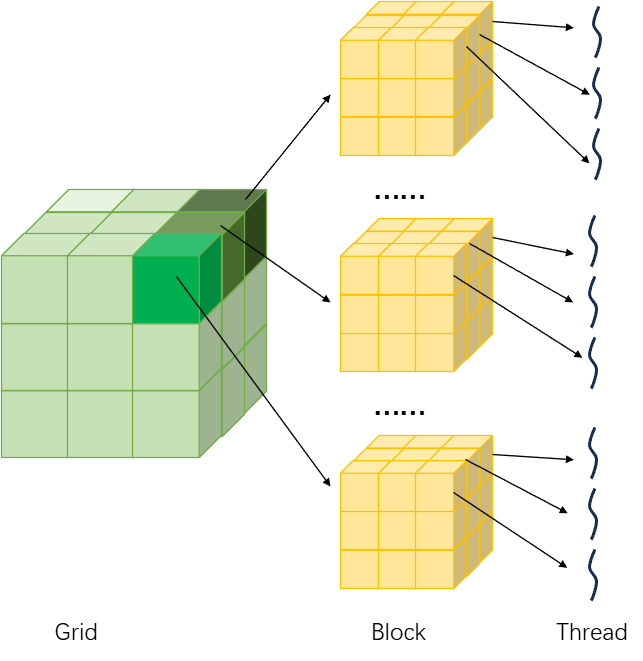
Grid, Block, and Thread are three software levels. A CUDA computation program is viewed as a Grid, which contains multiple Blocks, and each Block contains multiple threads, with each thread corresponding to a specific computation process. The dimensions of Grid and Block are logical dimensions aimed at developers, not actual logical dimensions at the hardware level. Therefore, a three-dimensional Grid and a one-dimensional Grid are essentially equivalent for the purpose of achieving a “packaging” process.
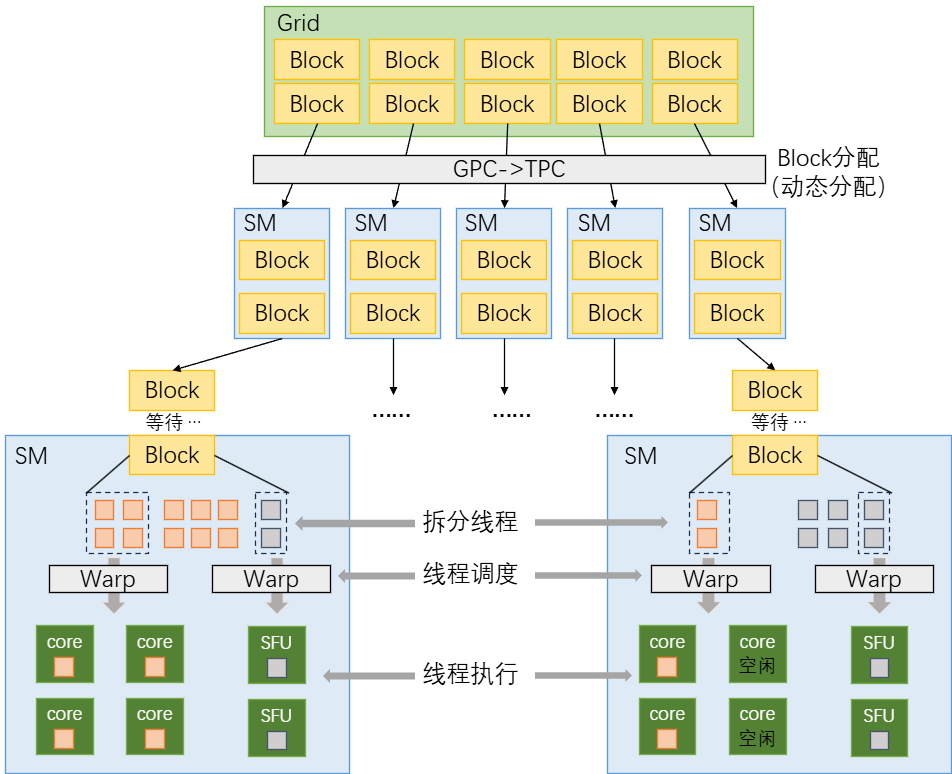
Once an SM is allocated to a Block, it decomposes it. Each Warp can have a maximum of 32 threads (as per GPU convention). The Warp scheduler assigns threads to different Cores, and each Warp can only execute the same instruction in the same cycle (SIMT characteristic). Once threads are assigned to Cores, they will execute the computation process. With reasonable allocation and scheduling, the entire GPU can compute many calculations simultaneously.
CUDA Programming
The primary source for learning CUDA programming is the CUDA C++ Guide official website. This article will implement GPU programming through a matrix operation.
(Website: https://docs.nvidia.com/cuda/cuda-c-programming-guide/index.html#)
GPU code is typically written in <span>.cu</span> files and calls the CUDA interface through <span>#include <cuda_runtime.h></span>, which is the C/C++ extension syntax provided by CUDA. Functions marked with the <span>__global__</span> keyword are treated as “kernel functions” and run on the GPU; <span>cudaMalloc</span>, <span>cudaMemcpy</span>, and <span>cudaFree</span> are used to manage GPU memory, and the kernel function is executed using the following syntax, where <span><<< >>></span> configures the kernel function.
Function<<<gridDim, blockDim>>>(a,b,c);Importing external library files
#include <cuda_runtime.h>
#include <stdio.h>
#include <stdlib.h>
#include <time.h>
Defining an N-order square matrix
#define MATRIX_SIZE 23170For ordinary CPU computations, we only need to traverse each element of the matrix and add them element-wise, requiring iterations.
void cpu_matrix_add(float *h_A, float *h_B, float *h_C, int size) {
    for (int i = 0; i < size; i++) {
        for (int j = 0; j < size; j++) {
            h_C[i * size + j] = h_A[i * size + j] + h_B[i * size + j];
        }
    }
}
For the GPU function, if there are CUDA cores, then it only needs to execute iterations to complete all calculations, where the is the thread index.
__global__ void gpu_matrix_add(float *d_A, float *d_B, float *d_C, int size) {
    int i = blockIdx.y * blockDim.y + threadIdx.y;
    int j = blockIdx.x * blockDim.x + threadIdx.x;
    if (i < size && j < size) {
        d_C[i * size + j] = d_A[i * size + j] + d_B[i * size + j];
    }
}
The CUDA API does not actively display errors; we need to manually implement a macro definition for CUDA error handling:
#define CHECK_CUDA_ERROR(func) do { \
    cudaError_t err = func; \
    if (err != cudaSuccess) { \
        printf("CUDA Error: %s (line %d)\n", cudaGetErrorString(err), __LINE__); \
        exit(1); \
    } \
} while(0)
This macro definition accepts the function <span>func</span>, and at compile time, <span>CHECK_CUDA_ERROR(func(a,b))</span> is equivalent to:
do {
    cudaError_t err = func(a,b);
    if (err != cudaSuccess) {
        printf("CUDA Error: %s (line %d)\n", cudaGetErrorString(err), __LINE__);
        exit(1);
    }
} while(0)
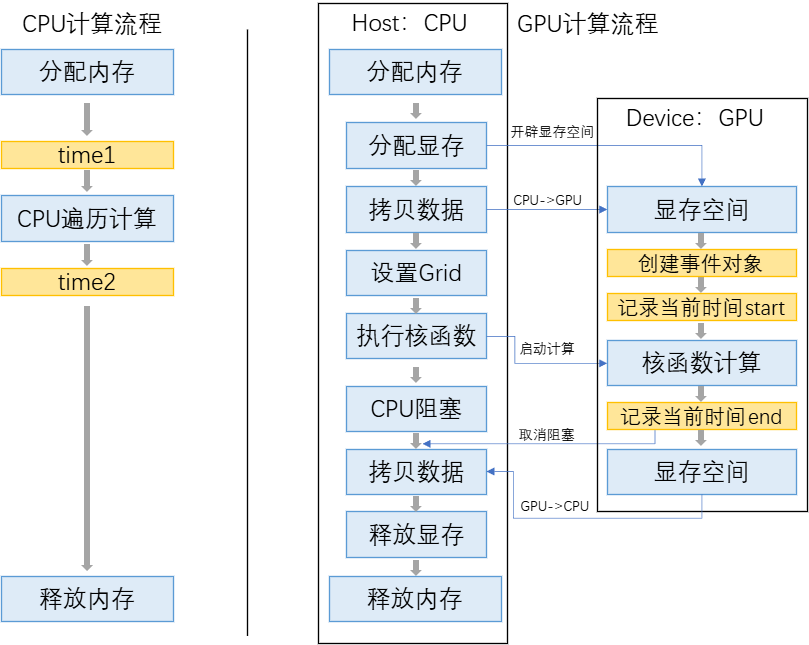
Below is the main function. For single-threaded CPU tasks, we only need to allocate memory, perform computations, and free memory. For GPU tasks, we need to go through several main steps: allocating video memory, copying data, configuring the kernel function, executing the kernel function, CPU waiting, copying data, and freeing video memory:
int main() {
    // Set matrix size, here directly using a square matrix
    int size = MATRIX_SIZE;
    size_t matrix_bytes = size * size * sizeof(float);


    printf("=== Large Matrix Addition: CPU vs GPU ===\n");
    printf("Matrix Size: %d x %d\n", size, size);
    printf("Single Matrix Data Size: %.2f GB\n", (float)matrix_bytes / (1024*1024*1024));
    printf("Total Data Size (A+B+C): %.2f GB\n", (float)(3 * matrix_bytes) / (1024*1024*1024));
    printf("=========================================\n\n");

    // Allocate memory, h_A, h_B are the matrices to be summed, h_C_cpu, h_C_gpu are the results
    float *h_A = (float*)malloc(matrix_bytes);
    float *h_B = (float*)malloc(matrix_bytes);
    float *h_C_cpu = (float*)malloc(matrix_bytes);
    float *h_C_gpu = (float*)malloc(matrix_bytes);

    if (!h_A || !h_B || !h_C_cpu || !h_C_gpu) {
        printf("CPU Memory Allocation Failed!\n");
        exit(1);
    }

    // Randomly initialize the values of the matrices to be summed
    srand((unsigned int)time(NULL));
    for (int i = 0; i < size * size; i++) {
        h_A[i] = (float)rand() / RAND_MAX;
        h_B[i] = (float)rand() / RAND_MAX;
    }

    // Start executing the CPU summation function and time it
    printf("Starting CPU Matrix Addition...\n");
    clock_t cpu_start = clock();
    cpu_matrix_add(h_A, h_B, h_C_cpu, size);
    clock_t cpu_end = clock();
    double cpu_time = (double)(cpu_end - cpu_start) / CLOCKS_PER_SEC;
    printf("CPU Addition Completed! Time: %.2f seconds\n\n", cpu_time);

    // Allocate video memory
    float *d_A, *d_B, *d_C;
    CHECK_CUDA_ERROR(cudaMalloc((void**)&d_A, matrix_bytes));
    CHECK_CUDA_ERROR(cudaMalloc((void**)&d_B, matrix_bytes));
    CHECK_CUDA_ERROR(cudaMalloc((void**)&d_C, matrix_bytes));

    // Copy matrices A and B to video memory
    CHECK_CUDA_ERROR(cudaMemcpy(d_A, h_A, matrix_bytes, cudaMemcpyHostToDevice));
    CHECK_CUDA_ERROR(cudaMemcpy(d_B, h_B, matrix_bytes, cudaMemcpyHostToDevice));

    // Configure Grid and Block, each Block 32x32 = 1024 threads
    // Divide Grid based on total thread count and Block size, total thread count is the number of matrix elements to compute
    // (size + blockDim.x - 1) / blockDim.x rounds up
    dim3 blockDim(32,32);
    dim3 gridDim(
        (size + blockDim.x - 1) / blockDim.x,
        (size + blockDim.y - 1) / blockDim.y
    );

    // GPU timer
    cudaEvent_t gpu_start, gpu_end;
    CHECK_CUDA_ERROR(cudaEventCreate(&gpu_start));
    CHECK_CUDA_ERROR(cudaEventCreate(&gpu_end));

    printf("Starting GPU Matrix Addition...\n");
    CHECK_CUDA_ERROR(cudaEventRecord(gpu_start, 0));

    // Execute kernel function
    gpu_matrix_add<<<gridDim, blockDim>>>(d_A, d_B, d_C, size);

    CHECK_CUDA_ERROR(cudaEventRecord(gpu_end, 0));
    CHECK_CUDA_ERROR(cudaEventSynchronize(gpu_end));

    // Calculate elapsed time
    float gpu_time_ms;
    // The time interpolation at this point is the time from kernel function start to end
    CHECK_CUDA_ERROR(cudaEventElapsedTime(&gpu_time_ms, gpu_start, gpu_end));
    double gpu_time = gpu_time_ms / 1000.0;
    printf("GPU Addition Completed! Time: %.4f seconds\n\n", gpu_time);

    // Copy the computation results back from memory
    CHECK_CUDA_ERROR(cudaMemcpy(h_C_gpu, d_C, matrix_bytes, cudaMemcpyDeviceToHost));

    // Output time results
    printf("\n=== Performance Comparison ===\n");
    printf("CPU Time: %.2f seconds\n", cpu_time);
    printf("GPU Time: %.4f seconds\n", gpu_time);
    printf("GPU is %.2f times faster than CPU\n", cpu_time / gpu_time);
    printf("==============================\n");

    // Finally, free memory and video memory
    free(h_A); free(h_B); free(h_C_cpu); free(h_C_gpu);
    CHECK_CUDA_ERROR(cudaFree(d_A));
    CHECK_CUDA_ERROR(cudaFree(d_B));
    CHECK_CUDA_ERROR(cudaFree(d_C));
    CHECK_CUDA_ERROR(cudaEventDestroy(gpu_start));
    CHECK_CUDA_ERROR(cudaEventDestroy(gpu_end));

    return 0;
}
Compilation
Compiling CUDA programs requires the NVCC compiler, which primarily splits the code into host code and GPU code. The GPU code is compiled using CUDA-specific tools, while the host code is compiled using the system’s default compiler, and finally linked together to generate an executable file.
After installing nvcc on Linux, you can compile by running the command line. On Windows, you need to install the MSVC compiler and load the <span>x64 Native Tools Command Prompt for VS 2022</span> module to correctly link the MSVC compiler.
Finally, we can directly execute the nvcc compile command to obtain the executable file:
nvcc test.cuResult Comparison
When we run the program, we can see that the created matrix size is , with a single matrix occupying 2GB of memory and a total of 6GB of memory. The CPU computation time is , and the GPU computation time is , with the GPU being 57 times faster than the CPU! This clearly demonstrates the speed of GPUs in parallel computing.
=== Large Matrix Addition: CPU vs GPU ===
Matrix Size: 23170 x 23170
Single Matrix Data Size: 2.00 GB
Total Data Size (A+B+C): 6.00 GB
=========================================

Starting CPU Matrix Addition...
CPU Addition Completed! Time: 1.07 seconds

Starting GPU Matrix Addition...
GPU Addition Completed! Time: 0.0184 seconds


=== Performance Comparison ===
CPU Time: 1.07 seconds
GPU Time: 0.0184 seconds
GPU is 57.89 times faster than CPU
==============================
This introductory case will allow readers to learn the core process of CUDA programming. The key point is to understand that both the GPU and CPU are programmable, and the GPU can be operated using C++ extension syntax. In subsequent articles, more CUDA computation optimization algorithms will be introduced, and readers can also refer to the NVIDIA C++ programming guide for official primary materials.