BLE Advertising Packet Data Format Description ...... Jinchen's dedicationIntroduction
The packet format is a fundamental theoretical basis for learning Bluetooth. This article will discuss the Bluetooth advertising packet format and how to set the advertising packet in the Qinheng Micro Bluetooth chip code.
I am Jinchen, known by the same name across the internet, striving to write each series of articles with care, not exaggerating or settling, treating the knowledge we learn seriously. Jinchen’s dedication, where perseverance opens the way!
1. Advertising Packet Format
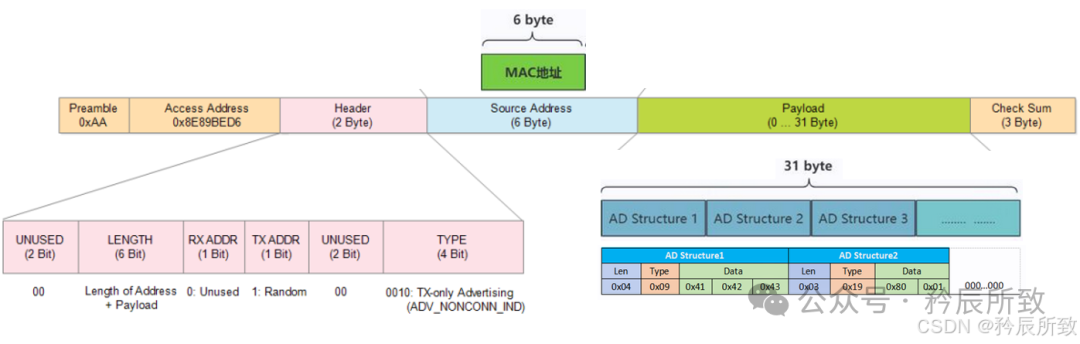
The complete format of a BLE advertising packet (Advertising Packet) in the air is divided into 4 segments, totaling 47 bytes (the same for BLE 4.x/5.x). The only part that users can modify is the middle 31 bytes of the Payload (the light green part in the figure below), while the rest is automatically assembled by the link layer.
1.1 Format Analysis
First, let’s look at an overall diagram of the advertising packet (which will be analyzed in detail later):
Now let’s add some explanatory notes:
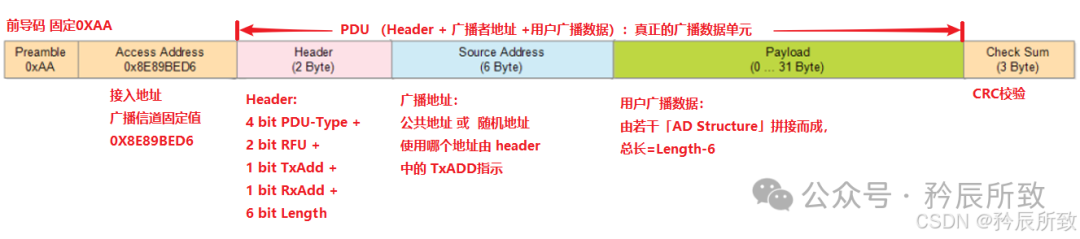
Looking at the complete format packet, let’s focus on the Payload part that we can modify during application. This part is composed of several “AD Structures” concatenated together. The “AD Structure” has a specific format, and when we define the advertising packet in the code, we need to fill in the advertising data according to this format.
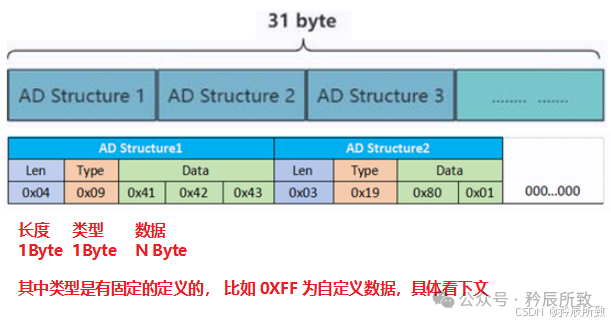
The format of the “AD Structure” is as follows:
Len(1 B) + Type(1 B) + Data(n B)
The total length of the entire packet ≤ 31 B, and if it is insufficient, it is padded with 0, as shown in the figure below:
For each “AD Structure”, the key point to know is the type. The AD Type (including all definitions from 0x01 to 0xFF) is uniformly assigned and maintained by the Bluetooth SIG (Bluetooth Special Interest Group). You can look up what you need online. Here are some commonly used AD Types (kept updated):
| AD Type | Value (Hex) | Description |
| Flags | 0x01 | Advertises certain features of the Bluetooth device |
| Incomplete List of 16-bit Service UUIDs | 0x02 | Only part of the 16-bit UUID, not complete |
| Complete List of 16-bit Service UUIDs | 0x03 | Complete 16-bit UUID |
| Incomplete List of 32-bit Service UUIDs | 0x04 | Part of the 32-bit UUID |
| Complete List of 32-bit Service UUIDs | 0x05 | Complete 32-bit UUID |
| Incomplete List of 128-bit Service UUIDs | 0x06 | Part of the 128-bit UUID |
| Complete List of 128-bit Service UUIDs | 0x07 | Complete 128-bit UUID |
| Shortened Local Name | 0x08 | Short name of the device |
| Complete Local Name | 0x09 | Full name of the device |
| TX Power Level | 0x0A | Advertises the RF transmission power of the device |
| Simple Pairing Option OOB Tags | 0x0D ~ 0x0F | Advertises out-of-band tags for security management (ignored in this article) |
| Security Manager TK Value | 0x10 | Advertises the TK used for out-of-band pairing (ignored in this article) |
| Security Manager OOB Flags | 0x11 | Advertises out-of-band feature flags (ignored in this article) |
| Slave Connection Interval Range | 0x12 | Advertises the desired connection parameters |
| ServiceData | 0x16 | Service data |
| Appearance | 0x19 | Appearance type (must be included for HID devices like mouse/keyboard/game controller) |
| Advertising Interval | 0x1A | Advertises the current advertising interval (in units of 0.625 ms) |
| PB-ADV | 0x22 | Broadcast carrier specifically for mesh networking |
| Manufacturer Specific Data | 0xFF | Advertises manufacturer information (users can include custom data) |
Based on the table above, if we want to set a short 16-bit UUID:
0x03 0x02 (low 8 bits of UUID) (high 8 bits of UUID)0x03 0x02 0xE1 0xFF
If we want to set the complete name:
(length of name + 1) 0x09 (name, calculated by yourself)0x07 0x09 ‘S’ ‘i’ ‘m’ ‘p’ ‘l’ ‘e’
Thus, the advertising packet format is now completely clear to everyone.
1.2 Bluetooth Advertising and Scan Response
Why mention scan response when discussing Bluetooth advertising?
The format of the scan response packet is identical to that of the Bluetooth advertising packet.
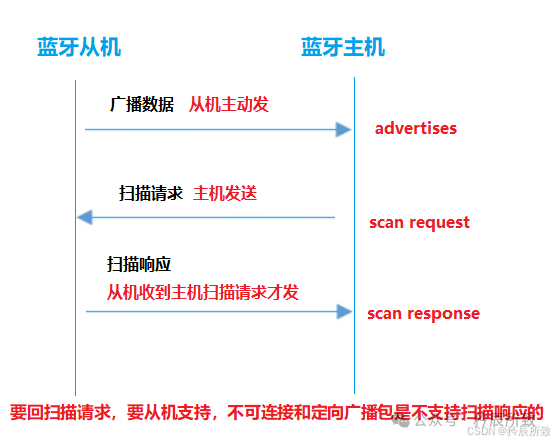
First, let’s explain what a scan response is. Advertising is a packet actively sent by the slave device, while the scan response is a response packet sent by the slave device after receiving a scan request from the master device (provided it supports responding to scan requests), as shown in the figure below:
What is the purpose of the scan response?
We know that the Bluetooth advertising packet only allows 31 bytes for user-defined data. If we want to include more data that cannot fit in the advertising packet, we can write it in the scan response. During the scanning process on the phone, it will be included as part of the advertising packet for parsing (examples will be provided below).
2. Code Example
Having completed the theoretical explanation, let’s look at how the advertising packet is implemented in practical engineering. This test explanation uses the Qinheng Micro Bluetooth chip CH585, and the example is based on the official slave example <span>Peripheral</span>.
2.1 Example Effect
The key point to focus on in the project is in the <span>peripheral.c</span> file, where there are two arrays that define the advertising packet: <span>scanRspData[]</span> corresponds to the scan response, and <span>advertData[]</span> corresponds to the advertising packet. After programming, let’s observe the phenomenon:
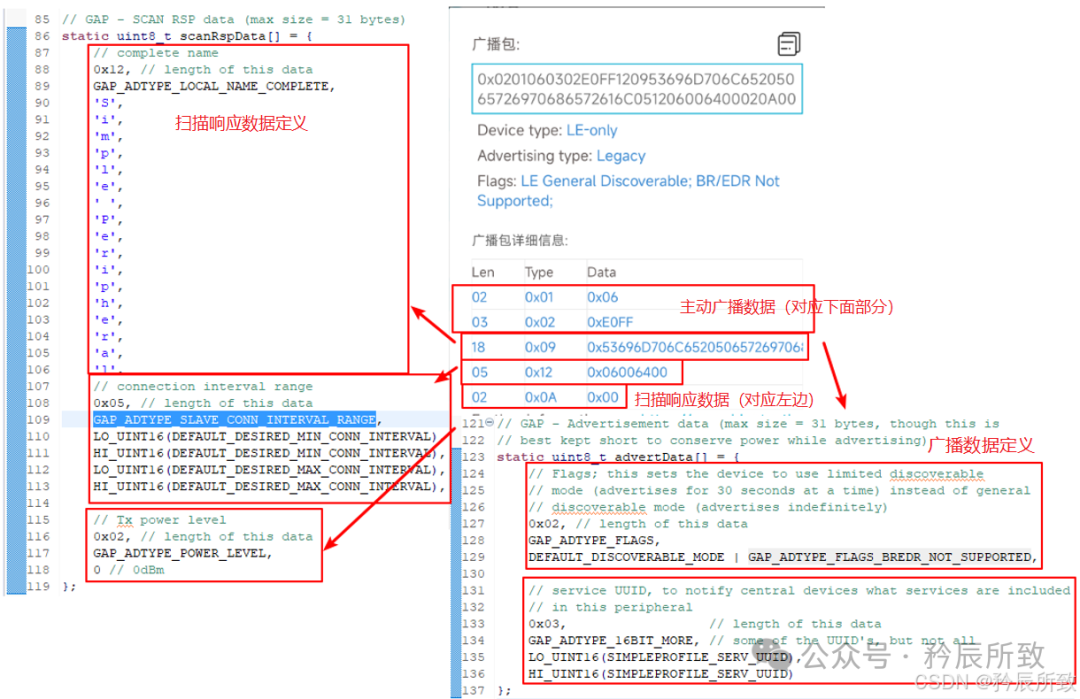
From the image, everyone should be able to understand intuitively, and combined with the “AD Structure” format analysis mentioned above, it should all make sense.
You can completely set the advertising data as you wish based on the explanations above.
2.2 Setting Advertising Type
It is important to note that not all advertising packets support scan responses. In the CH58x EVT, the advertising type is set using:
GAPRole_SetParameter(GAPROLE_ADV_EVENT_TYPE, 1, &advEventType);However, the initialization phase of the slave in the example does not set the <span>GAPROLE_ADV_EVENT_TYPE</span> type operation because the default is <span>GAP_ADTYPE_ADV_IND</span> type:

We can continue to check what types are defined by the official:

The previous table is self-explanatory:
| Macro Definition (CH585 SDK) | Actual Value | Advertising Type | Supports Connection? | Supports Scan Response? | Typical Use |
<span>GAP_ADTYPE_ADV_IND</span> |
0x00 | General advertising (connectable / undirected) | ✅ | ✅ | Most common, peripherals allow connections |
<span>GAP_ADTYPE_ADV_HDC_DIRECT_IND</span> |
0x01 | High duty cycle directed advertising (connectable / directed) | ✅ | ❌ | Fast reconnection, does not respond to scans |
<span>GAP_ADTYPE_ADV_SCAN_IND</span> |
0x02 | Scannable advertising (non-connectable / undirected) | ❌ | ✅ | Only broadcasts data, allows scanning but not connecting |
<span>GAP_ADTYPE_ADV_NONCONN_IND</span> |
0x03 | Non-connectable advertising (non-connectable / undirected) | ❌ | ❌ | Pure beacon, neither connects nor scans |
<span>GAP_ADTYPE_ADV_LDC_DIRECT_IND</span> |
0x04 | Low duty cycle directed advertising (connectable / directed) | ✅ | ❌ | Lower power directed packet, also does not respond to scans |
Note: The Qinheng Micro code separates “high duty cycle” and “low duty cycle” into two macros, but they both belong to the same PDU type <span>ADV_DIRECT_IND</span><span>.</span>
Therefore, to set the advertising type, we just need to add these two lines of code during initialization:
uint8_t  advEventType = GAP_ADTYPE_ADV_IND;
GAPRole_SetParameter(GAPROLE_ADV_EVENT_TYPE, 1, &advEventType);
2.3 Chinese Advertising Packet
To set a Chinese advertising packet, we first need to know the encoding of Chinese characters. The encoding format used for Bluetooth names is UTF-8, where each Chinese character occupies 3 bytes in UTF-8 format. In actual production coding, we generally need to use tools.
During testing, we can generate this encoding using the following online tool:
https://www.jyshare.com/front-end/695/
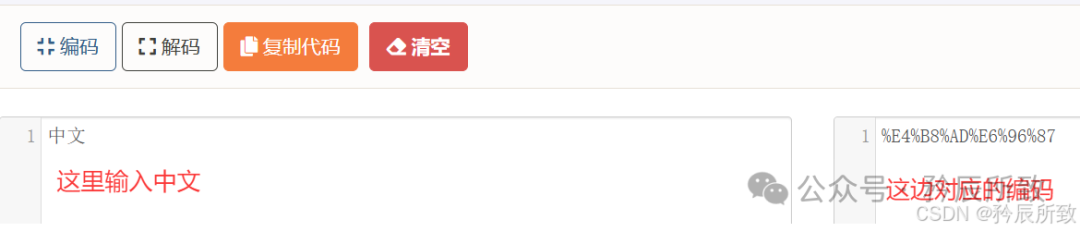
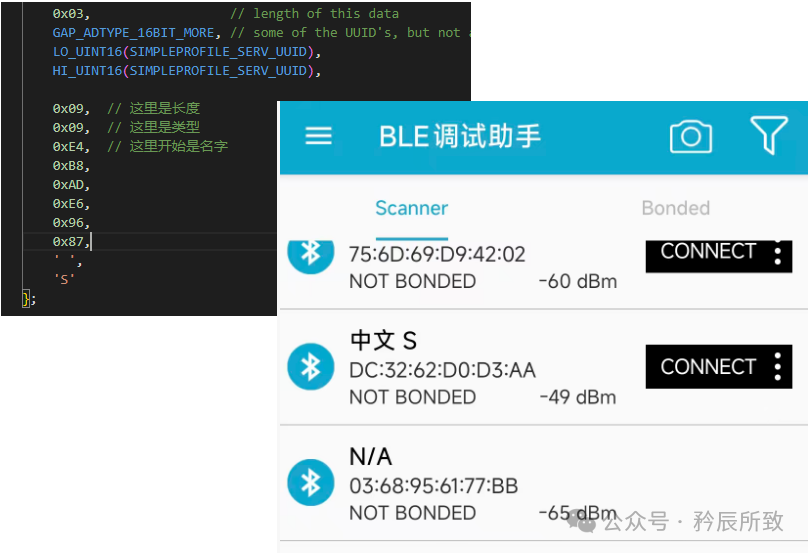
Then we write this encoding into the advertising packet definition array according to the format, and the effect is as follows:
3. BLE Analyzer Packet Capture
The advertising packet is not complicated, and here we will briefly show the effect of capturing packets with a Bluetooth analyzer:
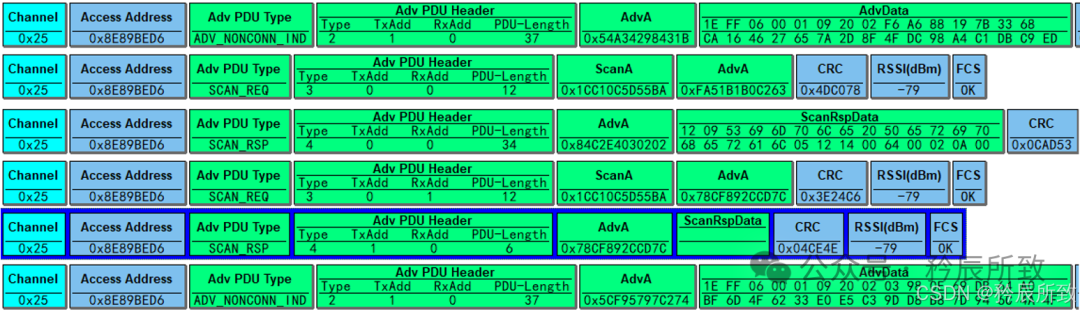
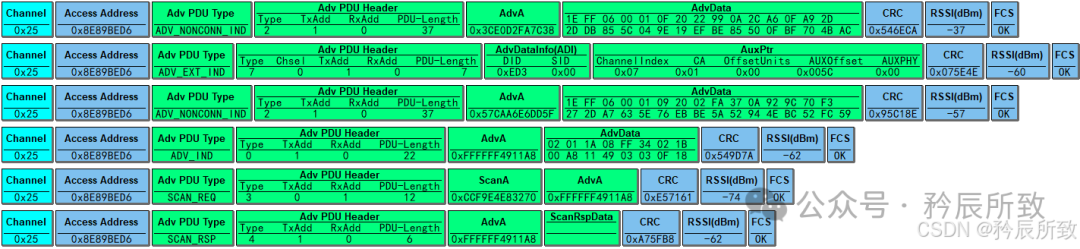
Through Adv PDU Type, we can see the type of the packet in the air. Let’s briefly explain:
SCAN_REQ
- • Scan request from the master device, the master device sends a SCAN_REQ request for the slave to respond, used to obtain information from the slave device (including device name, service UUID, and other manufacturer-specific information, etc.)
SCAN_RSP
- • Response from the slave device, as a supplement to the advertising packet, the slave can provide more advertising data to the master device, relying on this packet to supplement data. For example, some devices do not include the device name in the advertising packet, and this is where the device name can be sent to the master device.
ADV_NONCONN_IND
- • Non-connectable advertising packet
- • Used for devices to broadcast their own information (such as name, service type, etc.), data format: includes advertising address (AdvA) and advertising data (AdvData), where AdvData consists of multiple AD structures, each containing length, type, and data fields.Typical devices: iBeacon and other devices that need periodic broadcasting but do not require connection.
ADC_IND
- • General advertising packet, can be received and responded to by any device.Data format: similar to ADV_NONCONN_IND, but the type identifier is different (the lower 4 bits of the packet type are 0000, this type is in the pink part of the header in the first image).
AD_EXT_IND
- • This is not within the scope of this article, but since we have the packet capture tool, let’s add that AD_EXT_IND is the “index packet” for BLE5 extended advertising, the “header packet” for BLE5 Extended Advertising (auxiliary advertising), sent only on the primary advertising PHY, to inform the scanner that “there is a longer payload in the auxiliary packet”.When BLE5 needs to send >31 B of advertising or wants to use 2 M / coded PHY, the link layer will first create the header as AD_EXT_IND and send it to channels 37/38/39 (1 M PHY).
3.1 Advertising Packet Types
Since we mentioned Adv PDU Type above, let’s add some explanation. This part is represented in the protocol as follows:
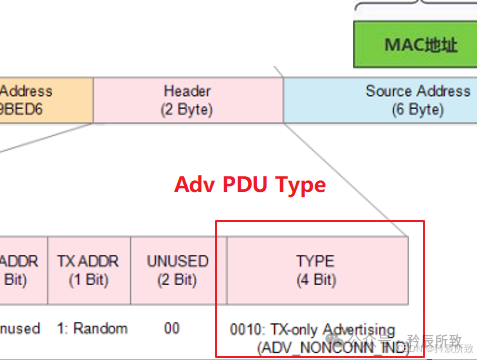
The previous table:
| PDU Type | Name | Brief Description |
| 0b0000 (0) | ADV_IND | Connectable, scannable, undirected |
| 0b0001 (1) | ADV_DIRECT_IND | Connectable, directed, non-scannable |
| 0b0010 (2) | ADV_NONCONN_IND | Non-connectable, non-scannable |
| 0b0011 (3) | SCAN_REQ | Scan request |
| 0b0100 (4) | SCAN_RSP | Scan response |
| 0b0101 (5) | CONNECT_IND | Connection request |
| 0b0110 (6) | ADV_SCAN_IND | Scannable, non-connectable |
| 0b0111 (7) | ADV_EXT_IND | Extended advertising header packet (points to AUX packet) |
| 0b1000 (8) | AUX_ADV_IND | Actual payload of extended advertising |
How the capture tool derives the TYPE:
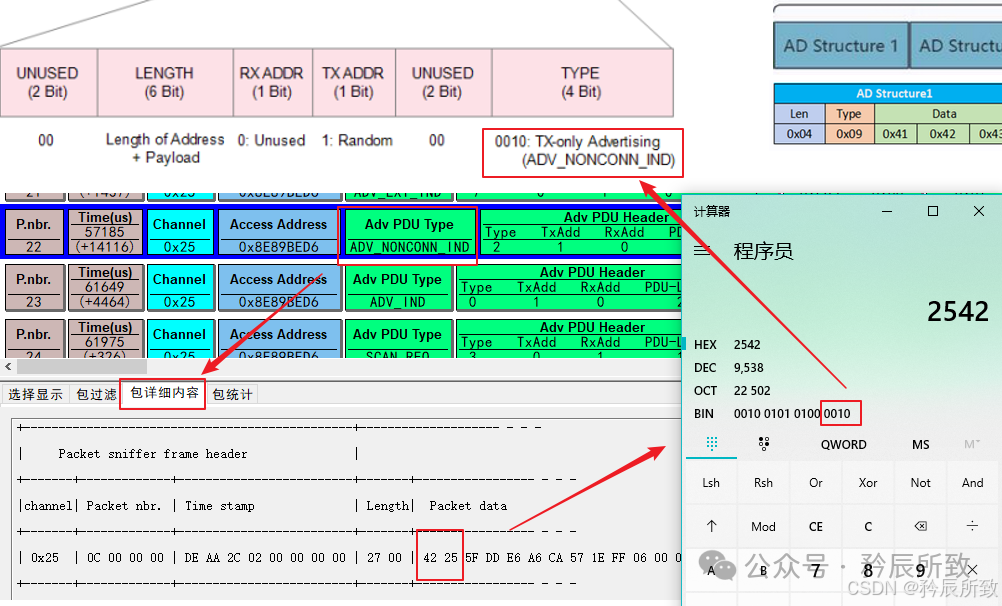
Conclusion
In this article, we explained the packet format of Bluetooth advertising packets and how to set the advertising packet using the Qinheng Micro Bluetooth chip. Through this article, I believe everyone will be able to handle all issues related to modifying advertising data.
After connecting to Bluetooth devices, the data exchange during the connection process will also have its own protocol packets, which I will analyze in a future article if given the opportunity.
That’s all for this article. Thank you, everyone!