Application Layer Protocols
DNS Protocol
Main Function: Responsible for resolving domain names into IP addresses.
-
What is a domain name:
- Root Domain: .
- Top-Level Domains: com, edu, net, cn, org, gov
- Second-Level Domains: baidu.com, 91xueit.com
- Third-Level Domains: dba.baidu.com, ftp.baidu.com
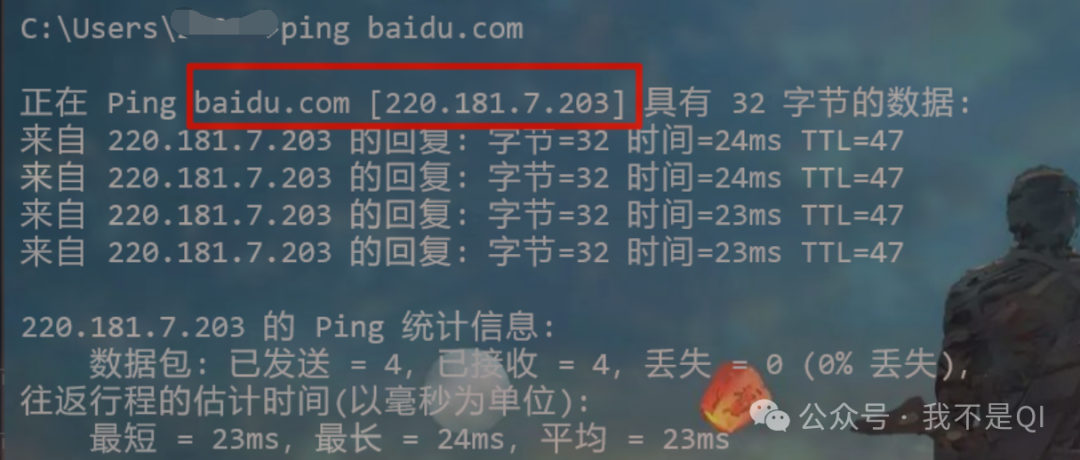
Domain Name Resolution Test:
Signal baidu.com
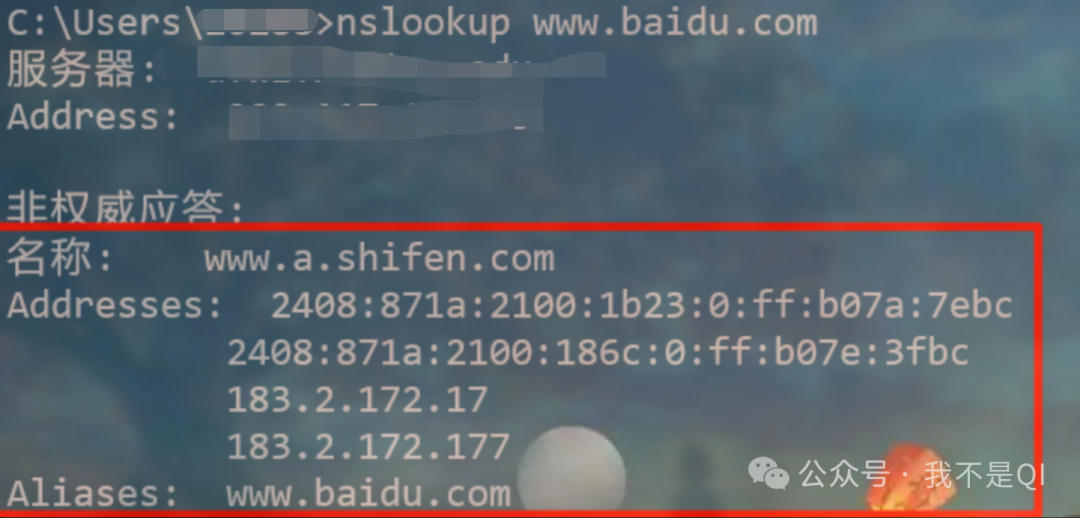
nslookup www.baidu.com (CDN causes different resolution results)
DHCP Protocol
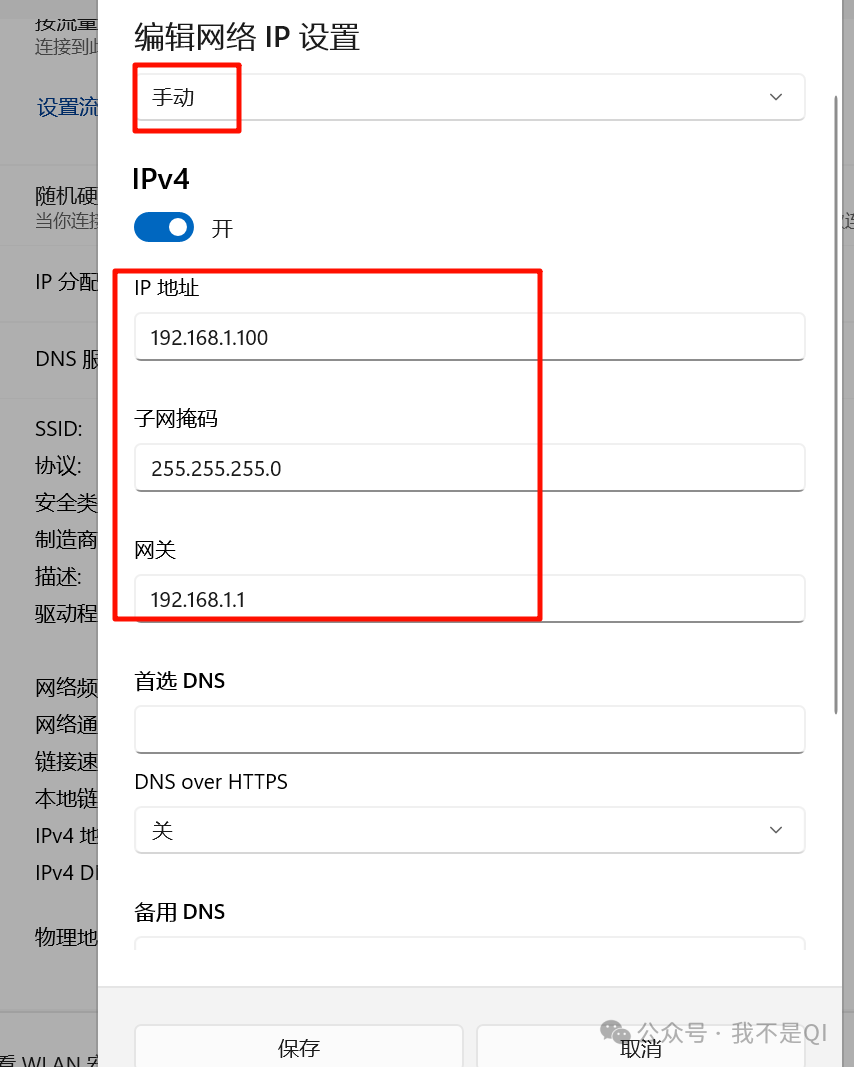
Main Function: Automatically assigns IP addresses and related network parameters (such as subnet mask, default gateway, DNS server, etc.) to devices on the network.
-
Static IP Address
-
Dynamic IP Address

-
Process of DHCP Client Requesting an IP Address

-
DHCP Server Must Have a Static Address
-
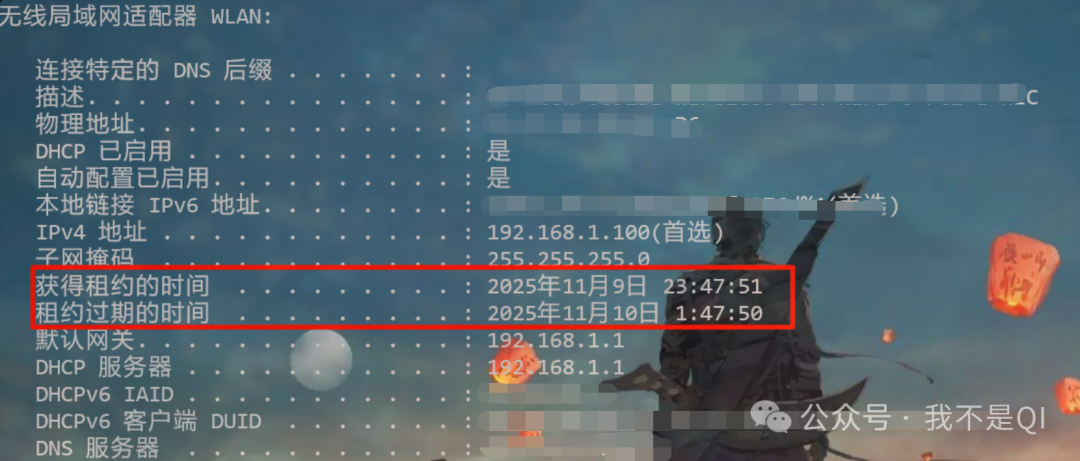
DHCP Lease Release
-
Cross-Subnet Address Allocation

FTP Protocol
Main Function: Enables file upload, download, and management over the network.
-
FTP Connection Methods:

Control Connection: Standard port 21, used for sending FTP command information
Data Connection: Standard port 20, used for uploading and downloading data
Types of Data Connection Establishment:
- Active Mode: The server actively initiates a connection to the client from port 20
- Passive Mode: The server passively waits for the client to initiate a connection on a specified port range.
FTP Transfer Modes
- Text Mode: ASCII mode, transmits data as text sequences
- Binary Mode: Binary mode, transmits data as binary sequences
FTP Active Mode

- Control Connection Establishment: The client actively initiates a TCP connection to the server’s port 21 to transmit login commands, file operation requests (upload/download), etc. This connection remains throughout the session.
- Data Connection Establishment: After receiving the client’s file transfer request, the server actively initiates a TCP connection from port 20 to a random port on the client, specifically for transmitting file data (such as file content, directory listings).
- Core Feature: The data connection is initiated by the server, relying on the server’s port 20 for external communication. If the client has a firewall enabled and does not open the corresponding random port, it may lead to data connection failure.
FTP Passive Mode

- Control Connection Establishment: Same as active mode, the client still initiates a TCP connection to the server’s port 21 for transmitting control commands.
- Data Connection Establishment: After receiving the file transfer request, the server opens a random port (e.g., port 1234 in the example) and informs the client of this port via the control connection; then the client actively initiates a TCP connection to this random port on the server for data transmission.
- Core Feature: The data connection is initiated by the client, with the server passively listening on the random port, avoiding the need for the server to actively initiate connections, which can bypass client firewall restrictions, making it a more commonly used mode in the current internet environment.
Telnet Protocol
Main Function: Enables remote terminal login and command line operations, allowing users to remotely access another computer’s command line interface over the network.
Working Principle: Based on a client-server model, the client connects to the remote server’s 23 TCP port using a Telnet client program, establishing a session where the user can operate the remote host as if on a local terminal.
- Change User Group Password: net User administrator a1! Windows requires username and password when connecting via telnet!!
- Add User: net user Han A1! /add
RDP Protocol:
Function: Provides graphical remote desktop access, allowing users to see the remote computer’s desktop interface and perform mouse and keyboard operations.
Transmission Method: Based on TCP port 3389, supports encrypted transmission, providing high security.
- Add users to the Remote Desktop Users group
World Wide Web
1. Overview: The World Wide Web (WWW) is not a special type of computer network; it is a large-scale, online information repository. The WWW allows easy access from one point on the internet to another through links, enabling users to actively retrieve rich information as needed. This access method is called “linking“.
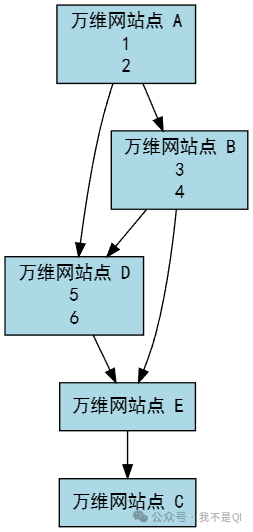
2. The World Wide Web is a distributed hypermedia system:
- It is an extension of the hypertext system.
- Hypertext: Linked from multiple information sources. It is the foundation of the World Wide Web.
- Difference between hypermedia and hypertext: Document content differs; hypertext documents contain only text information, while hypermedia documents also include other information such as graphics, images, sound, animations, and even active video images.
- Distributed System: Information is distributed across the entire internet. Each document on each host is managed independently.
3. Working Method
- Works in a client-server manner.
- Client Program: Browser
- Server Program: Runs on the host where the WWW document resides. This computer is also called a web server.
- The client program sends requests to the server program, which returns the requested WWW document to the client program.
- The WWW document displayed in a client program’s main window is called a page.
4. Uniform Resource Locator (URL)
- A concise representation of the location and access method of resources on the internet.
- Provides an abstract identification method for the location of resources.
- Essentially, it is the address of a resource on the internet.
- Clearly, all resources on the internet have a uniquely defined URL.
- Resource: Refers to any object that can be accessed on the internet, including file directories, files, documents, images, sounds, etc., as well as any form of data connected to the internet.
A URL is equivalent to an extension of a filename across the network. Therefore, a URL is a pointer to any accessible object on a machine connected to the internet.
URL Format:<span><protocol>://<host>:<port>/<path></span>
- Protocol: Specifies the method of accessing the resource;
- Host: The server address where the resource is located;
- Port: The network port on the server (optional, default port can be omitted);
- Path: The specific location of the resource on the server.
Common Protocol Examples:
<span>ftp</span>: File Transfer Protocol, used for transferring files over the network;<span>http</span>: Hypertext Transfer Protocol, the core protocol of the World Wide Web (WWW), used for transmitting web pages and other hypertext resources;<span>News</span>: Used to access USENET newsgroup resources.
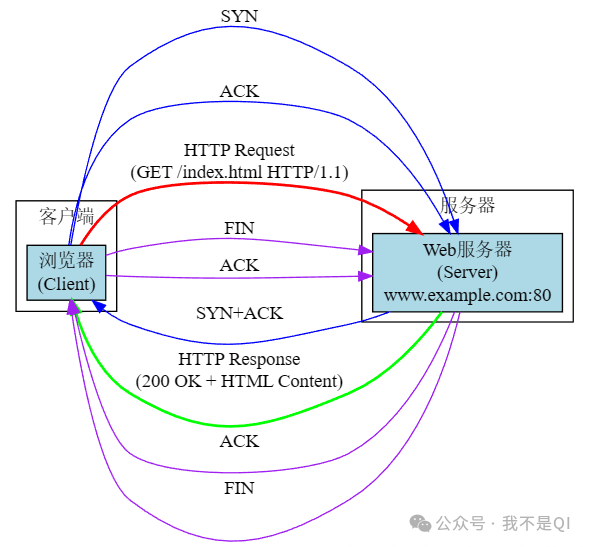
HTTP (Hypertext Transfer Protocol) Process Diagram:
(1. Interaction Entities
- Client: For example, a device with a browser program (the interface shows “Tsinghua University Department Settings”), triggers a request by clicking a hyperlink.
- Server: For example, its server program listens on TCP port 80 (the default HTTP port).
<span>www.tsinghua.edu.cn</span>
(2. Process (Based on TCP Connection)
- Establish TCP Connection: The client and server first establish a reliable TCP connection, providing a foundation for HTTP message transmission.
- Send HTTP Request Message: The client’s browser sends a request to the server for the required resource (such as a web page).
- Send HTTP Response Message: After receiving the request, the server returns a response message containing the resource.
- Release TCP Connection: After communication is complete, the TCP connection is released.
(3. Characteristics of HTTP Messages
Both HTTP requests and responses consist of ASCII character strings, and responses also use a “MIME-like” format, with HTTP messages typically transmitted over TCP connections.
-
Email Definition: Email (e-mail) refers to the method of exchanging mail using electronic devices.
-
Email Advantages: Convenient to use, fast delivery, low cost, can transmit various types of information, including text, sound, and images.
-
Important Email Standards:
- Simple Mail Transfer Protocol (SMTP)
- Internet Text Message Format
- Multipurpose Internet Mail Extensions (MIME)
- Mail Retrieval Protocols (POP3 and IMAP)
-
Components of the Email System: Three main components: User Agent, Mail Server, and Mail Sending and Reading Protocols
SMTP and POP3 (or IMAP) both use TCP connections to reliably transmit emails.

-
Composition of an Email:
An email consists of two parts: the envelope and the content.
The email transmission program delivers the email based on the information on the email envelope. Users can only see the content of the email when reading it from their mailbox.
-
Email Address Format
Recipient’s mailbox name@domain name of the mailbox host
For example: (This username is unique within the domain of the mailbox host)xiexiren@tsinghua.org.cn (The domain of the mailbox host must be unique worldwide)
-
SMTP Protocol:
The SMTP client first establishes a TCP connection with the recipient’s SMTP server using the well-known port 25.
Note: SMTP does not use intermediate mail servers.
Three Stages of SMTP Protocol
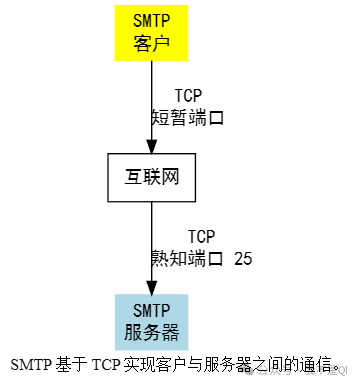
- Connection Establishment: A connection is established between the sending host’s SMTP client and the receiving host’s SMTP server, and SMTP does not use intermediate mail servers.
- Email Transmission
- Connection Release: After the email is sent, SMTP releases the TCP connection, completing the communication process.
MIME Standards:
1. MIME Standard Specifications
- Content-Type Format: Must include “type” and “subtype”, separated by “/”, for example.
<span>image/jpeg</span> - Type Definitions: Originally defined 7 basic content types and 15 subtypes, while allowing senders and receivers to define custom content types (which must start with “X-” to avoid naming conflicts).
2. Examples of MIME Content-Type Types and Subtypes
| Content Type | Example Subtypes | Description |
|---|---|---|
| Text | Plain, HTML, XML, CSS | Different formats of text |
| Image | GIF, JPEG, PNG | Different formats of still images |
| Audio | Basic, MPEG, MP4 | Audible sound |
| Video | MPEG, MP4, QuickTime | Different formats of video |
| Model | VRML | 3D models |
| Application | Octet-stream, PDF, JavaScript, ZIP | Data produced by different applications |
| Message | HTTP, RFC822 | Encapsulated messages |
| Multipart | Mixed, Alternative, Parallel, Digest | Combination of multiple types, enhancing email flexibility |
3. MIME Example Analysis
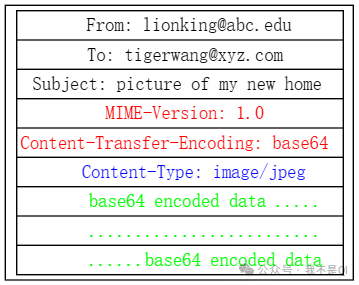
For example, an email containing a JPEG image has the following key parts in its MIME structure:
- MIME-Version: Specifies the MIME version (e.g., 1.0).
- Content-Transfer-Encoding: Specifies the encoding method (e.g., base64).
- Content-Type: Specifies the content type/subtype (e.g.,
<span>image/jpeg</span>). - Encoded Data: The actual content encoded in base64 character stream.