For Loop
After using <span>while</span> loops, SpongeBob can quickly complete tasks every day. Seeing this, Mr. Krabs waved his hand and decided to increase the takeout service. The residents of Bikini Bottom responded enthusiastically, leaving their names when ordering.
Faced with a long list of orders, SpongeBob cleverly wrote the following program:
# List of customers ordering Krabby Patties
names = ['Squidward', 'Patrick', 'Mrs. Puff', 'Sandy']
# Define variable i to represent the index, initial value is 0
i = 0
# Use len() function to get the length of the names list
num = len(names)
while i < num:
    print('Making a Krabby Patty for ' + names[i])  # Increment i by 1 to make a Krabby Patty for the next customer
    i = i + 1
'''Output:
Making a Krabby Patty for Squidward
Making a Krabby Patty for Patrick
Making a Krabby Patty for Mrs. Puff
Making a Krabby Patty for Sandy
'''
Using a <span>while</span> loop for this task requires setting a variable <span>i</span> to represent the index. Each time through the loop, you access the elements in the list <span>names</span> using the index, and you also need to increment <span>i</span> by 1 to access the next element, which can be a bit cumbersome. Is there a better way?
The answer is yes. In addition to the <span>while</span> loop, Python has another commonly used loop structure—the <span>for</span> loop, which is very suitable for batch processing data.
Let’s first look at the structure of the <span>for</span> loop.
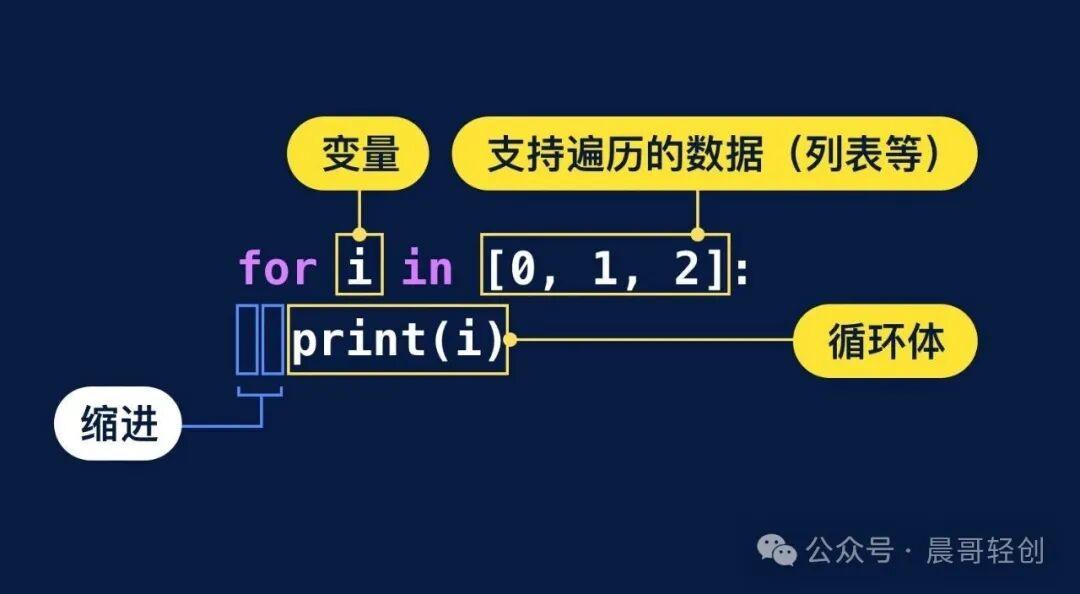
We see our old friends indentation and loop body. I believe you have already made the connection: the loop body is a block of code that needs to be executed repeatedly, indicated by the indentation, which shows it is governed by the loop.
😵 However, the <span>for</span> loop structure does not have a loop condition. How does Python know when to execute the loop body?
This is also the biggest difference between the <span>for</span> loop and the <span>while</span> loop. The <span>for</span> loop in Python is implemented using the <span>for ... in ...</span> statement, which emphasizes performing repeated operations on a specific sequence.
When the computer encounters a <span>for</span>, it will sequentially access the elements in the sequence, assign them to the variable <span>i</span>, and execute the loop body once. When all elements in the sequence have been accessed, the loop naturally stops. This process of accessing each element in the sequence once along a certain path is called <span>iteration</span>.
Let’s take a look at the execution process of the <span>for</span> loop to deepen our understanding.
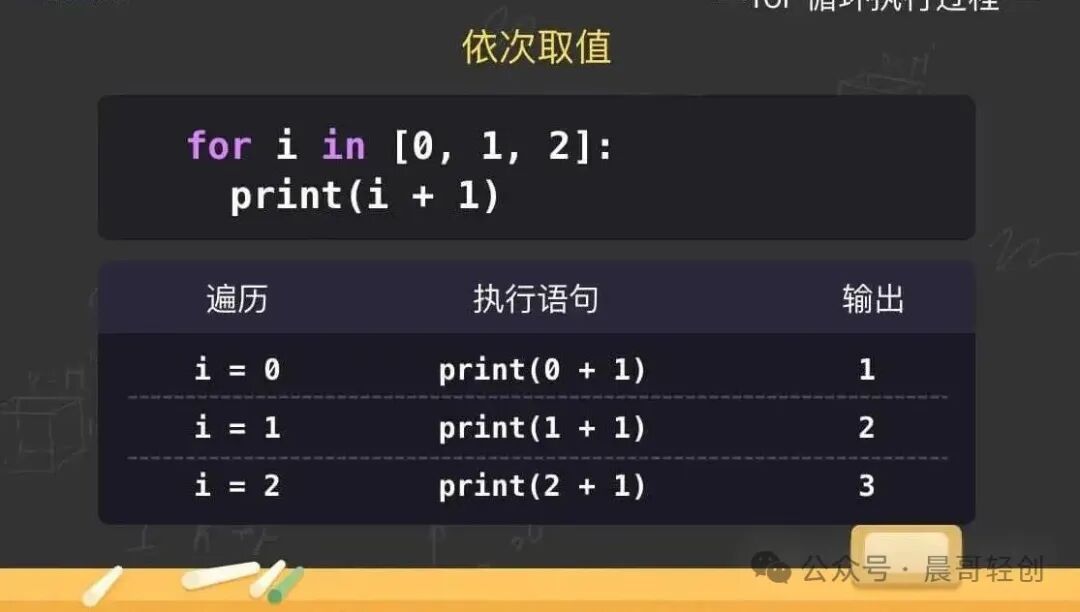
The code in the image is actually iterating over the list <span>[0, 1, 2]</span>. Each time it accesses a number, Python assigns the accessed number to the variable <span>i</span> and executes the <span>print(i + 1)</span> statement. Therefore, the entire code’s function is to print out 1, 2, 3 line by line.
Pay attention, the variable after <span>for</span> can be named freely. When iterating over a sequence of pure numbers, we often name it <span>i</span>. However, in most cases, we should try to choose a variable name that is easy to read and meaningful.
for i in [1, 1, 2, 3]:
    print(i)
# Output line by line: 1 1 2 3
# names contains several people's names
names = ['Squidward', 'Patrick', 'Mrs. Puff', 'Sandy']
for name in names:
    print(name)
# Output line by line: Squidward Patrick Mrs. Puff Sandy