 Arduino Sensor: HS-S01A Infrared SensorArduino Sensor: HS-S02P Infrared Sensor (Obstacle Avoidance)Arduino Sensor: HS-S03P Ultraviolet SensorArduino Sensor: HS-S05P Sound SensorArduino Sensor: HS-F07P Active BuzzerArduino Sensor: HS-S08P Flame SensorArduino Sensor: HS-S09LB Raindrop SensorArduino Sensor: HS-S09PC Soil Moisture Sensor
Arduino Sensor: HS-S10P Mist Sensor
Arduino Sensor: HS-S11-L Gas Sensor
Arduino Sensor: HS-S20P Ambient Light Sensor
Arduino Sensor: HS-S21P Tilt SensorArduino Sensor: HS-S22P Grayscale SensorArduino Sensor: HS-S24P Digital Temperature SensorArduino Sensor: HS-S26A Temperature and Humidity SensorArduino Sensor: HS-S28P Rotary Potentiometer
Arduino Sensor: HS-S31P Touch Sensor
Arduino Sensor: HS-S37PS Water Level Sensor
Arduino Sensor: HS-S38P Human Body Sensor
Arduino Sensor: HS-S40P Hall Magnetic Sensor
Arduino Sensor: HS-S45P Barometric Pressure Sensor
Arduino Sensor: HS-S46P Weighing Sensor
Arduino Sensor: HS-S59P Slot Type Photoelectric Sensor
Arduino Sensor: HS-S70P Heart Rate and Blood Oxygen Sensor
Arduino Sensor: Photoresistor Sensor
Arduino Sensor: Infrared Receiver Module
Arduino Sensor: Infrared Transmitter Module
Arduino Sensor: Clock Module
Arduino Sensor: Rotary Encoder Module
Arduino Sensor: Dual-axis Joystick Module
Arduino Sensor: Gyroscope Module
Arduino Sensor: Voice Broadcast Module
Arduino Sensor: Voice Recognition Control Module
Arduino Communication Module: Bluetooth Module
Arduino Power Module: Motor Driver Module
Arduino Control Module: Self-locking Button ModuleArduino Storage Module: SD Card Module
Arduino Control Module: Conductive Switch Module
Arduino Execution Module: Electromagnet Module
Arduino Detection Module: Ultrasonic ModuleArduino Interaction Module: Button Switch ModuleArduino Display Module: One-digit Seven-segment DisplayArduino Display Module: Four-digit Seven-segment DisplayArduino Display Module: 8*8 Dot Matrix Display— Previous Recommendations —

01Basic Knowledge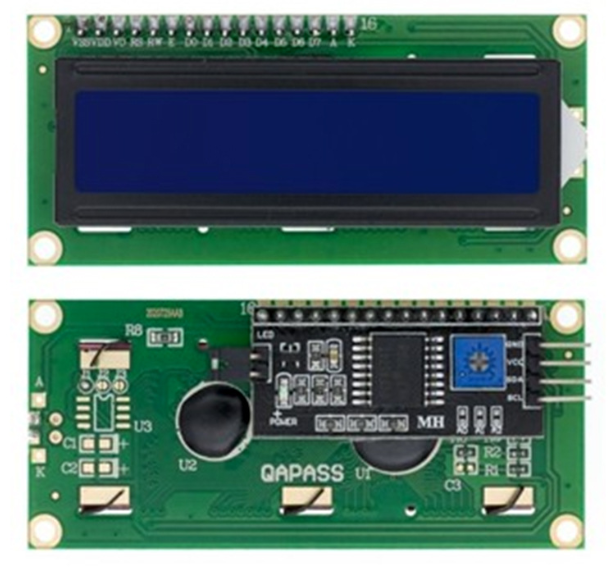 Model: HS-F21-PName: LCD Liquid Crystal DisplaySeries: Display ModuleDescription: It is a 16-column by 2-row character-type liquid crystal display module, integrating an I2C communication interface (including SDA/SCL pins), supporting ASCII character display and custom 5×8 dot matrix characters. It can clearly present numbers, letters, simple symbols, and device status information. It adopts a low-power driving scheme, featuring stable display, simple interface, and strong adaptability, making it a core display component for data visualization in Arduino systems, device operation interfaces, and educational experiments.Usage Scenarios: Arduino system status monitoring (e.g., real-time display of temperature and humidity, voltage, etc. sensor data), small electronic device operation interfaces (e.g., button input feedback, menu selection display), primary and secondary school science experiments (exploring the principles of liquid crystal display, I2C communication protocol, in line with the “Guidelines for Artificial Intelligence General Education in Primary and Secondary Schools (2025 Edition)” practical requirements), children’s programming teaching tools (controlling character display through code to understand data visualization logic), industrial simple parameter screens (e.g., displaying runtime and count values of small devices), and assistive displays for visually impaired individuals (adjustable contrast and backlight to meet low vision needs).Disciplinary Integration: Physics, Mathematics, Electronic Engineering Information TechnologyEthical Education: Display content must be accurate and objective, avoiding misleading data (e.g., medical assistive displays must be rigorous) to reflect technological integrity. Electronic waste disposal must pay attention to the compliant recycling of harmful substances (e.g., mercury) in liquid crystal panels to reduce environmental pollution. Display design must consider inclusivity (e.g., high contrast for visually impaired individuals, large fonts for elderly users). Long-term use must control backlight brightness to balance display needs with eye health, avoiding visual fatigue. Public display must comply with information security standards and not leak privacy or sensitive data.Note: Images sourced from the internet, products based on actual purchases.
02Technical Parameters
Working Principle:
The core of the module consists of an LCD1602 liquid crystal panel and a PCF8574 I2C to parallel interface chip. The I2C commands sent by Arduino are converted into parallel signals by the PCF8574 to drive the arrangement of liquid crystal molecules to form characters; it supports a fixed display area of 16 columns × 2 rows, with a built-in ASCII character library (including numbers, letters, and common symbols), and can customize 8 special characters in a 5×8 dot matrix (e.g., arrows, simple graphics); the backlight module can be independently controlled via I2C commands, and the contrast can be adjusted through code or a hardware potentiometer.
Parameter Analysis:
G (GND): Power input negative
V (VCC): Power input positive
SDA (Serial Data): I2C communication data pin
SCL (Serial Clock): I2C communication clock pin
Control Chip: PCF8574 (I2C to parallel interface chip), responsible for converting I2C signals into LCD driving signals
Display Specification: 16 columns × 2 rows of characters, supports ASCII code (0x20-0x7F), can customize 8 special characters in a 5×8 dot matrix
Communication Protocol: Standard I2C bus, supports multiple device mounting (requires modification of I2C address, common addresses are 0x27 or 0x3F)
Working Voltage: 5V DC (recommended), compatible with 3.3V (only some modules support, display effect poor)
Working Current: Static current ≈ 2mA, during display ≈ 10-20mA (when backlight is on), can drop below 5mA when backlight is off
Display Contrast: Supports code adjustment or hardware potentiometer adjustment (some modules have contrast adjustment pins)
Backlight Type: LED backlight (usually white/blue), supports I2C command control switch
Viewing Angle: Horizontal viewing angle ≈ 120°, vertical viewing angle ≈ 80°, clarity best at the front (±30° range)
03Code Example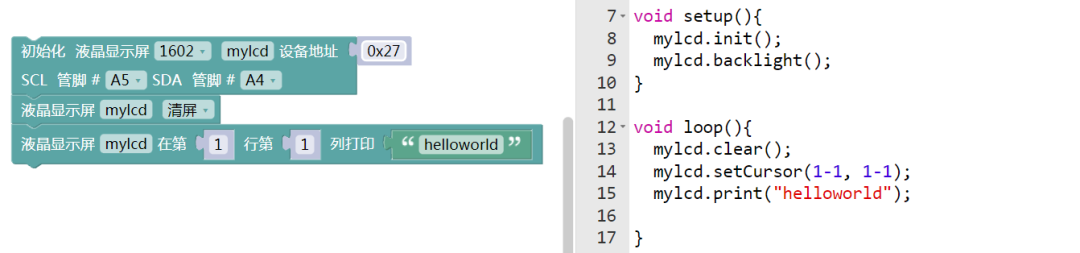
Connect pins to SCL\A5; SDA\A4.
04Safety Measures
1. Wiring Safety: Power must be turned off before wiring, confirm VCC is 5V; connecting above 5V (e.g., 12V) will directly burn the PCF8574 chip and the liquid crystal panel, connecting 3.3V may cause display failure;
2. Physical Protection: Avoid pressing hard on the liquid crystal panel to prevent liquid crystal leakage (toxic) or glass breakage; do not use sharp objects to scratch the screen surface;
3. Backlight Usage: It is recommended to turn off the backlight when not necessary (use code <span><span>lcd.noBacklight()</span></span>), prolonged high brightness will accelerate backlight LED aging, shortening module lifespan;
4. Communication Stability: SDA/SCL wire length should be ≤2 meters, for long wire transmission, it is recommended to parallel 10kΩ pull-up resistors on both wires (some modules are already built-in, no need to add), to reduce signal interference;
5. Soldering Specifications: Soldering pins with soldering iron temperature ≤300℃, soldering time ≤3 seconds, avoid high temperature damaging the PCF8574 chip (poor high-temperature resistance);
6. Child Scene Adaptation: When used as children’s programming teaching tools, the circuit board must be enclosed (e.g., wrapped in a shell) to prevent children from touching pins or swallowing small parts;
7. Debugging Troubleshooting: If the display screen shows nothing, first check: ① Is the I2C address correct? ② Are the SDA/SCL connections loose? ③ Is the power voltage stable (5V sufficient supply needed)?
05Expansion
Students can try the following methods:
1. Environmental Monitoring Dashboard: Work with HS-S26A Temperature and Humidity Sensor, HS-S45P Barometric Pressure Sensor to display “Temp: XX.X°C” “Hum: XX%” “Press: XXXX hPa” on the LCD1602, updating environmental parameters in real-time;2. Interactive Menu Screen: Combine with HS-S39A Touch Keyboard or HS-S28P Rotary Potentiometer to achieve menu switching (e.g., “1. View Data” “2. Set Threshold” “3. Clear Records”), LCD synchronously displays selected status during touch/rotation operations;3. Countdown Reminder: Combine with clock module (e.g., DS3231), display “Countdown: 01:23:45” on the LCD1602, triggering HS-F07P Active Buzzer alarm when the countdown ends, suitable for experimental timing and task reminder scenarios;4. SD Card Data Reader: Work with SD Card Module to read experimental data stored on the SD card (e.g., soil moisture change logs), switch LCD1602 display pages through buttons to achieve historical data pagination viewing;5. Smart Home Appliance Status Screen: Work with Relay Module, HS-S38P Human Body Sensor to display “Light: ON/OFF” “Person: Detected/No” on the LCD1602, providing real-time feedback on appliance switch status and human sensing results, achieving simple monitoring of smart home.