KS
Knowledge Sharing
We are now in an era of resource sharing, as well as knowledge sharing. If you find this article informative, please share the knowledge with others!
A Brief History of HTTP Development
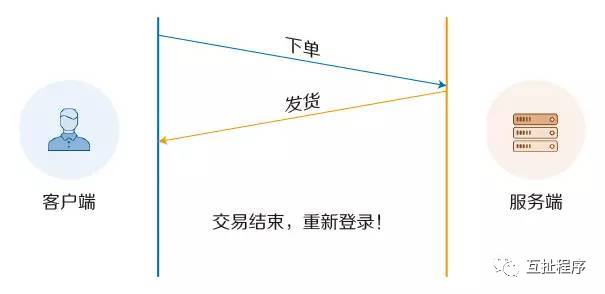
Above: Connection cannot be reused
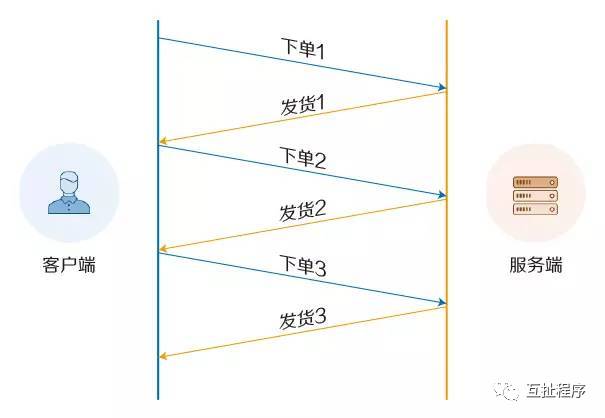
Above: Set Connection: Keep-Alive to keep the connection open for a period of time.
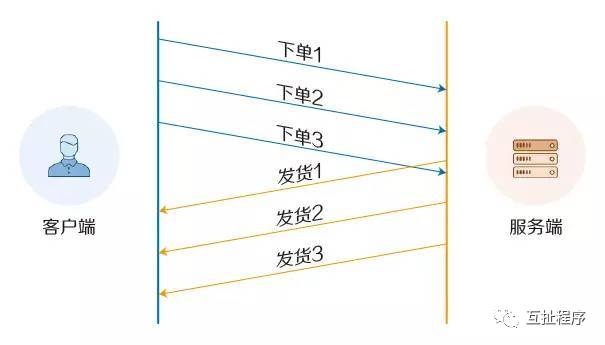
Above: HTTP pipelining: Establishing multiple connections
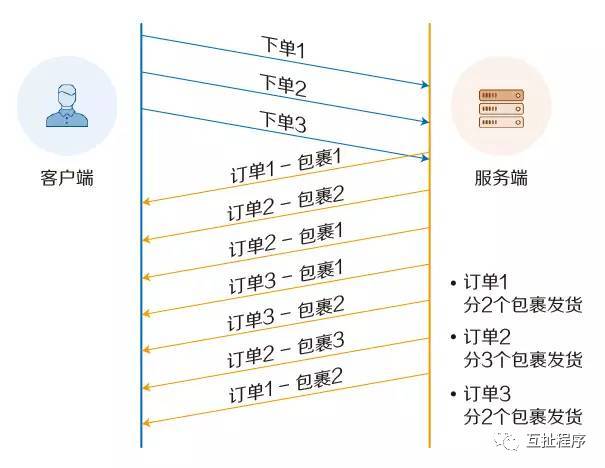
Above: Multiplexing
First, let’s briefly introduce the HTTP protocol:
1. The HTTP protocol: Hyper Text Transfer Protocol (超文本传输协议), is a protocol used for transferring hypertext from World Wide Web (WWW) servers to local browsers. It is the most widely used network protocol on the Internet. All WWW files must comply with this standard.
2. HTTP is a protocol based on TCP/IP communication for transmitting data (HTML files, image files, query results, etc.).
3. HTTP is an object-oriented protocol belonging to the application layer. Due to its simplicity and speed, it is suitable for distributed hypermedia information systems. It was proposed in 1990 and has been continuously improved and expanded over the years.
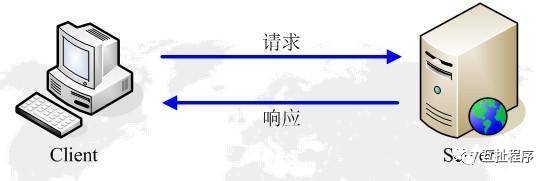
4. The HTTP protocol works on a client-server architecture. The browser acts as an HTTP client that sends all requests to the HTTP server (WEB server) via URL. The web server sends response information back to the client based on the received requests.
Versions of the HTTP protocol:
-
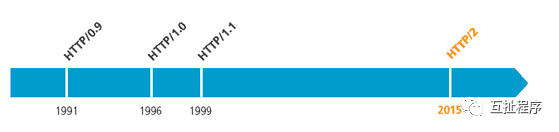
HTTP 0.9 was the first version of the HTTP protocol. It is very weak. The request (Request) consists of only one line, for example: GET www.leautolink.com
2. HTTP 1.0 was first used in web pages in 1996, at that time it was only used on some simpler web pages and network requests.
3. HTTP 1.1 began to be widely used in major browsers’ network requests in 1999, and HTTP 1.1 is currently the most widely used HTTP protocol.
Upgrades in HTTP 1.1:
-
Cache handling: In HTTP 1.0, caching was mainly determined by headers like If-Modified-Since and Expires. HTTP 1.1 introduced more cache control strategies such as Entity tag, If-Unmodified-Since, If-Match, If-None-Match, and more cache headers to control caching strategies.
-
Bandwidth optimization and network connection usage: In HTTP 1.0, there were some bandwidth-wasting phenomena, such as when the client only needed part of an object, but the server sent the entire object and did not support resuming downloads. HTTP 1.1 introduced the range header field in the request header, allowing the request for only a part of the resource, with a return code of 206 (Partial Content), making it easier for developers to fully utilize bandwidth and connections.
-
Error notification management: HTTP 1.1 added 24 new error status response codes, such as 409 (Conflict) indicating that the requested resource conflicts with the current state of the resource; 410 (Gone) indicating that a certain resource on the server has been permanently deleted.
-
Host header handling: In HTTP 1.0, it was assumed that each server was bound to a unique IP address, so the URL in the request message did not convey the hostname. However, with the development of virtual host technology, multiple virtual hosts (Multi-homed Web Servers) can exist on a single physical server, sharing one IP address. The request and response messages in HTTP 1.1 must support the Host header field, and if the request message does not have a Host header field, it will report an error (400 Bad Request).
-
Persistent connections: HTTP 1.1 supports persistent connections (PersistentConnection) and pipelining, allowing multiple HTTP requests and responses to be sent over a single TCP connection, reducing the overhead and latency of establishing and closing connections. In HTTP 1.1, Connection: keep-alive is enabled by default, which mitigates the drawback of HTTP 1.0 requiring a new connection for each request.
How to establish a connection (Three-way handshake)
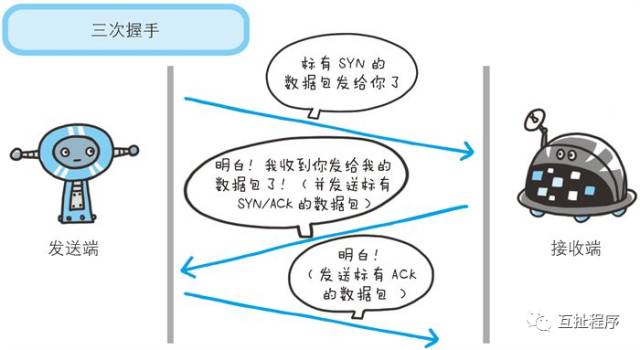
HTTP is based on the TCP protocol, and the browser can only carry the HTTP request message during the third handshake, achieving a true connection establishment. However, these connections cannot be reused, leading to each request undergoing three handshakes and slow start. The impact of three-way handshakes is particularly noticeable in high-latency scenarios, while slow start significantly affects large file requests.
-
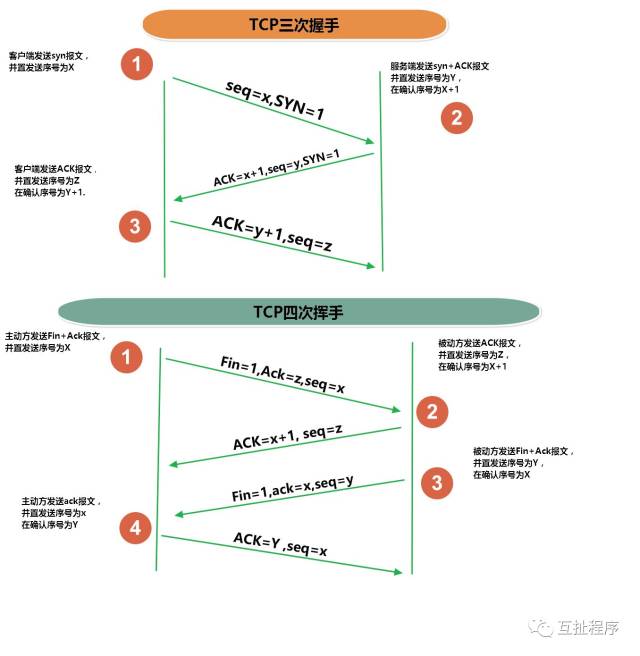
First handshake: When establishing a connection, the client sends a SYN packet (syn=j) to the server and enters the SYN_SENT state, waiting for the server’s confirmation; SYN: Synchronize Sequence Numbers.
-
Second handshake: The server receives the SYN packet, must confirm the client’s SYN (ack=j+1), and also sends a SYN packet (syn=k), forming a SYN+ACK packet, at which point the server enters the SYN_RECV state;
-
Third handshake: The client receives the server’s SYN+ACK packet and sends an acknowledgment packet ACK(ack=k+1) to the server. After this packet is sent, both the client and server enter the ESTABLISHED (TCP connection successful) state, completing the three-way handshake.
After completing the three-way handshake, the client and server begin to transmit data.
How to close a connection (Four-way handshake):
Since TCP connections are full-duplex, each direction must be closed separately. This principle allows one party to send a FIN to terminate the connection in that direction after completing its data transmission task. Receiving a FIN only means that there is no data flow in that direction; a TCP connection can still send data after receiving a FIN. The first party to close will perform an active close, while the other party will perform a passive close.
The disassembly of a TCP connection requires sending four packets, hence it is called a four-way handshake. Either the client or server can actively initiate the handshake; in socket programming, any party executing the close() operation will trigger the handshake.
-
The client A sends a FIN to close the data transmission from client A to server B.
-
Server B receives this FIN and sends back an ACK, confirming the sequence number as the received sequence number plus one. Like SYN, a FIN will occupy a sequence number.
-
Server B closes the connection with client A and sends a FIN to client A.
-
Client A sends back an ACK message to confirm, setting the acknowledgment number to the received number plus one.
Browser Blocking (HOL blocking):
For the same domain, PC browsers generally establish 6-8 connections to a single server, while mobile browsers typically limit the number of connections to 4-6 (this may vary depending on the browser kernel). Requests exceeding the maximum connection limit of the browser will be blocked.
Before discussing HTTP/2, let’s talk about SPDY.
SPDY is an application layer protocol proposed by Google based on the Transmission Control Protocol (TCP), which shortens loading times through compression, multiplexing, and priority. This protocol is a faster content delivery protocol, released in mid-2009.
Google Chrome, Mozilla Firefox, and Opera have SPDY enabled by default. Google has claimed that its tests showed a doubling of page load speeds. This protocol is a faster content delivery protocol.
Goals set by the SPDY protocol:
1. Reduce Page Load Time (PLT) by 50%;
2. No need for website authors to modify any content;
3. Minimize configuration complexity, no changes to network infrastructure required;
Note: To achieve the goal of reducing page load time by 50%, SPDY introduced a new binary framing layer to enable multiplexed requests and responses, prioritization, and minimize and eliminate unnecessary network delays, aiming to utilize the underlying TCP connection more effectively;
HTTP/2: An upgraded version of SPDY
-
The HTTP Working Group (HTTP-WG) brought HTTP 2.0 to the agenda in early 2012, learning from the experiences of SPDY and establishing an official standard based on it.
-
The main goal of HTTP/2 is to improve transmission performance, utilize network resources more effectively, and achieve low latency and high throughput. On the other hand, the high-level protocol semantics of HTTP will not be affected by this version upgrade. All HTTP headers, values, and their usage scenarios will remain unchanged.
-
HTTP/2 aims to break through the well-known performance limitations of the previous generation standard, but it is also an extension of the previous 1.x standards rather than a replacement. The reason for incrementing to a major version of 2.0 is primarily due to the change in the way data is exchanged between clients and servers.
How does HTTP/2 improve efficiency?
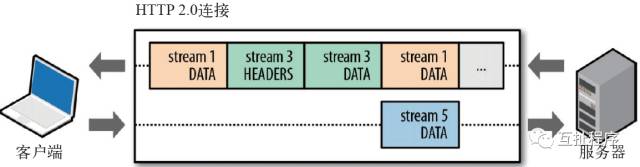
Binary Framing: All frames in HTTP 2.0 are encoded in binary
-
Frame: Clients and servers communicate by exchanging frames, which are the smallest unit of communication based on this new protocol.
-
Message: Refers to logical HTTP messages, such as requests and responses, composed of one or more frames.
-
Stream: A stream is a virtual channel in the connection that can carry bidirectional messages; each stream has a unique integer identifier (1, 2…N);
Multiplexing
Multiplexing allows multiple request-response messages to be initiated simultaneously over a single HTTP/2 connection. With the new framing mechanism, HTTP/2 no longer relies on multiple TCP connections to achieve parallel streams. Each data stream is split into many independent frames, which can be interleaved (sent out of order) and prioritized. Finally, they are reassembled on the other end. HTTP 2.0 connections are persistent, and only one connection is needed between the client and server (one connection per domain).
Request Prioritization
-
After breaking down HTTP messages into many independent frames, the interleaving and transmission order of these frames can be optimized. Each stream can have a 31-bit priority value: 0 indicates the highest priority; 2^31-1 indicates the lowest priority.
-
The server can control resource allocation (CPU, memory, bandwidth) based on the stream’s priority, and when response data is ready, it will prioritize sending the highest priority frames to the client.
-
HTTP 2.0 effectively resolves all these inefficiencies: browsers can immediately dispatch requests upon discovering resources, specify the priority of each stream, and allow the server to determine the optimal response order. This way, requests do not have to queue, saving time and maximizing the utilization of each connection.
Header Compression
HTTP 1.x headers contain a lot of information and are repeated with each request. HTTP/2 uses an encoder to reduce the size of headers that need to be transmitted, with both parties caching a copy of the header fields table, avoiding the transmission of duplicate headers and reducing the size that needs to be transmitted.
Server Push
-
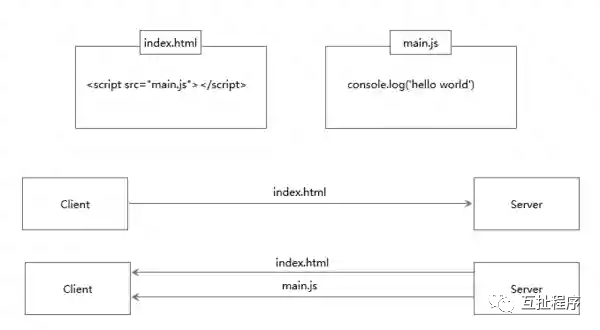
The server can send multiple responses to a single client request. The server can push resources to the client without the client explicitly requesting them.
-
After establishing an HTTP 2.0 connection, the client and server exchange SETTINGS frames, which can limit the maximum number of concurrently active streams.
-
All pushed resources must comply with the same-origin policy. In other words, the server cannot arbitrarily push third-party resources to the client; it must be mutually agreed upon.
-
The server must adhere to the request-response cycle and can only push resources in response to a request.
What is server push?
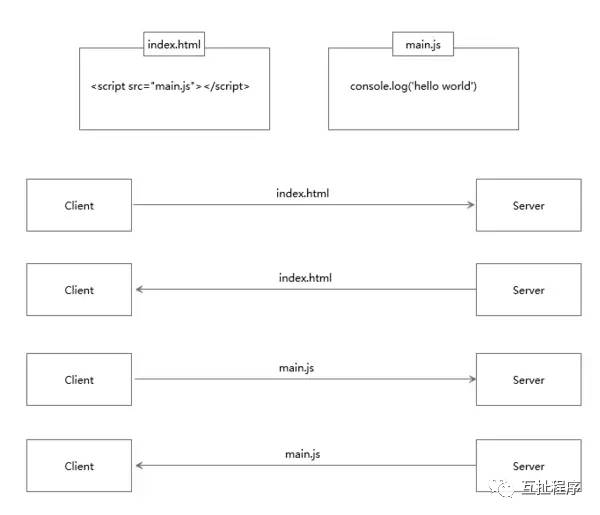
Server push allows the server to send resources needed by the client along with index.html, eliminating the need for the client to make repeated requests. Because there are no request initiation, connection establishment, and other operations, static resources can be significantly accelerated through server push.
Normal client request process:
Server push process:
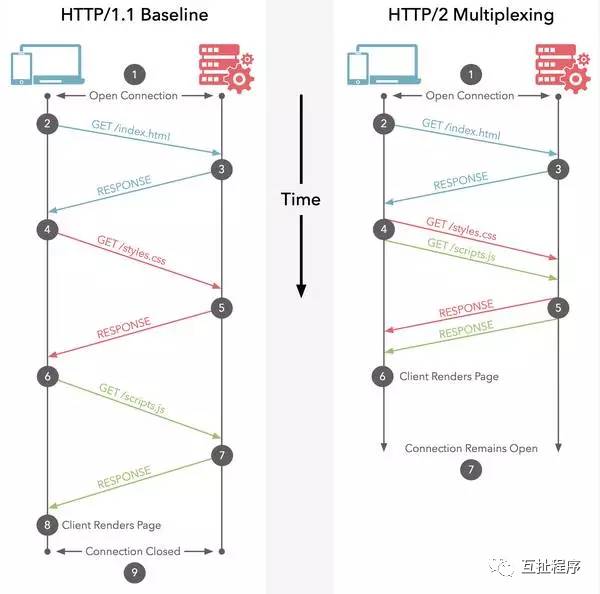
What is the difference between HTTP/2 multiplexing and HTTP 1.1 persistent connection reuse?
-
HTTP/1.0 establishes a connection for each request-response and closes it after use; each request requires a new connection.
-
HTTP/1.1 Pipelining solves this by queuing several requests for serial processing in a single thread; subsequent requests must wait for the previous requests to return before they can execute. If any request times out, subsequent requests will be blocked, which is commonly referred to as head-of-line blocking.
-
HTTP/2 allows multiple requests to be executed in parallel over a single connection. If one request takes a long time, it will not affect the normal execution of other connections.
How to apply it to your own projects:
Any existing website or application can run on HTTP 2.0 without any modifications. There is no need to change tags to take advantage of HTTP 2.0 benefits. The HTTP server must run the HTTP 2.0 protocol, but most users will not be affected by this.
If you are using NGINX, you can simply enable the corresponding protocol in the configuration file. You can refer to the NGINX white paper and the official guide for configuring HTTP 2.0.
If you use HTTP 2.0, what about the original HTTP 1.x? This issue is actually not a concern; HTTP 2.0 is fully compatible with the semantics of HTTP 1.x. For browsers that do not support HTTP 2.0, NGINX will automatically fall back to compatibility.
If you find this helpful, please share it with more people!


A small circle for architects, gathering 100,000 architects! Sharing technical insights and industry secrets from time to time! Collecting various interesting topics and trends! Long press the left image to scan the code to join the architect WeChat group!