Click the blue “One Bite Linux” in the upper left corner, and select “Set as Favorite“
Get the latest technical articles first


☞【Resources】Embedded Driver Engineer Learning Path
☞【Resources】Linux Embedded Knowledge Points - Mind Map - Free Access
☞【Employment】A comprehensive project based on Linux IoT that can be included in your resume
☞【Employment】Resume Template
Assembly language is the closest language to machine language, and assembly instructions are the most microscopic. It relates to large software in a way similar to the relationship between organelles and the cell nucleus.
All C language programs must ultimately be translated into assembly code, organized according to certain rules into executable programs, which can then be executed on hardware.
Only by truly understanding assembly code can one clearly know how to write C code efficiently,
and thus write high-quality C code.
Mastering assembly code will help everyone become a true programming master more quickly.
This article explains through a simple example based on ARM bare-metal development,how the code structure of if-else is ultimately translated into ARM assembly code.
For the testing environment, refer to the articles below:
“Linux Driver, ARM LearningEnvironment Setup“
“4. Learning ARM from Scratch – ARM Assembly Instructions are Actually Very Simple“
“7. Learning ARM from Scratch – Assembly Pseudo Instructions,lds Detailed Explanation”
1. C Code
Without further ado, here is the C code. This code is very simple, so I won’t elaborate.
/*
 * main.c
 *
 *  Created on: 2025-10-23
 *  Author: pengdan
 */

int main(void)
{
 int sum = 0;
 int a = 10;
 int b = 22;

 int flag = 15;

 if(flag > 11)
 {
  sum = a+b;
 }else{
  sum = a-b;
 }
    return 0;
}
2. Compiling the Code
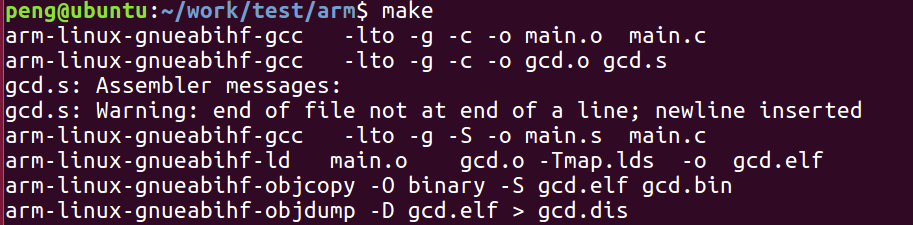
The final compiled programgcd.bin can be burned onto the ARM board for execution.
For easier understanding, we can usearm-linux-gnueabihf-objdump to remove the symbol information from the program and generate the programgcd.dis
gcd.dis
  1
  2 gcd.elf:     file format elf32-littlearm
  3
  4
  5 Disassembly of section .text:
  6
  7 40008000 <_start>:
  8 40008000:   e3a0d207    mov sp, #1879048192 ; 0x70000000
  9 40008004:   ea00000f    b   40008048 <__main_from_arm>
 10
 11 40008008 <main>:
 12 40008008:   b480        push    {r7}
 13 4000800a:   b085        sub sp, #20
 14 4000800c:   af00        add r7, sp, #0
 15 4000800e:   2300        movs    r3, #0
 16 40008010:   60fb        str r3, [r7, #12]
 17 40008012:   230a        movs    r3, #10
 18 40008014:   60bb        str r3, [r7, #8]
 19 40008016:   2316        movs    r3, #22
 20 40008018:   607b        str r3, [r7, #4]
 21 4000801a:   230f        movs    r3, #15
 22 4000801c:   603b        str r3, [r7, #0]
 23 4000801e:   683b        ldr r3, [r7, #0]
 24 40008020:   2b0b        cmp r3, #11
 25 40008022:   dd04        ble.n   4000802e <main>
 26 40008024:   68ba        ldr r2, [r7, #8]
 27 40008026:   687b        ldr r3, [r7, #4]
 28 40008028:   4413        add r3, r2
 29 4000802a:   60fb        str r3, [r7, #12]
 30 4000802c:   e003        b.n 40008036 <main>
 31 4000802e:   68ba        ldr r2, [r7, #8]
 32 40008030:   687b        ldr r3, [r7, #4]
 33 40008032:   1ad3        subs    r3, r2, r3
 34 40008034:   60fb        str r3, [r7, #12]
 35 40008036:   2300        movs    r3, #0
 36 40008038:   4618        mov r0, r3
 37 4000803a:   3714        adds    r7, #20
 38 4000803c:   46bd        mov sp, r7
 39 4000803e:   f85d 7b04   ldr.w   r7, [sp], #4
 40 40008042:   4770        bx  lr
 41 40008044:   0000        movs    r0, r0
 42     ...

</main></main></main>
3. Assembly Code Analysis
1) Variable Stack Allocation
 11 40008008 <main>:
 12 40008008:   b480        push    {r7}
 13 4000800a:   b085        sub sp, #20
 14 4000800c:   af00        add r7, sp, #0
</main>
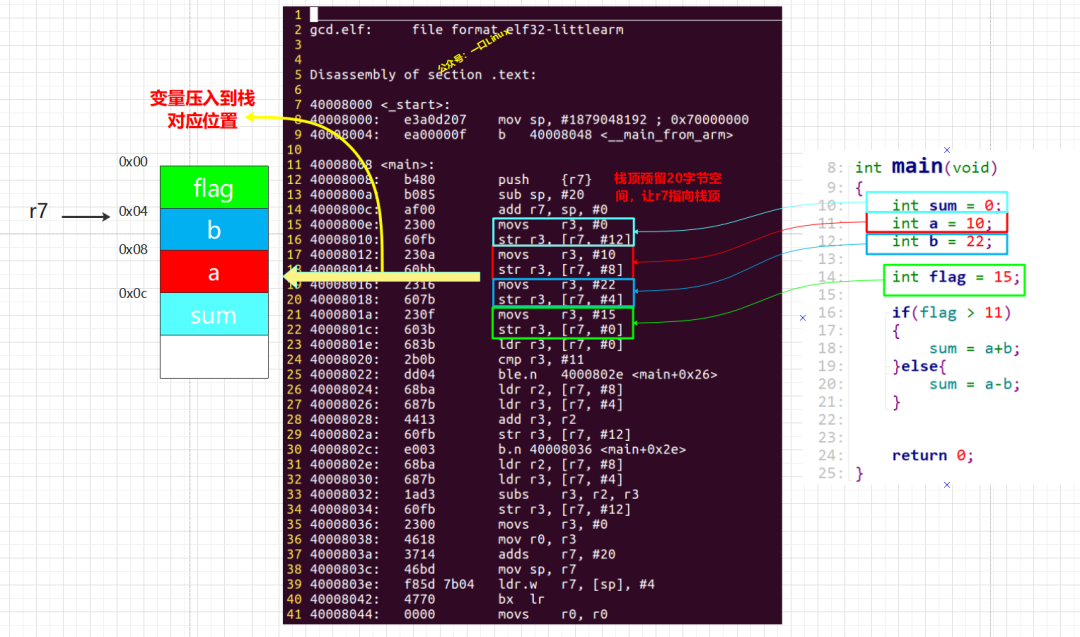
These lines of code reserve 20 bytes of space at the top of the stack, with r7 pointing to the allocated stack top.
They also allocate corresponding stack space for the variables: flag, b, a, and sum, with the corresponding stack addresses as shown below: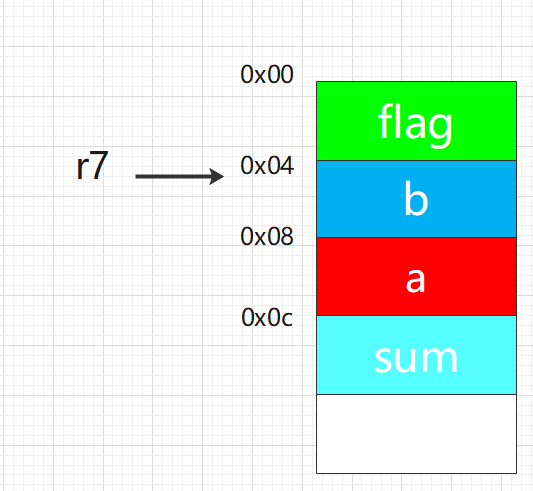
Refer to the diagram below for the allocation process:
2) If Code Block
The assembly code block corresponding to the if branch is shown in the diagram below:
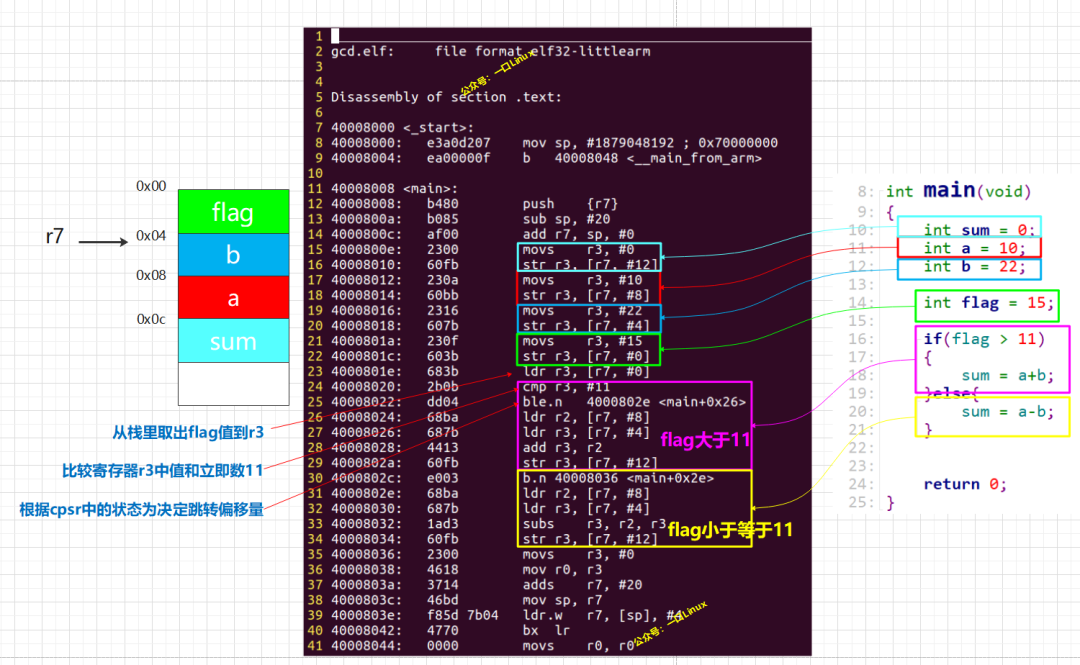
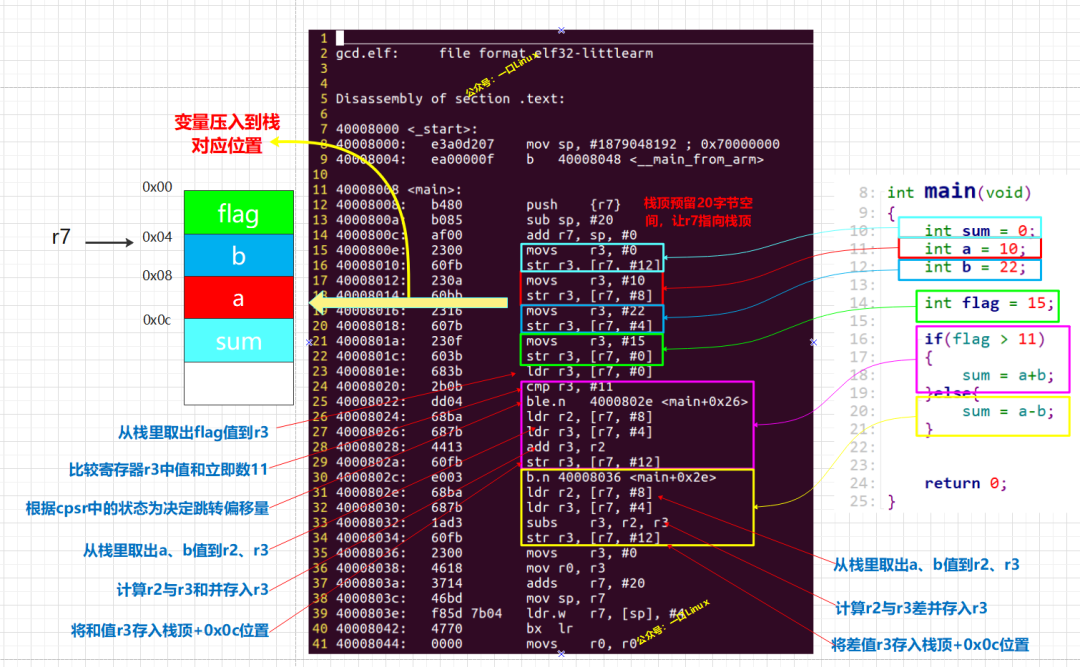
From the above diagram, we can conclude that the thought process for translating the if code block into assembly code is as follows:
-
Line 23: First, read the variable from the stack into register r3,
-
Line 24: Use the assembly instruction cmp to compare r3 with the immediate value 11; this instruction will affect the cpsr status bits.
-
Lines 25 and 30: Use the assembly instruction b.n to decide which code block to execute based on the cpsr n status bit.
-
Lines 26-27 and 31-32: After entering the if branch, retrieve the values of a and b from the stack into r2 and r3 respectively.
-
Lines 28 and 29: If flag is greater than 11, r3 = r2 + r3, then store the sum in the corresponding position of sum in the stack.
Lines 32 and 33: If flag is less than 11, r3 = r2 – r3, then store the difference in the corresponding position of sum in the stack.
Complete analysis as follows:
4. Other Compilation Files
gcd.s
.text
.global _start
_start:
  ldr  sp,=0x70000000         /*get stack top pointer*/
  b  main
Makefile
TARGET=gcd
TARGETC=main
all:
 arm-linux-gnueabihf-gcc   -lto -g -c -o $(TARGETC).o  $(TARGETC).c
 arm-linux-gnueabihf-gcc   -lto -g -c -o $(TARGET).o $(TARGET).s
 arm-linux-gnueabihf-gcc   -lto -g -S -o $(TARGETC).s  $(TARGETC).c
 arm-linux-gnueabihf-ld   $(TARGETC).o    $(TARGET).o -Tmap.lds  -o  $(TARGET).elf
 arm-linux-gnueabihf-objcopy -O binary -S $(TARGET).elf $(TARGET).bin
 arm-linux-gnueabihf-objdump -D $(TARGET).elf > $(TARGET).dis
clean:
 rm -rf *.o *.elf *.dis *.bin
map.lds file
OUTPUT_FORMAT("elf32-littlearm", "elf32-littlearm", "elf32-littlearm")
/*OUTPUT_FORMAT("elf32-arm", "elf32-arm", "elf32-arm")*/
OUTPUT_ARCH(arm)
ENTRY(_start)
SECTIONS
{
 . = 0x40008000;
 . = ALIGN(4);
 .text      :
 {
  gcd.o(.text)
  *(.text)
 }
 . = ALIGN(4);
    .rodata :
 { *(.rodata) }
    . = ALIGN(4);
    .data :
 { *(.data) }
    . = ALIGN(4);
    .bss :
     { *(.bss) }
}
For more embedded knowledge, please add Teacher Peng as a friend:yikoupen
end
One Bite Linux
Follow and reply with 【1024】 to receive a wealth of Linux materials
Collection of Wonderful Articles
Article Recommendations
☞【Album】ARM☞【Album】Fan Q&A☞【Album】All Originals☞【Album】LinuxIntroduction☞【Album】Computer Networks☞【Album】Linux Drivers☞【Resources】Embedded Driver Engineer Learning Path☞【Resources】All Linux Embedded Knowledge Points – Mind Map