In assembly language, programs are composed of a stream of instructions, which generally consist of operators and operands. The operator is the action that the CPU performs to accomplish a specific function, while the operand is the object that the operator processes. For example, in the instruction: add eax, 42, “add” is the operator that performs addition, and the constant 42 and the data stored in the eax register are the operands. Therefore, this instruction adds the value in eax to the constant 42 and saves the result back to eax.
In high-level languages, data itself carries type information. For instance, in C, the literal constant 6 is an integer (int) value, ‘6’ is a character (char) value, and “6” is a string type value. For a variable like int a, the data stored at the memory address “&a” is a signed int. However, in assembly language, if we look at data outside the context of instructions, it is merely binary data without specific meaning, meaning it lacks type information. A piece of data only reveals its meaning when it appears in an instruction as an operand. The same data used in different forms of instructions may represent different types.
Note: This article explains assembly language for the x86-64 processor, and the format of assembly instructions follows Intel style. The following content represents personal views.
1. How is data represented?
Since data in assembly language does not have type information, how can we represent it? There are three elements to describe data: location, length, and content.
The location indicates where the data is stored and how to find it. Data can only be stored in three places: in instructions, in registers, and in memory.
The length refers to how much storage space the data occupies. For example, data can occupy 1 byte, 2 bytes, 4 bytes, 8 bytes, 16 bytes, etc., which are powers of 2. If stored in memory, it can also be 3 bytes, 5 bytes, 6 bytes, or even n bytes, such as arrays or strings representing string operations.
The content indicates what the data represents. The same data may represent a character, an integer, a floating-point number, an address, etc., depending on what instruction the data is used as an operand for. Thus, what the data represents is determined by the context of the instruction it is in, and its meaning is closely related to the instruction that operates on it.
Clearly, length and content correspond to types in high-level languages. For example, declaring short data in C/C++ indicates that data occupies 2 bytes and represents an integer in the range of -32768 to 32767. The location of data depends on where it is defined: it can be in the stack, heap, data segment, or constant segment. In assembly language, if data is stored in memory, for example, [rax], the register rax contains a 64-bit address, which corresponds to a void* pointer in high-level languages. However, without relevant prefix information like dword ptr, the length of the data it points to is unknown, as is what it represents.
Next, let’s look at how these are represented in assembly language.
2. Data Location – Where is it stored?
In assembly language, data exists in three places:
1. In Instructions
Data is a constant, also known as an immediate value, which is encoded into the instruction and becomes part of it. It can only be used as a source operand for instructions, such as in the instruction mov eax, 42, where the source data 42 is located in the instruction.
Below is the binary instruction stream after this instruction is compiled, which is the binary data b82a000000 after assembling the mov instruction. When executed, the CPU places this binary instruction stream in the execution engine, and during decoding, it can extract the data 42 from it.
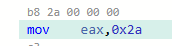
We know that the decimal number 42 corresponds to the hexadecimal 0x2a, and b8 indicates storing 4 bytes of binary data into the register eax, while the remaining part of the instruction 2a000000 is the number 42, which is 4 bytes in length.
Immediate values generally come from constants in high-level languages, such as const int, constexpr int, and integer literals in C++. However, constants in high-level languages are not always treated as immediate values in instructions; sometimes they may reside in read-only data segments, i.e., stored in memory.
2. In Registers
Data stored in general-purpose registers can be used as both source and destination operands. For example:
add eax, edxThe addition operation add has two operands, with data stored in registers eax and edx. During execution, the execution engine retrieves data from these two registers.
3. In Memory
The location of data in memory can be indirectly represented in instructions by registers, such as mov eax, dword ptr [rdi], where the memory address is in register rdi, or by directly representing absolute address constant data, such as mov eax, dword ptr [0x7fff324ce00c], where the memory address is 0x7fff324ce00c. It can be used as either a source or destination operand, but not both simultaneously. The most common representation of memory addresses is: [64-bit register ± offset], i.e., register indirect addressing, for example, [rax+4], where the value in register rax represents a memory address. Assuming it is 0x7fff324ce00c, adding 4 means accessing the memory location 0x7fff324ce010. Directly representing memory locations in instructions using constant data is uncommon in 64-bit processors; instead, relative addressing using the rip register is preferred.
3. Data Length – How much space does it occupy?
The length information of data is related to where it is stored, and different locations have different ways of representing length.
1. Immediate Values
The length depends on the length of the literal form of the source and destination operands, generally being 1, 2, 4, or 8 bytes. For example, for the immediate value 0x42, if the destination is a single-byte length, it is one byte in the instruction; if the destination is 2 bytes, it is 2 bytes in the instruction; if the destination is 4 or 8 bytes, it is 4 bytes in the instruction. For the immediate value 0x4200, if the destination is 2 bytes, it is 2 bytes in the instruction; if the destination is 4 or 8 bytes, it is 4 bytes in the instruction. For the immediate value 0x4200000000, it can only be 8 bytes in the instruction.
2. Registers
The length depends on the size of the register. Taking the accumulator registers ax, eax, rax series and SIMD registers as examples:
|
Register |
Bytes |
Bits |
Possible Corresponding C/C++ Types |
|---|---|---|---|
| al | 1 | 8 |
char, uint8_t, int8_t |
| ax | 2 | 16 |
short, uint_16, int_16 |
| eax | 4 | 32 |
int, uint32_t, int32_t, float |
| rax | 8 | 64 |
long long, uint64_t, int64_t, double |
| rdx:rax combination | 16 | 128 |
struct {int64_t, int64_t}, int64_t[2], double[2] |
| xmm | 16 | 128 |
int8_t[16], int16_t[8], int32_t[4], int64_t[2], float[4], double[2] |
| ymm | 32 | 256 |
int8_t[32], int16_t[16], int32_t[8], int64_t[4], float[8], double[4] |
| zmm | 64 | 512 |
int8_t[64], int16_t[32], int32_t[16], int64_t[8], float[16], double[8] |
According to the above table, if a piece of data is stored in the register eax, its length is 4 bytes (32 bits), which could correspond to data types from high-level languages such as int, uint32_t, int32_t, float, struct{short, short}, char[4], etc.
3. Memory Data
Memory can store more data, and there is no additional information to indicate its length, so in instructions, a special identifier is needed to specify length. Different styles of assembly language have different representations.
In Intel-style assembly language, length information for memory data needs to be explicitly specified with prefixes. For example, single-byte length memory data uses the byte ptr prefix, while 4-byte length memory data uses the dword ptr prefix. For instance, mov eax, dword ptr [rax] indicates that the value in register rax is used as an address to read 4 bytes of data from memory into register eax, meaning the data is 4 bytes in length at the memory location pointed to by [rax].
In ATT-style assembly language, length information is indicated by suffixes used by the operators. For example, movl (%rax), %eax uses the movl operator to indicate that the 4-byte data at the memory location pointed to by register rax is stored in register eax. Other operators like movb, movw, movq are used for different lengths of data, where the suffixes b, w, l, q represent 1 byte, 2 bytes, 4 bytes, and 8 bytes of memory data length, respectively.
Below is a list of various data length prefixes and their corresponding C/C++ types:
| Prefix | Bytes | Bits |
Possible Corresponding C/C++ Types |
|---|---|---|---|
| byte ptr | 1 | 8 |
char, uint8_t, int8_t |
| word ptr | 2 | 16 |
short, uint_16, int_16 |
| dword ptr | 4 | 32 |
int, uint32_t, int32_t, float |
| qword ptr | 8 | 64 |
long long, uint64_t, int64_t, double |
| xmm ptr | 16 | 128 |
int8_t[16], int16_t[8], int32_t[4], int64_t[2], float[4], double[2] |
| ymm ptr | 32 | 256 |
int8_t[32], int16_t[16], int32_t[8], int64_t[4], float[8], double[4] |
| zmm ptr | 64 | 512 |
int8_t[64], int16_t[32], int32_t[16], int64_t[8], float[16], double[8] |
Additionally, assembly also has string operations (corresponding to array types in C/C++), and all these data are stored in memory. The length of string operation data needs to be stored in a special register, which is stored in registers cx/ecx.
4. Data Content – What does it store?
The type represented by data depends on what it is used as an operand for in instructions. The operands in instruction operations can be integers, floating-point numbers, pointers, bit fields, BCD integers, strings, and composite types.
For example, consider the following instruction format:
Operator eax, dword ptr [rbp-24];
Source operand: dword ptr [rbp-24];
Location: rbp-24, the value in register rbp minus 24, indicating the source operand’s location in memory.
Length: dword, meaning 4 bytes in length.
Type: depends on the operator type; if it is a transfer type like mov, it is uncertain; if it is an arithmetic operator, it is an integer; if it is a logical operator, it is an unsigned integer.
Destination operand: eax
Location: register eax
Length: the length of eax is 32 bits, i.e., 4 bytes.
Type: depends on the operator type.
Now, consider an example:
Assuming the source data is qword ptr [rsp], this format can determine two elements of the data: Location: the value stored in register rsp, which is the address of the stack top; Length: 8 bytes. Below are possible scenarios for qword ptr [rsp] and their corresponding C/C++ types, assuming long and double are 64-bit lengths:
1. ADD rax, qword ptr [rsp] Because the ADD operator is used for integer addition, the type may be long or unsigned long.2. MUL rax, qword ptr [rsp]Because the MUL operator is used for unsigned integer multiplication, the type is unsigned long.3. IMUL rax, qword ptr [rsp] Because the IMUL operator is used for signed integer multiplication, the type is signed long.4. MOVSS xmm0, qword ptr [rsp] Because the MOVSS operator is used for single-precision floating-point transfer, the type is float.5. MOVSD xmm2, qword ptr [rsp] Because the MOVSD operator is used for double-precision floating-point transfer, the type is double.6. PADDW mm1, qword ptr [rsp]Because the PADDW operator is used for double-byte composite number addition, the type is composite integer, equivalent to short[4] array.7. PADDB mm1, qword ptr [rsp]Because the PADDB operator is used for single-byte composite number addition, the type is composite integer, equivalent to char[8] array.8. JMP qword ptr [rsp] Because JMP is a jump instruction, the type is an address, which may be a pointer, including function pointer types.9. JCC qword ptr [rsp] Because JCC is a conditional jump instruction, the type is an address, which may be a pointer, including function pointer.10. CALL qword ptr [rsp] Because CALL is a function call instruction, the type is a function pointer.11. The following example requires more instruction context to determine the data type stored in memory qword ptr [rsp]:MOV rax, qword ptr [rsp]Any type is possible, depending on the subsequent use of rax as an operand.MOVD xmm0, qword ptr[rax]rax is used as an address, pointing to an 8-byte data, but it is still unknown what type it points to.MOVSD xmm3, xmm0Because MOVSD is a scalar double-precision floating-point transfer instruction, at this point, it is determined that the pointer points to a double, meaning the data stored in memory qword ptr [rsp] is of type double*.
It is evident that the same data in different forms of instructions may represent different types. For instance, assuming the content at the memory pointed to by the rsp register is 0x8123456781234567, in the following instructions, qword ptr [rsp] will represent different type values:
1. MUL rax, qword ptr [rsp]
It is of type uint64_t, value is 9305357565928097127.
2. IMUL rax, qword ptr [rsp]
It is of type int64_t, value is -9141386507781454489.
3. MOV rax, qword ptr [rsp] and MOV mm0, qword ptr[rax]
It is a pointer, pointing to the memory location 0x8123456781234567.
4. MOV mm0, qword ptr[rsp]
It is a char array, value is {0x81, 0x23, 0x45, 0x67, 0x81, 0x23, 0x45, 0x67}.
5. MOVSD xmm0, qword ptr [rsp]
It is of type double, value is -3.5127004713770933e-303, almost 0.0.
5. How to Access Data
Knowing where the data is, and its length, how do we retrieve the data? Especially how to access data in memory? This is done through different addressing modes to access data. In x86-64 processors, there are several ways:
1. Immediate Addressing
Data is an immediate constant, existing in the instruction. For example, the instruction: mov eax, 42, its binary encoding is: b82a000000, where the 4-byte length 2a000000 is the immediate value 42.
In C/C++ code, these data generally correspond to literals or constants modified by const or constexpr.
2. Register Addressing
Data is in registers, and this addressing mode is very efficient because registers are inside the CPU execution unit, making access very fast.
In C/C++ code, function parameters, return results, loop variables, and variables modified by register are stored in registers. Additionally, intermediate results of numerical expressions are generally also stored in registers.
3. Direct Memory Addressing
Data is in memory, accessed directly using absolute addresses, such as mov eax, dword ptr [0x7fff324ce00c], which reads 4 bytes of data from memory location 0x7fff324ce00c.
In C/C++ code, global variables, static variables, and function entry addresses may use this addressing mode. However, due to longer instruction encoding, it is less common; generally, the following indirect memory addressing mode is preferred, especially the rip relative addressing mode in x86-64 processors (see the next section “4.7, rip Relative Addressing”).”>
4. Indirect Memory Addressing
This type of addressing mode is the most diverse.
4.1. Register Indirect
Format: [register], such as [rax]
In C/C++ code, dereferencing pointers using the * operator or accessing the virtual function table address through the this pointer are examples of this addressing mode.
For example, dereferencing a pointer:

4.2. Base + Offset
Format: [register ± immediate offset], such as [rbp-16]
This can also be viewed as a special case of the previous register indirect addressing mode when the offset is 0, such as [rax] being equivalent to [rax+0].
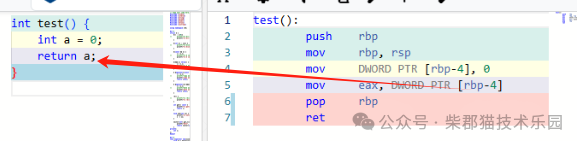
In C/C++, this addressing mode is common when accessing local variables, array elements, or structure members. The base registers used are often rax, rbx, rbp, rsp, and using them results in shorter instruction encoding. In C++, if rdi appears as the base register, it indicates that the first parameter of the function is a pointer, possibly calling a member function, accessing the data members of an object through the this pointer. The register rbp is used to access the base of the function stack frame, and rsp is used as the stack top base, which is standard usage across all compilers.
For example, accessing a local variable:
4.3. Base + Index
Format: [base register ± index register], such as [rbx+rsi]
Common base registers include rbx, rbp, while index registers include rsi, rdi. Using them results in shorter instruction encoding, although all registers can be used.
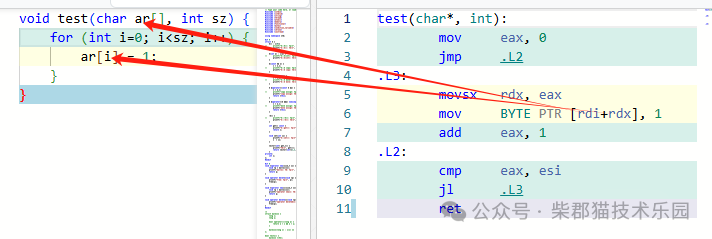
In C/C++, this addressing mode is used when accessing arrays composed of single-byte data like char or uint8_t, where the starting position of the array is the base register, and the index is the index register.
For example, accessing elements of a char array by index:
4.4. Base + Index * Factor
Format: [base register ± index register * immediate factor], where the immediate factor can only be a power of 2, such as [rbx+rsi*4]
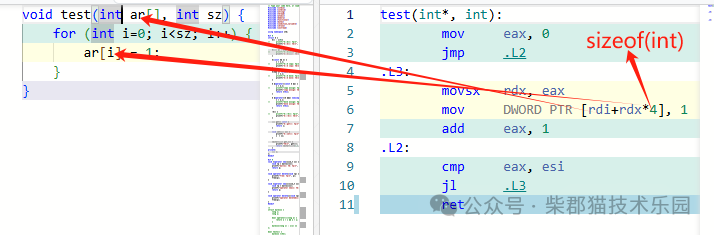
In C/C++, this addressing mode is used when accessing arrays composed of multi-byte data like short, int, float, where the starting position of the array is the base register, and the index is the index register, with the immediate factor being the length of the array elements. For example, for an array: int ar[], the immediate factor is sizeof(int)=4.
For example:
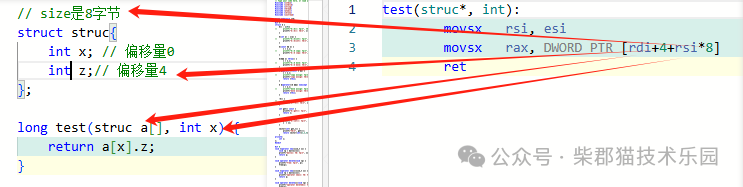
4.5. Base + Index * Factor + Offset
Format: [base register ± index register * immediate factor ± immediate offset], where the immediate factor can only be a power of 2, such as [rbx+rsi*4+8]
In C/C++, this addressing mode is used when accessing data members of a structure within an array of structures, where the starting position of the array is the base register, the index is the index register, the immediate factor is the length of the structure, and the offset is the data member’s offset within the structure.
For example:
4.6. Base + Index + Offset
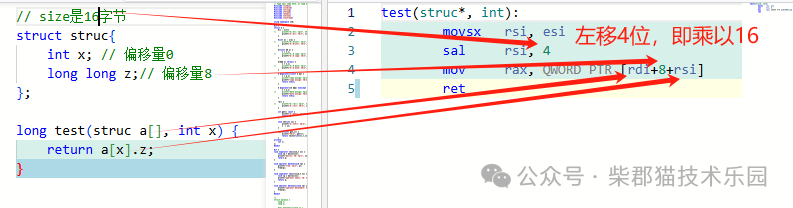
Format: [base register ± index register ± immediate offset], such as [rbx+rsi+8]
In C/C++, this addressing mode is used when accessing data members of a structure within an array of structures. If the addressing mode 4.5 is not used (because the index factor can only take limited values like 1, 2, 4, 8), two instructions are used for addressing: first calculating the value of index * factor and storing it in the index register, where the starting position of the array is the base register, and the index position is the index register, with the offset being the data member’s offset within the structure.
For example:
4.7. Rip Relative Addressing
Format: [rip ± immediate offset], for example, [rip – 0x33538]
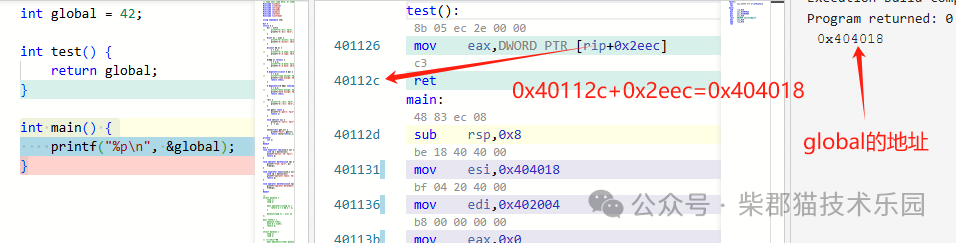
In modern operating systems, the memory layout model of processes is flat, meaning all code and data are no longer managed in segments but are uniformly addressed in the same address space. This allows the instruction pointer register rip to access data. When an instruction accesses memory data, the position where it is executed (i.e., the value of RIP) plus the distance to the target address – the offset, allows access to the memory data at the target address. In C/C++, this addressing mode can be used to access global variables, static variables, dynamically loaded functions, and global variables.
For example:

Let’s take a look at how the address calculation works during program execution with rip relative addressing.
Finally
Although the data has been divided into three parts for explanation, in reality, these three aspects are closely related and are represented simultaneously in an instruction. For example, in the following instruction:
add edx, DWORD PTR [rdi+4+rsi*8]1. The source data is in memory, using a “base + index * factor + offset” addressing mode. The location is the memory address calculated from the base register rdi and the index register rsi, and the data length is 4 bytes (indicated by dword ptr), while the address data is stored in register rdi, which is 8 bytes long, equivalent to a pointer type in C/C++.
2. The destination data is in register edx, which is 4 bytes long.
3. The instruction operator is add, which is an arithmetic addition operation, so both the source and destination data are integers, but whether they are signed or unsigned is still unknown.
This is somewhat similar to the following C/C++ code structure:
struct strct { int x; int z;};.....strct ar[M];int index;int sum;...sum += ar[index].z;Where ar is an array of structures. The instruction add edx, DWORD PTR [rdi+4+rsi*8] corresponds to sum += ar[index].z in the following way: edx=sum, rdi=&ar, rsi=index, 4=z is the offset in strct, 8=sizeof(struct strct), DWORD = sizeof(z) = 4.