
HTTP, or HyperText Transport Protocol, is a network technology that defines the communication between browsers and servers. It operates at the application layer and uses TCP port 80 to provide services.
Hypertext is a type of text that links text, images, videos, and other multimedia content together. It not only includes textual content but also allows for non-linear and arbitrary navigation and browsing through links (hyperlinks) between documents or within a document. In short, it is text that contains hyperlinks that can link to other resources such as images, audio, video, and other documents. It can represent almost any data format transmitted over the internet (JSON, XML, etc.).
Transmission: It defines how data is communicated and transmitted between the client and the server.
Protocol: Both parties in communication (client and server) must adhere to this set of rules to successfully converse.
How does HTTP work?
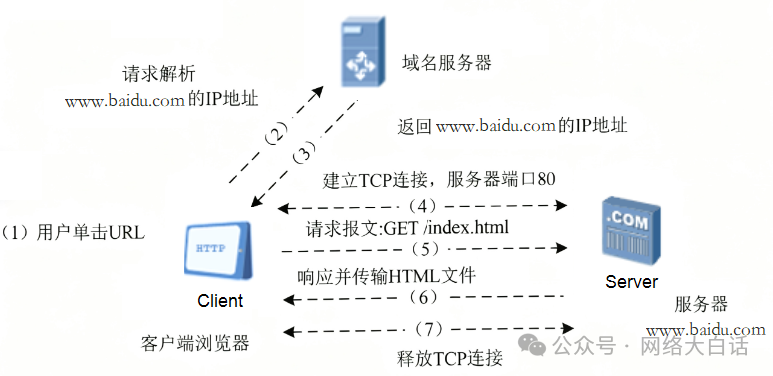
HTTP follows a client-server model and operates in a connectionless and stateless request/response manner.
1. Establishing a connection: The client (usually a browser) first establishes a TCP connection with the server (HTTP is typically based on TCP, with the default port being 80). Before establishing the connection, the domain name may need to be resolved to an IP address, followed by a TCP three-way handshake to establish the connection.
2. Client sends a request: The client sends an HTTP request message to the server.
3. Server processes the request and responds: After receiving the request, the server parses it and performs the corresponding action based on the request’s content (such as looking up a web page file, querying a database, etc.). Once processing is complete, the server returns an HTTP response message to the client. This message contains the result of the request (success or failure) and the requested resource (if successful).
4. Closing the connection: (TCP four-way handshake to close the connection) In HTTP/1.0, the connection is usually closed after the response. In HTTP/1.1 and later, the connection may be kept alive for subsequent requests to improve efficiency.
HTTP Messages
HTTP messages consist of request messages and response messages.
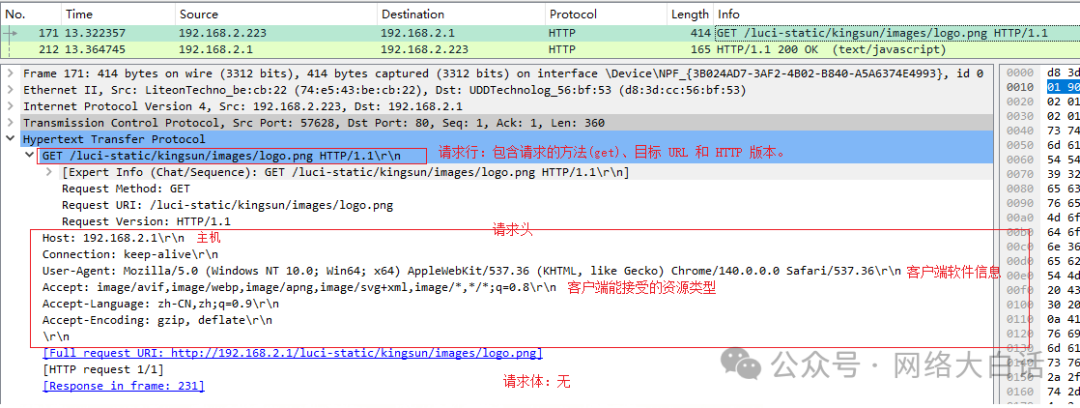
Request message: Sent by the client to the server to “request” a resource or action. It includes a request line, request headers, and a request body.
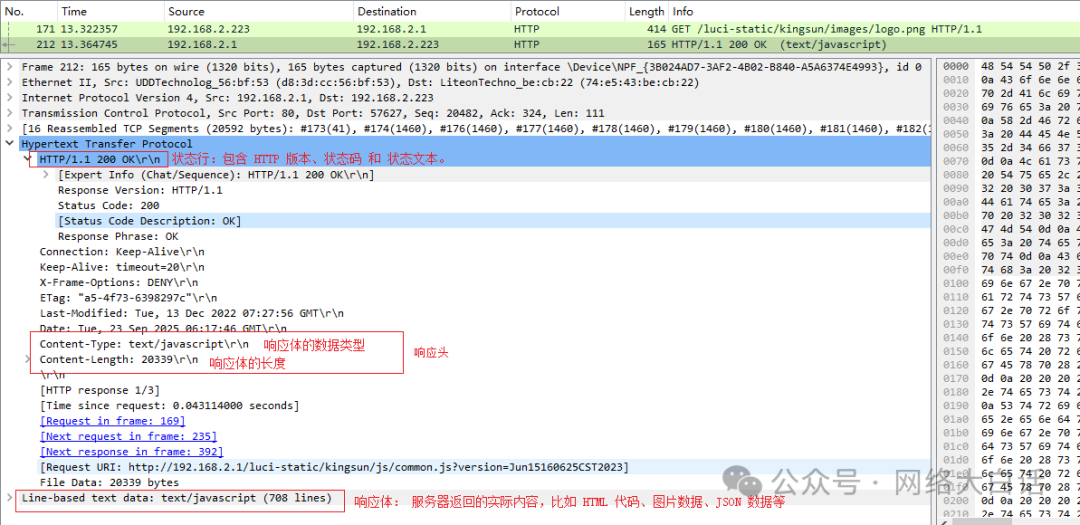
Response message: Returned by the server to the client as a “response” to the request. It includes a response line, response headers, and a response body.
Structure of an HTTP Request
A standard HTTP request consists of three parts:
Request line: Contains the request method, target URL, and HTTP version. For example: GET /index.html HTTP/1.1
Request headers: Contains additional information about the request, represented as key-value pairs. Common header information includes:
Host: www.example.com (target host, required)
User-Agent: Mozilla/5.0… (client software information)
Accept: text/html,application/json (resource types the client can accept)
Cookie: name=value (for state management)
Request body: An optional part. Typically used when submitting form data or uploading files with methods like POST or PUT.
Methods of Request Messages:
|
Method |
Purpose |
Typical Application Scenarios |
|
GET |
Retrieve/Read resource |
Browsing web pages, searching, retrieving data |
|
POST |
Create/Submit data |
Logging in, submitting forms, creating new resources |
|
PUT |
Complete update/Replace resource |
Updating user profiles (all fields) |
|
PATCH |
Partial update resource |
Updating user profiles (only modifying email) |
|
DELETE |
Delete resource |
Deleting articles, canceling accounts |
|
HEAD |
Retrieve resource metadata |
Checking link validity, file information |
|
OPTIONS |
Query supported methods |
CORS preflight requests, API self-describing |
|
TRACE |
Diagnostic echo |
Network debugging (rarely used) |
|
CONNECT |
Establish tunnel |
SSL tunnel (HTTPS proxy) |
Structure of an HTTP Response
A standard HTTP response also consists of three parts:
Status line: Contains the HTTP version, status code, and status text. For example: HTTP/1.1 200 OK
Response headers: Contains additional information about the response. Common header information includes:
Content-Type: text/html; charset=utf-8 (data type of the response body)
Content-Length: 1024 (length of the response body)
Set-Cookie: sessionId=abc123 (allows the client to set a cookie)
Response body: The actual content returned by the server, such as HTML code, image data, JSON data, etc.
Why does HTTP use TCP for transmission instead of UDP?
The reason is that the TCP protocol provides transmission control, ensuring that packets are not lost and are received in order, while UDP is a best-effort transmission that does not guarantee data integrity or order.
HTTP is stateless, but it uses the TCP protocol, which is stateful. How can this be understood?
The statefulness of TCP operates at the transport layer. It is a transport layer protocol whose main function is to provide a reliable, ordered, connection-based data stream.
When establishing a connection, it needs to record the connection state (such as sequence numbers, acknowledgment numbers, window sizes, etc.), which is the connection state.
It needs to remember which data has been sent and which has been acknowledged to ensure reliability.
If packets are lost during transmission, the TCP protocol stack will retransmit them.
This connection state begins when the connection is established (three-way handshake) and ends when the connection is closed (four-way handshake).
Therefore, the statefulness of TCP is to ensure that “packets can be accurately transmitted from one program to another.”
HTTP is an application layer protocol that runs on top of the reliable connection provided by TCP. Its main function is to define the semantics and format of communication between web clients and servers.
Each request in the HTTP protocol is independent: a request must contain all the information needed by the server to process that request (such as URL, method, authentication token, cookies, etc.).
The HTTP protocol specification does not require the server to maintain the client’s state. Server applications create state through cookies and sessions, which is the behavior of the application, not defined by the HTTP protocol itself.
In simple terms, the statelessness of HTTP means that “the logic of web server applications should not depend on previous requests.” There is no conflict between the two.
How do the two work together?
Establishing TCP state (transport layer): Your browser (client) initiates a TCP connection to port 80 of www.example.com (server) (three-way handshake). At this point, the operating systems of the computer and the server have established and maintained the TCP connection state, allowing both parties to send data to each other.
The client sends a stateless HTTP request (application layer): Through the established TCP connection, the browser sends the first HTTP request: GET /page1.html HTTP/1.1. The server receives the request, looks up, and returns the page1.html file.
The client sends a second stateless HTTP request (application layer): The browser sends a second HTTP request through the same TCP connection: GET /image.jpg HTTP/1.1. The server responds again, returning the image.
Subsequently, the client makes various HTTP requests, all based on the above TCP connection, and the HTTP server responds to the client independently, with no other associations.
Closing TCP state (transport layer): After all resources are loaded, the TCP connection is closed after a period of inactivity (four-way handshake). At this point, the transport layer’s “connection state” is cleared.
-end-
 If you like it, please give a little heart

If you like it, please reward me with a “follow”, “share”, and “ “~
“~
Please open in the WeChat client