The directory tree structure in the Linux system is a hierarchical file organization method that organizes files and directories in a tree-like format, making it easy for users and programs to find and manage files. In Linux, everything is a file, including hardware devices and the directories themselves.In Linux, various commands can be used to view the directory tree structure. Two commonly used commands are ls and tree.
- After logging into the system, enter the command in the current command window: ls /

- The tree structure of directories:
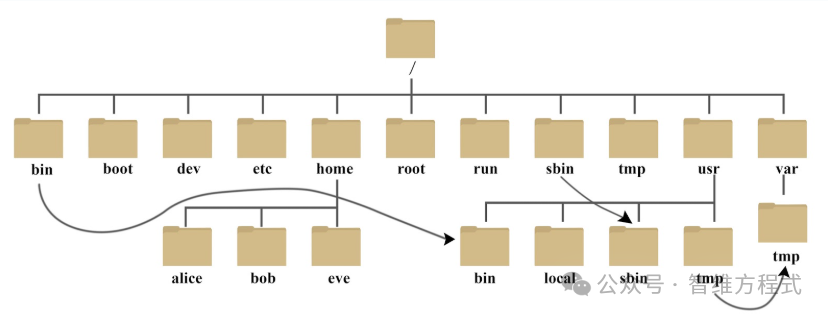
Below is an explanation of these directories:
-
/bin: bin is short for Binaries, and this directory contains the most frequently used commands.
-
/boot: This directory contains essential files used to boot Linux, including some connection files and image files.
-
/dev: dev is short for Device, and this directory contains external devices of Linux. In Linux, accessing devices is done in the same way as accessing files.
-
/etc: etc is short for Etcetera, and this directory is used to store all configuration files and subdirectories needed for system management.
-
/home: The home directory for users. In Linux, each user has their own directory, typically named after the user’s account, such as alice, bob, and eve in the above image.
-
/lib: lib is short for Library, and this directory contains the basic dynamic linking shared libraries of the system, similar to DLL files in Windows. Almost all applications require these shared libraries.
-
/lost+found: This directory is usually empty, but it stores some files after an illegal shutdown of the system.
-
/media: The Linux system automatically recognizes some devices, such as USB drives and CD-ROMs. Once recognized, Linux mounts the devices in this directory.
-
/mnt: This directory is provided by the system for users to temporarily mount other file systems. For example, we can mount a CD-ROM at /mnt/ and then access its contents by entering that directory.
-
/opt: opt is short for optional, and this directory is used for placing additional software installed on the host. For example, if you install an ORACLE database, it can be placed in this directory. It is empty by default.
-
/proc: proc is short for Processes. /proc is a pseudo-filesystem (i.e., a virtual filesystem) that stores a series of special files representing the current kernel’s running state. This directory is a virtual directory that maps to the system memory, and we can access it directly to obtain system information. The contents of this directory are not on the hard disk but in memory. We can also directly modify some files inside it. For example, we can use the following command to block the ping command to prevent others from pinging your machine:

-
/root: This directory is the home directory for the system administrator, also known as the superuser.
-
/sbin: s stands for Super User, and it is short for Superuser Binaries. This directory contains system management programs used by the system administrator.
-
/selinux: This directory is specific to Redhat/CentOS. Selinux is a security mechanism similar to the Windows firewall, but it is more complex. This directory stores files related to selinux.
-
/srv: This directory stores data needed after some services are started.
-
/sys:
This is a significant change in the Linux 2.6 kernel. This directory contains a new filesystem called sysfs introduced in the 2.6 kernel.
The sysfs filesystem integrates information from three types of filesystems: the proc filesystem for process information, the devfs filesystem for devices, and the devpts filesystem for pseudo-terminals.
This filesystem is an intuitive reflection of the kernel device tree.
When a kernel object is created, the corresponding files and directories are also created in the kernel object subsystem.
-
/tmp: tmp is short for temporary, and this directory is used to store temporary files.
-
/usr: usr is short for unix system resources. This is a very important directory where many user applications and files are stored, similar to the program files directory in Windows.
-
/usr/bin: Applications used by system users.
-
/usr/sbin: Advanced management programs and system daemons used by the superuser.
-
/usr/src: The default directory for kernel source code.
-
/var: var is short for variable. This directory contains things that are constantly expanding, and we typically place directories that are frequently modified here, including various log files.
-
/run: This is a temporary filesystem that stores information since the system was booted. When the system restarts, the files in this directory should be deleted or cleared. If your system has a /var/run directory, it should point to run.
【In the Linux system, there are several important directories that should be carefully managed to avoid accidental deletion or modification of internal files.
/etc: As mentioned above, this is the configuration file directory of the system. Changing a file in this directory may cause the system to fail to boot.
/bin, /sbin, /usr/bin, /usr/sbin: These are the preset directories for executable files in the system. For example, ls is located in the /bin/ls directory.
It is worth noting that /bin and /usr/bin are for commands used by system users (general users other than root), while /sbin and /usr/sbin are for commands used by root.
/var: This is a very important directory. Many programs running on the system generate logs, which are recorded in this directory, specifically in the /var/log directory. Additionally, the default location for mail is also here.】