 Search WeChat
 Technical Training
The function of PLC automatic sequencing is to control equipment to operate according to a pre-designed process flow. There are several methods for writing PLC automatic programs, and below we will provide a detailed explanation.
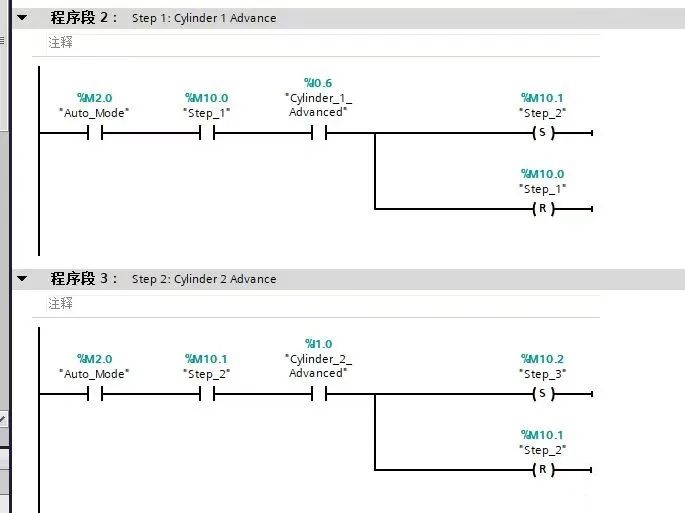
PART 01First Method: Set and Reset Auxiliary Relays
This method is the most primitive and basic way of writing, and it is also the simplest. For example, in the first step, set M0; after M0 is activated, it controls a certain result. After achieving the result, reset M0 and then set M1, proceeding sequentially for process control. This method is applicable to all PLCs.
PART 02Using Step Sequence Numbers
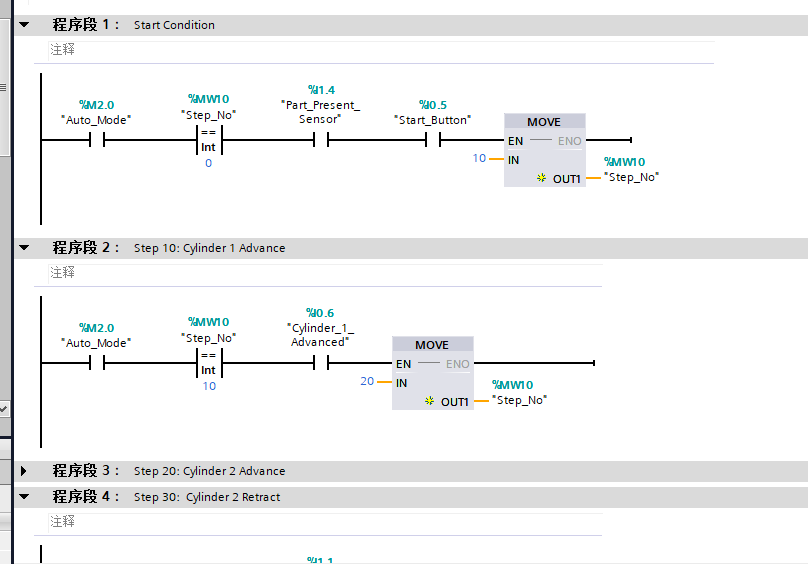
Using integer variables as step sequence numbers is easy to understand and maintain. Incrementing, decrementing, and jumping steps are convenient and straightforward. During reset operations, simply change the variable value to 0. It is important to note that when multiple step sequence conditions are true simultaneously, the step number will increment continuously within one PLC cycle until the last non-activated step command, while other programs triggered by the step number will not execute. This situation can be easily overlooked during debugging.
PART 03GRAPH (Sequential Function Chart Language, also known as SFC)
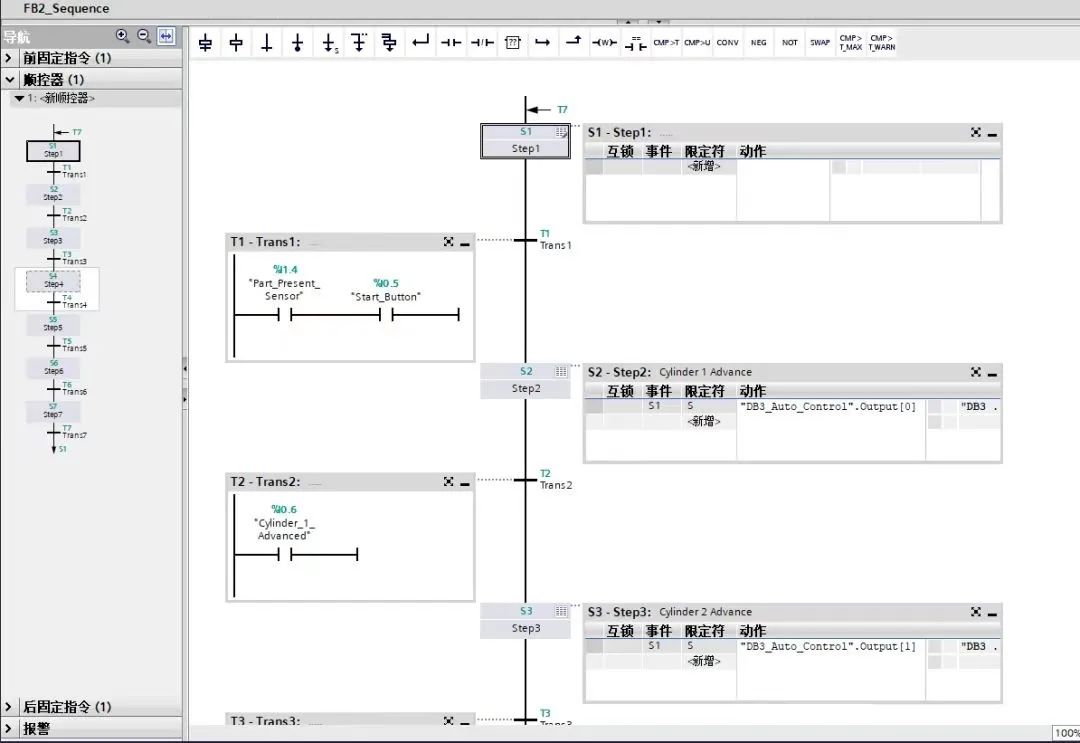
This method is very similar to our equipment process flow chart and is also the most intuitive form of programming. It clearly shows what the first step is and what conditions initiate the second step. Although the program appears clear on the surface, the actual process of writing project programs is not simple. Familiarizing oneself with this writing style takes time, and this method is not universally applicable to all PLCs (for example, Siemens S7-1200 does not support it, only S7-1500 does). Additionally, it requires high PLC performance and occupies a large amount of working memory.
PART 04Shift Instruction Method
This method utilizes the principle of shift instructions to control the sequence. For example, Omron’s SFT instruction, Mitsubishi’s ROL, ROR, etc., and Siemens’ shift instructions are similar. The key is to understand the working principle of shift instructions, which is applicable to programming across all PLCs.
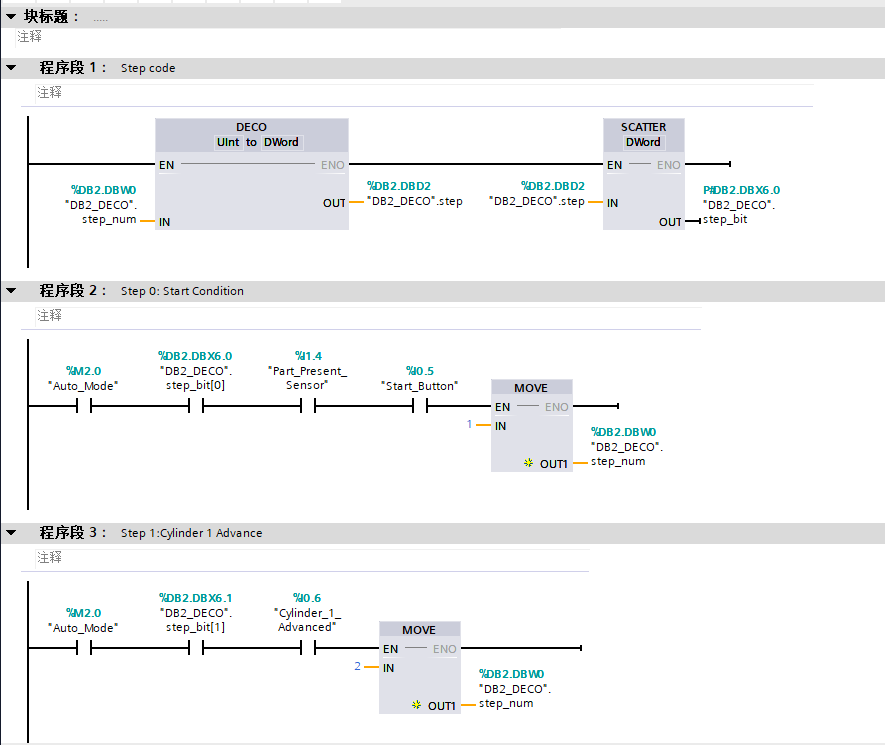
PART 05DECO Decoding Instruction Method
The decoding instruction DECO: converts an integer into the corresponding position 1 in a DWORD, and when the step sequence changes, the PLC will re-execute a scan cycle, avoiding the situation where multiple steps are skipped continuously. This prevents commands triggered by the step sequence in the program from being executed. Jumping and resetting operations are easy to write. For instance, Siemens S7-1200 PLC supports DWORD decoding (32 bits), while S7-1500 supports LWORD decoding (64 bits).
PART 06Working and Status Variable Assignment Method
This method combines data transfer instructions with comparison instructions to achieve program flow step conversion. I personally think this method is the easiest to understand and simplest to operate, and I recommend beginners try using it. Of course, this method is also applicable to all PLCs. Set up two variable words: state word and work word. The bits in the state word serve as step markers, while the work word indicates the target step for jumping. When the condition corresponding to the step position in the state word is met, it triggers the corresponding bit in the work word for the next step. Then, when the PLC sequentially scans to the transfer instruction, the value of the work word is assigned to the state word, completing the step jump. The advantage is that there are no set and reset operations, and at any given time, there is only one position set to 1. During a jump, simply set the corresponding position in the work word to 1. For reset, clear both the state word and work word to zero, and the program will automatically light up the first bit in the state word. When the number of steps exceeds 16, it can be changed to DWORD or increase the number of words to add more steps.
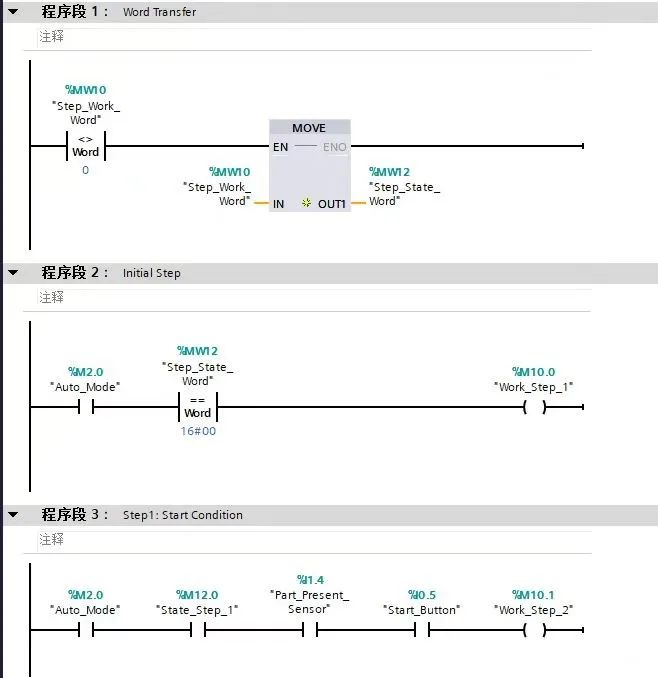
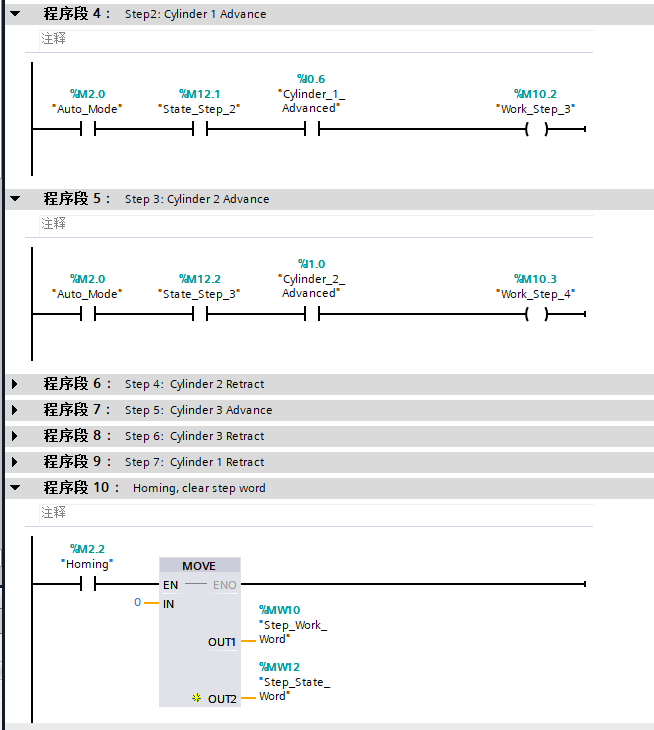
PART 07SCL Programming Method
More and more small PLCs support SCL language, which is a high-level programming language similar to PASCAL. Common control statements like FOR, IF, WHILE, and CASE can be combined to write powerful algorithms and logic, and the number of people using this writing style is increasing. Using SCL to design automatic programs primarily involves combining CASE and IF statements, treating Step as the program number. If there are relatively long branches or parallel actions, it requires the use of multiple Step programs, but we won’t delve into that here.
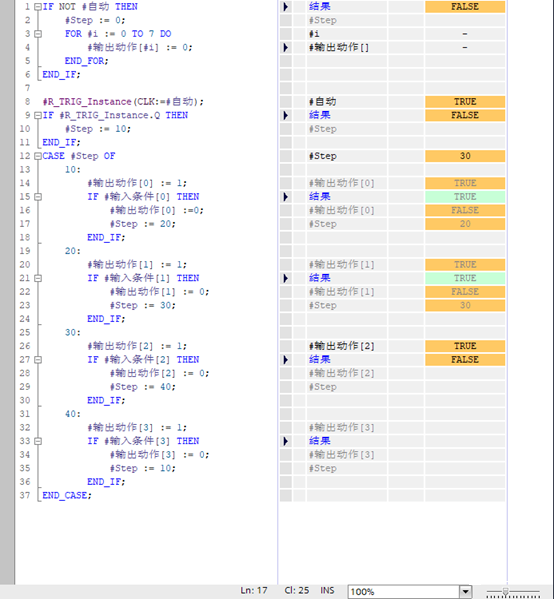
Do you have other methods? Please share them so everyone can learn from each other. Thank you!
Disclaimer: This article is reproduced from the internet, and the copyright belongs to the original author. If there are any copyright issues, please contact us for deletion. Thank you!
HISTORY/Previous Recommendations
2022 Electrician Beginner Exam Question Bank Complete Version (with Answers)
Three must-have tools for electricians, accessible with one click on WeChat!
[Collection] The “Path” of a veteran electrician, the secret to earning over ten thousand a month!
Five major electrical drawing software (CAD, Eplan, CADe_simu…), which one do you pick?
The latest electrical version of CAD drawing software, with a super detailed installation tutorial!
The latest electrical drawing software EPLAN, with a super detailed installation tutorial!
Common issues for beginners using S7-200 SMART programming software (with download links)
Comprehensive electrical calculation EXCEL spreadsheets, generated automatically! No need to seek help for electrical calculations!
Bluetooth headsets, electrician/PLC introductory books available for free? Come and claim your electrical gifts!
PLC programming basics: Ladder diagrams and control circuits (with 1164 practical cases of Mitsubishi PLC)
Still can’t understand electrical diagrams? Basics of electrician diagram reading, simulation software available for quick practical learning!
12 free electrician video courses, 10GB software/e-books, and 30 days of free live electrician classes are available!
Don’t forget to like + check it out!
 Click “Read the Original” to learn PLC/electrician courses for free.