Introduction: Why Do We Need Concurrency?
In today’s world, where Moore’s Law is slowing down, the improvement of single-core performance has reached a bottleneck. CPU manufacturers have turned to multi-core architectures, which means modern computers generally have multiple cores capable of executing multiple computational tasks simultaneously. To fully utilize these hardware resources, concurrent programming has emerged.
- Concurrency: Refers to the overlapping execution of multiple tasks in time, where they can execute alternately, appearing to run simultaneously. This is logically simultaneous execution.
- Parallelism: Refers to the actual simultaneous execution of multiple tasks at the same time, which requires support from multi-core processors. This is physically simultaneous execution.
The release of the C++11 standard was a milestone in the history of C++ development, as it provided cross-platform support for concurrent programming at the language level for the first time, liberating developers from the obscure and platform-dependent Pthreads (POSIX) or Windows API. This article will systematically explore C++ multithreaded programming based on the modern features of C++11/14/17/20.
Chapter 1: Basics of Threads – <span>std::thread</span>
<span>std::thread</span> is the cornerstone of the C++ thread library, allowing us to create and manage a new execution thread.
1.1 Creating and Starting Threads
By creating a <span>std::thread</span> object and passing a callable object (function, lambda expression, function object, etc.), the thread will immediately start executing.
#include <iostream>
#include <thread>
#include <chrono>
void task() {
    std::cout << "Task Thread ID: " << std::this_thread::get_id() << std::endl;
    std::this_thread::sleep_for(std::chrono::seconds(1));
}
int main() {
    std::cout << "Main Thread ID: " << std::this_thread::get_id() << std::endl;
    // Create and start thread
    std::thread my_thread(task);
    std::cout << "Main Thread continues executing..." << std::endl;
    // Wait for the child thread to finish
    my_thread.join();
    std::cout << "Main Thread ends." << std::endl;
    return 0;
}
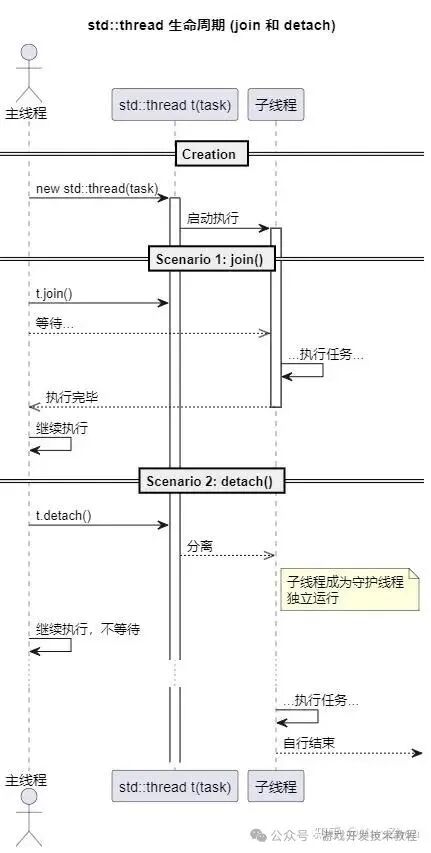
1.2 Thread Lifecycle: <span>join()</span> and <span>detach()</span>
Each <span>std::thread</span> object must have a defined state before it is destroyed: either wait for it to finish using <span>join()</span>, or separate it from the <span>std::thread</span> object using <span>detach()</span>.
<span>join()</span>: Blocks the current thread (usually the main thread) until the called thread finishes executing. This is a common method to ensure the visibility of the results of the child thread’s operations. If you do not<span>join()</span>, the main thread may finish before the child thread, leading to abnormal program termination or forced interruption of the child thread.<span>detach()</span>: Separates the child thread from the<span>std::thread</span>object, making the child thread a “daemon thread” that runs independently in the background. The main thread can no longer interact with it, nor can it<span>join()</span>. Once detached, the lifecycle of the child thread is managed by the C++ runtime library. This is suitable for “fire and forget” tasks.
Warning: Forgetting to <span>join()</span> or <span>detach()</span> will cause the program to call <span>std::terminate()</span> when the <span>std::thread</span> object is destructed, causing the program to crash.
UML – Thread Lifecycle Sequence Diagram
1.3 Passing Parameters to Threads
When passing parameters to a thread function, by default, the parameters are copied or moved into the thread’s internal storage.
void print_message(const std::string& msg) {
    std::cout << "Thread Message: " << msg << std::endl;
}
int main() {
    std::string message = "Hello, Thread!";
    // message is copied into the thread
    std::thread t(print_message, message);
    t.join();
}
If you need to pass a reference, you must use <span>std::ref()</span> or <span>std::cref()</span> wrappers; otherwise, the parameters will still be copied.
#include <functional> // For std::ref
void update_value(int& val) {
    val = 100;
}
int main() {
    int my_value = 10;
    // Use std::ref to pass by reference
    std::thread t(update_value, std::ref(my_value));
    t.join();
    std::cout << "Updated value: " << my_value << std::endl; // Outputs 100
    return 0;
}
Chapter 2: The Nightmare of Shared Data – Data Races and Race Conditions
Problems arise when multiple threads access the same shared resource, and at least one thread modifies that resource.
- Race Condition: The correctness of the program depends on the relative execution order of operations by multiple threads.
- Data Race: Specifically refers to concurrent access to the same memory location by two or more threads performing non-atomic operations without synchronization, with at least one being a write operation. This is undefined behavior in C++.
Example: A Faulty Counter
#include <iostream>
#include <thread>
#include <vector>
int counter = 0;
void increment() {
    for (int i = 0; i < 100000; ++i) {
        // The problem: read-modify-write operation is not atomic
        counter++;
    }
}
int main() {
    std::vector<std::thread> threads;
    for (int i = 0; i < 10; ++i) {
        threads.push_back(std::thread(increment));
    }
    for (auto& t : threads) {
        t.join();
    }
    // The result is almost certainly not 1,000,000
    std::cout << "Final count: " << counter << std::endl;
    return 0;
}
<span>counter++</span> consists of at least three steps: 1. Read the value of <span>counter</span> into a register; 2. Increment the value in the register; 3. Write the register value back to <span>counter</span>. Two threads may read the old value simultaneously, leading to a lost increment.
Chapter 3: Synchronization Primitives (I) – Mutexes and Locks
To solve data races, we need synchronization mechanisms to protect shared data. A mutex is the most basic synchronization primitive.
3.1 <span>std::mutex</span>
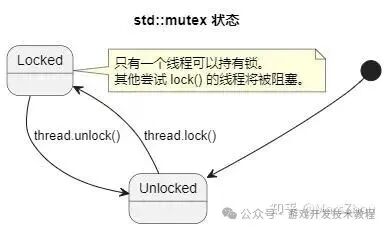
<span>std::mutex</span> (mutex lock) ensures that only one thread can acquire the lock and access the protected resource at any given time.
#include <iostream>
#include <thread>
#include <vector>
#include <mutex>
int counter = 0;
std::mutex mtx; // Declare a mutex
void safe_increment() {
    for (int i = 0; i < 100000; ++i) {
        mtx.lock();   // Acquire lock
        counter++;
        mtx.unlock(); // Release lock
    }}// ... main function similar to before, but calls safe_increment ...
This code is now thread-safe, but manually calling <span>lock()</span> and <span>unlock()</span> is dangerous: if an exception occurs between locking and unlocking, the lock will never be released, leading to deadlock.
3.2 RAII-style Lock Management: <span>std::lock_guard</span> and <span>std::unique_lock</span>
To address the above issue, C++ provides RAII (Resource Acquisition Is Initialization) style lock wrappers.
<span>std::lock_guard</span>: A lightweight RAII wrapper. It acquires the lock in its constructor and releases it in its destructor. It is simple and efficient but has limited functionality.
void safe_increment_guard() {
    for (int i = 0; i < 100000; ++i) {
        std::lock_guard<std::mutex> guard(mtx); // Lock on construction, automatically unlocks on scope exit
        counter++;
    } // guard destructs here, lock is released
}<span>std::unique_lock</span>: A more flexible but slightly more expensive RAII wrapper. It supports deferred locking, try-locking, timed locking, and transfer of lock ownership, and is essential for using condition variables.
std::unique_lock<std::mutex> lock(mtx, std::defer_lock); // Create without locking
lock.lock(); // Manually lock
// ...
lock.unlock(); // Manually unlock
UML – Mutex State Diagram
3.3 Deadlock
Deadlock occurs when two or more threads are waiting for each other to release resources. A classic example is two threads acquiring two locks in different orders.
std::mutex mtx1, mtx2;
void func1() {
    std::lock_guard<std::mutex> guard1(mtx1);
    std::this_thread::sleep_for(std::chrono::milliseconds(10)); // Create deadlock opportunity
    std::lock_guard<std::mutex> guard2(mtx2);
    // ...}
void func2() {
    std::lock_guard<std::mutex> guard2(mtx2);
    std::this_thread::sleep_for(std::chrono::milliseconds(10));
    std::lock_guard<std::mutex> guard1(mtx1); // Opposite order to func1
// ...}Solutions:
- Ensure Locking Order: All threads acquire locks in the same order.
- Use
<span>std::lock</span>(C++11) or<span>std::scoped_lock</span>(C++17): They can atomically lock multiple mutexes, using an algorithm that avoids deadlock.<span>std::scoped_lock</span>is a more modern and recommended choice.
void safe_func() {
    // C++17: RAII style, automatically manage locks
    std::scoped_lock lock(mtx1, mtx2);
    // ... safely operate on shared resources ...
}
Chapter 4: Synchronization Primitives (II) – Condition Variables
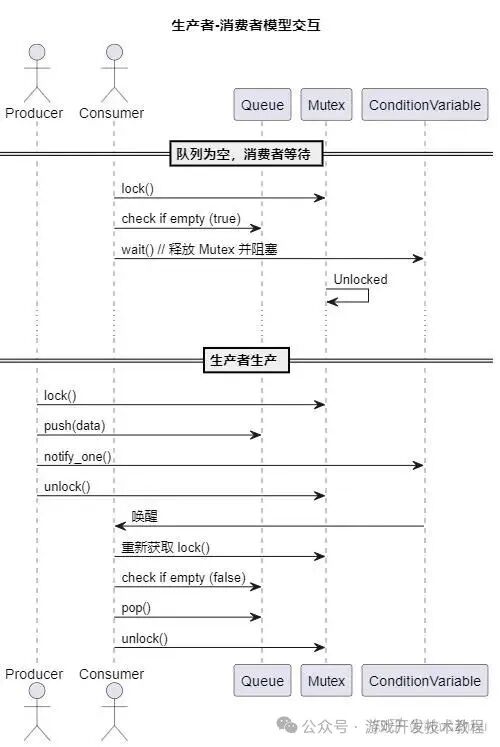
<span>std::condition_variable</span> allows one or more threads to wait for a specific condition to be met. It is typically used in conjunction with <span>std::mutex</span> and <span>std::unique_lock</span> to implement complex inter-thread communication, such as the classic “producer-consumer” model.
4.1 Producer-Consumer Model
One or more producer threads add data to a queue, while one or more consumer threads take data from the queue for processing.
- When the queue is empty, consumers must wait.
- When the queue is full, producers must wait.
#include <iostream>
#include <thread>
#include <mutex>
#include <condition_variable>
#include <queue>
#include <chrono>
std::mutex mtx;
std::condition_variable cv;
std::queue<int> data_queue;
const unsigned int MAX_QUEUE_SIZE = 10;
void producer() {
    for (int i = 0; i < 20; ++i) {
        std::unique_lock<std::mutex> lock(mtx);
        // Wait until the queue is not full
        cv.wait(lock, []{ return data_queue.size() < MAX_QUEUE_SIZE; });
        std::cout << "Producing: " << i << std::endl;
        data_queue.push(i);
        lock.unlock(); // Unlock early to let consumers work as soon as possible
        cv.notify_one(); // Wake up one waiting consumer
        std::this_thread::sleep_for(std::chrono::milliseconds(100));
    }}
void consumer() {
    while (true) {
        std::unique_lock<std::mutex> lock(mtx);
        // Wait until the queue is not empty
        cv.wait(lock, []{ return !data_queue.empty(); });
        int data = data_queue.front();
        data_queue.pop();
        std::cout << "Consuming: " << data << std::endl;
        lock.unlock(); // Unlock early
        cv.notify_one(); // Wake up a producer that may be waiting for the queue to be not full
        if (data == 19) break; // Exit after consuming the last one
        std::this_thread::sleep_for(std::chrono::milliseconds(200));
    }}
int main() {
    std::thread p(producer);
    std::thread c(consumer);
    p.join();
    c.join();
    return 0;
}
Key Points:
<span>cv.wait(lock, predicate)</span>: Atomically unlocks<span>lock</span>and puts the thread into a waiting state. When woken up, it re-locks and checks the<span>predicate</span>(a lambda returning a boolean). If<span>predicate</span>is<span>true</span>,<span>wait</span>returns; if<span>false</span>(spurious wakeup), it continues waiting.Always use the wait version with a predicate.<span>cv.notify_one()</span>: Wakes up one waiting thread.<span>cv.notify_all()</span>: Wakes up all waiting threads.
UML – Producer-Consumer Sequence Diagram
Chapter 5: Advanced Abstractions – <span>future</span>, <span>promise</span> and <span>async</span>
C++ provides higher-level concurrency abstractions for handling task-based concurrency, rather than directly manipulating threads and locks.
5.1 <span>std::async</span>, <span>std::future</span>
<span>std::async</span> is a function template that starts a callable object asynchronously (possibly in a new thread) and returns a <span>std::future</span> object.<span>std::future</span> represents the eventual result of that asynchronous operation.
#include <iostream>
#include <future>
#include <chrono>
int long_computation() {
    std::this_thread::sleep_for(std::chrono::seconds(2));
    return 42;
}
int main() {
    std::cout << "Starting asynchronous computation..." << std::endl;
    // Start task, std::launch::async policy forces execution in a new thread
    std::future<int> result_future = std::async(std::launch::async, long_computation);
    std::cout << "Main thread can do other things..." << std::endl;
    // ... do other work ...
    // When the result is needed, call get()
    // get() will block until the result is ready
    int result = result_future.get();
    std::cout << "Computation result: " << result << std::endl;
    return 0;
}
<span>std::async</span> launch policies:
<span>std::launch::async</span>: Guarantees asynchronous execution on a new thread.<span>std::launch::deferred</span>: Deferred execution. The task will only execute on the current thread when<span>future</span>is called with<span>get()</span>or<span>wait()</span>.- Default policy (
<span>std::launch::async | std::launch::deferred</span>): Implementation decides whether to create a new thread immediately or defer execution.
5.2 <span>std::promise</span> and <span>std::packaged_task</span>
<span>std::async</span> is backed by the mechanisms of <span>std::promise</span> and <span>std::packaged_task</span>.
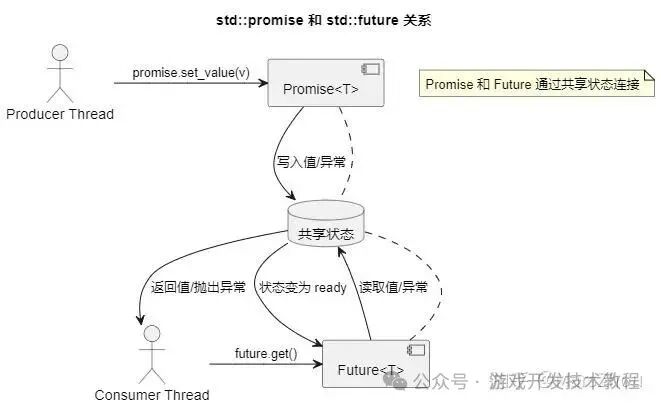
<span>std::promise</span>: Allows you to set a value in one thread and retrieve that value in another thread through the associated<span>std::future</span>. It establishes a one-time communication channel between producer and consumer.<span>std::packaged_task</span>: Wraps a callable object so it can be called asynchronously. Its return value or exception is stored in a<span>std::future</span>. This is very useful for building task queues.
<span>std::promise</span> Example:
void set_value(std::promise<int> p) {
    try {
        // ... computation ...
        p.set_value(101);
    } catch (...) {
        p.set_exception(std::current_exception());
    }
}
int main() {
    std::promise<int> p;
    std::future<int> f = p.get_future();
    std::thread t(set_value, std::move(p));
    std::cout << "Waiting for result..." << std::endl;
    std::cout << "Result: " << f.get() << std::endl;
    t.join();
}
UML – Future/Promise Model
Chapter 6: Lock-Free Programming – Atomic Operations Library <span><atomic></span>
For very simple operations (like incrementing a counter, reading and writing pointers), the overhead of using mutexes may be too high.<span>std::atomic</span> library provides the ability to perform atomic operations on built-in types, which are indivisible and can avoid data races.
#include <atomic>
std::atomic<int> atomic_counter = 0;
void atomic_increment() {
    for (int i = 0; i < 100000; ++i) {
        // fetch_add is an atomic "read-modify-write" operation
        atomic_counter.fetch_add(1, std::memory_order_relaxed);
    }}
<span>std::atomic</span> is centered around memory order, which determines how atomic operations synchronize with other memory operations (including non-atomic and atomic operations).
<span>memory_order_relaxed</span>: The loosest, only guarantees the atomicity of the operation itself, without providing any synchronization or ordering constraints. Highest performance.<span>memory_order_acquire</span>: Acquire semantics. No read or write operations in the current thread can be reordered to before this operation.<span>memory_order_release</span>: Release semantics. No read or write operations in the current thread can be reordered to after this operation.<span>memory_order_acq_rel</span>: Both acquire and release semantics.<span>memory_order_seq_cst</span>: Sequential consistency. The strictest, guarantees that all threads see the order of all atomic operations consistently. This is the default for all atomic operations.
Memory order is a very complex topic that requires a deep understanding of compiler and hardware memory models. For beginners, sticking to the default <span>memory_order_seq_cst</span><span> is the safest choice.</span>
Chapter 7: C++20 and Future Concurrency Features
C++20 introduces more powerful concurrency tools:
<span>std::jthread</span>: A<span>std::thread</span>that automatically calls<span>join()</span>. Its destructor checks if the thread can be<span>joined</span>, and if so, calls<span>join()</span>. It also introduces a cooperative interruption mechanism (via<span>stop_token</span>). This is a significant improvement over<span>std::thread</span>, and is highly recommended.
#include <thread> // in C++20, jthread is here
void some_task(std::stop_token st) {
    while (!st.stop_requested()) {
        // ... work ...
    }}
int main() {
    std::jthread jt(some_task);
// ...} // jt destructs here, automatically requests stop and joins()- Semaphores (
<span>std::counting_semaphore</span>): A classic synchronization primitive that allows a certain number of threads to access resources simultaneously. - Latches (
<span>std::latch</span>) and Barriers (<span>std::barrier</span>): Used to synchronize multiple threads at a certain execution point.<span>latch</span>is one-time, while<span>barrier</span>is reusable. - Coroutines: C++20 introduces coroutine support, a brand new concurrency model (cooperative multitasking) that differs from preemptive multithreading. It allows functions to suspend and resume, making it very suitable for I/O-intensive asynchronous tasks, allowing you to write asynchronous code that is as easy to understand as synchronous code.
Conclusion and Best Practices
Modern C++ provides a powerful and rich toolbox for concurrent programming.
- Prefer Higher-Level Abstractions:
<span>std::async</span>,<span>std::packaged_task</span>are better than manually managing<span>std::thread</span>. - Embrace RAII: Always use
<span>std::lock_guard</span>or<span>std::unique_lock</span>to manage mutexes. In C++17, prefer using<span>std::scoped_lock</span>to lock multiple mutexes. In C++20, replace<span>std::thread</span>with<span>std::jthread</span>. - Share Data Wisely: Reducing shared data is the best way to avoid concurrency issues. If sharing is necessary, strictly protect it with synchronization primitives.
- Be Careful of Deadlocks: Ensure consistent locking order, or use
<span>std::scoped_lock</span>. - Use Condition Variables Correctly: Always use them with mutexes and
<span>std::unique_lock</span>, and use the version of<span>wait</span>with a predicate to prevent spurious wakeups. - Use Atomic Operations Only When Necessary: Consider
<span>std::atomic</span>when performance is critical and operations are simple. But be cautious of the complexities introduced by memory order. - Understand Your Tools: Deeply understand the applicable scenarios, advantages, and overhead of each concurrency tool.
Concurrent programming is a double-edged sword; it can greatly enhance program performance but also introduces new complexities and sources of bugs. By mastering these tools and paradigms provided by modern C++, you can confidently write robust, efficient, and maintainable concurrent programs.
Note: This article is sourced from AI’s PY.
-
Perspective from Painters and Programmers
- New Discoveries in Rendering Details of Mihayou ZZZ Absolute Zone Zero
-
Netizens Discover that “Black Myth: Wukong” Mistakenly Scanned Rebar into the Game, How to Evaluate Such Practices of Scene Scanning in Games? How Was It Done?
- Collect and Forward, GPU, CPU, Memory, and More than 150 Game Development Performance Analysis Optimization Tips Collection!
- Unity3D Game Development Implementation and Source Code Collection of 100+ Effects – Definitely Useful to Keep!
- Not an Advertisement! 6-Year-Old Account Benefits, Outline, Depth of Field, Bloom, Shadow, and More than 60 Game Post-Processing Effects Implementation Collection!
-
Collect and Forward! Research Collection of Rendering Effect Techniques for 80+ Games such as Genshin Impact, Sekiro, and God of War 4! Free!
The statement: This article comes from the public account: Game Development Technology Tutorial (GameDevLearning), please attach the original link and this statement when reprinting.
Follow 【Game Development Technology Tutorial】
Game Development Technology, Skills, Tutorials, and Resources, Q&A, Internal PushInterviews