Author | Source: gitee
Those who have truly worked on projects based on RTOS should know the dangers ofdisabling global interrupts to protect critical sections (loss of response, processing delays). For example, phenomena such as frame loss in high-speed communication reception and pulse loss in high-speed capture due to interrupt response loss.
Some RTOS indiscriminately disable global interrupts and fail to provide core parameters such as “maximum system interrupt disable time”, making real-time performance a moot point. In actual development, many projects have certain requirements for the real-time response of RTOS interrupts, expecting high-priority interrupts to preempt in real-time with zero interrupt latency.
Thus, engineers have developed an RTOS claimed to have 【zero interrupt latency】:CosyOS.
Open source address:
https://gitee.com/cosyos/cosyos
About CosyOS
CosyOS is an open-source real-time operating system from China, capable of achieving global non-disabling of interrupts and zero interrupt latency from classic 8051 cores to popular Arm Cortex-M cores, suitable for scenarios with high requirements for system real-time performance and interrupt response speed.
CosyOS implements a highly object-oriented and user-friendly design through romantic macro definitions.
With zero interrupt latency as its mission, innovation as its guideline, and simplicity as its principle, CosyOS aims to be easy to use.
CosyOS – Real-time Operating Model
-
User Interrupt Layer-> Execution of local interrupt services-> Loading of suspended interrupt services
-
Kernel Service Layer
-
SysTick [minpri]-> Software RTC/timer counting-> Restore timing tasks-> Call timing hooks/tick hooks (execution of tick services)
-
PendSV [minpri]-> Execution of suspended interrupt services-> Task scheduling/switching
-
Task Critical Section [Disable SysTick/PendSV]-> Execution of task services
-
Task Layer
-
Taskmgr[maxpri]
-
Debugger[maxpri]
-
Starter[maxpri-1]
-
General User Tasks[maxpri-1 ~ minpri+1:1]
-
User Idle Task[minpri:0]
-
System Idle Task[minpri:0]
-
User interrupts preempt in real-time with zero interrupt latency based on interrupt priority
-
Preemptive scheduling for tasks of different priorities, time-slice round-robin scheduling for tasks of the same priority
Basic Principles of Zero Interrupt Latency
-
In the service layer, SysTick, PendSV, and task critical sections are mutually exclusive. In other words, the entire service layer is a large critical section (service layer critical section).
-
All kernel services (except local interrupt services) are executed in the “service layer critical section”, ensuring that the “operational flow” of services is not interrupted.
-
Local interrupt services use a mutual exclusion access mechanism.
Initial Experience
Now, let’s have an initial experience of the ease of use of CosyOS.
Example of creating a task in CosyOS:
| Task Name | Task Priority | Task Stack Size | Safe Runtime | Private Message |
|---|---|---|---|---|
| demo1_task | Level 1 | 128 bytes | 0, infinite | 0, no private message |
| demo2_task | Level 2 | 256 bytes | 9 time slices | 3 parameters |
Note 1:Safe runtime is a safety-critical technology of CosyOS that prevents any task from monopolizing or timing out the processor for too long. Note 2:Private message is a unique inter-task communication method in CosyOS, used to implement signals, events, messages, etc.
# Static creation of demo1_task
uCreateTask(demo1_task, 1, 128, 0, 0)
{
    uSendTaskMsg(demo2_task, "hello", 999, 3.14); // Send private message to demo2_task
    uDelay_ms(100); // Block delay for 100ms
    uEndTasking; // Last line of all task threads
}
# Dynamic creation of demo2_task
dCreateTask(demo2_task, 2, 256, 9, 3)(char *p, int a, float b)
{
if(uRecvTaskMsg(500)){ // Receive private message, timeout of 500 ticks, returns true if received successfully
/* Use private message (read p, a, b)*/
    }
    uEndTasking;
}
# Start hook
void start_hook(void)
{
    uStartTask(demo1_task, 0); // Start demo1_task and set task's initial state to ready
    uStartTask(demo2_task, 1); // Start demo2_task and set task's initial state to suspended
}
Are you impressed? Creating a task in CosyOS is so simple, just by calling the API and entering various parameters, then directly writing the task code (the loop is integrated, and users do not need to write the loop themselves). The next step is to start the task in the start hook, and the task can participate in scheduling and run.
CosyOS also innovatively uses task parameters as private messages, allowing private message parameters (quantity, name, type) to be freely defined, similar to ordinary function parameter definitions. Other applications also follow this principle, aiming to simplify processes and reduce developers’ workload as much as possible, creating a warm and comfortable development environment for developers.
Breakthrough Innovations
-
Achieved global non-disabling of all kernel interrupts (zero interrupt latency), ensuring real-time response of interrupts
-
Exclusive technology enables system services to be reentrant, allowing 51 to completely eliminate reentrant stacks and significantly speed up
-
Highly optimized performance for 51, making it vibrant and shining
-
251 supports both MSP and PSP stack modes, where the PSP mode allows task switching efficiency to be equivalent to Cortex-M
-
Timing services (software timer interrupts), including timed interrupt tasks/hooks and timed query tasks/hooks, with priorities flexibly configurable by users
-
Software RTC, supports setting and getting time, can replace hardware RTC
-
Innovative flying message, minimal type, rapid communication, a powerful tool for inter-thread communication
-
Innovative private message, freely defined, flexible and variable, convenient for passing multiple messages
-
Message mailbox, each mailbox can define its own data type upon creation, greatly enriching the forms of messages and facilitating inter-thread message passing
-
Message queue, supports static and dynamic queues, transmission modes support FIFO and LIFO, using efficient pointer referencing
-
Event flag groups, define flag bits while declaring flag groups, different flag groups can have the same flag bit names, access to flag groups and bits is achieved through group names and bit names, greatly facilitating the application of flag groups
-
Global variable access, supports safe access to global variables in any task and interrupt without worrying about reentrancy
-
Safety-critical technology, includes multiple safety-critical technologies such as interrupt suspended service space isolation and safe runtime, ensuring high reliability
-
Task stack monitoring, has multiple monitoring measures for task stacks, allowing for early prediction of task stack overflow risks
Conservative Approach
-
Completely open-source, royalty-free, deterministic RTOS
-
Task scheduling supports preemptive scheduling and time-slice round-robin scheduling
-
Unlimited number of user tasks, and each task can have 255 priority levels (0~254)
-
Simple and efficient code, extremely low hardware resource usage, making CosyOS easily applicable to various small MCUs
-
Task manager, can monitor the operation of each task in real-time, helping developers quickly identify potential issues in design
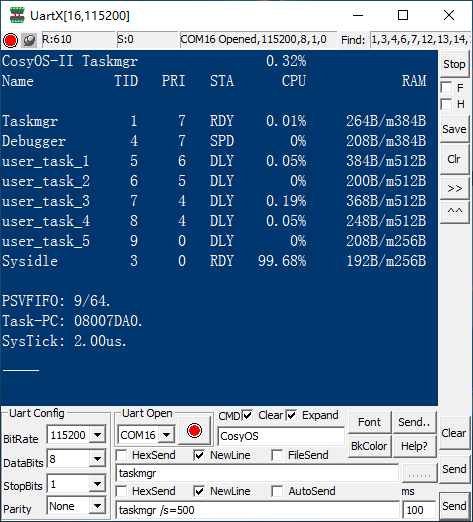 —————————— CosyOS – Task Manager ——————————
Supported Kernels
CosyOS currently supports 8051, 80251, Cortex-M, etc., and will gradually add support for other kernels in the future.
Compilation Environment
CosyOS is developed under the Keil C51, C251, MDK-Arm compilers, with the best support. In the future, support for other compilers will be gradually optimized and adjusted.
File Description
| Name | Description |
|---|---|
| System | Kernel files of CosyOSur_api.h: User APIsv_: System service filesos_: Other kernel files |
| Config | Configuration files of CosyOSsyscfg.h: System configuration filemcucfg_: MCU configuration files |
| Hook | System hooks of CosyOSCosyOS has created six system hook functions for users, located in their respective files, allowing users to write code directly. |
———— END ————