Author: Zhang Zhengjun
Working at Central European Fund, a fan of Zhishutang, a database enthusiast, familiar with various databases such as RDBMS, NoSQL, NewSQL, etc.
After finishing O’Reilly’s “High Performance MySQL” and Teacher Jiang’s “MySQL Technical Insider”, along with 2-3 years of practical experience, one can essentially become a DBA capable of handling problems independently.However, sometimes when encountering some tricky problems, one may feel helpless. Therefore, if you want to further improve your technical level, source code debugging is unavoidable.
Introduction to GDB
GDB is a very common debugging tool in the Linux system, and it has the following functions:
-
Start your program, specifying anything that might affect its behavior.
-
Make your program stop on specified conditions.
-
Examine what has happened, when your program has stopped.
-
Change things in your program, so you can experiment with correcting the effects of one bug and go on to learn about another.
Common command parameters:
-
info threads: view all threads
-
thread n: specify a certain thread
-
b: set a breakpoint at a certain point
-
c: continue execution
-
s: execute one line of code; if it calls a function, enter the function
-
n: execute one line of code without entering function calls
-
p: print the value of a certain variable
-
list: print the text information of the code
-
bt: view the stack frame of a certain thread
-
info b: view the current breakpoint information
Setting Up the Debugging Environment
Using gdb directly in Linux is currently the simplest and most effective way available on the market.
1. Install gdb
yum install -y cmake make gcc gcc-c++ ncurses-devel bison gdb
2. Download and Extract Source Code
wget https://dev.mysql.com/get/Downloads/MySQL-5.7/mysql-boost-5.7.25.tar.gz

tar zxvf mysql-boost-5.7.25.tar.gz

mkdir -p /gdb/mysql/

mkdir -p /gdb/data/
3. Install the Database
cmake -DCMAKE_INSTALL_PREFIX=/gdb/mysql/ -DMYSQL_DATADIR=/gdb/data/ -DSYSCONFDIR=/gdb/mysql/ -DWITH_INNOBASE_STORAGE_ENGINE=1 -DWITH_ARCHIVE_STORAGE_ENGINE=1 -DWITH_BLACKHOLE_STORAGE_ENGINE=1 -DWITH_FEDERATED_STORAGE_ENGINE=1 -DWITH_PARTITION_STORAGE_ENGINE=1 -DMYSQL_UNIX_ADDR=/gdb/mysql/mysql3.sock -DMYSQL_TCP_PORT=3306 -DENABLED_LOCAL_INFILE=1 -DEXTRA_CHARSETS=all -DDEFAULT_CHARSET=utf8 -DDEFAULT_COLLATION=utf8_general_ci -DMYSQL_USER=mysql -DWITH_BINLOG_PREALLOC=ON -DWITH_BOOST=/gdb/mysql-5.7.25/boost/boost_1_59_0 -DWITH_DEBUG=1
-DWITH_DEBUG=1 is the key parameter, it enables DBUG
make && make install
4. Initialize the Database
vim /etc/my.cnf
    # Simple configuration for my.cnf file
    [client]
    port            = 3306
    socket          = /gdb/data/mysqld.sock

    [mysqld]
    port            = 3306
    socket          =/gdb/data/mysqld.sock
    skip-external-locking
    key_buffer_size = 8M
    max_allowed_packet = 1M
    table_open_cache = 64
    sort_buffer_size = 512K
    net_buffer_length = 8K
    read_buffer_size = 128K
    read_rnd_buffer_size = 256K
    myisam_sort_buffer_size = 8M
    lower_case_table_names=1
    innodb_buffer_pool_size=300M
    log-bin=mysql-bin
    character_set_server=utf8
    binlog_format=row
    datadir=/gdb/data
    log-error =/gdb/data/error.log
    pid-file = /gdb/data/mysql.pid

    innodb_log_file_size=512M
    innodb_log_files_in_group = 3
    sql_mode=''
    autocommit=1

    server-id       = 1
    max_connections=1500
    wait_timeout=70
    interactive_timeout=70

    skip-name-resolve

    [mysqldump]
    quick
    max_allowed_packet = 16M

    [myisamchk]
    key_buffer_size = 20M
    sort_buffer_size = 20M
    read_buffer = 2M
    write_buffer = 2M
5. Start the Database
Grant permissions so that the mysql user has permission to generate files in this directory: chown -R mysql:mysql /gdb/data
Command to initialize the database:
cd /gdb/mysql/bin
./mysqld --initialize --user=mysql --basedir=/gdb/mysql --datadir=/gdb/data
Start the database:
cd /gdb/mysql/support-files
 ./mysql.server start
Insert Breakpoint Debugging
1. View MySQL Process ID
[root@ops sql]# ps aux | grep mysql
root       629  0.0  0.0 112724   972 pts/2    S+   14:52   0:00 grep -E --color=auto mysql
root     20926  0.0  0.0 113312  1628 pts/0    S    11:15   0:00 /bin/sh /gdb/mysql/bin/mysqld_safe --datadir=/gdb/data --pid-file=/gdb/data/mysql.pid
mysql    21357  0.0  5.8 1740820 223820 pts/0  Sl   11:15   0:01 /gdb/mysql/bin/mysqld --basedir=/gdb/mysql --datadir=/gdb/data --plugin-dir=/gdb/mysql/lib/plugin --user=mysql --log-error=/gdb/data/error.log --pid-file=/gdb/data/mysql.pid --socket=/gdb/data/mysqld.sock --port=3306
The MySQL process ID at this time is: 20926
2. Attach MySQL Process in GDB
[root@ops ~]# gdb
GNU gdb (GDB) Red Hat Enterprise Linux 7.6.1-119.el7
Copyright (C) 2013 Free Software Foundation, Inc.
License GPLv3+: GNU GPL version 3 or later
This is free software: you are free to change and redistribute it.
There is NO WARRANTY, to the extent permitted by law.  Type "show copying"
and "show warranty" for details.
This GDB was configured as "x86_64-redhat-linux-gnu".
For bug reporting instructions, please see:
.
(gdb) attach 21357
Attaching to process 21357
Reading symbols from /gdb/mysql/bin/mysqld...done.
Reading symbols from /lib64/libpthread.so.0...(no debugging symbols found)...done.
[New LWP 21617]
[New LWP 21387]
[New LWP 21386]
[New LWP 21384]
[New LWP 21383]
[New LWP 21382]
[New LWP 21381]
[New LWP 21380]
[New LWP 21379]
[New LWP 21378]
[New LWP 21377]
[New LWP 21376]
[New LWP 21375]
[New LWP 21374]
[New LWP 21373]
[New LWP 21369]
[New LWP 21368]
[New LWP 21367]
[New LWP 21366]
[New LWP 21365]
[New LWP 21364]
[New LWP 21363]
[New LWP 21362]
[New LWP 21361]
[New LWP 21360]
[New LWP 21359]
[New LWP 21358]
[Thread debugging using libthread_db enabled]
Using host libthread_db library "/lib64/libthread_db.so.1".
Loaded symbols for /lib64/libpthread.so.0
Reading symbols from /lib64/libcrypt.so.1...(no debugging symbols found)...done.
Loaded symbols for /lib64/libcrypt.so.1
Reading symbols from /lib64/libdl.so.2...(no debugging symbols found)...done.
Loaded symbols for /lib64/libdl.so.2
Reading symbols from /lib64/librt.so.1...(no debugging symbols found)...done.
Loaded symbols for /lib64/librt.so.1
Reading symbols from /lib64/libstdc++.so.6...(no debugging symbols found)...done.
Loaded symbols for /lib64/libstdc++.so.6
Reading symbols from /lib64/libm.so.6...(no debugging symbols found)...done.
Loaded symbols for /lib64/libm.so.6
Reading symbols from /lib64/libgcc_s.so.1...(no debugging symbols found)...done.
Loaded symbols for /lib64/libgcc_s.so.1
Reading symbols from /lib64/libc.so.6...(no debugging symbols found)...done.
Loaded symbols for /lib64/libc.so.6
Reading symbols from /lib64/ld-linux-x86-64.so.2...(no debugging symbols found)...done.
Loaded symbols for /lib64/ld-linux-x86-64.so.2
Reading symbols from /lib64/libfreebl3.so...Reading symbols from /lib64/libfreebl3.so...(no debugging symbols found)...done.
(no debugging symbols found)...done.
Loaded symbols for /lib64/libfreebl3.so
Reading symbols from /lib64/libnss_files.so.2...(no debugging symbols found)...done.
Loaded symbols for /lib64/libnss_files.so.2
Reading symbols from /lib64/libnss_sss.so.2...Reading symbols from /lib64/libnss_sss.so.2...(no debugging symbols found)...done.
(no debugging symbols found)...done.
Loaded symbols for /lib64/libnss_sss.so.2
0x00002b15ce803f0d in poll () from /lib64/libc.so.6
Missing separate debuginfos, use: debuginfo-install glibc-2.17-222.el7.x86_64 libgcc-4.8.5-39.el7.x86_64 libstdc++-4.8.5-39.el7.x86_64 nss-softokn-freebl-3.34.0-2.el7.x86_64 sssd-client-1.16.0-19.el7.x86_64
(gdb)
3. Find the Breakpoint
This time we are looking at the insert process, finding the sql_insert.cc file:
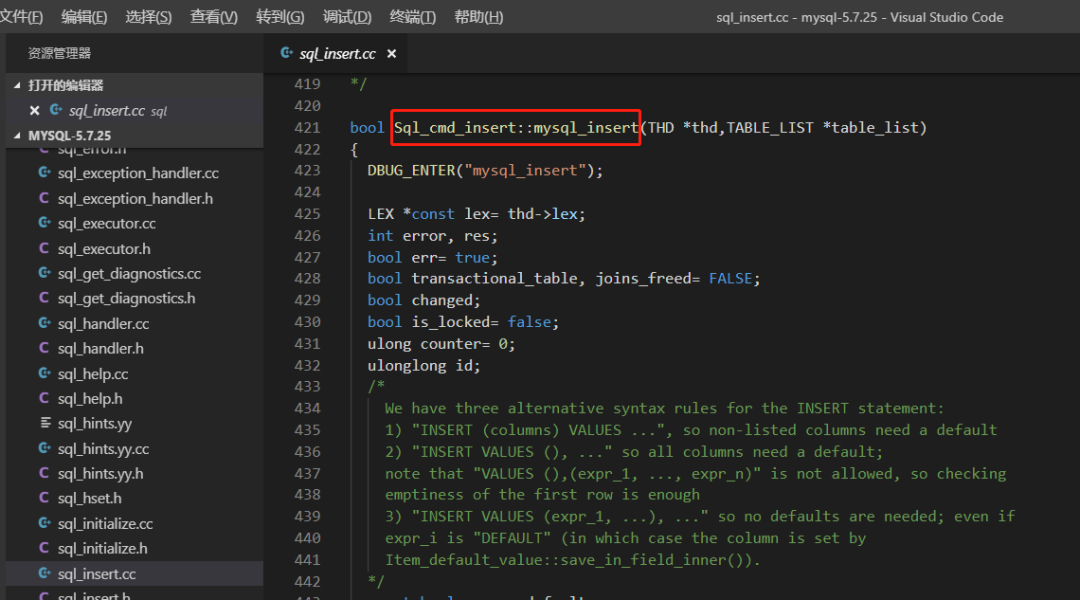
The function in the source code is: Sql_cmd_insert::mysql_insert
4. Set the Breakpoint
(gdb) b Sql_cmd_insert::mysql_insert
Breakpoint 1 at 0x175aed9: file /gdb/mysql-5.7.25/sql/sql_insert.cc, line 423.
Then check the stack frame of the thread:
(gdb) bt
#0  0x00002b15ce803f0d in poll () from /lib64/libc.so.6
#1  0x0000000001667f87 in Mysqld_socket_listener::listen_for_connection_event (this=0x3967430) at /gdb/mysql-5.7.25/sql/conn_handler/socket_connection.cc:852
#2  0x0000000000eb15cc in Connection_acceptor<Mysqld_socket_listener>::connection_event_loop (this=0x4f882e0) at /gdb/mysql-5.7.25/sql/conn_handler/connection_acceptor.h:66
#3  0x0000000000ea904a in mysqld_main (argc=38, argv=0x383c248) at /gdb/mysql-5.7.25/sql/mysqld.cc:5149
#4  0x0000000000ea01bd in main (argc=9, argv=0x7ffc73765b88) at /gdb/mysql-5.7.25/sql/main.cc:25
5. Database Login
After setting the gdb breakpoint, start a new database connection:

At this point, you will find that you cannot log in. In gdb, execute next:
(gdb) n
Single stepping until exit from function poll,
which has no line number information.
Mysqld_socket_listener::listen_for_connection_event (this=0x3967430) at /gdb/mysql-5.7.25/sql/conn_handler/socket_connection.cc:859
859   if (retval < 0 && socket_errno != SOCKET_EINTR)
From the output, it can be seen that the database is in the process of acquiring the system socket status. Next, there are a few steps to skip, we will directly use continue (go directly to the next executable code)
(gdb) c
Continuing.
A new client connection was successful:
[root@ops bin]# mysql -uroot -p
Enter password:
Welcome to the MySQL monitor.  Commands end with ; or \g.
Your MySQL connection id is 14
Server version: 5.7.25-debug-log Source distribution

Type 'help;' or '\h' for help. Type '\c' to clear the current input statement.

mysql>
6. Database Insert
Before the insert operation, switching schemas and querying are all fine:
mysql> use gdb
Database changed
mysql> show tables;
+---------------+
| Tables_in_gdb |
+---------------+
| test          |
+---------------+
1 row in set (0.00 sec)

mysql> select * from test;
+------+
| id   |
+------+
|    1 |
|    2 |
+------+
2 rows in set (0.00 sec)
Inserting a data with id=3 results in a wait:
mysql> insert into test values (3);
7. Analyze Breakpoint Information
Breakpoint triggered, as follows:
(gdb) c
Continuing.
[Switching to Thread 0x2b15faf02700 (LWP 21617)]

Breakpoint 1, Sql_cmd_insert::mysql_insert (this=0x2b1614008348, thd=0x2b1614003af0, table_list=0x2b1614007db8) at /gdb/mysql-5.7.25/sql/sql_insert.cc:423
423   DBUG_ENTER("mysql_insert");
bt command displays the stack frame:
(gdb) bt
#0  Sql_cmd_insert::mysql_insert (this=0x2b1614008348, thd=0x2b1614003af0, table_list=0x2b1614007db8) at /gdb/mysql-5.7.25/sql/sql_insert.cc:423
#1  0x000000000176256e in Sql_cmd_insert::execute (this=0x2b1614008348, thd=0x2b1614003af0) at /gdb/mysql-5.7.25/sql/sql_insert.cc:3118
#2  0x000000000153b093 in mysql_execute_command (thd=0x2b1614003af0, first_level=true) at /gdb/mysql-5.7.25/sql/sql_parse.cc:3596
#3  0x0000000001540820 in mysql_parse (thd=0x2b1614003af0, parser_state=0x2b15faf01690) at /gdb/mysql-5.7.25/sql/sql_parse.cc:5570
#4  0x0000000001536131 in dispatch_command (thd=0x2b1614003af0, com_data=0x2b15faf01df0, command=COM_QUERY) at /gdb/mysql-5.7.25/sql/sql_parse.cc:1484
#5  0x0000000001534f9a in do_command (thd=0x2b1614003af0) at /gdb/mysql-5.7.25/sql/sql_parse.cc:1025
#6  0x00000000016658dc in handle_connection (arg=0x39610f0) at /gdb/mysql-5.7.25/sql/conn_handler/connection_handler_per_thread.cc:306
#7  0x0000000001ced592 in pfs_spawn_thread (arg=0x5508e50) at /gdb/mysql-5.7.25/storage/perfschema/pfs.cc:2190
#8  0x00002b15cd699e25 in start_thread () from /lib64/libpthread.so.0
#9  0x00002b15ce80ebad in clone () from /lib64/libc.so.6
Next, entering n will output line by line; we will directly continue, and the blocked insert is also completed:
mysql> insert into test values (3);
Query OK, 1 row affected (2 min 49.57 sec)
Release a Special Version of MySQL
Some functions in the source code are relatively easy to understand, such as the insert function or the delete function. Can we package a version of MySQL that will never delete data by modifying the delete function?
Locate Function Position
First, trace the MySQL process:
(gdb) attach 21357
Attaching to process 21357
Reading symbols from /gdb/mysql/bin/mysqld...done.
Reading symbols from /lib64/libpthread.so.0...(no debugging symbols found)...done.
[New LWP 5584]
[New LWP 5583]
[New LWP 21617]
[New LWP 21387]
[New LWP 21386]
[New LWP 21384]
[New LWP 21383]
[New LWP 21382]
[New LWP 21381]
[New LWP 21380]
[New LWP 21379]
[New LWP 21378]
[New LWP 21377]
[New LWP 21376]
[New LWP 21375]
[New LWP 21374]
[New LWP 21373]
[New LWP 21369]
[New LWP 21368]
[New LWP 21367]
[New LWP 21366]
[New LWP 21365]
[New LWP 21364]
[New LWP 21363]
[New LWP 21362]
[New LWP 21361]
[New LWP 21360]
[New LWP 21359]
[New LWP 21358]
[Thread debugging using libthread_db enabled]
Using host libthread_db library "/lib64/libthread_db.so.1".
Loaded symbols for /lib64/libpthread.so.0
Reading symbols from /lib64/libcrypt.so.1...(no debugging symbols found)...done.
Loaded symbols for /lib64/libcrypt.so.1
Reading symbols from /lib64/libdl.so.2...(no debugging symbols found)...done.
Loaded symbols for /lib64/libdl.so.2
Reading symbols from /lib64/librt.so.1...(no debugging symbols found)...done.
Loaded symbols for /lib64/librt.so.1
Reading symbols from /lib64/libstdc++.so.6...(no debugging symbols found)...done.
Loaded symbols for /lib64/libstdc++.so.6
Reading symbols from /lib64/libm.so.6...(no debugging symbols found)...done.
Loaded symbols for /lib64/libm.so.6
Reading symbols from /lib64/libgcc_s.so.1...(no debugging symbols found)...done.
Loaded symbols for /lib64/libgcc_s.so.1
Reading symbols from /lib64/libc.so.6...(no debugging symbols found)...done.
Loaded symbols for /lib64/libc.so.6
Reading symbols from /lib64/ld-linux-x86-64.so.2...(no debugging symbols found)...done.
Loaded symbols for /lib64/ld-linux-x86-64.so.2
Reading symbols from /lib64/libfreebl3.so...Reading symbols from /lib64/libfreebl3.so...(no debugging symbols found)...done.
(no debugging symbols found)...done.
Loaded symbols for /lib64/libfreebl3.so
Reading symbols from /lib64/libnss_files.so.2...(no debugging symbols found)...done.
Loaded symbols for /lib64/libnss_files.so.2
Reading symbols from /lib64/libnss_sss.so.2...Reading symbols from /lib64/libnss_sss.so.2...(no debugging symbols found)...done.
(no debugging symbols found)...done.
Loaded symbols for /lib64/libnss_sss.so.2
0x00002b15ce803f0d in poll () from /lib64/libc.so.6
Missing separate debuginfos, use: debuginfo-install glibc-2.17-222.el7.x86_64 libgcc-4.8.5-39.el7.x86_64 libstdc++-4.8.5-39.el7.x86_64 nss-softokn-freebl-3.34.0-2.el7.x86_64 sssd-client-1.16.0-19.el7.x86_64
Set a breakpoint on the delete function here:
(gdb) b Sql_cmd_delete::mysql_delete
Breakpoint 1 at 0x175198b: file /gdb/mysql-5.7.25/sql/sql_delete.cc, line 50.
Trigger the breakpoint by executing the delete statement in the database:
mysql> delete from test where id =3;
Breakpoint information:
Breakpoint 1, Sql_cmd_delete::mysql_delete (this=0x2b16040020c8, thd=0x2b1604007e30, limit=18446744073709551615) at /gdb/mysql-5.7.25/sql/sql_delete.cc:50
50    DBUG_ENTER("mysql_delete");
View related stack frames:
#0  Sql_cmd_delete::mysql_delete (this=0x2b16040020c8, thd=0x2b1604007e30, limit=18446744073709551615) at /gdb/mysql-5.7.25/sql/sql_delete.cc:50
#1  0x0000000001755cc6 in Sql_cmd_delete::execute (this=0x2b16040020c8, thd=0x2b1604007e30) at /gdb/mysql-5.7.25/sql/sql_delete.cc:1392
#2  0x000000000153b12f in mysql_execute_command (thd=0x2b1604007e30, first_level=true) at /gdb/mysql-5.7.25/sql/sql_parse.cc:3606
#3  0x0000000001540820 in mysql_parse (thd=0x2b1604007e30, parser_state=0x2b15faf43690) at /gdb/mysql-5.7.25/sql/sql_parse.cc:5570
#4  0x0000000001536131 in dispatch_command (thd=0x2b1604007e30, com_data=0x2b15faf43df0, command=COM_QUERY) at /gdb/mysql-5.7.25/sql/sql_parse.cc:1484
#5  0x0000000001534f9a in do_command (thd=0x2b1604007e30) at /gdb/mysql-5.7.25/sql/sql_parse.cc:1025
#6  0x00000000016658dc in handle_connection (arg=0x54b6510) at /gdb/mysql-5.7.25/sql/conn_handler/connection_handler_per_thread.cc:306
#7  0x0000000001ced592 in pfs_spawn_thread (arg=0x5508e50) at /gdb/mysql-5.7.25/storage/perfschema/pfs.cc:2190
#8  0x00002b15cd699e25 in start_thread () from /lib64/libpthread.so.0
#9  0x00002b15ce80ebad in clone () from /lib64/libc.so.6
Modify the Source Code
You can see that #1 is Sql_cmd_delete::execute, which is the function that handles the delete operation. Find the corresponding function in the source code:
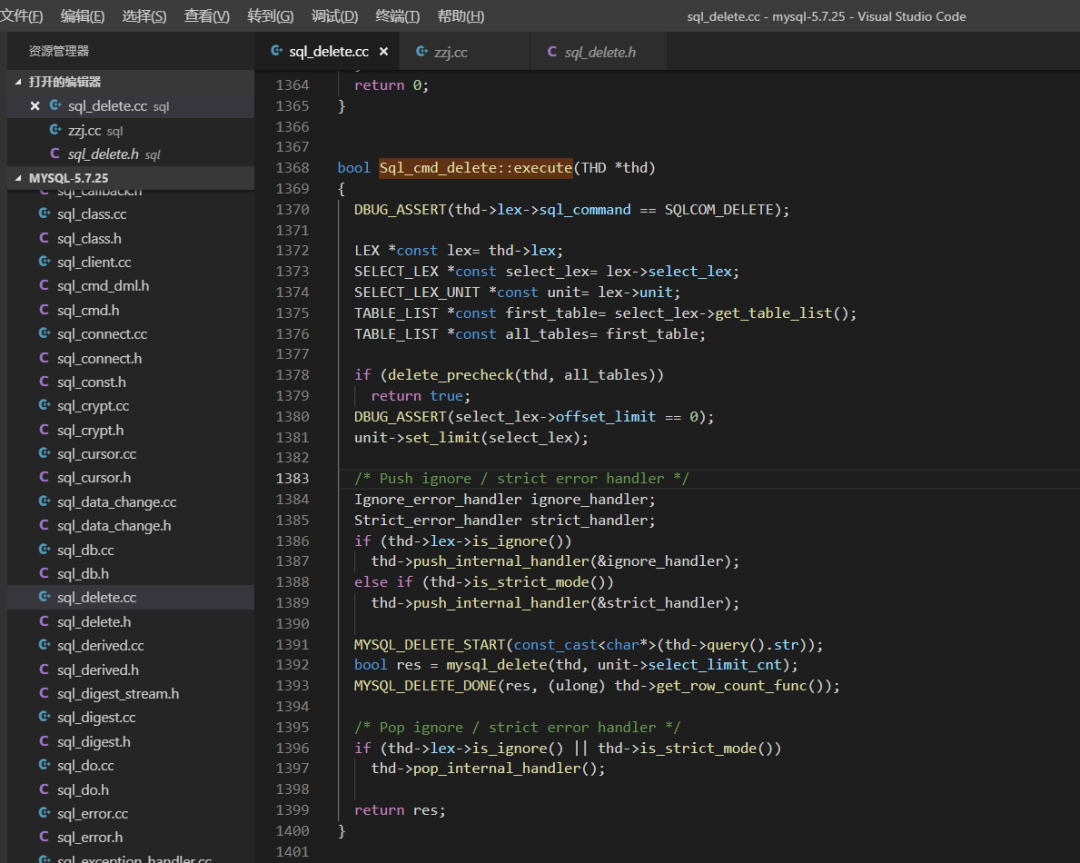
Comment out the code that implements the actual delete logic and directly assign the return value to true:
bool Sql_cmd_delete::execute(THD *thd)
{
  DBUG_ASSERT(thd->lex->sql_command == SQLCOM_DELETE);


  LEX *const lex= thd->lex;
  SELECT_LEX *const select_lex= lex->select_lex;
  SELECT_LEX_UNIT *const unit= lex->unit;
  TABLE_LIST *const first_table= select_lex->get_table_list();
  TABLE_LIST *const all_tables= first_table;


  if (delete_precheck(thd, all_tables))
    return true;
  DBUG_ASSERT(select_lex->offset_limit == 0);
  unit->set_limit(select_lex);


  /* Push ignore / strict error handler */
  Ignore_error_handler ignore_handler;
  Strict_error_handler strict_handler;
  if (thd->lex->is_ignore())
    thd->push_internal_handler(&ignore_handler);
  else if (thd->is_strict_mode())
    thd->push_internal_handler(&strict_handler);


/* Comment out the following delete logic code */
/*
  MYSQL_DELETE_START(const_cast<char*>(thd->query().str));
  bool res = mysql_delete(thd, unit->select_limit_cnt);
  MYSQL_DELETE_DONE(res, (ulong) thd->get_row_count_func());
*/


/* Directly return true */
  bool res =true;


  /* Pop ignore / strict error handler */
if (thd->lex->is_ignore() || thd->is_strict_mode())
    thd->pop_internal_handler();


  return res;
}
Then use the methods mentioned above to recompile MySQL, and after starting, you will find that the delete statement cannot delete data.
Debugging Summary
If you want to learn the source code in depth, you can start from the stack frame, but this is based on knowing the function interface and functionality. If you don’t know what function will be called for a certain feature, breakpoint debugging becomes very difficult.
Reading all the MySQL source code directly is too costly, and the code structure of MySQL is not friendly, making it time-consuming and labor-intensive. The best approach is to look for function entry points as needed when encountering issues or focusing on specific features, and then gradually analyze.
I hope this article can help those who want to get in touch with MySQL source code debugging. In the future, when I encounter special problems, I will also debug the relevant functions using gdb. Everyone can keep following~
The end of the article.
Enjoy MySQL 🙂
Teacher Ye’s “MySQL Core Optimization” class has been upgraded to MySQL 8.0. Scan the code to start your journey of MySQL 8.0 cultivation.