Click↑↑Technical Training, follow and pinto subscribe for free long-term
180,000+Industrial control personnel follow the WeChat platform: technical sharing, learning exchange, industrial control videos
Nowadays, more and more PLCs are equipped with Ethernet communication ports, for example: the S7-200 SMART PLC comes standard with an Ethernet communication interface. Today, let’s talk about the Ethernet communication content of the S7-1200 PLC. The S7-1200 CPU integrates a PROFINET communication port that supports Ethernet and communication standards based on TCP/IP and UDP. This Ethernet interface is a 10/100Mb/S RJ45 port that supports cable crossover adaptation, so both standard and crossover Ethernet cables can be used with this interface.
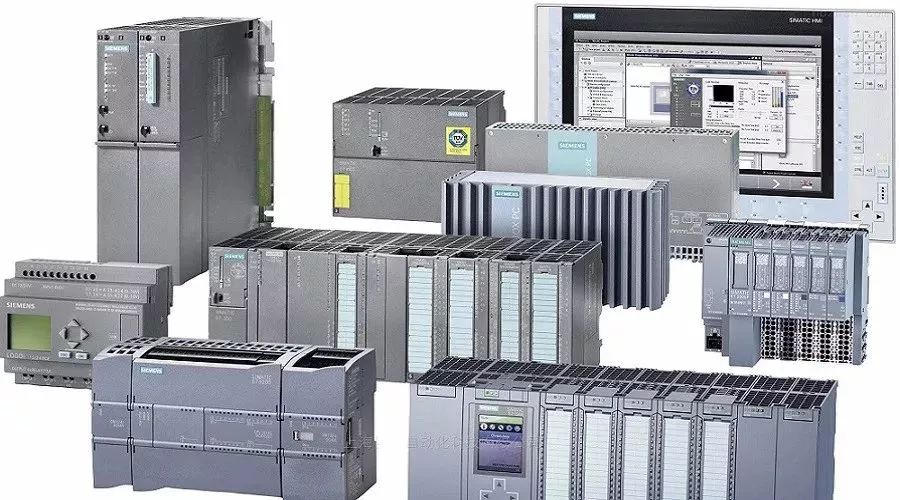
 What Communication Methods Are Supported by S7-1200 PLC Ethernet Port?
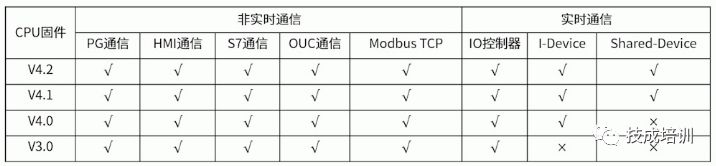
The S7-1200 PLC integrates 1-2 Ethernet ports, supporting both non-real-time and real-time communication services. Non-real-time communication includes PG communication, HMI communication, S7 communication, OUC communication, and MODBUS TCP communication, while real-time communication is mainly used for PROFINET IO communication.
S7 communication, OUC communication, MODBUS TCP communication, and PN communication are particularly important.
Depending on the firmware version of the S7-1200 CPU, the communication service functions supported by the Ethernet interface may vary. The following table lists the Ethernet interface service functions supported by different firmware versions of the S7-1200 CPU.
In summary, PG communication is primarily used for connecting programming devices, which means that the TIA Portal software can access the PLC for program uploading, downloading, debugging, and diagnostics.HMI communication is mainly used to connect touch screen devices, which can be Siemens’ own touch screens or third-party devices. It is important to note that when connecting third-party touch screens, the “Allow Remote Access” option must be checked in the PLC properties under the connection security mechanism for normal communication.
S7 communication is mainly used for communication between Siemens SIMATIC CPUs, such as communication between S7-1500 and S7-1200, as well as between S7-300/400 and S7-1200, etc. Since this communication standard is not public, it cannot communicate with third-party devices.
How Many Communication Connection Resources Does the S7-1200 PLC Have?
When communicating via Ethernet with the S7-1200 CPU, the number of communication devices is limited by communication connection resources. In the CPU properties under general options, find “Connection Resources” to check the various communication connection resources of the CPU. Each CPU can support a maximum of 68 specific connection resources (this does not mean it can connect to 68 devices), of which 62 are for specific category communication resources, and 6 are dynamic connection resources (which can be allocated automatically), allowing for expansion of S7, OUC, and other communication resources as needed.
PG communication has 4 connection resources, but only 1 can be guaranteed for normal use.
HMI communication has 12 connection resources (this does not mean it can support 12 touch screens); different touch screens occupy different numbers of connection resources. The actual number of HMI devices that the S7-1200 CPU can connect to depends on the type and functionality of the HMI devices, but at least 4 HMI devices can be guaranteed to connect.
The connection resources for S7 communication can be configured for 6 dynamic connection resources as needed, resulting in a maximum of 14 S7 connection resources.
The connection resources for OUC communication can also be configured for 6 dynamic connection resources, resulting in a maximum of 14 OUC connection resources, which includes TCP, ISO_on_TCP, UDP, and Modbus TCP. The total number of connections that can be established simultaneously is also a maximum of 14. (This article is original by Technical Training, unauthorized reproduction is prohibited, and violators will be prosecuted!)
Did you understand today’s content? If not
long press the QR code immediately, to listen to Teacher Zeng’s detailed explanation
↓↓

Siemens S7-1200 Ethernet Communication Function Applications
Course Introduction
Technical Training Network launched
Learning platform: Technical Training Network
Course type: Recorded premium course
Class format: Online learning
Course access: Gold, Platinum, and Diamond members within the service period canwatch for free
Content Introduction:
Learn about data exchange between Siemens S7 series PLCs via the Ethernet port, which can also achieve data exchange with third-party devices, and can be used to control some drive devices that support the PN protocol. This course mainly introduces several common communication applications in S7-1200 Ethernet.


 Course Outline
Chapter 1: Overview of S7-1200 PLC Ethernet Communication
1. Supported communication protocols for S7-1200 Ethernet port
2. Introduction to communication resources
Chapter 2: S7 Communication
1. Explanation of S7 communication instructions in S7-1200
2. Explanation of S7 communication configuration
3. Demonstration of S7 communication between S7 series PLCs
Chapter 3: OUC Communication
1. Overview of OUC communication applications
2. Network configuration for OUC communication
3. Explanation of instructions for OUC communication applications
4. Demonstration of OUC communication applications
Chapter 4: MODBUS TCP Communication
1. Immediate MODBUS TCP protocol
2. Relationship between function codes and operation addresses on MODBUS TCP
3. Explanation of MODBUS TCP instructions
4. Demonstration of MODBUS TCP communication
Chapter 5: PN Communication
1. PN communication between S7-1200 and remote I/O
2. Application of S7-1200 as IO intelligent devices
3. PN communication applications between S7-1200 and drives
Target Audience
1. Electrical design personnel
2. Students with a foundation in S7-1200
3. Teachers and students in automation/electronics related majors
Instructor Introduction
Zeng Xin, previously worked as an electrical technician at Giti Tire and Conch Cement Factory, responsible for improving and maintaining electrical equipment in the plant. Responsible for electrical design and program design of non-standard equipment such as sewage treatment, faucet testing equipment, and PCB testing equipment. Received system training on S7-1200 at Siemens and served as a public training instructor for “Programmable Controller Application Technology” organized by the Longhua District Government of Shenzhen.
Long press the QR code to listen to the good class immediately