
Introduction: This article aims to summarize the key points of performance design and optimization management of the VMware virtualization platform in performance-intensive application scenarios, based on the author’s years of operational experience, hoping to help readers in the healthcare industry with the application of virtualization technology.
By utilizing the “Performance” view in the vCenter Server management interface and the esxtop performance analysis tool, along with performance monitoring tools in the virtual machine operating system, we can analyze the overall performance load of the virtualization platform and provide targeted optimization recommendations to improve the rationality of the overall virtualization environment. Adjustments can be made in cases of insufficient or over-allocated virtual machine system resources, with the goal of using limited resources more reasonably and efficiently while ensuring application system performance. Through standardized design and adjustments, the performance and business continuity of virtual machines, as well as the overall utilization efficiency and usage level of the virtualization platform, have been effectively improved.
Introduction
Sufficient resources are the basic condition for ensuring efficient operation of applications. Therefore, most users allocate as many CPU and memory resources as possible when creating virtual machines. In fact, this process may not necessarily help improve the performance of virtual machines and application systems. For example, allocating multiple vCPUs to a single-threaded application system will cause the operating system scheduler of the virtual machine to migrate the single-thread workload between multiple vCPUs, leading to a loss of cache locality. These resource demands will convert into actual CPU resource consumption on the physical host, meaning that this incorrect design not only fails to enhance the performance of the virtual machine but also wastes resources on the physical host.
Misconceptions in Virtual Machine Resource Planning and Principles to Follow
1. Blindly allocating and reserving unnecessary virtual machine resources can lead to decreased performance Many users overlook some hardware devices that may not be used by the virtual machine. For example, when creating a virtual machine or cloning a physical machine to the virtualization platform, floppy drives, COM ports, USB controllers, and other devices are generated in the virtual machine’s hardware configuration. These devices (such as USB controllers) run polling schemes that consume additional CPU resources, and some PCI devices reserve memory blocks, wasting these memory blocks on the ESXi host. For instance, Windows client operating systems frequently poll optical drives (CD or DVD drives). When the virtual machine is configured to use physical drives, multiple client operating systems may attempt to access the drive simultaneously, resulting in performance degradation.
2. Virtual machine resource planning should always follow the principle of resource allocation from less to more Based on years of experience in architecture design and management of virtualization platforms, the author offers the following insights for virtual machine users to consider. When planning virtual machines for application systems, it is essential to collaborate with the application system provider to understand the actual needs of the application system and its performance before virtualization (the scale of the application on physical servers, performance load), determining which resource subsystems the application system is sensitive to in terms of performance. Whether the application system is department-level or hospital-wide can help quantify the scale and performance requirements of the application system accurately. For example, workloads related to intensive and highly concurrent databases require sufficient processor and memory resources for the virtual machine; whereas lightweight small application systems at the department level should allocate minimal CPU and memory resources; avoiding resource allocation based on little or no metrics. Allocating more resources than needed for a virtual machine can actually reduce the performance of that virtual machine and other virtual machines sharing the same host. Therefore, when designing and creating virtual machines, it is crucial to adhere to the principle and process of resource allocation from less to more.
VMware Virtual Machine Performance Analysis Methods
Using performance monitoring and analysis tools provided by VMware, you can monitor and grasp the performance data of the entire virtualization platform, including CPU utilization, memory, disk, and network performance load conditions for each host, virtual machine, resource pool, or compute resource, identifying the causes of current and potential issues.
esxtop is a performance monitoring tool built into ESXi that provides real-time visibility into host performance. The top four values displayed on the esxtop panel are uptime, uptime since the last system reboot, current running environment count, and average load. Average load shows the average load over the past 1 minute, 5 minutes, and 15 minutes. Average loads of 1.00, 2.00, and 0.50 indicate full utilization of all physical CPUs, that the ESXi system may require twice the current available physical CPUs, and that half of the physical CPUs on the ESXi system are utilized, respectively.

Figure 1 esxtop Output CPU Performance Values of ESXi Host
As shown in Figure 1, the average CPU load of the host is sufficient in the current and past 15 minutes.
Typically, the first metric ESXi administrators look at when troubleshooting performance issues is the CPU ready time (%RDY) metric. This metric indicates the wait time for virtual machine vCPUs to access pCPUs. From a MHz perspective, high CPU ready time does not necessarily mean high pCPU utilization; it is more likely caused by one or more virtual machines on the host excessively using or merging vSMP. Another possible cause could be the excessive use of vCPUs on the ESXi host. To resolve performance issues related to high virtual machine CPU ready time, it is essential to remember that the %RDY metric in esxtop is the sum of all vCPUs on a specific VM. A virtual machine with two vCPUs can have a maximum %RDY time measure of 200%. Under normal circumstances, a virtual machine with two vCPUs should have a normal %RDY metric of 18%-20%; otherwise, it will affect the performance of the virtual machine. The most likely reason for a high %RDY metric is that the affected virtual machine is excessively using sVMP, such as a large virtual machine with 8 or more vCPUs. It is usually worthwhile to investigate the actual utilization of the virtual machine operating system, which may reveal that not all vCPU utilization rates are high. In such cases, adjusting and reducing the number of vCPUs for the virtual machine can help improve performance, as it helps to reduce %RDY and %CSTP times. As shown in Figure 2, the virtual machine named “ydhl_hisdb_RHEL” shows that both %RDY and %CSTP values indicate that the vCPU count configuration for this virtual machine is excessive.

Figure 2 esxtop Output CPU Performance Values of Each Virtual Machine on ESXi Host
Since adjusting the number of vCPUs and memory for virtual machines must be done while the virtual machine is powered off, this process can affect applications that provide 24-hour service. VMware vSphere ESXi has supported CPU and memory hot-add features since version 5.0, allowing users to add CPU and memory resources while the virtual machine is running, which is significant for some 24-hour continuous service application systems.
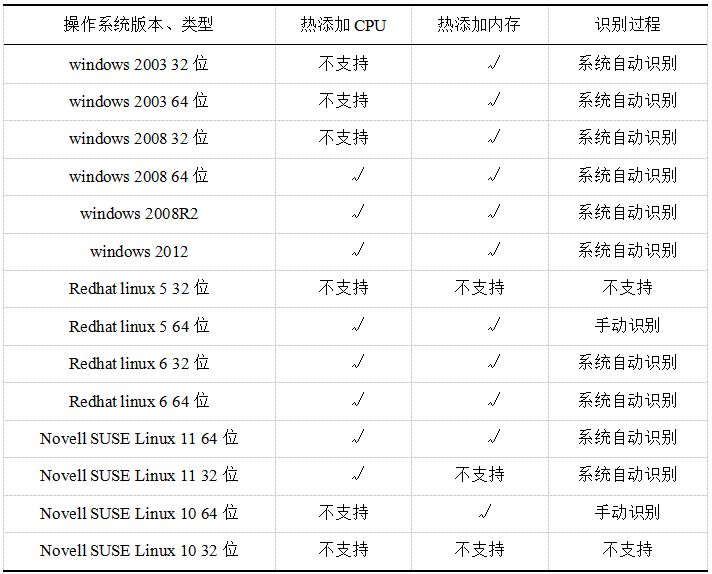
The use of this feature requires not only support from the vSphere ESXi version but also the virtual machine hardware version and guest OS support. Not all guest operating systems support CPU hot-add. Table 1 lists commonly used x86 operating systems in the IT environment and organizes their support for CPU and memory hot-add features.
Table 1 Support of Common Operating Systems for CPU and Memory Hot-Add
Performance Adjustment Methods
After analyzing the performance of the ESXi host and virtual machines in terms of CPU and memory, configurations for virtual machines that require adjustments to vCPU and memory capacities are made.
By default, the “Memory/CPU Hot Plug” feature for virtual machines is set to “Disabled”. This is because enabling this feature incurs overhead, and to allow administrators to add CPU resources to the virtual machine operating system at any time, vSphere reserves the resources needed to add the maximum number of CPUs. Administrators can enable this feature for virtual machines that may require online expansion after the virtual machine is created, enabling future online hot-add of memory and CPU. This feature needs to be enabled while the virtual machine is powered off. Furthermore, most operating systems currently only support online addition of processors and memory resources, while reducing the configuration of virtual machines still requires the virtual machine to be powered off.
Results
In a virtualized cluster environment with the same hardware resource configuration scale, reasonable and correct resource planning and allocation can support more virtual machines and application systems while ensuring the flexibility and business continuity of business systems.
The design of virtual machine performance is a relatively complex process, involving a series of hardware technologies, ESXi software, virtual machine operating systems, and applications that run on the virtualization platform. This article only addresses the need to plan virtual machine CPU resources, improve virtual machine performance, and enhance ESXi host resource utilization. It combines targeted screenshots to illustrate the methods for online addition of VMware virtual machine vCPUs and memory resources, as well as the considerations to keep in mind, aiming to spark further discussion. This allows virtualization technology users to plan their virtual machines more scientifically and systematically, reduce resource waste, and allocate host resources more reasonably, enabling virtualization technology to serve healthcare information construction more effectively and efficiently.
Source: “Chinese Digital Medicine” magazine, issue 11, 2017. Authors and affiliations: Liu Yang, Liu Qian, Xiangya Hospital of Central South University, Information Management Department of Hainan Provincial People’s Hospital.


2018 CHINC
Notice for the 2018 China Hospital Information Network Conference (CHINC) Call for Papers
The selection for the “2017 National Outstanding Leadership in Hospital Informationization” has officially started
The selection for the “2017 National Outstanding Innovation in Hospital Informationization” has officially started

Welcome to follow the CHINC service account for the latest conference news


Public account ID: jcdm2006
Disseminating the latest developments in the field of digital medicine, focusing on healthcare informationization-related news.