In-Depth Analysis of Linux File Systems and Device Files
1. Core Technical Concepts
1.1 Technical Definitions
The Linux file system is the architecture used by the operating system to organize, store, and access data, which includes:
- Hierarchical directory structure (tree organization)
- Metadata management (permissions, timestamps, etc.)
- Mapping from physical storage to logical
- Device abstraction layer (accessing hardware through device files)
Device files (located in <span>/dev</span>) are abstract interfaces for hardware devices, divided into:
- Character devices (
<span>c</span>): stream access (e.g., keyboard, serial port) - Block devices (
<span>b</span>): block access (e.g., hard drives, SSDs)
1.2 Core Fundamental Concepts
| Concept | Description | Example |
|---|---|---|
| Inode | Stores file metadata (permissions, size, timestamps), unique identifier | <span>stat file.txt</span> to view inode |
| Dentry | Directory entry cache, speeds up path lookup | Kernel-maintained mapping from path to inode |
| Superblock | Global information about the file system (block size, total inodes, etc.) | Ext4 superblock stores volume information |
| VFS (Virtual File System) | Kernel abstraction layer, unifies interfaces of different file systems | Entry point for system calls related to file operations |
| Page Cache | Memory cache that speeds up file I/O | <span>free -m</span> to view cache usage |
| Block Layer | Manages block device I/O requests, includes I/O schedulers | CFQ, Deadline scheduling algorithms |
1.3 Development Context
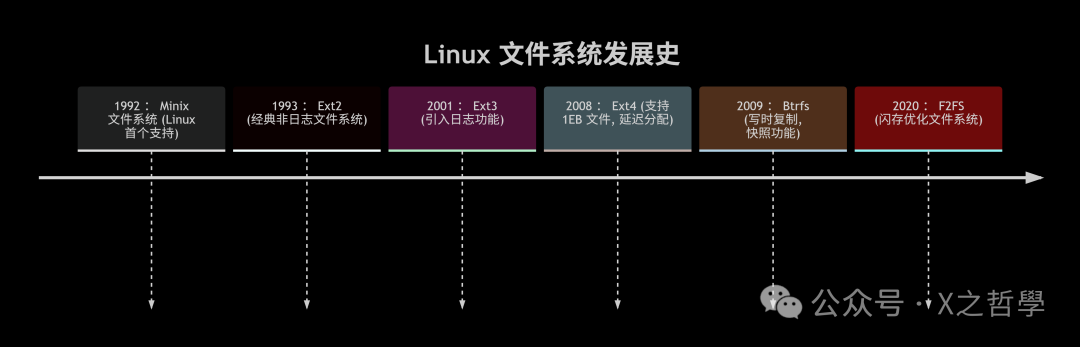
1.4 Technical Necessity
- Data persistence: Data is not lost after power failure
- Hardware abstraction: Unified access to different storage media (HDD/SSD/NVMe)
- Permission control: Fine-grained permission management through inodes
- Performance optimization: Page Cache reduces disk I/O
- Device standardization: Device files allow
<span>read()/write()</span>operations on hardware
2. Knowledge Framework
2.1 Core Mechanism Flowchart

2.2 Code Execution Flow
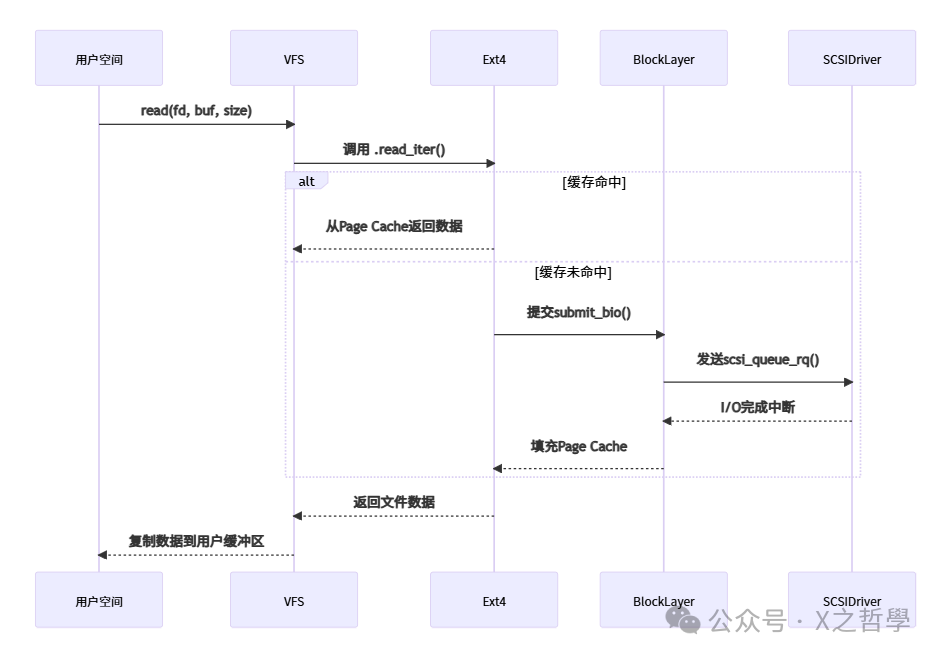
2.3 System Interaction Architecture
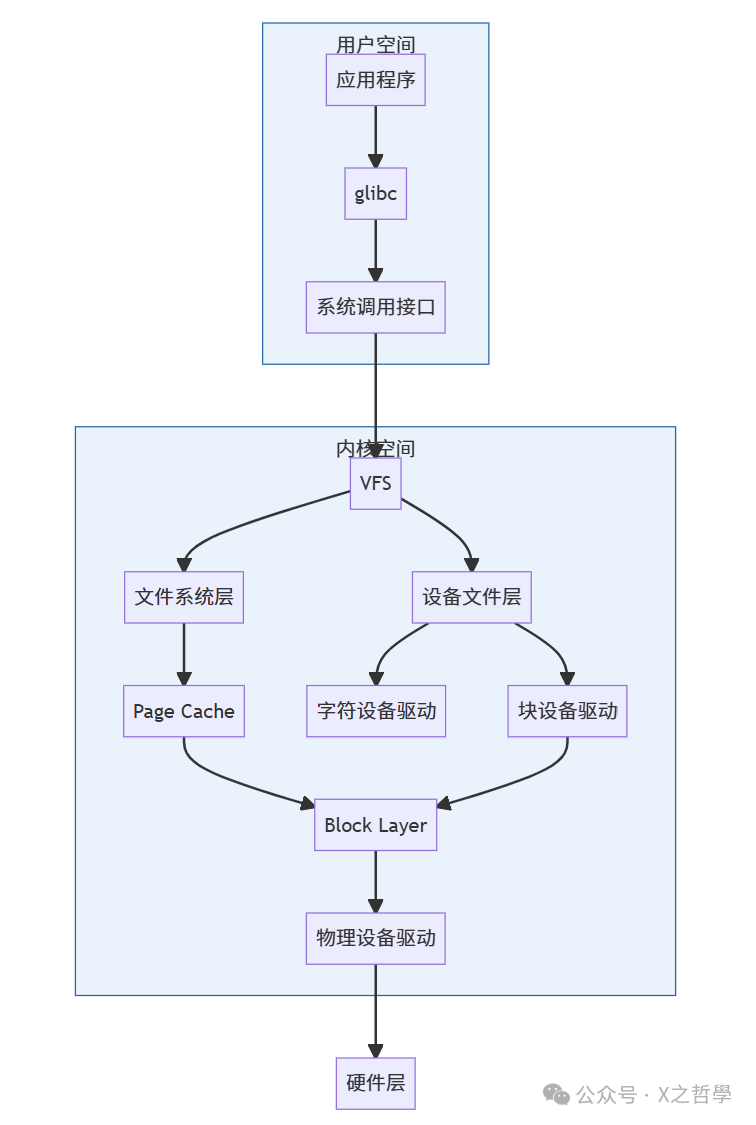
3. Core Data Structures and Code
3.1 Key Data Structures
- VFS Core Structure
// include/linux/fs.h
struct inode {
    umode_t i_mode; // File type and permissions
    kdev_t i_rdev; // Device number
    struct file_operations *i_fop; // File operation functions
    // ...
};

struct file {
    struct path f_path; // Path information
    loff_t f_pos; // Current file offset
    const struct file_operations *f_op; // Operation function table
    // ...
};

struct file_operations {
    ssize_t (*read)(struct file *, char __user *, size_t, loff_t *);
    ssize_t (*write)(struct file *, const char __user *, size_t, loff_t *);
    int (*open)(struct inode *, struct file *);
    // ...
};
- Device Driver Structure
// include/linux/cdev.h
struct cdev {
    struct kobject kobj;
    const struct file_operations *ops; // Device operation functions
    dev_t dev; // Device number
    // ...
};

// Block device operations
struct block_device_operations {
    int (*open)(struct block_device *, fmode_t);
    void (*release)(struct gendisk *, fmode_t);
    int (*ioctl)(struct block_device *, fmode_t, unsigned, unsigned long);
    // ...
};
3.2 Key Code Flow
Block Device I/O Submission
// fs/block_dev.c
ssize_t blkdev_write_iter(struct kiocb *iocb, struct iov_iter *from) {
    struct bio *bio;
    // 1. Create BIO request
    bio = bio_alloc(GFP_KERNEL, nr_pages);

    // 2. Fill data pages
    bio_add_page(bio, page, len, offset);

    // 3. Set callback function
    bio->bi_end_io = end_bio;

    // 4. Submit to Block Layer
    submit_bio(REQ_OP_WRITE | REQ_SYNC, bio);
}
Character Device Registration
// Driver initialization
static int __init mychardev_init(void) {
    dev_t dev = MKDEV(MAJOR_NUM, 0);
    // 1. Allocate device number
    register_chrdev_region(dev, 1, "mychardev");

    // 2. Initialize cdev structure
    cdev_init(&my_cdev, &fops);

    // 3. Add to kernel
    cdev_add(&my_cdev, dev, 1);
}
4. Simple Example
Character Device Driver Implementation
#include <linux/module.h>
#include <linux/fs.h>
#define DEVICE_NAME "simple_char"
static int major;
static ssize_t simple_read(struct file *filp, char __user *buf, size_t len, loff_t *off) {
const char *msg = "Hello from kernel!\n";
size_t msg_len = strlen(msg);
// Copy data to user space
if (copy_to_user(buf, msg, msg_len))
return -EFAULT;
return msg_len;
}
static struct file_operations fops = {
.owner = THIS_MODULE,
.read = simple_read,
};
static int __init simple_init(void) {
major = register_chrdev(0, DEVICE_NAME, &fops);
printk(KERN_INFO "Char device registered with major=%d\n", major);
return 0;
}
static void __exit simple_exit(void) {
unregister_chrdev(major, DEVICE_NAME);
}
module_init(simple_init);
module_exit(simple_exit);
MODULE_LICENSE("GPL");
User Space Test Program
#include <fcntl.h>
#include <stdio.h>

int main() {
    char buf[256];
    int fd = open("/dev/simple_char", O_RDONLY);
    read(fd, buf, sizeof(buf));
    printf("Received: %s\n", buf);
    close(fd);
    return 0;
}
5. Debugging and Common Tools
5.1 Core Toolset
| Tool | Purpose | Example Command |
|---|---|---|
<span>lsblk</span> |
List block device information | <span>lsblk -o NAME,SIZE,TYPE,MOUNTPOINT</span> |
<span>blktrace</span> |
Block device I/O tracing | <span>blktrace -d /dev/sda -o trace</span> |
<span>hdparm</span> |
View/tune hard disk parameters | <span>hdparm -tT /dev/sda</span> (speed test) |
<span>debugfs</span> |
Debugging interaction with Ext file systems | <span>debugfs /dev/sda1</span> |
<span>lsof</span> |
View open files | <span>lsof /mnt/data</span> |
<span>strace</span> |
Trace system calls | <span>strace -e file ls /dev</span> |
<span>vfsstat</span> |
Real-time VFS operation statistics | <span>vfsstat 1 5</span> (once per second, output 5 times) |
5.2 Debugging Methods
-
File System Corruption Repair
# Unmount the file system umount /dev/sdb1 # Force repair Ext4 fsck -y /dev/sdb1 # XFS repair xfs_repair /dev/sdb1 -
Device Driver Troubleshooting
- Check kernel logs:
dmesg | grep -i "error\|sda" - Trace device opening:
strace -e trace=open,ioctl dd if=/dev/sda bs=4k count=1
Page Cache Tuning
# Clear Page Cache (for testing)
sync; echo 1 > /proc/sys/vm/drop_caches

# View cache statistics
cat /proc/meminfo | grep -i "cache"
I/O Scheduler Adjustment
# View current scheduler
cat /sys/block/sda/queue/scheduler

# Switch to deadline
echo deadline > /sys/block/sda/queue/scheduler
Memory Mapping Debugging
# View file page cache
vmtouch -v /var/log/syslog

# Monitor page cache hit rate
perf stat -e 'cache-references,cache-misses' ls -R /
Conclusion
The Linux file system unifies interfaces through the VFS abstraction layer, optimizes performance with Page Cache, and manages metadata using Inode/Dentry. Device files abstract hardware as files, associating drivers through device numbers. Understanding its architecture requires mastering:
- Data flow: User space → VFS → File system/driver → Block Layer → Hardware
- Core structures:
<span>inode</span>,<span>file</span>,<span>dentry</span>,<span>cdev</span> - Debugging toolchain:
<span>blktrace</span>/<span>strace</span>/<span>debugfs</span>used in combination
Through source code analysis and tool practice, one can gain a deep understanding of the underlying mechanisms of file systems and device interactions.