1. Background
Recently, during discussions with some developers or feedback in developer groups, it has been noted that the development approach for the HPM microcontroller is different from traditional microcontroller development methods. Some developers feel lost due to not being familiar with this approach, while others believe their apps heavily rely on hpm_sdk.
Based on this feedback, it seems necessary to publish a discussion article on the advantages and disadvantages of the hpm_sdk development method, as well as how it differs from traditional microcontroller development methods. This can provide some inspiration for developers and facilitate quicker application development using hpm_sdk.
This article will also leverage some development experiences shared by developers, and I would like to thank the articles contributed by HPMicro developers.
2. Development Differences
(1) IDE
The current general MCU architecture used by HPM is based on RISC-V, which is different from the various ARM Cortex-M series microcontrollers commonly found in China. Even the STM32 microcontrollers that are B2B compatible cannot support ARM’s own platform – Keil MDK.
For engineers who heavily rely on Keil, especially many developers in China, this is indeed not friendly. After all, Keil has developed over the years, and its user-friendly interface along with abundant online troubleshooting records make it easy for those who have never been exposed to microcontroller development to get started.
However, Keil is not a free commercial IDE. Although many chip manufacturers for Cortex-M microcontrollers in China provide firmware library packages similar to STM32, it is not stated that they have purchased the copyright for Keil. This copyright issue is passed on to the chip developers. While many in China may use cracked versions for commercial purposes, one must always be cautious of copyright issues in commercial use.
Although HPM development does not support Keil, it provides its own IDE developed by SEGGER (the well-known Jlink debugger manufacturer), which is SEGGER Embedded Studio for RISC-V. This is also not a free commercial IDE, but HPM places great importance on copyright and has purchased commercial rights for its chip development. Currently, it is not limited to a specific version of SEGGER Embedded Studio and allows developers to use it for commercial development, thus avoiding copyright issues. This IDE operates similarly to Keil, allowing configuration through a visual interface, and combined with Jlink, debugging becomes more user-friendly.
The IDE supports the SEGGER compilation chain, GCC compilation chain, and Andes compilation chain.
SEGGER Embedded Studio download page: https://www.segger.com/downloads/embedded-studio/
SEGGER Embedded Studio HPMicro license registration page: https://license.segger.com/hpmicro.cgi
Developer article: (SEGGER Embedded Studio for RISC-V, for HPMicro Devices solves activation issues for first-time users, prompts no License) https://blog.csdn.net/zhengwenbang/article/details/129740589
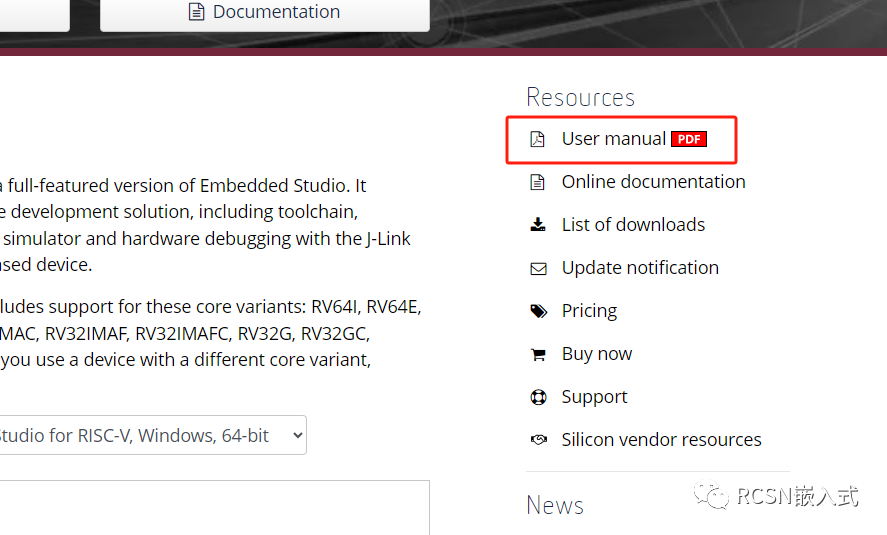
Additionally, SEGGER Embedded Studio has a corresponding user manual for developers to fill in gaps. Page: https://www.segger.com/products/development-tools/embedded-studio/editions/risc-v/
(2) Build System
For domestic ARM Cortex-M microcontroller manufacturers, there is no so-called build system development environment. However, for some developers who have worked with Espressif products, such as the ESP32, the esp-idf uses a CMake build system (the early esp-idf was based on Makefile). The Raspberry Pi RP2040’s pico-sdk also uses a similar build system. This type of build system has a bit of a learning curve, requiring some basic knowledge of CMake (such as CMakeLists syntax) and experience in setting up the environment. However, this seems to be the trend for future embedded development, managing configurations and generating cross-platform projects through CMakeLists.txt (for example, generating SEGGER Embedded Studio projects in HPM development and supporting IDEs in the future). The generated Makefile can be parsed by compilers across different platforms.
For chip manufacturers and developers, this type of build system allows multiple chip series and component packages to only require support for one SDK, rather than providing multiple library chip packages. It can extend to support various IDEs, such as generating SEGGER Embedded Studio projects through commands or visual interfaces; supporting cross-platform development with CMake-enabled VSCode, CLion, etc.
3. Development Advantages
Project engineering is managed through CMakeLists.txt files, a management method similar to adding relevant paths or custom compilation macros in Keil, such as:
1. Setting some custom compilation macro switches
2. Configuring different compilation and linking options based on different compilation types
3. Adding header file paths, compilation macros, and other routine operations
4. Adding source code compilation
5. Adding external components, etc.
Does this development method seem familiar? IDEs like Keil have similar interface operations, but for CMake, a single CMakeLists file can accomplish these tasks. Once familiar, it can greatly improve development efficiency.
This article uses hpm_sdk1.2 to illustrate a few commonly used command explanations and the convenience of managing with a CMakeLists file.
More command interfaces can be referenced in the sample CMakeLists within the SDK and the encapsulated command functions in the CMake folder, which are beyond the scope of this article.
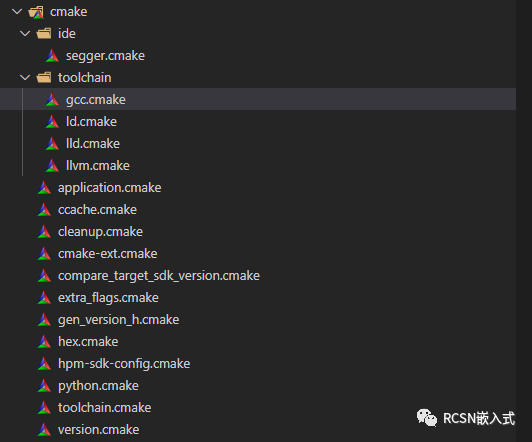
This version has supported creating your own boards outside the SDK, but developing your applications outside the SDK has always been possible.
(1) Creating Your Own AP Application Folder
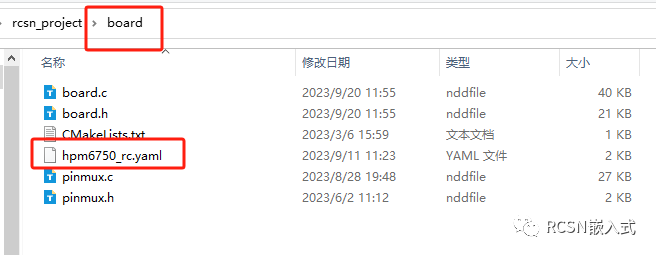
Create your own APP folder and place a Board inside – here I am using hpm6750_rc, which is extracted from hpm_sdk’s board hpm6750evkmini, and renaming hpm6750evkmini.yaml to hpm6750_rc.yaml, as shown below:
Copy a sample from hpm_sdk, such as hello_world. Then, in your created application folder, create a build folder, enter that build folder, and use the command:
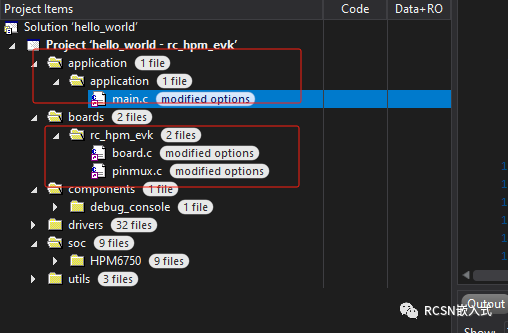
cmake -G Ninja -DBOARD=rc_hpm_evk -DBOARD_SEARCH_PATH=your custom/rcsn_project/board/ -DCMAKE_BUILD_TYPE=flash_xip ..Now open the build folder in SEGGER Embedded Studio, and you will see that the boards have changed to your project’s Board and your application has been added.
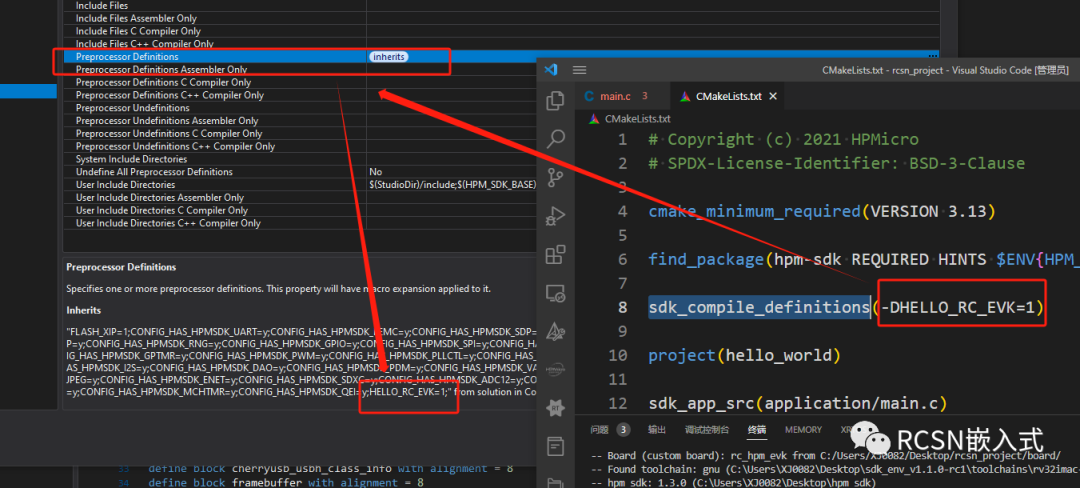
(2) Defining Macro Switches and Preprocessor Definitions
In Keil, preprocessor definitions can be manually entered in options.

Similarly, SEGGER Embedded Studio also has similar definitions.
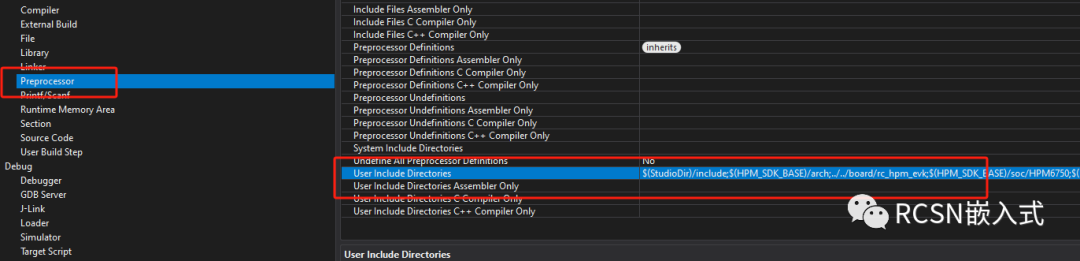
However, in hpm_sdk, developers do not need to add them manually. In CMakeLists, using the command: sdk_compile_definitions allows you to define preprocessor symbols.
(3) Adding Header File Paths
For example, in Keil, there are corresponding control operations.
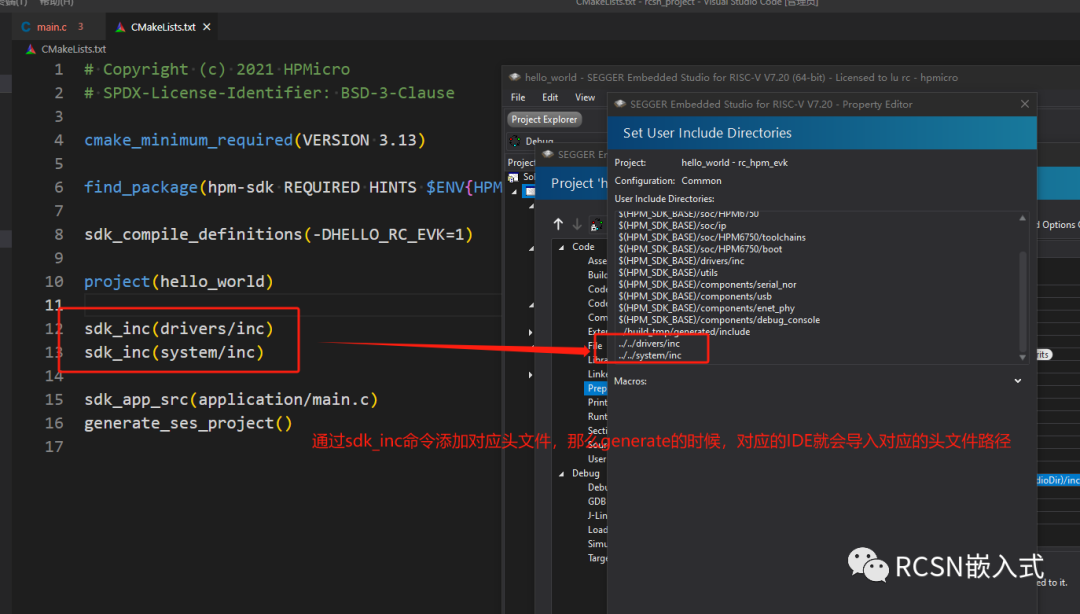
In SEGGER Embedded Studio, there is also a similar operation interface.
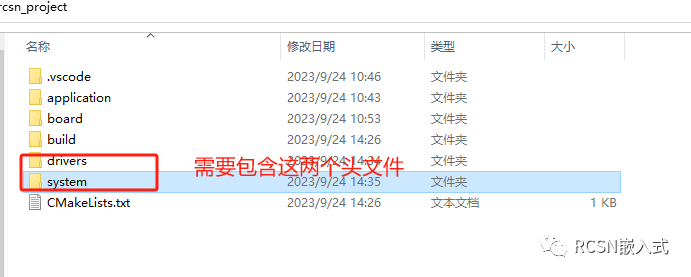
In the HPM_SDK build process, users also do not need to operate through the interface; they can directly set paths in CMakeLists through the sdk_inc command. For example, defining the following project directories, each containing an inc folder for the header file paths to be included.
(4) Adding Source Files
Like Keil, SEGGER Embedded Studio also has its own source file directory structure. For example, to add files from the drivers mentioned earlier, you can set them using the sdk_app_src command. For example:
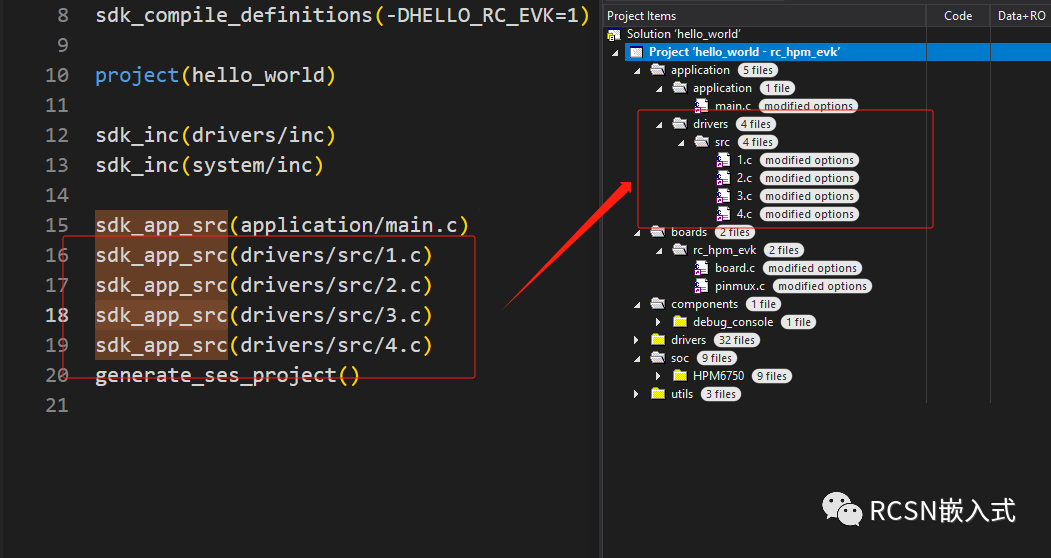
(5) Compilation Related
For example, setting optimization levels, GCC compilation parameters, instruction set selection, etc. can all be set using the sdk_compile_options command.
To set O3 optimization, use:
sdk_compile_options("-O3")To set specific GCC warnings:
sdk_compile_options("-Wall")To set ABI and ISA:
sdk_compile_options("-mabi=ilp32d")sdk_compile_options("-march=rv32gc")4. Development Disadvantages
(1) Higher Entry Barrier
Currently, the CMake build method is not commonly seen in MCU development, and it has a certain entry barrier. However, for project build optimization and management, it is significantly efficient. For instance, introducing a third-party middleware only requires managing its internal file links through CMakeLists, and the project can conditionally include it, thereby maximizing the reduction of coupling brought by the middleware.
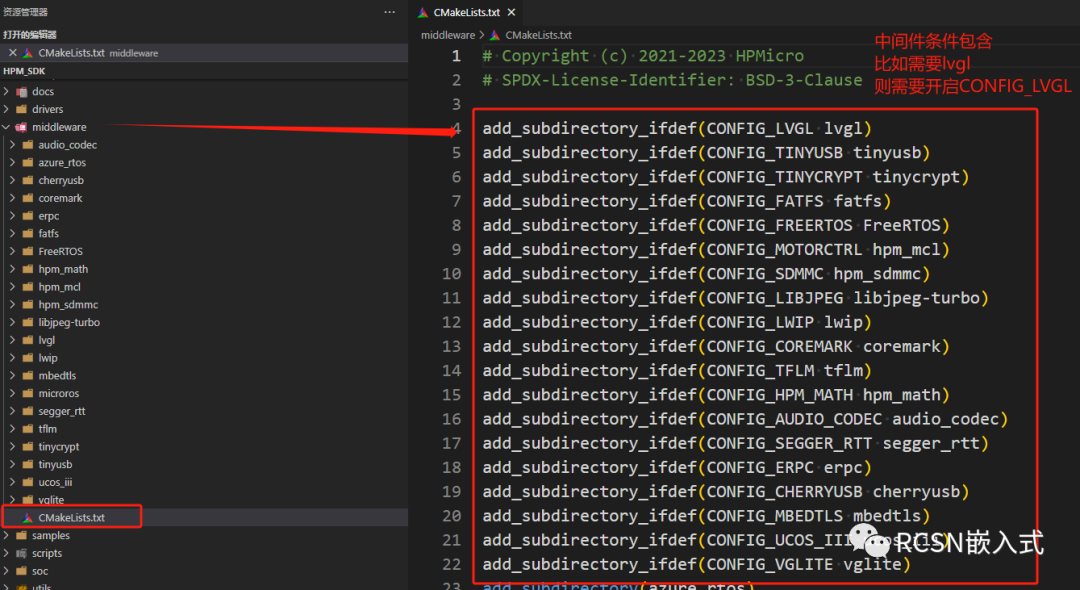
Some basic knowledge of CMake is required, which brings a certain learning cost.
(2) Relative Constraints in Project Management
In traditional MCU development, many developers prefer to include the MCU manufacturer’s own drivers and component source code in their project directories for easier management, and they may even modify the official library code (which is highly discouraged). However, hpm_sdk tends to separate the developer’s APP application from the SDK. This development is akin to upper-level machine QT development, where QT’s official libraries are managed through pro/pri files. If you do not wish to use a specific library, you simply do not enable it, similar to how Python development allows you to choose through Import.
This development method requires placing the hpm_sdk path in the corresponding folder and adding the path to the environment variable, similar to software installation. All chip series from HPM depend on this hpm_sdk, and users only need to care about their application development path. During the copying process, they only need to copy their applications, but the prerequisite is that the other party must also have “installed” hpm_sdk.
This constraint method may not be friendly for some developers. Of course, in the future, HPM may also support allowing developers to import the necessary files required by hpm_sdk into their project directories, similar to the STM32CubeMX initialization peripheral generation tool. However, the CMake build method of hpm_sdk remains the main development approach.