Time is undoubtedly one of the most critical factors in all aspects of life, making it essential to record and track time. In Python, you can track dates and times using its built-in libraries. Today, we will introduce how to use the time and datetime modules to find and modify dates and times.
 Modules for Handling Dates and Times in Python
Python provides the time and datetime modules, which help us easily obtain and modify dates and times. Let’s explore each of them one by one.
Time Module
This module includes all the time-related functions needed to perform various operations with time, and it also allows us to access different types of clocks required for various purposes.
Built-in Functions:
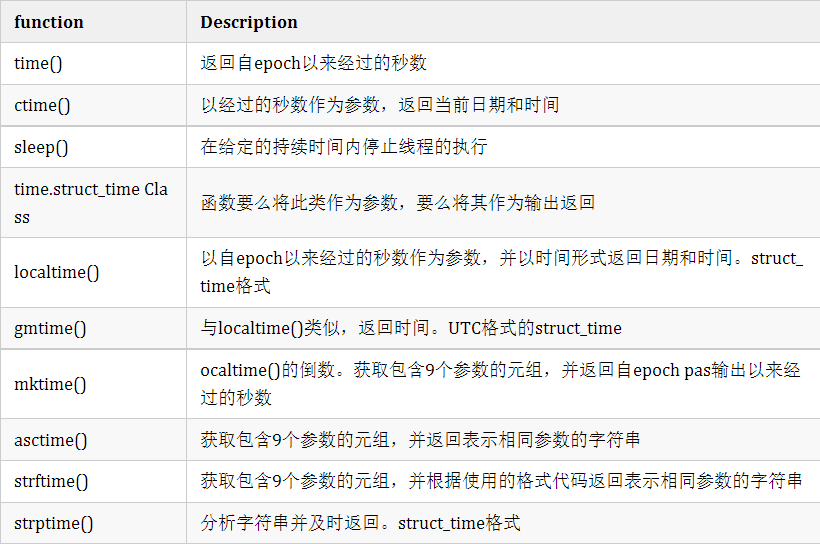
Refer to the table below, which describes some important built-in functions of the time module.
Code Formatting:
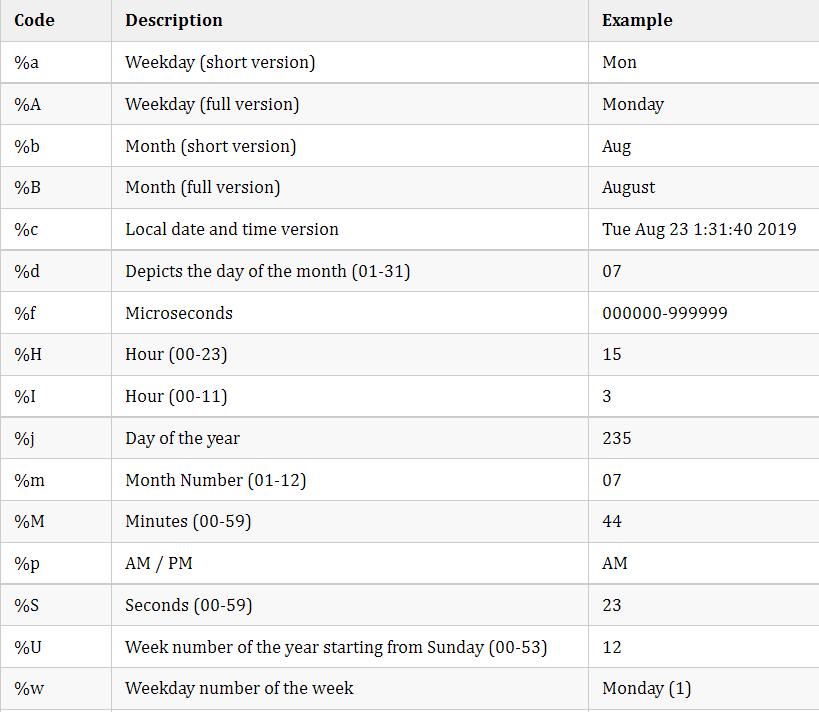
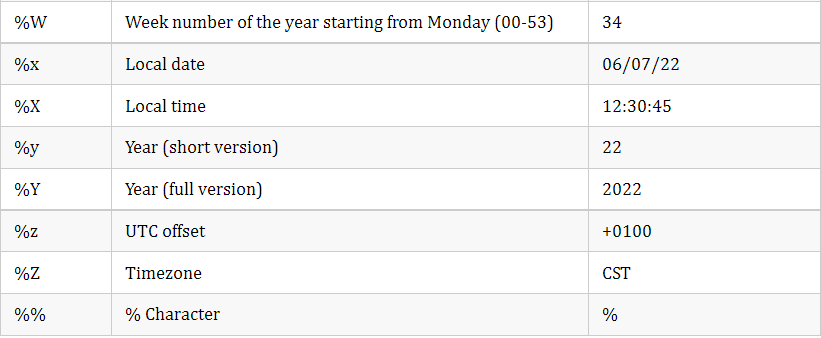
Before explaining each function with examples, let’s take a look at all the valid ways to format the code:
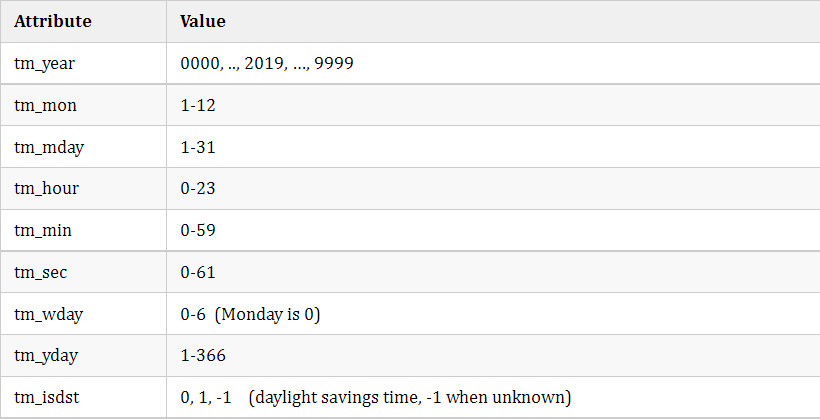
The struct_time class has the following attributes:
Now let’s look at a few examples of the time module.
-
Using the time module to find dates and times
Using the built-in functions and formatting codes described in the table above, you can easily obtain dates and times in Python.
import time
#time
a=time.time()           #total seconds since epoch
print(Seconds since epoch :,a,end='n----------n')
#ctime
print(Current date and time:)
print(time.ctime(a),end='n----------n')
#sleep
time.sleep(1)     #execution will be delayed by one second
#localtime
print(Local time :)
print(time.localtime(a),end='n----------n')
#gmtime
print(Local time in UTC format :)
print(time.gmtime(a),end='n-----------n')
#mktime
b=(2019,8,6,10,40,34,1,218,0)
print(Current Time in seconds :)
print( time.mktime(b),end='n----------n')
#asctime
print(Current Time in local format :)
print( time.asctime(b),end='n----------n')
#strftime
c = time.localtime() # get struct_time
d = time.strftime(%m/%d/%Y, %H:%M:%S, c)
print(String representing date and time:)
print(d,end='n----------n')
#strptime
print(time.strptime parses string and returns it in struct_time format :n)
e = 06 AUGUST, 2019
f = time.strptime(e, %d %B, %Y)
print(f)
Output:
Seconds since epoch : 1565070251.7134922
———-
Current date and time:
Tue Aug 6 11:14:11 2019
———-
Local time :
time.struct_time(tm_year=2019, tm_mon=8, tm_mday=6, tm_hour=11, tm_min=14, tm_sec=11, tm_wday=1, tm_yday=218, tm_isdst=0)
———-
Local time in UTC format :
time.struct_time(tm_year=2019, tm_mon=8, tm_mday=6, tm_hour=5, tm_min=44, tm_sec=11, tm_wday=1, tm_yday=218, tm_isdst=0)
———–
Current Time in seconds :
1565068234.0
———-
Current Time in local format :
Tue Aug 6 10:40:34 2019
———-
String representing date and time:
08/06/2019, 11:14:12
———-
time.strptime parses string and returns it in struct_time format :

time.struct_time(tm_year=2019, tm_mon=8, tm_mday=6, tm_hour=0, tm_min=0, tm_sec=0, tm_wday=1, tm_yday=218, tm_isdst=-1)
-
Datetime Module
Similar to the time module, the datetime module contains all the methods necessary for handling dates and times.
Built-in Functions:
The table below introduces some important functions in this module:
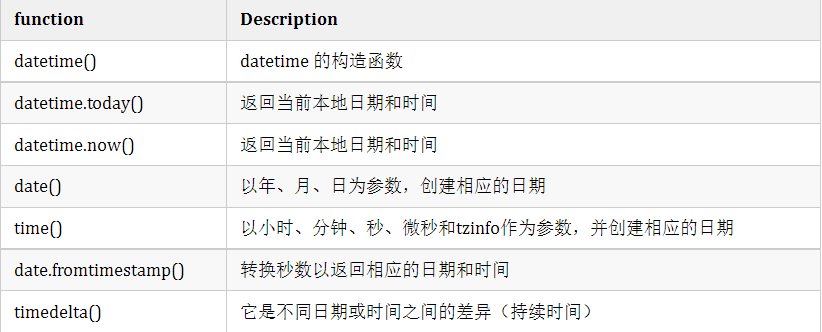
-
Using datetime to find dates and times
Now, let’s try to implement these functions to find dates and times in Python using the datetime module.
import datetime
#datetime constructor
print(Datetime constructor:n)
print(datetime.datetime(2019,5,3,8,45,30,234),end='n----------n')

#today
print(The current date and time using today :n)
print(datetime.datetime.today(),end='n----------n')

#now
print(The current date and time using today :n)
print(datetime.datetime.now(),end='n----------n')

#date
print(Setting date :n)
print(datetime.date(2019,11,7),end='n----------n')

#time
print(Setting time :n)
print(datetime.time(6,30,23),end='n----------n')

#date.fromtimestamp
print(Converting seconds to date and time:n)
print(datetime.date.fromtimestamp(23456789),end='n----------n')

#timedelta
b1=datetime.timedelta(days=30, seconds=0, microseconds=0, milliseconds=0, minutes=0, hours=4, weeks=8)
b2=datetime.timedelta(days=3, seconds=0, microseconds=0, milliseconds=0, minutes=0, hours=4, weeks=8)
b3=b2-b1
print(type(b3))
print(The resultant duration = ,b3,end='n----------n')

#attributes
a=datetime.datetime.now()   #1
print(a)
print(The year is :,a.year)

print(Hours :,a.hour)
Output:
Datetime constructor:

2019-05-03 08:45:30.000234
———-
The current date and time using today :

2019-08-06 13:09:56.651691
———-
The current date and time using today :

2019-08-06 13:09:56.651691
———-
Setting date :

2019-11-07
———-
Setting time :

06:30:23
———-
Converting seconds to date and time:
1970-09-29
———-
<class ‘datetime.timedelta’>
The resultant duration = -27 days, 0:00:00
———-
2019-08-06 13:09:56.653694
The year is : 2019
Hours : 13
That’s all for today’s sharing. If you liked it, please give it a thumbs up!