Follow and star our official account to access exciting content

Source: Technology Makes Dreams Greater
Author: Li Xiaoyao
Recently, I have been using Nordic’s 52832 development board, which also belongs to the ARM Cortex M4 architecture. I won’t go into details about the chip; the main difference between M4 and M0/M3 is that it has an FPU (Floating Point Unit), which is exactly what I need.
Since the project involves related algorithms, including Kalman filtering, it requires support for floating-point instruction sets, making speed very important. After using the CMSIS DSP software library’s math library arm_math, the performance in mathematical operations can be dozens or even hundreds of times higher than that of M0/M3.
What is the CMSIS DSP Software Library?
The CMSIS DSP software library is a set of common signal processing functions for devices based on Cortex-M and Cortex-A processors. This library covers the following categories of functions:
-
Basic mathematical functions
-
Fast mathematical functions
-
Complex mathematical functions
-
Filtering functions
-
Matrix functions
-
Transform functions
-
Motor control functions
-
Statistical functions
-
Support functions
-
Interpolation functions
-
Support Vector Machine (SVM) functions
-
Bayesian classifier functions
-
Distance functions
This library typically has separate functions for operations on 8-bit integers, 16-bit integers, 32-bit integers, and 32-bit floating-point values.
Introduction to Library Usage
The library installer in the Lib folder contains pre-built versions of the library. Here is a list of the pre-built libraries:
-
arm_cortexM7lfdp_math.lib (Cortex-M7, little-endian, double-precision floating-point unit)
-
arm_cortexM7bfdp_math.lib (Cortex-M7, big-endian, double-precision floating-point unit)
-
arm_cortexM7lfsp_math.lib (Cortex-M7, little-endian, single-precision floating-point unit)
-
arm_cortexM7bfsp_math.lib (Cortex-M7, big-endian, single-precision floating-point unit)
-
arm_cortexM7l_math.lib (Cortex-M7, little-endian)
-
arm_cortexM7b_math.lib (Cortex-M7, big-endian)
-
arm_cortexM4lf_math.lib (Cortex-M4, little-endian, floating-point unit)
-
arm_cortexM4bf_math.lib (Cortex-M4, big-endian, floating-point unit)
-
arm_cortexM4l_math.lib (Cortex-M4, little-endian)
-
arm_cortexM4b_math.lib (Cortex-M4, big-endian)
-
arm_cortexM3l_math.lib (Cortex-M3, little-endian)
-
arm_cortexM3b_math.lib (Cortex-M3, big-endian)
-
arm_cortexM0l_math.lib (Cortex-M0 / Cortex-M0+, little-endian)
-
arm_cortexM0b_math.lib (Cortex-M0 / Cortex-M0+, big-endian)
-
arm_ARMv8MBLl_math.lib (Armv8-M baseline, little-endian)
-
arm_ARMv8MMLl_math.lib (Armv8-M mainline, little-endian)
-
arm_ARMv8MMLlfsp_math.lib (Armv8-M mainline, little-endian, single-precision floating-point unit)
-
arm_ARMv8MMLld_math.lib (Armv8-M mainline, little-endian, DSP instructions)
-
arm_ARMv8MMLldfsp_math.lib (Armv8-M mainline, little-endian, DSP instructions, single-precision floating-point unit)
Library functions are declared in the common file arm_math.h located in the Include folder. Simply include this file and link the appropriate library in your application to start using the library functions.
The library supports Cortex-M cores with both little-endian and big-endian configurations, and the same header file will be used for floating-point unit (FPU) variants.
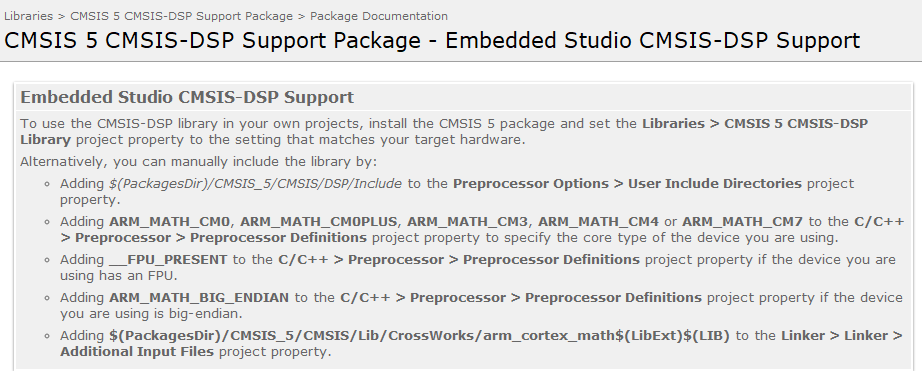
How to Add Configuration Using Segger Embedded Studio
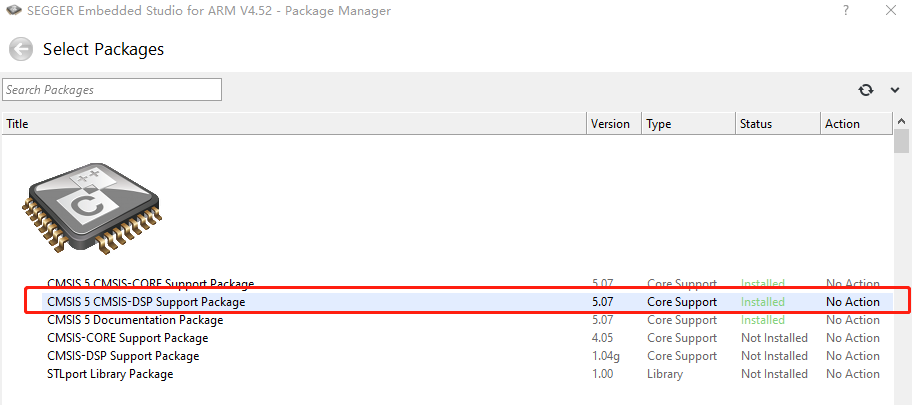
You can install directly in tools-->Package Manager. I have already installed CMSIS 5 CMSIS-DSP Support Package.
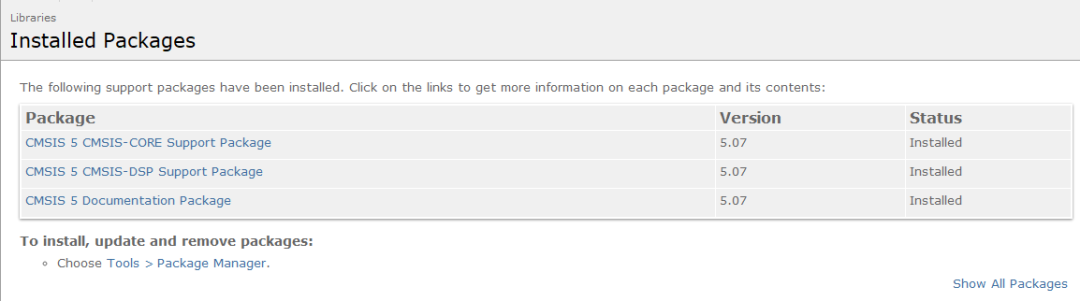
You can also click on the installed library to display the following image.
Then add it to the project. I am using arm_cortexM4lf_math.lib, as shown in the following image 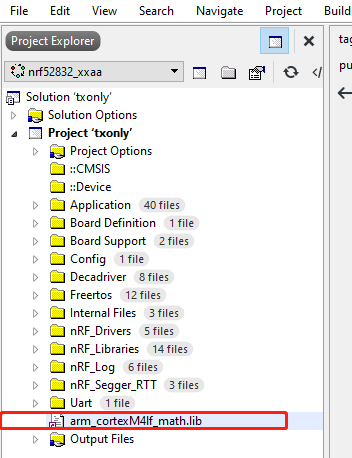
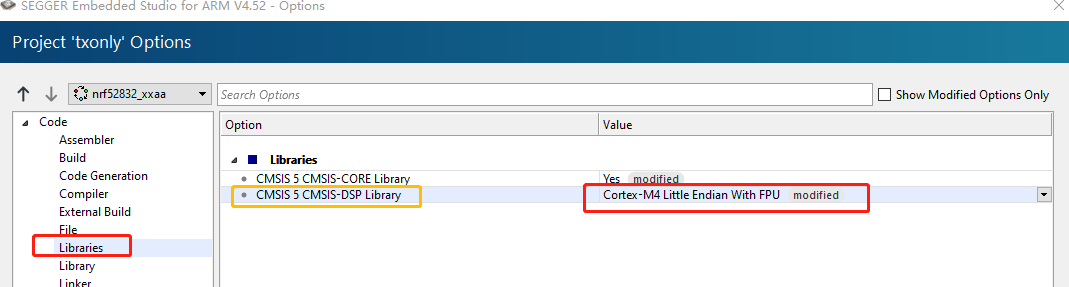
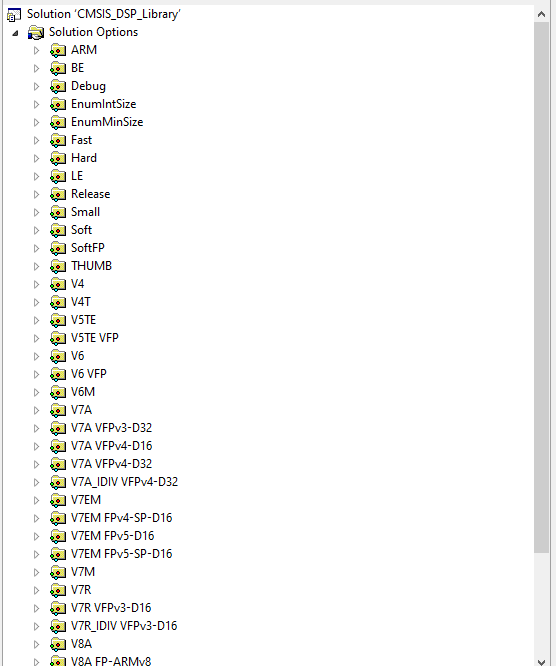
When using Segger Embedded Studio, you also need to set the project as shown in the following images.
File Structure of the CMSIS DSP Software Library
The following image shows the file structure of DSP_Lib.
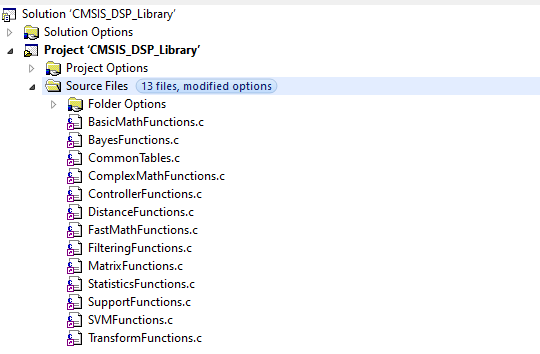
Below are instructions for using each source file.
- BasicMathFunctions
Provides various basic arithmetic functions for floating-point numbers, such as addition, subtraction, multiplication, and division. For M0/M3, only Q operations can be used, i.e., files ending with _q7, _q15, _q31; while M4F can directly perform hardware floating-point calculations, belonging to files ending with _f32.
- CommonTables
The arm_common_tables.c file provides bit-reversal parameter tables.
- ComplexMathFunctions
Complex mathematical functions, such as vector processing and modulus operations.
- ControllerFunctions
Control functions, mainly for PID control functions.
- FastMathFunctions
Fast mathematical function functions provide a 256-point cosine and sine function table and the ability to calculate cosine and sine values for any angle, as well as Q value square root calculations:
-
Arm_cos_f32/_q15/_q31.c: Provides a 256-point cosine function table and the ability to calculate cosine values for any angle. -
Arm_sin_f32/_q15/_q31.c: Provides a 256-point sine function table and the ability to calculate sine values for any angle. -
Arm_sqrt_q15/q31.c: Provides a function to compute square roots using an iterative method. For M4F, square root operations are completed by executing the VSQRT instruction. -
FilteringFunctions
Filtering function capabilities, mainly for FIR and LMS (Least Mean Squares) filtering functions.
- MatrixFunctions
Matrix processing functions.
- StatisticsFunctions
Statistical function functions, such as calculating averages, computing RMS, calculating variance/standard deviation, etc.
- SupportFunctions
Support function functions, such as data copying, conversion between Q format and floating-point format, and conversion between any Q format.
- TransformFunctions
Transformation functions, including complex FFT (CFFT)/inverse complex FFT (CIFFT), real FFT (RFFT)/inverse real FFT (RIFFT), and DCT (Discrete Cosine Transform) along with associated initialization functions.
Preprocessor Macros
- ARM_MATH_BIG_ENDIAN:
Defines the macro ARM_MATH_BIG_ENDIAN to build the library for big-endian targets. By default, the library is built for little-endian targets.
- ARM_MATH_MATRIX_CHECK:
Defines the macro ARM_MATH_MATRIX_CHECK to check the input and output sizes of matrices.
- ARM_MATH_ROUNDING:
Defines the macro ARM_MATH_ROUNDING for rounding support functions.
- ARM_MATH_LOOPUNROLL:
Defines the macro ARM_MATH_LOOPUNROLL to enable manual loop unrolling in DSP functions.
- ARM_MATH_NEON:
Defines the macro ARM_MATH_NEON to enable the Neon version of DSP functions. By default, it is not enabled since performance depends on the compiler and target architecture.
- ARM_MATH_NEON_EXPERIMENTAL:
Defines the macro ARM_MATH_NEON_EXPERIMENTAL to enable certain DSP functions.
- ARM_MATH_HELIUM:
Means flags ARM_MATH_MVEF and ARM_MATH_MVEI and ARM_MATH_FLOAT16.
- ARM_MATH_MVEF:
Selects f32 algorithms, meaning ARM_MATH_FLOAT16 and ARM_MATH_MVEI.
- ARM_MATH_MVEI:
Selects the version of algorithms for int and fixed-point.
- ARM_MATH_FLOAT16:
Float16 implementations for some algorithms (requires MVE extension).
Applications and Testing
In extended Kalman filtering, there are many matrix inversion operations, such as the following function:
_Bool matrixAddF(DOUBLE_TEST* result, DOUBLE_TEST* m, unsigned int row, unsigned int col, DOUBLE_TEST add) {
   DOUBLE_TEST dt[row*col];
  memset(dt, add, sizeof(DOUBLE_TEST)*row*col);

  unsigned int i, j;
  for (i = 0; i < row; i++)
   for (j = 0; j < col; j++)
    result[i * col + j] = m[i * col + j] + add;
  return true;
}
Using the mathematical function acceleration can be changed to:
_Bool matrixAddF(DOUBLE_TEST* result, DOUBLE_TEST* m, unsigned int row, unsigned int col, DOUBLE_TEST add) {
   DOUBLE_TEST dt[row*col];
  memset(dt, add, sizeof(DOUBLE_TEST)*row*col);

  arm_mat_init_f32(&mtrin1, row, col, m);
  arm_mat_init_f32(&mtrin2, row, col, dt);
  arm_mat_init_f32(&mtrout, row, col, result);
  arm_mat_add_f32(&mtrin1, &mtrin2, &mtrout);
}
Another example:
_Bool matrixMult(DOUBLE_TEST* result, DOUBLE_TEST* m1, unsigned int row1, unsigned int col1, DOUBLE_TEST* m2, unsigned int row2, unsigned int col2) {
  if (col1 != row2)
     return false;

  unsigned int i, j, k;
  unsigned int M, N;
  M = row1;
  N = col2;
  DOUBLE_TEST sum = 0;
  for (i = 0; i < M; i++)
  {
   for (j = 0; j < N; j++)
   {
    sum = 0;
    for (k = 0; k < col1; k++)
     sum += m1[i * col1 + k] * (m2[k * col2 + j]);
   result[i * N + j] = sum;
   }
  }
  return true;
}
Can be changed to:
_Bool matrixMult(DOUBLE_TEST* result, DOUBLE_TEST* m1, unsigned int row1, unsigned int col1, DOUBLE_TEST* m2, unsigned int row2, unsigned int col2) {
  if (col1 != row2)
     return false;
  arm_mat_init_f32(&mtrin1, row1, col1, m1);
  arm_mat_init_f32(&mtrin2, row2, col2, m2);
  arm_mat_init_f32(&mtrout, row1, col2, result);
  arm_mat_mult_f32(&mtrin1, &mtrin2, &mtrout);

  return true;
}
The definition of arm_mat_init_f32 is in arm_math.h, as follows:
  /**
   * Floating-point matrix initialization
   * [in,out] S         points to an instance of the floating-point matrix structure.
   * [in]     nRows     number of rows in the matrix.
   * [in]     nColumns  number of columns in the matrix.
   * [in]     pData     points to the matrix data array.
   */
void arm_mat_init_f32(
        arm_matrix_instance_f32 * S,
        uint16_t nRows,
        uint16_t nColumns,
        float32_t * pData);
The arm_mat_add_f32 function is as follows:
  /**
   * Floating-point matrix addition
   * [in]  pSrcA  points to the first input matrix structure
   * [in]  pSrcB  points to the second input matrix structure
   * [out] pDst   points to output matrix structure
   * return     The function returns either
   */
arm_status arm_mat_add_f32(
  const arm_matrix_instance_f32 * pSrcA,
  const arm_matrix_instance_f32 * pSrcB,
        arm_matrix_instance_f32 * pDst);
The arm_mat_sub_f32 function is as follows:
  /**
   * Floating-point matrix subtraction
   * [in]  pSrcA  points to the first input matrix structure
   * [in]  pSrcB  points to the second input matrix structure
   * [out] pDst   points to output matrix structure
   * return     The function returns either
   */
arm_status arm_mat_sub_f32(
  const arm_matrix_instance_f32 * pSrcA,
  const arm_matrix_instance_f32 * pSrcB,
        arm_matrix_instance_f32 * pDst);
The structures arm_status and arm_matrix_instance_f32 defined in the above functions are as follows:
/**
 * Error status returned by certain functions in the library.
 */
typedef enum
{
  ARM_MATH_SUCCESS        =  0,        /**< No error */
  ARM_MATH_ARGUMENT_ERROR = -1,        /**< One or more arguments are incorrect */
  ARM_MATH_LENGTH_ERROR   = -2,        /**< Length of data buffer is incorrect */
  ARM_MATH_SIZE_MISMATCH  = -3,        /**< Size of matrices is not compatible with the operation */
  ARM_MATH_NANINF         = -4,        /**< Not-a-number (NaN) or infinity is generated */
  ARM_MATH_SINGULAR       = -5,        /**< Input matrix is singular and cannot be inverted */
  ARM_MATH_TEST_FAILURE   = -6         /**< Test Failed */
} arm_status;

/**
 * @brief Instance structure for floating-point matrix structure
 */
typedef struct
{
  uint16_t numRows;     /**< number of rows of the matrix.     */
  uint16_t numCols;     /**< number of columns of the matrix.  */
  float32_t *pData;     /**< points to the data of the matrix. */
} arm_matrix_instance_f32;
After testing, using hardware acceleration, my program’s running speed increased by 10 times, and running the extended Kalman filter is no longer slow.
Reference: https://www.keil.com/pack/doc/CMSIS/DSP/html/index.html
‧‧‧‧‧‧‧‧‧‧‧‧‧‧‧‧ END ‧‧‧‧‧‧‧‧‧‧‧‧‧‧‧‧Recommended Reading:
Embedded Programming Collection
Linux Learning Collection
C/C++ Programming Collection

Qt Advanced Learning Collection
Follow my WeChat public account, reply “Add Group” to join the technical exchange group according to the rules.
Click “Read the original text” for more shares.