In cloud computing, The so-called virtualization technology can generally be divided into virtual machine technology and container technology. A virtual machine is a Virtual Machine (VM), while a container is a Container. So what is Docker virtualization technology? Let’s take a look:
Docker is a lightweight virtualization technology. Compared to traditional virtual machines, Docker containers implement virtualization at the operating system level, directly reusing the host’s operating system, while the traditional method virtualizes its own system based on hardware and then deploys relevant applications on that system. It is also an open-source application container runtime environment setup platform that allows developers to conveniently package applications into a portable container, which can then be installed on any server running Linux or Windows systems. Compared to traditional virtual machines, Docker containers have three main characteristics:
-
Lightweight:
-
Multiple Docker containers running on a single host can share the host’s operating system kernel; they start quickly and occupy very little computing and memory resources.
-
Standard Open:
-
Docker containers are based on open standards and can run on all mainstream Linux versions, Microsoft Windows, and any infrastructure including VMs, bare metal servers, and cloud.
-
Safe and Reliable:
-
Docker provides isolation for applications that is not limited to isolation from each other but is also independent of the underlying infrastructure. Docker defaults to providing the strongest isolation, so if an application has issues, it only affects that single container and does not impact the entire host.
Let’s review the deployment process to see why containers are so useful.
1. Stages of Application Deployment
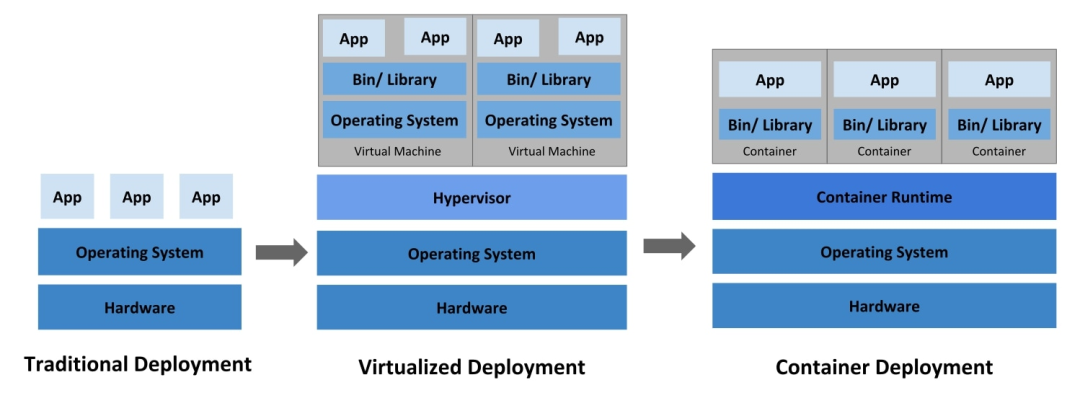
1. Traditional Deployment Stage
In the early days, we ran applications on physical servers. There was no way to define resource boundaries for applications on physical servers, leading to resource allocation issues. For example, if multiple applications were running on a physical server, one application might consume most of the resources, resulting in poor performance for other applications. The solution was to run each application on different physical servers. However, this method could not scale due to underutilization of resources, and the cost of maintaining many physical servers was high.
The biggest problem with traditional deployment models is waste of resources
2. Virtualization Deployment Stage
After virtualization technology was introduced, it allowed us to run multiple virtual machines (VMs) on a single physical server’s CPU. Virtualization allows applications to be isolated between virtual machines, avoiding resource conflicts and providing a certain level of security since one application’s information cannot be freely accessed by another application.
Virtualization allows us to better utilize the resources of physical servers, offering better scalability as applications can be easily added or updated, reducing hardware costs, etc. Through virtualization technology, we can represent a set of physical resources as a cluster of one-time virtual machines.
Each VM runs all components (including its own operating system) on top of virtualized hardware.
3. Containerization Deployment Stage
Containers are similar to VMs, but they have looser isolation properties to share the operating system between applications. The essence of a container is processes (using NameSpace for isolation, Cgroups for limits, and rootfs for a special filesystem), thus containers are considered to be lighter than VMs. Like virtual machines, containers have their own filesystem, CPU sharing, memory, process space, etc. Because they are decoupled from the underlying infrastructure, they can be ported across cloud and operating system versions.
Container technology can help enterprises break free from vendor lock-in.
2. What Are the Functions of Containers? What Problems Do They Solve?
Containers are widely summarized as:
-
Containers are an isolation technology based on operating system capabilities.
-
The essence of a container is a set of processes that are resource-limited and isolated from each other.
Containers share the host’s kernel, occupy little resources, and are lightweight, benefiting applications.
-
Docker is currently the mainstream containerization tool, and Kubernetes (k8s) is the mainstream container orchestration management tool.
-
Docker is based on two functionalities of the Linux kernel:
-
Namespace: We know that PID, IPC, network, and other resources in Linux are global, while the Namespace mechanism is a resource isolation scheme. Under this mechanism, these resources are no longer global but belong to a specific Namespace, and resources under each Namespace do not interfere with each other, making each Namespace look like an independent operating system. However, Namespace alone is not enough.
-
Control groups: Although the Namespace technology can achieve resource isolation, processes can still access system resources uncontrolled, such as CPU, memory, disk, network, etc. To control the access of processes in containers to resources, Docker uses control groups technology (cgroup), which allows controlling the consumption of system resources by processes in containers, such as limiting the maximum memory usage for a container and specifying which CPUs it can run on.
What Problems Do Containers Solve?
Actually, the content explained through the evolution of application deployment methods summarizes the main problems solved by containers (which are also their benefits):
-
Solves the cumbersome online process
-
Solves the low resource utilization issue
-
Solves the issue of untimely scaling up/down
-
Solves the bloated server environment issue
-
Solves the inconsistent environment issue
3. Differences Between Virtual Machines and Containers
A virtual machine (VM) is best described as a software program that emulates the functions of physical hardware or computing systems. It runs on a piece of emulation software called a hypervisor, which replicates the functionality of the underlying physical hardware resources. These resources can be called the host machine, while the virtual machine running on the hypervisor is usually referred to as the guest machine.
Containerization creates an abstract concept at the operating system level so that individual modular functions of applications can run independently. Therefore, several isolated workloads – containers – can dynamically run using the same physical resources. The less strict technical definition of a container can be: a software unit that, while lightweight, can still bundle code, its dependencies, and configuration into a single image.
Namespaces are an advanced concept in Linux, where each Namespace has its own independent resources without the need for actual partitioning of the underlying hardware. Namespaces are used to virtualize the underlying operating system.
Summary
-
Virtual Machines
-
Enhance server resource utilization
-
Provide a fully isolated environment (OS-level)
Containers
-
Containers provide a basic independent environment, achieving container isolation and resource limitation.
-
Containers mainly solve application-level problems, achieving rapid deployment and efficient management.
Personally, I feel that we should not simply compare virtual machines and containers because, as we can see from the above summaries and comparisons, their focus and purposes are different. The reason they are compared is that they are both means of virtualization.
In fact, in cloud platforms, I believe that the following image (image by bluetata, please indicate the source) better reflects the relationship between virtual machines and containers; they complement each other and work together with different roles:
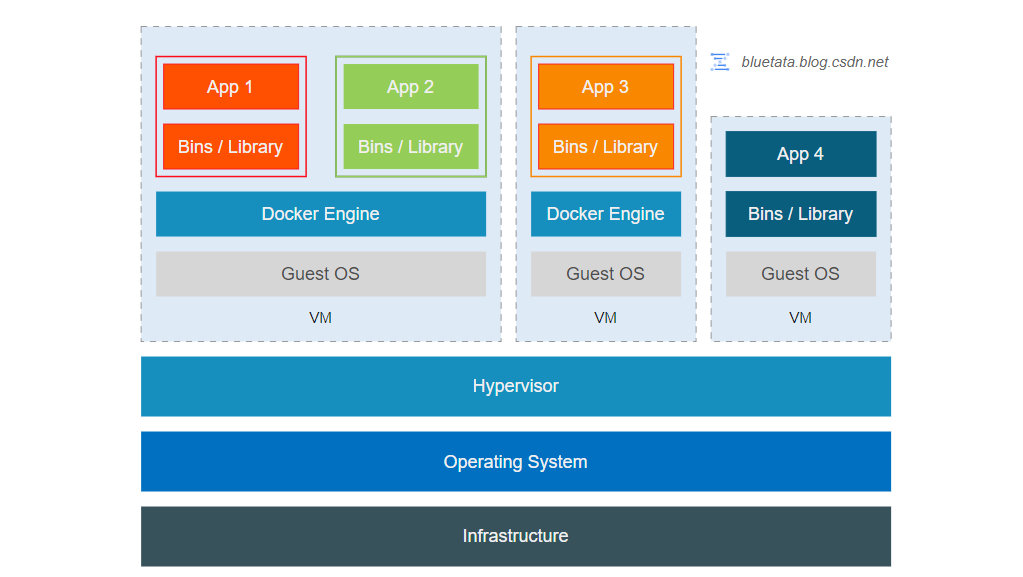
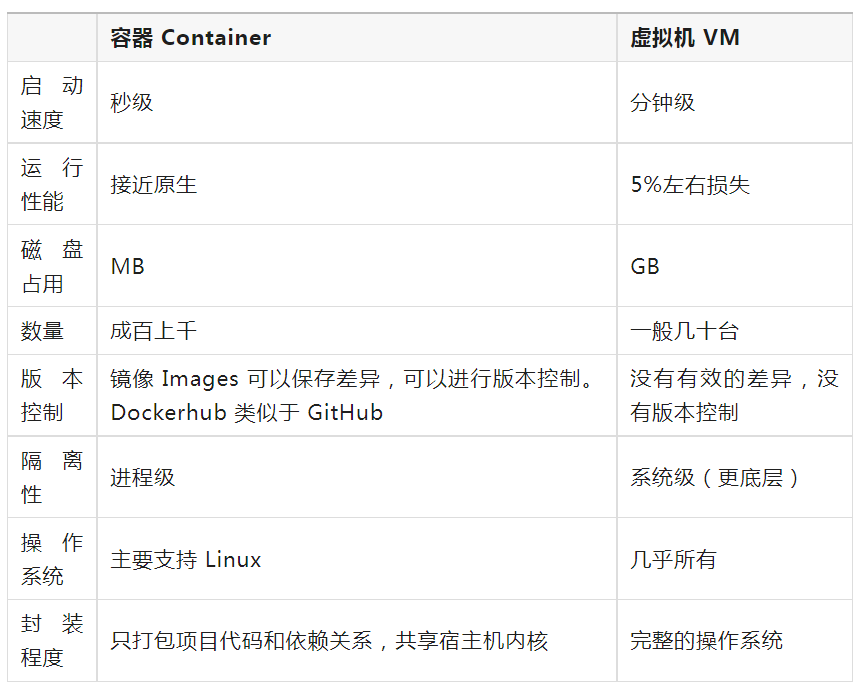
If we really want to compare virtual machines and containers, a summary comparison table can refer to the following:
Docker is an open-source project that emerged in early 2013, initially an amateur project within dotCloud company. It is implemented based on the Go language launched by Google. The project later joined the Linux Foundation and follows the Apache 2.0 license, with the project code maintained on GitHub.
The Docker project is just one implementation of container technology, and because it is the most popular tool for managing containers, it has become synonymous with container technology. Other notable container tools include: rkt, Podman, LXC, containerd, Buildah, etc.
Docker uses a client-server (C/S) architecture model, which consists of a client (Client) and a server (Server).
The main architectural components of Docker are as follows: 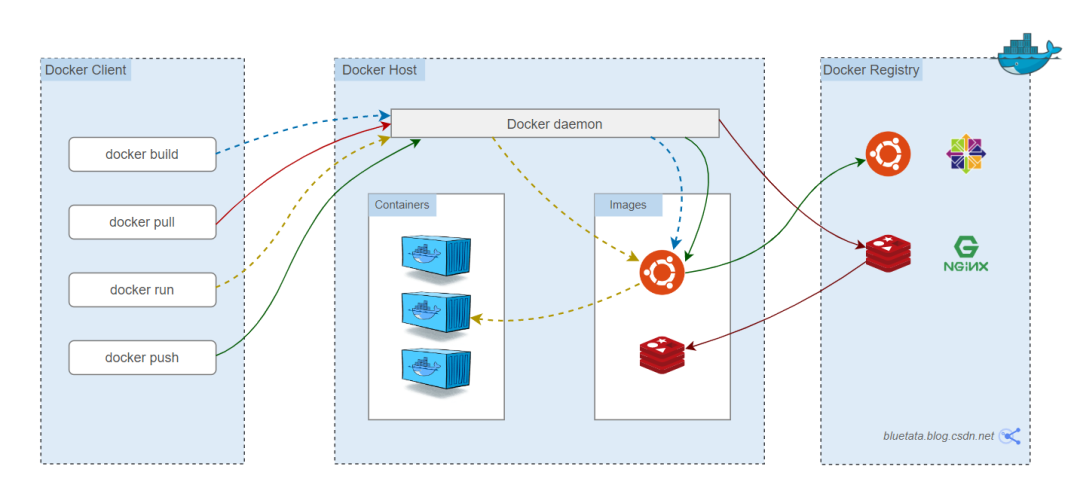
1. Docker Client
The Docker Client communicates with the Docker daemon through the command line or other tools using the Docker API/SDK. For example, when using the docker run command, the Docker Client sends it to dockerd to perform the corresponding function.
In summary, some features of the Docker Client are:
-
The Docker Client can interact with multiple Docker daemons.
-
The Docker Client uses the Docker API through the command line or other tools.
-
The Docker Client and server communicate via Socket or RESTful API.
-
The Docker Client can connect to local or remote daemons.
2. Docker Host
A physical or virtual machine used to execute the Docker daemon and containers.
3. Docker Daemon
The Docker daemon (dockerd) listens for Docker API requests and manages Docker objects such as images, containers, networks, and volumes.
For example: it receives and processes requests sent by the Docker client. The daemon starts a server in the background, which is responsible for accepting requests sent by the Docker client; after receiving a request, the server routes and dispatches to find the appropriate handler to execute the request.
4. Docker Container
Similar to a lightweight sandbox, it can be seen as a minimal Linux system environment (including root privileges, process space, user space, and network space, etc.). Containers are created based on Docker images, which are static definitions; containers are the entities that run the images; they can be created, started, stopped, deleted, paused, etc. Containers run independently as one or more applications.
5. Docker Images
Docker images contain packaged applications and their dependencies, available file systems, and other metadata. Docker images are templates used to create Docker containers.
6. Docker Registry
The registry is used to store Docker images, divided into public and private registries. You can upload images to a registry and then download them to another computer to run.
Docker Hub is a public registry maintained by Docker, from which Docker defaults to look for images. We can also maintain our private image hosting service.
When using docker pull or docker run commands, the required images will be pulled from the configured registry. When using the docker push command, the images will be pushed to the configured registry.
1. Used as a Cloud Host
Compared to virtual machines, containers use a series of very lightweight virtualization technologies, making their startup, deployment, upgrade, and management processes as fast as those of processes, providing flexibility and feeling almost indistinguishable from virtual machines. Therefore, some people directly use Docker’s Ubuntu and other images to create containers as lightweight virtual machines.
2. Used as a Service
If you only use Docker containers as lightweight fixed virtual machines, that can only be considered an alternative use. The most important value of Docker containers lies in providing a complete set of platform-independent standardized technologies that simplify the deployment, upgrading, and maintenance of services. As long as various services that need operations and maintenance are packaged into standard containers, they can run in any environment that can run Docker, achieving out-of-the-box effectiveness. This feature is the fundamental reason why Docker containers have become popular worldwide.
-
Web application services
-
Continuous integration and continuous deployment
3. Microservices Architecture Usage
If the above two application scenarios are not enough to illustrate the significant advantages compared to traditional PaaS platforms, then the seamless support for the complex and flexible usage scenarios of microservices architecture is absolutely revolutionary.
Microservices architecture continues to decouple traditional distributed services into smaller service modules, which can be independently deployed and upgraded. These characteristics align perfectly with the lightweight and efficient deployment of containers.
4. How Enterprises Implement Containers
Enterprises should not hesitate to add containers to their tool pool. Want to leverage them? Here are some ways to start utilizing containers:
● Understand your current environment. Analyze your applications and check the environments that suit them best. Are yourefactoring existing applications or building new ones? If you are interested in refactoring, start with independent applications that can run without interacting with other applications.
● Cultivate promoters. Someone (or many people) in your organization may have their own ideas about containerization strategies. Talk to them, learn from them, and consider making them promoters of this activity.
● Designate a project. Identify a small project to start, designate a project team, and set rough project goals. Assess changes along the way.
● Encourage participation in training. Learning new technologies takes time. Consider attending relevant training courses, or at least provide developers with dedicated learning time.
If enterprises wish to leverage DevOps to accelerate the continuous release of microservices-based distributed application functionalities, they will continue to increase containerization investments, especially in areas where virtualization cannot achieve these goals.
Long press to recognize the QR code below to consult and register immediately~
▼

Registration Hotline: 400-808-2006

1. Virtualization Container Technology Docker + K8s Advanced Training
2. Practical Training Course on Machine Learning, Deep Learning, and Computer Image Processing Technology
3. LINUX Application and Core Technology Practice Training Course
4. Oracle Database Management and Tuning Advanced Training
5. VUE3.0 Technical Practical Training Course from Practice to Source Code Analysis