Bluetooth is a familiar technology to everyone, as we have all used it to some extent. But what about Bluetooth modules in microcontrollers? This article will take you into the world of Bluetooth modules.
1
Introduction to Bluetooth Modules
A Bluetooth module is a commonly used wireless communication module, widely applied in various smart devices. A wireless Bluetooth module refers to a chip that integrates Bluetooth functionality for short-range 2.4G wireless communication.
For end users, the Bluetooth module is a semi-finished product. By further developing and packaging the module, a final product that utilizes Bluetooth communication can be achieved. Low Energy Bluetooth modules (BLE) refer to modules that support Bluetooth protocol 4.0 or higher, also known as BLE modules.
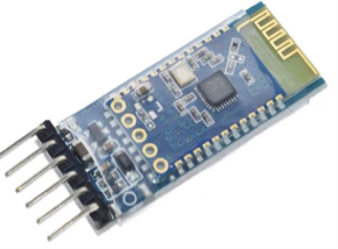
JDY-31
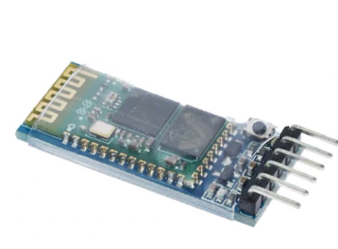
HC-05
More Bluetooth modules can be searched independently.
2
Versions
Bluetooth versions include V1.0, V2.0, V3.0, and V4.0, with V4.0 being the latest. Bluetooth is backward compatible; for example, a phone with V2.0 cannot search for or recognize a Bluetooth 3.0 module, but the reverse is possible.
Due to special settings for Bluetooth devices on Apple devices, Bluetooth serial modules prior to V4.0 cannot be directly used with Apple. If you are using an Apple device and encounter pairing issues with the Bluetooth module, you can try searching for LightBlue in the app store. As for the usage of LightBlue, I am not very clear, but those who need it can explore (or buy an Android device instead~).
3
Operating Modes
Bluetooth modules have two operating modes:
Command Response Mode and Auto-Connect Mode.
When the module is in Auto-Connect Mode, it will automatically connect based on pre-set data transfer methods; when in Command Response Mode, it can execute AT commands, allowing users to send various AT instructions to set control parameters or issue control commands to the module.
AT commands can only take effect when the module is not connected; once the Bluetooth module is connected to a device, it enters Data Transparent Mode (AT commands are used for the connection and communication between terminal devices and PC applications, with AT standing for Attention. AT commands are strings that start with AT and end with a character, and the response data of the AT command is included. Each command has a corresponding return indicating success or failure.)
The AT command set for different Bluetooth modules varies, and it is generally provided in the Chinese data manual from the seller.
4
Configuration
Connect the Bluetooth module to the RXD, TXD, GND, and VCC of a USB to TTL converter. Press and hold the small button on the Bluetooth module, then power on (holding during power on is configuration mode; powering on directly is normal operating mode). Use Bluetooth testing software to enter absolute AT mode to retrieve module information.
Usually, you can configure the baud rate, master/slave settings, and pairing password to set module parameters, device name, connection password, etc. Ensure the baud rate is consistent; otherwise, garbled characters may appear, preventing successful information exchange.
The Bluetooth module can be used as a full-duplex serial port without needing to understand complex Bluetooth protocols.
5
Hardware Connections
Similar to connecting conversion modules, connect the RX of the Bluetooth module to the TX of the microcontroller, the TX of the Bluetooth module to the RX of the microcontroller, and connect the VCC and GND pins. Other pins usually do not need to be connected.
6
Program
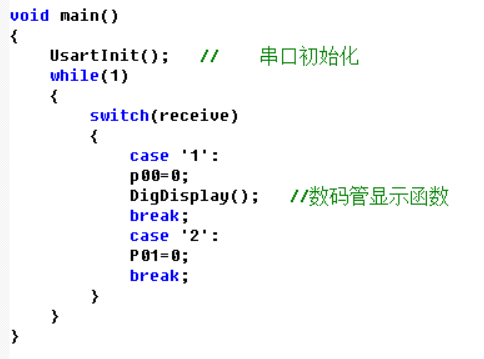
The following program connects to Bluetooth via a mobile phone, sending ‘1’ through the Bluetooth Serial Assistant to execute the digital tube display function, and sending ‘0’ to turn off the digital tube.
Main function👇
Receiving data in the interrupt👇
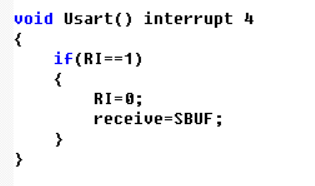
The serial interrupt of the 51 microcontroller receives data byte by byte. For example, if the phone sends data “123” to the microcontroller, the interrupt function will trigger three times, receiving the data “123” in three parts, one character at a time.
7
Mobile Operation
Connect to Bluetooth via a mobile phone and send data through the Bluetooth Serial Assistant (find the Bluetooth Serial Assistant directly in the mobile app store).
The Bluetooth module has an indicator light. Before a successful Bluetooth connection, the red light on the Bluetooth module keeps flashing. After a successful connection, the red light stops flashing. Each time a command is sent, the serial debugging assistant on the computer can receive messages sent from the mobile phone.
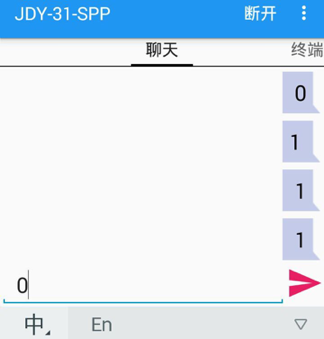
Most Bluetooth serial apps can modify the button names on the mobile page as needed.
Once the communication between the Bluetooth module and the mobile phone is debugged successfully, you can send specific characters through the mobile Bluetooth Serial Debug Assistant to execute commands on the microcontroller. You can try making a Bluetooth remote-controlled car, controlling home appliances, etc.
This is a simple usage of a Bluetooth module.
There are various operations to explore on your own~
This article is reprinted from: MCU Development StationDisclaimer: This article is a reprint, and the purpose of this reprint is to convey more information. Copyright belongs to the original author.
MCU Development Station
Follow the latest information and related technical applications in MCU development, and share insights on innovative MCU designs with MCU development enthusiasts!