Today, I will share 10 classic interview questions.
Colleagues who have interviewed for operations positions have likely encountered the following questions. How did you respond at that time?
1. How to check system resource usage?
Interviewer’s Purpose: To assess your understanding of Linux system performance monitoring.
Common Commands:
top             # Display system running information in real-time (CPU, memory, processes)
htop            # Enhanced version of top (requires installation)
free -h         # Check memory usage
df -h           # Check disk usage
du -sh *        # Space occupied by each folder in the current directory
vmstat 1 5      # Display virtual memory usage
iostat -x 1     # I/O load (requires sysstat installation)
uptime          # Check system uptime and average load
2. How to check if a port is occupied?
Interviewer’s Purpose: To troubleshoot port conflicts or check if a service has started successfully.
Common Commands:
netstat -tulnp | grep :port_number
ss -tulnp | grep :port_number  # Recommended, more efficient
lsof -i:port_number            # Check which program occupies the port
3. How to add execute permissions to a file?
Interviewer’s Purpose: To assess understanding of Linux permission mechanisms.
Command Examples:
chmod +x script.sh         # Add execute permission
chmod 755 script.sh        # rwxr-xr-x: commonly used for executable scripts
ls -l                      # Check permissions

# chown command to change owner and group
chown liyb.liyb script.sh  # Change the owner and group of the script to liyb

# The -R option can apply permissions recursively
4. How to view detailed information about a process?
Interviewer’s Purpose: To locate process resource usage and troubleshoot issues.
Common Commands:
ps aux | grep process_name           # Find process PID and status
top -p PID                    # View dynamic resource usage for a specified PID
cat /proc/PID/status          # View detailed status of the process
lsof -p PID                   # View files opened by the process
strace -p PID                 # Trace system calls (for troubleshooting hangs)
5. What is the difference between soft links and hard links?
Interviewer’s Purpose: To assess understanding of file systems.
- Soft Link: Similar to a Windows shortcut, points to a file path.
- Hard Link: Points to the same inode, does not depend on the file name.
Differences:
-
Deleting the original file: Soft link becomes invalid, hard link remains usable.
-
Cross-partition: Soft link can, hard link cannot.
-
Directory: Hard links are usually not allowed to be created.
ln -s source.txt softlink.txt     # Create a soft link
ln source.txt hardlink.txt        # Create a hard link
6. What to do if the Linux system load is high?
Interviewer’s Purpose: To assess system performance tuning capabilities.
Troubleshooting Steps:
Confirm Load:
   uptime     # Check load average (last 1, 5, 15 minutes)
   top        # View processes consuming CPU and memory
Check I/O Pressure:
   iostat -x 1
   iotop              # Real-time view of I/O heavy processes
Memory Check:
   free -m
   vmstat 1 5
Log Check:
dmesg | tail       # Kernel error messages
journalctl -xe     # View recent system errors
Advanced Tools:
<span>strace</span>,<span>perf top</span>,<span>sar</span>etc. for in-depth performance analysis
7. What is the Linux boot process?
Interviewer’s Purpose: To assess understanding of system internals.
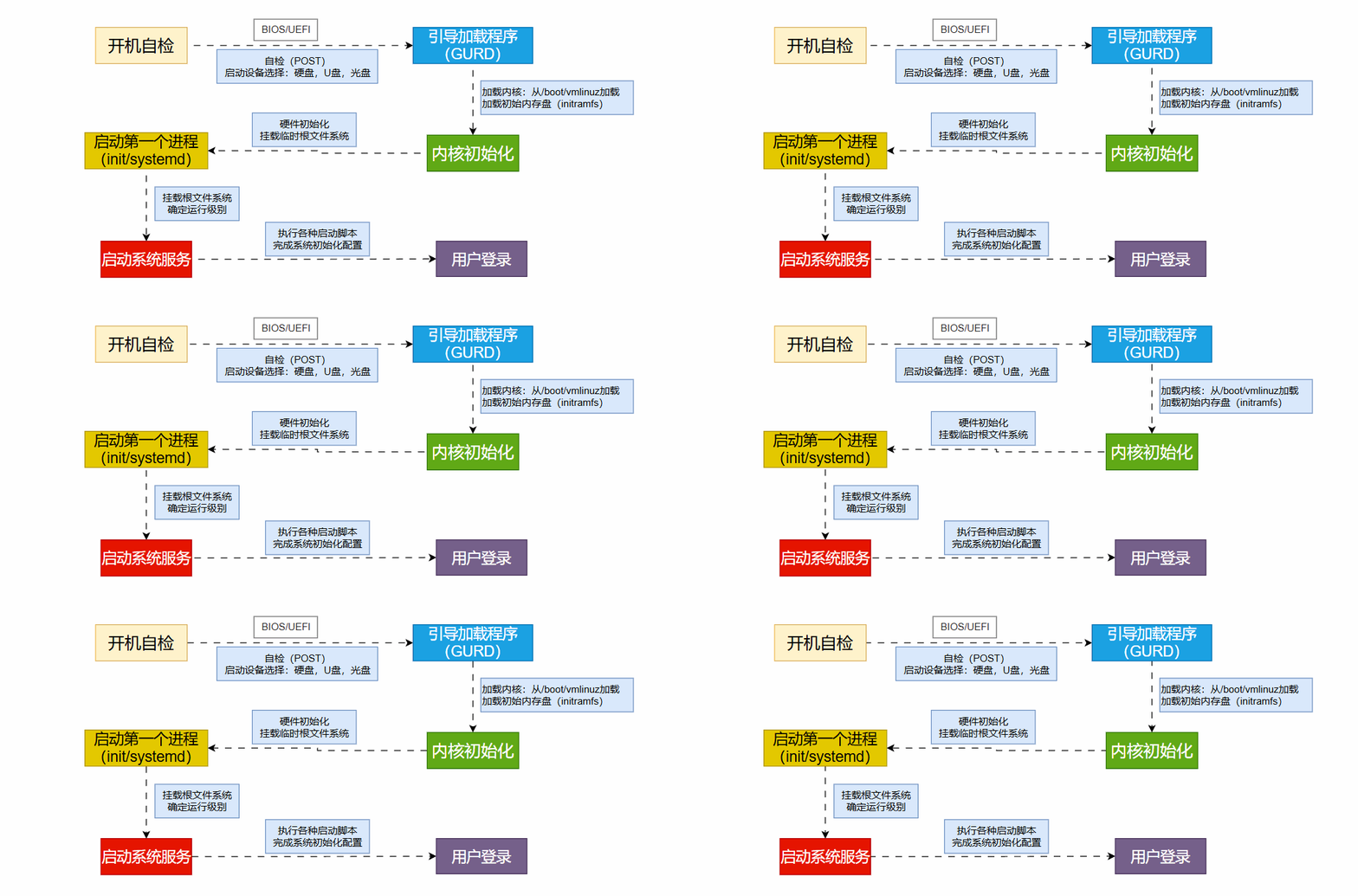
Boot Process:
- BIOS Power-On Self-Test (POST);
- Load MBR boot sector, boot GRUB;
- GRUB loads the kernel (vmlinuz) and initializes the filesystem (initrd/initramfs);
- Start the first user-space process:
<span>/sbin/init</span>or<span>systemd</span>; - systemd executes service startup logic, entering multi-user or graphical mode;
- User login.
8. How to view and analyze system logs?
Interviewer’s Purpose: To assess troubleshooting capabilities.
Log Locations:
/var/log/messages      # System log (traditional Linux)
/var/log/syslog        # Debian system
/var/log/dmesg         # Boot hardware log
journalctl  -xe             # systemd log viewer
Some are application logs, which need to be checked based on actual configuration paths. When viewing logs, it is common to use<span>tail -f </span> to continuously view log output.
9. How to set up scheduled tasks in Linux?
Interviewer’s Purpose: To assess automation capabilities.
Setting Scheduled Tasks:
crontab -e           # Edit current user's scheduled tasks
crontab -l           # View current tasks
Syntax Structure:
* * * * * command_to_run
Minute Hour Day Month Week Command to execute
Example: Execute backup script at 3 AM every day
0 3 * * * /home/user/backup.sh
10. How to find files or content?
Interviewer’s Purpose: To assess command line efficiency and file management skills.
Finding Files:
find /path -name "*.log"           # Find by name
find / -type f -size +100M         # Find large files
Finding File Content:
grep "keyword" filename
grep -r "keyword" ./               # Recursive search
find . -type f | xargs grep "keyword"
This is just a simple example; find and grep have other parameters, and you can discuss more if you are familiar with them.
The above interview questions are mostly entry-level. If you master them, it indicates you have a certain foundation in Linux.
Feel free to share this with your technical friends, and let me know in the comments if there are any classic interview questions you would like to add, so we can grow together!
If you need technical support or want to join the discussion group, add me on WeChat: lige_linux
Previous Exciting Articles:
Summary of K8S Commands【Personal Collection】| K8S Cluster Deployment | K8S Storage Practical Cases |K8S Certificate Renewal for Ten Years | K8S Deployment of Prometheus |Rancher Deployment and Management of K8S |Jenkins Installation and Deployment |Gitlab Installation and Deployment |Service Mesh Istio Installation and Practice |Building an Enterprise-Level Harbor Repository |K8S Integration with Harbor Repository |Summary of Common Docker Commands |Solutions for Docker Image Download Issues |Three Methods to Install Docker |Summary of Basic Docker Concepts |Oracle 19C RAC Cluster Setup |Summary of Oracle Cluster Management Commands |MySQL Cluster Installation and Deployment |MySQL One-Click Backup Script |MySQL Cluster Directory Migration |Redis Three Masters and Three Slaves Cluster Deployment |150 Common Linux Commands | 8 Interesting Linux Commands |Summary of Network Card Configuration Methods for Mainstream Linux Operating System Versions, Recommended for Collection! |Detailed Explanation of Firewalld Firewall | Building Internal Yum Repository |Comprehensive Disk Expansion Methods |Out-of-Band Management Knowledge for ServersRecommended optimizations to perform after installing the operating system!