Dear friends, today I would like to introduce you to Tock. You might find this name a bit unfamiliar, but once you learn about its powerful features, you will definitely fall in love with this operating system. Especially if you are involved in embedded system development, this article will be helpful for you!
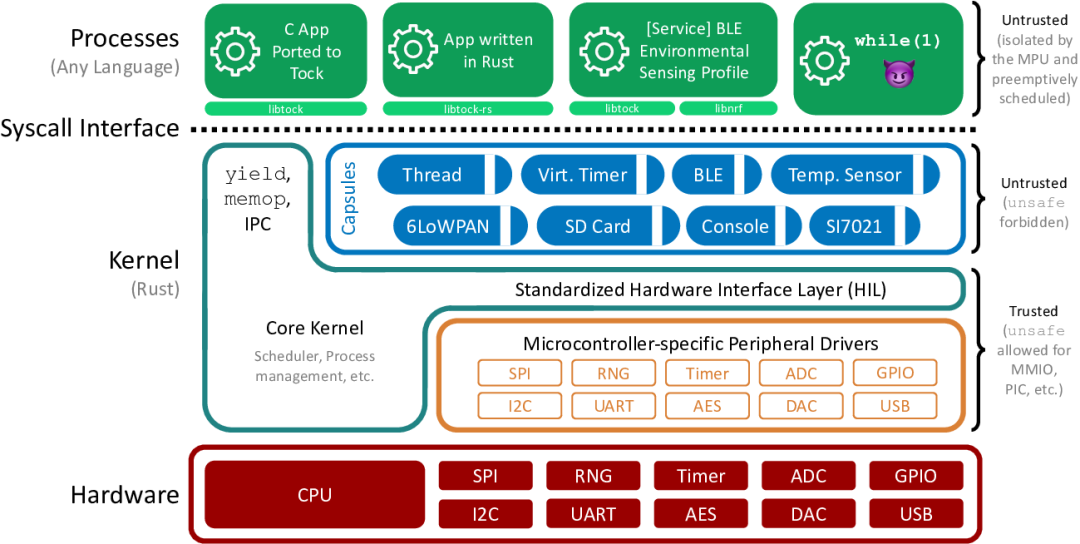
What is Tock?
In simple terms, Tock is an embedded operating system designed specifically for embedded platforms such as Cortex-M and RISC-V. Its biggest highlight is the ability to securely run multiple mutually untrusting applications simultaneously on the same hardware. Just think about it, this not only improves efficiency but also addresses security issues; sounds impressive, right?
The design philosophy of Tock revolves around “protection.” It not only prevents potential malicious applications from interfering with the system but also ensures that device drivers do not affect each other. In other words, Tock guarantees the stability and security of the operating system!
What Problems Does It Solve?
Tock primarily addresses the following pain points:
- 1. Securely Running Multiple Applications: Previously, only a single application could run on embedded devices, but Tock allows multiple applications to run in parallel without interference, which is truly worry-free.
- 2. Memory Safety: The kernel and device drivers are written in Rust, ensuring memory safety and type safety, thus avoiding common memory error issues.
- 3. Isolation Mechanism: Tock implements isolation between applications through a Memory Protection Unit (MPU), so even if one application encounters a problem, it will not affect other applications.
Getting Started with Tock
If you want to try Tock, you can follow the steps below:
- 1. Environment Setup: Ensure you have a development board that supports Cortex-M or RISC-V.
- 2. Clone the Code Repository:
git clone https://github.com/tock/tock.git cd tock - 3. Compile and Download: Depending on your hardware, follow Tock’s documentation to compile the program and download it to the development board.
- 4. Run the Application: You can refer to the example applications provided by Tock for easy functionality testing.
Code Example
Here is a code snippet for a simple application written in Tock. Suppose you want to create a project that blinks an LED on Tock:
#![no_std]
#![no_main]

use kernel::prelude::*;
use kernel::hil::gpio;

struct App {
    led: &'static dyn gpio::LED,
}

impl kernel::App for App {
    fn init(&self, _process: &kernel::ProcessId) {
        self.led.on();
    }
}

#[no_mangle]
pub unsafe fn main() {
    let led = /* get LED device handle */;
    let app = App { led };
    app.init(/* pass process ID */);
}
This small example controls an LED switch on Tock, and you will find that writing embedded applications is not that complicated.
Pros and Cons of Tock
Of course, Tock also has some notable pros and cons:
Pros:
- • Multi-Application Support: Can safely and efficiently run multiple applications simultaneously.
- • Using Rust Language: Ensures memory safety and reduces crash risks.
- • Active Community: Provides rich documentation and resources, making it easy to get started.
Cons:
- • Learning Curve: If you are not familiar with Rust, it may be a bit challenging at first.
- • Hardware Dependency: Can only be used on devices that support Cortex-M and RISC-V.
Conclusion
In summary, Tock is an exciting embedded operating system with an innovative design philosophy and high security, allowing you to be more efficient in developing multiple applications. If you are looking for an effective solution to tackle everyday embedded development challenges, Tock is definitely worth trying.
Project Address:https://github.com/tock/tock