Embedded Linux: A Comprehensive Guide to Pointers
This article aims to summarize the learning of pointers in C language. If you like it, feel free to follow, as I will continue to update knowledge related to Embedded Linux.
1. The Relationship Between Pointers and Arrays
1. What is a Pointer?
Like data types such as int, char, and float, a pointer is also a data type in C language, but it stores the address of a variable instead of the variable’s value.
The pointer we usually refer to is typically a pointer variable, which is a variable used to store memory addresses.
Summary: A pointer is an address.
2. Definition and Initialization of Pointers
Syntax format: data type * pointer variable name = [initial address value].
int a = 10;
int *pa = &a;
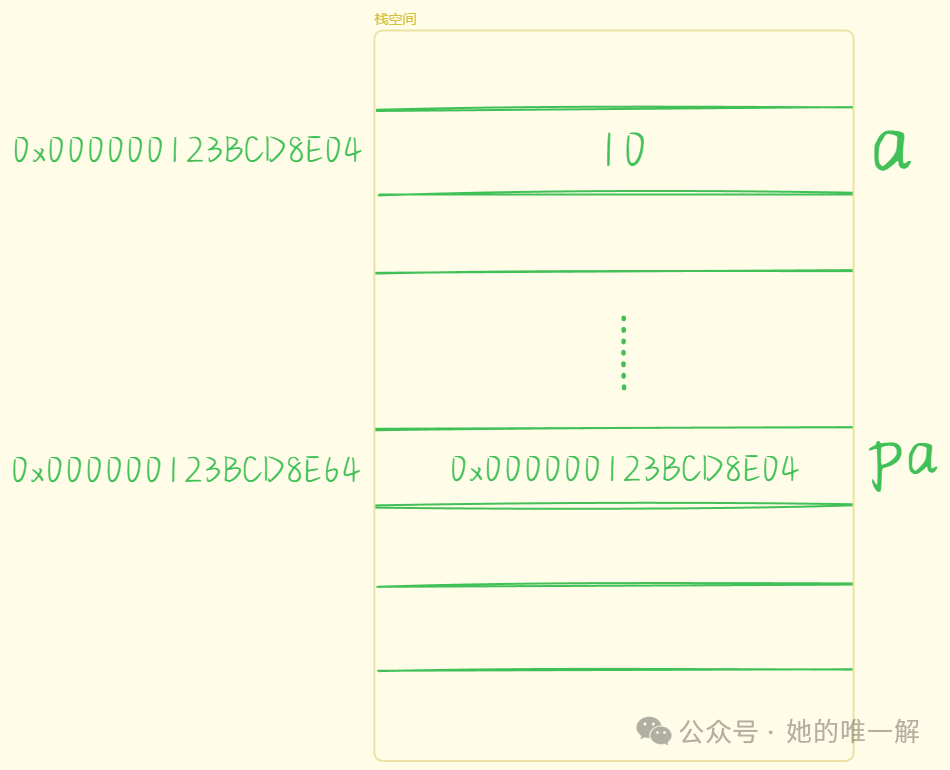
The size of a pointer variable is 4 bytes on a 32-bit platform and 8 bytes on a 64-bit platform. In hexadecimal, this can be represented as 64/4 = 16 bits, so the addresses printed on a 64-bit computer contain 16 hexadecimal digits. Pointer variables can be initialized with the address of a defined variable, an already initialized pointer variable of the same type, or NULL (null pointer). When declaring a variable, if there is no specific address to assign, it is a good programming practice to assign a NULL value to the pointer variable.
int *pa = NULL;
3. Dereferencing Pointers
The address operator & and the dereference operator * are used together.
int a = 10;
int* pa = &a;
printf("%d\n", *pa);
The address of a is stored in the pointer variable pa using the address operator &, and then the value stored at that address is accessed using the dereference operator *: the data 10 stored in a. This is the dereferencing of a pointer.
Earlier, the concept of a null pointer was mentioned; here we will also add the concept of a wild pointer, which points to an unknown address. The following situations can lead to wild pointers:
- Using a pointer without initialization.
int *p; // Local variable pointer not initialized, defaults to a random value
*p = 10;
- Pointer out-of-bounds access.
#include <stdio.h>
int main()
{
 int arr[10] = { 0 };
 int* p = arr;
 for (int i = 0; i <= 11; i++)
 {
  // Pointer points beyond the range of array arr
  *(p++) = i;
 }
 return 0;
}
- Pointer pointing to space that has been freed without being set to NULL.
This is related to dynamic memory allocation; after freeing dynamic memory, the pointer should also be set to NULL.
All the above situations can cause the pointer to point to an unknown address. Dereferencing wild pointers or null pointers is not allowed, especially dereferencing a null pointer, which is an illegal operation.
4. Pointer Types and Pointed Types
These two concepts are crucial for understanding pointers. It is important to distinguish between them. When defining a pointer, I prefer to separate the pointer name from the *, attaching the * to the preceding type to emphasize the type.
int* ptr1; // Pointer type is int*; pointed type is int
char* ptr2; // Pointer type is char*; pointed type is char
int** ptr3; // Pointer type is int**; pointed type is int*
Removing the pointer name leaves the pointer type (which determines how the pointer is interpreted), and removing one * from the left leaves the pointed type, which is the type obtained after dereferencing the pointer variable once.
int a = 0x12345678;
int *p1 = &a;
char *p2 = &a;

printf("p1 = %p\n", p1); // Different pointer variables can point to the same address
printf("p2 = %p\n", p2);

printf("++p1 = %p\n", ++p1); // Increment step size is related to type
printf("++p2 = %p\n", ++p2);

printf("a = %x\n", *p1); // Since p1 is of type int*, it accesses 4 bytes at once
printf("a = %x\n", *p2); // Since p2 is of type char*, it accesses 1 byte at a time
return 0;
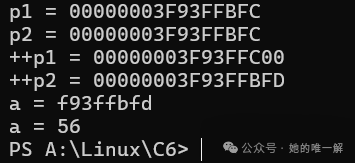
The type of the pointer determines the step size of the pointer.
A char* type pointer stores the address of a char type variable, and each step skips one char type, which is 1 byte.
A short* type pointer stores the address of a short type variable, and each step skips one short type, which is 2 bytes.
An int* type pointer stores the address of an int type variable, and each step skips one int type, which is 4 bytes.
5. Pointer Arithmetic
- Pointer ± an integer adds or subtracts a number of bytes according to the pointed type.
- Pointer ± Pointer: pointers of the same type can be added or subtracted, indicating how many elements have been traversed, with the length determined by the pointer type.
6. Single Pointer and One-Dimensional Array
As mentioned earlier, the type of the pointer determines how far the pointer moves forward or backward. For example, a char* type pointer stores the address of a char type variable, and each step skips one char type, which is 1 byte; an int* type pointer stores the address of an int type variable, and each step skips one int type, which is 4 bytes. Therefore, we can also access arrays through pointers.
int arr[10] = { 1,2,3,4,5,6,7,8,9,10 };
int* p = arr; // The address of the first element of the array is stored in p
for (int i = 0; i < 10; i++)
{
 // printf("%d ", arr[i]); or printf("%d ", *(arr + i));
 printf("%d ", *(p + i)); // printf("%d ", p[i]); is also correct
}
The name of a one-dimensional array can also represent the address of the first element. So what is the difference between it and a single pointer? Although the one-dimensional array name and a single pointer (pointing to a single element) have many similarities in usage, they have essential differences.
| Feature | One-Dimensional Array Name (e.g., <span>int arr[5]</span>) |
Single Pointer (e.g., <span>int* ptr</span>) |
|---|---|---|
| Type | Array type (<span>int[5]</span>) |
Pointer type (<span>int*</span>) |
| Stored Content | Address of the first element of the array (implicit conversion) | Stores the address of a variable |
| Memory Usage | Does not occupy extra memory (symbol table records) | Occupies memory (usually 4/8 bytes to store the address) |
| Modifiability | Cannot be modified (constant identifier) | Can be modified (point to another address) |
<span>sizeof</span> Behavior |
Returns the size of the entire array (e.g., <span>5*sizeof(int)</span>) |
Returns the size of the pointer itself (4/8 bytes) |
<span>&</span> Operation Result |
Returns the array pointer type (<span>int(*)[5]</span>) |
Returns the pointer’s pointer (<span>int**</span>) |
7. Pointers and Strings
When defining a string, you can use a character array or a character pointer pointing to the address of the first character of the string.
char* ps = "abcdef"; // Pointer variable method (read-only memory area)
char s[] = "abcdef"; // Character array method (stack area)
char* ps1 = s;
printf("%s\n", ps);
printf("%s\n", ps1);
If two pointers point to the same string constant, C/C++ will store the constant string in a separate memory area. When several pointers point to the same string, they actually point to the same memory block.
However, using the same constant string to initialize different arrays will open up different memory blocks (arrays are stored in the stack).
char* ps1 = "abcdef"; // Pointer variable method (read-only memory area)
char* ps2 = "abcdef";
char s1[] = "abcdef"; // Character array method (stack area)
char s2[] = "abcdef";
Here, ps1 = ps2, but s1 ≠ s2. At the same time, the value of the string in the read-only storage area cannot be changed, while the string in the stack can be changed.
char* ps = "hello";
p[1] = 'a'; // Error
char str[] = "hello";
str[0] = 'w'; // Correct
8. Double Pointers
Single pointer variables can store addresses of various types of variables, while the “address of a pointer variable” can be stored in a double pointer.
int a = 0;
int* pa = &a; // Single pointer
int** ppa = &pa; // Double pointer

**ppa = 25; // Two dereferences
printf("%d\n", a);
printf("%d\n", *pa);
printf("%d\n", **ppa);
** ppa = * (* ppa) = * pa = a = 25
The type pointed to by a double pointer is a pointer type, interpreted as int*, so double pointer +1 equals adding 4 bytes (32-bit) or 8 bytes (64-bit).
9. Constant Pointers and Pointer Constants
- Constant Pointer – A pointer that points to a constant.
A constant pointer is essentially a pointer, where the constant indicates the content pointed to, meaning that the pointer points to a “constant.” Constants cannot be changed, so the content pointed to by the pointer cannot be changed; however, the pointer’s direction can change.
int a = 10;
int b = 20;
const int* p = &a;  // p is a constant pointer
// int const* p = &a; // Both notations are the same as long as const is on the left of *
//*p = 100;  // Error: Cannot change the value of the space pointed to by the pointer
p = &b;   // The pointer's direction can change
- Pointer Constant – A constant of pointer type.
Essentially a constant, the pointer indicates the type of constant, meaning that this constant is a pointer type constant.The value of the pointer itself is a constant and cannot be changed, always pointing to the same address,and must be initialized at the time of definition. However, the content pointed to can change.
int a = 10;
int b = 20;
int* const p = &a; // Pointer constant
// p = &b; // Error: The pointer's direction cannot change
*p = 100; // The value of the space pointed to by the pointer can change
The two can be determined by the * combined with priority or the position of const and *.
10. Pointer Arrays and Array Pointers
- Pointer Array – An array that stores pointers (the type can be determined by the last phrase).
- Definition of Pointer Array
int* array[5];
array is an array with 5 elements, each element being of type int*. The priority of [ ] is higher than *, so arr is first combined with [ ], determining that it is an array, and each element is a pointer to int type, thus it is a pointer array.
- Usage of Pointer Array
int arr[3][5] = { 1,2,3,4,5,6,7,8 };
int* p[3] = { arr[0], arr[1], arr[2] }; // Save the address of the first element of each row of the array
for (int i = 0; i < 3; i++)
{
 for (int j = 0; j < 5; j++)
 {
   printf("%d ", p[i][j]); // printf("%d ", *(*(p + i) + j));
 }
 printf("\n");
}
p is first an array, and the 3 elements in the array are of type int*, initializing each element with the address of the first element of each row of the two-dimensional array. The usage of p is equivalent to that of a two-dimensional array.
- Array Pointer – A pointer that points to an array (can also be identified by the last phrase).
- Definition of Array Pointer
int (*array)[5];
Since the binding of [ ] is higher than *, parentheses are added to make arr first bind with *, indicating that arr is a pointer, and the type pointed to is int[5], meaning it points to an array of length 5 of int type, thus it is an array pointer.
- Usage of Array Pointer
int arr[10] = { 1,2,3 };
int (*p)[10] = &arr;
for(int i = 0; i < 10; i++)
 printf("%d ", (*p)[i]);
& arr is upgraded from int[10] type to int (* )[10] type, and then * p is downgraded to int[10] type, which is used as a one-dimensional array name.
int arr[3][5] = { 1,2,3,4,5,6,7,8 };
int(*p)[5] = arr;
for (int i = 0; i < 3; i++)
{
 for (int j = 0; j < 5; j++)
 {
   printf("%d ", p[i][j]); // printf("%d ", *(*(p + i) + j));
 }
 printf("\n");
}
array itself is of type int (* )[5], so after assignment, it can be used as a two-dimensional array name.
2. Pointers and Functions
1. One-Dimensional Arrays and Function Parameters
#include <stdio.h>
void test(int a[]) // √
{}   // When passing an array, the number of elements can be omitted
void test(int a[10]) // √
{}   // Normal parameter passing
void test(int* a) // √
{}   // When passing an array, the address of the first element is passed, and a pointer is just an address, so it receives normally
void test(int (*a)[10]) // √
{}  // Array pointer, pointing to an array with 10 int elements, meets arr conditions, can receive
void test2(int* a[20]) // √
{}   // Normal parameter passing
void test2(int** a) // √
{} // arr2 is a pointer array, the elements in the array are pointers, and the array name is also the address of the first element, which can be received by a double pointer
int main()
{
 int arr[10] = { 0 };
 int* arr2[20] = { 0 };
 test(arr);
 test2(arr2);
 return 0;
}
When using a one-dimensional array as a function parameter, whether int a[] or int a[10], they will ultimately be converted to int* a type by the compiler.
2. Two-Dimensional Arrays and Function Parameters
void test(int arr[3][5]) // √
{}   // Normal parameter passing
void test(int arr[][]) // ×
{}      // Cannot omit the number of columns
void test(int arr[][5]) // √
{}   // Can omit the number of rows
void test(int* arr) // ×
{}   // A two-dimensional array passes the address of the first row, and the address of the array cannot be received by a single pointer
void test(int* arr[5]) // ×
{}   // This is an array of pointers, not a pointer, nor a two-dimensional array, completely unrelated
void test(int(*arr)[5]) // √
{}   // Array pointer, pointing to an array with 5 int elements, can receive the address of the first row of a two-dimensional array
void test(int** arr) // × Type mismatch
{}   // A double pointer is used to receive the address of a single pointer, and cannot receive the address of an array
int main()
{
 int arr[3][5] = { 0 };
 test(arr);
}
In defining a two-dimensional array, the number of rows can be omitted, but the number of columns cannot be omitted, as the number of rows cannot determine the number of columns. Similarly, when passing a two-dimensional array, the function parameters can only omit the first [ ] number. Therefore, there are only three ways to pass a two-dimensional array: do not omit either, omit the number of columns, or use an array pointer.
Note: The address of a two-dimensional array is different from the address of the first element of the array! The address of the array must be dereferenced to obtain the address of the first element.
3. Single Pointer and Function Parameters
When a function’s parameter is a single pointer, what parameters can the function accept?
void test(int* p)
{
}
 int a = 10;
test(&a); // Address of the variable

int* p = &a;
test(p); // Single pointer

int arr[5];
test(arr); // Address of the first element of the array
A single pointer as a function parameter can accept the address of a variable, as well as pointers and the address of the first element of an array.
4. Double Pointer and Function Parameters
When the function parameter is a double pointer, what parameters can it accept?
void test(int** ptr)
{
}
 int* p;
test(&p); // Address of the single pointer

int** pp;
test(pp); // Double pointer

int* arr[10]; // Pointer array, the elements in the array are of type int*
test(arr); // Passes the address of the first element of the array, which is of type int* pointer, can be received by a double pointer
It can accept the address of a single pointer, a double pointer, and a pointer array.
5. Function Pointers
Like variables, functions also have corresponding addresses, and you can define a pointer variable pointing to that function. Such a pointer is called a function pointer, and function pointers can be used to call functions and pass parameters just like regular functions.
- Definition of Function Pointer
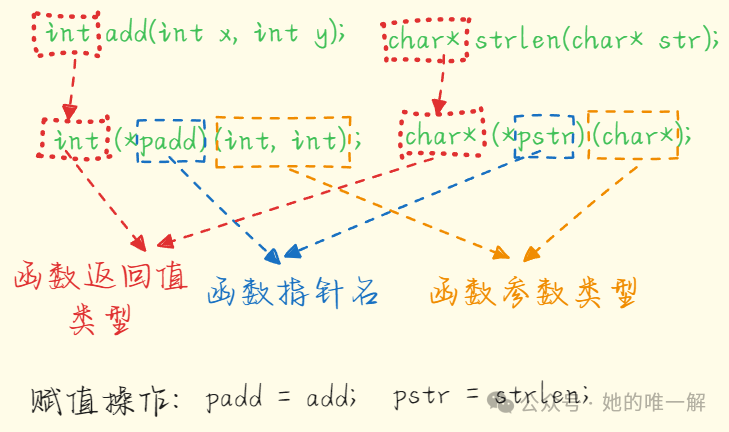
- Usage of Function Pointer
#include <stdio.h>
int Add(int x, int y)
{
 return x + y;
}
int main()
{
 int(*pf)(int, int) = Add; // int(*pf)(int, int) = &Add;
 int ret = pf(3, 5); // int ret = (*pf)(3, 5); both ways are fine
 printf("%d\n", ret);
 return 0;
}
Why can both methods be used here?
 int a[4];
 int * ptr = a;
 ptr[ 1 ] = 42;    // Access through pointer
 *(ptr + 1) = 42;  // Access through dereferencing
Similar to arrays, the function pointer p( ) and (* p)( ) also reflect this “syntactic sugar” concept.
6. Function Pointer Arrays
Storing the address of functions in an array creates a function pointer array, which stores the addresses of functions.
#include <stdio.h>
// Function declarations can omit parameter names, only types are retained, but function definitions cannot omit them, otherwise they cannot be used in the function
int getNumSum(int, int);
int getMaxNum(int, int);
int getMinNum(int, int);
int main()
{
 int a = 10;
 int b = 20;
 int* p1[2] = {&a, &b}; // Pointer array
 int ret; // Return value
 // Note that parentheses cannot be omitted  int* p[4]; // Definition of pointer array, function pointer array is defined on this basis by adding an array bracket
 int (*p[3])(int, int) = {getMaxNum, getMinNum, getNumSum}; // Function pointer array, but the addresses of three function entry points are inside
 printf("a = %d b = %d\n", a, b);
 for(int i = 0;i < 3; i++)
 {
  ret = (*p[i])(a, b);
  printf("Result: %d\n", ret); // Print
 }
 return 0;
}
// Problem: Given two integers a and b, find the larger one, the smaller one, and their sum
// Similar to Java interfaces, call different functions based on different situations during program execution
int getNumSum(int a, int b)
{
 return a + b;
}
int getMaxNum(int a, int b)
{
 int max;
 max = (a > b) ? a : b;
 return max;
}
int getMinNum(int a, int b)
{
 int min;
 min = (a < b) ? a : b;
 return min;
}
This program executes different functions based on the different values in the function pointer array. When declaring a function pointer array, you only need to add [ ] after the function pointer definition in the variable name.
7. Pointer to Function Pointer Arrays
A pointer to a function pointer array is a pointer that points to an array, where each element is a function pointer.
#include <stdio.h>
void test(const char* str)
{
 printf("%s\n", str);
}
int main()
{
 // Function pointer pf
 void (*pf)(const char*) = test;
 // Function pointer array pfArr
 void (*pfArr[5])(const char* str);
 pfArr[0] = test;
 // Pointer to function pointer array pfArr
 void (*(*ppfArr)[5])(const char*) = &pfArr;
 return 0;
}
First, ppfArr combines with * to indicate it is a pointer. Removing the variable name leaves ( * ( * )[ 5 ] ), ( * )[ 5 ] indicates it is a pointer to an array of length 5, and ( * ( * )[ 5 ] ) indicates that each element of the array is a pointer, and the pointer points to a function of type void ( * )(const char * ).
8. Callback Functions
If you pass the pointer (address) of a function as a parameter to another function, when this pointer is used to call the function it points to, we say this is a callback function. A simple example of a callback function is as follows.
#include <stdio.h>
// Function declarations can omit parameter names, only types are retained, but function definitions cannot omit them, otherwise they cannot be used in the function
int getNumSum(int, int);
int getMaxNum(int, int);
int getMinNum(int, int);
int dataHandle(int, int, int (*p)(int, int));
int main()
{
 int a = 10;
 int b = 20;
 int cmd; // User input 1-3
 int ret; // Return value
 int (*p)(int, int); // Function pointer p, several functions have the same parameters, can define one
 printf("a = %d b = %d\n", a, b);
 printf("Please enter 1 (to get the maximum), 2 (to get the minimum), 3 (to sum)\n");
 scanf("%d", &cmd);
 switch(cmd)
 {
  case 1:
   p = getMaxNum;
   break;
  case 2:
   p = getMinNum;
   break;
  case 3:
   p = getNumSum;
   break;
  default:
   printf("Input error\n");
   break;
 }
 ret = dataHandle(a, b, p); // Call function
 printf("Result: %d\n", ret); // Print
 return 0;
}
// Problem: Given two integers a and b, input 1, 2, 3, input 1 gives the larger one, input 2 gives the smaller one, input 3 sums them
// Similar to Java interfaces, call different functions based on different situations during program execution
int getNumSum(int a, int b)
{
 return a + b;
}
int getMaxNum(int a, int b)
{
 int max;
 max = (a > b) ? a : b;
 return max;
}
int getMinNum(int a, int b)
{
 int min;
 min = (a < b) ? a : b;
 return min;
}
int dataHandle(int a, int b, int (*p)(int, int)) // The third parameter is a function pointer // The variable name in the third parameter can be omitted, only the type is retained, as it will not allocate memory space
{
 int ret;
 ret = (*p)(a, b); // Execute
 return ret;
}
This function receives different function pointers and then performs different tasks through dataHandle(int a, int b, int (* p) (int a, int b)).
After reading this, I believe you have a deeper understanding of pointers, functions, and arrays. Now let’s do some exercises.
- Determine the pointer types based on the definitions below:
- int* p[10];
- int(*p)[10];
- int(*p[10])[5];
- int* (*p)[5];
- int (**p)[5];
2. Based on the description, provide the definition of the pointer:
- A pointer to a pointer;
- A pointer to an array of 10 integers;
- An array of 10 pointers, each pointing to an integer;
- A pointer to a pointer, where the pointed pointer points to an array of 10 integers;
- A pointer to a function that has one integer parameter and returns an integer;
- An array of 10 pointers, each pointing to a function that has one integer parameter and returns an integer;
- A function pointer that points to a function with two integer parameters and returns a function pointer, which points to a function with one integer parameter and returns an integer;
Do not peek at the answers (the answers are below).
Question 1
- p is an array with 10 elements, each element being of type int*.
- p is a pointer to an array, pointing to an array with 10 elements, each element being of type int.
- p first combines with [10] to form an array, with 10 elements, each of type int(* )[5], p is an array storing array pointers.
- p first combines with * to form a pointer, pointing to an array with 5 elements, each element being of type int*, so this array is a pointer array. p is a pointer to a pointer array.
- p is a pointer, (** p) is a double pointer, (**p)[ 5 ] is an array of length 5. The elements of the array are of type int.
Question 2
- int** p;
- int (* p)[10];
- int* p[10];
- int(** p)[10];
- int (* p)(int);
- int (* p[10])(int);
- int(* (* a)(int, int))(int);
Summary: When determining pointer types, remove the pointer name from the pointer declaration statement, and the remaining part is the type of the pointer; remove the pointer name and the pointer declaration symbol * to the left of the pointer name, and the remaining part is the type pointed to by the pointer. Alternatively, analyze from the name outward according to priority.
Thank you for watching!!!