Follow+Star Public Account Number, don’t miss out on exciting content
Author | strongerHuang
WeChat Public Account | strongerHuang
Recently, some fans have asked: How to add software version information to microcontroller projects?
We all know about software version information, for example: V1.0.0
For microcontroller projects, we need to manage software versions, including source code and microcontroller firmware (hex, bin, etc.).
Source Code Software Version
How do you usually manage the version of the software source code?
Compressed packaging? It can’t be that way, right?
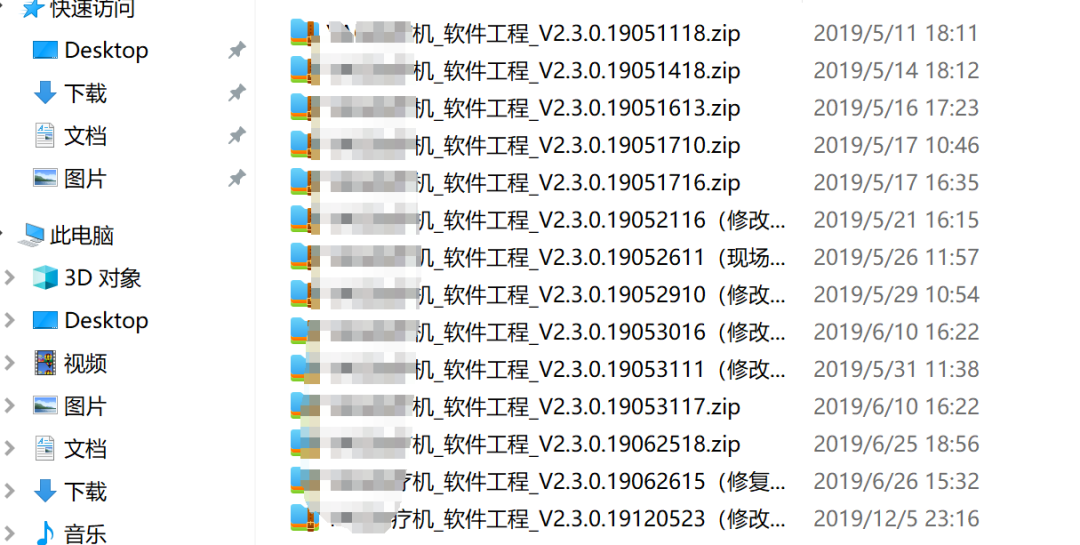
Using compressed packaging is not impossible, but it can be a bit troublesome to check changes later.
For companies with a certain level of management capability, it is better to use software version control tools, such as: SVN, Git, etc.
In the early days, we used SVN more, and later switched to Git,these two commonly used tools are not difficult, and there are many tutorials online.
Firmware Version
Microcontroller firmware usually refers to executable files like hex and bin.
1. Firmware Name Version
The name of the firmware (hex, bin) can be automatically configured and generated during compilation.
You can refer to my previous article:Method to Customize Hex File Names in Keil
2. Adding Version Information to Firmware
To read the software version information in microcontroller products, we need to include version information in the firmware. (For devices that are mass-produced and shipped across the country with different versions, it is very necessary to include version information. Otherwise, if a device has a bug, we won’t know which version of the software it is)
Next, I will share a commonly used and basic technique: in the Keil MDK environment, directly map the software code and store it at a specified address in Flash.
It includes: software version, compilation date,compilation time,the code is as follows:
#define VERINFO_ADDR_BASE   (0x0800FF00) // Address to store in FLASH
const char Software_Ver[] __attribute__((at(VERINFO_ADDR_BASE + 0x00)))  = "Software: 1.0.0";
const char Compiler_Date[] __attribute__((at(VERINFO_ADDR_BASE + 0x40))) = "Date: " __DATE__;
const char Compiler_Time[] __attribute__((at(VERINFO_ADDR_BASE + 0x60))) = "Time: " __TIME__;
Can everyone understand this code? It actually writes this string of information (the date and time generated automatically during compilation) into Flash.After writing successfully, we can read the corresponding address to see the version information, for example: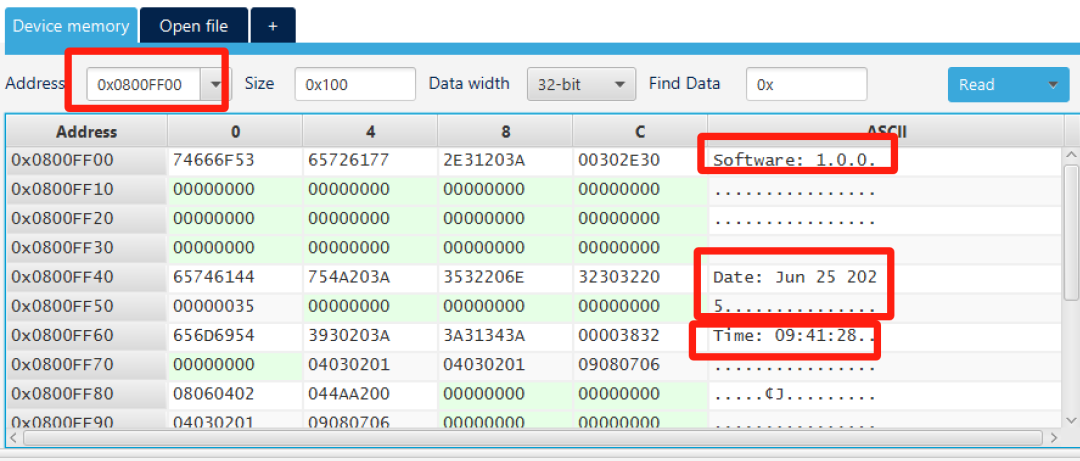 The principle is very simple, and there are similar methods for writing to Flash addresses (which I will not discuss here).There are several important knowledge points in this, let me describe them below.
a. __attribute__ Syntax
Attribute, translated as “attribute”, is a keyword in C language, and the syntax format is:
__attribute__ ((attribute-list))__attribute__ can set function attributes (Function Attribute), variable attributes (Variable Attribute), and type attributes (Type Attribute).
This part of the content does not need to be deeply understood; just knowing how to use it is enough. If you want to understand it in depth, there are many learning resources online.
b. C Language Standard Definitions
In the code:
const char Compiler_Date[] __attribute__((at(VERINFO_ADDR_BASE + 0x40))) = "Date: " __DATE__;
const char Compiler_Time[] __attribute__((at(VERINFO_ADDR_BASE + 0x60))) = "Time: " __TIME__;
You will see that__DATE__ and __TIME__ represent the date and time.
In fact, these two are special standard definitions in C language.
__DATE__: The date string at the time of compilation, such as “Apr 13 2021”__TIME__: The time string at the time of compilation, such as “20:00:00”
In addition to these two, there are actually many similar standard definitions, such as:
__FILE__ : The name of the file being compiled__LINE__ : The line number of the file being compiled__STDC__: Determines whether the file is a standard C program
This part of the content can refer to my article:Several Special Standard Definitions and Their Usage in C Language
c. Always Compile Version Files
In Keil MDK, by default, source files are not modified and are only compiled once.
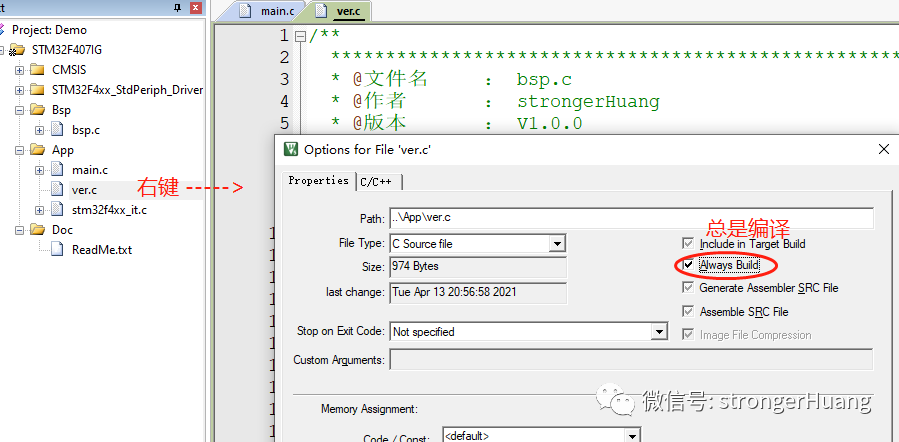
Therefore, to ensure that the version, date, and time are compiled correctly, settings need to be made:Always compile.
The settings are as follows:
 ———— END ————
● Column “Embedded Tools”“
● Column “Embedded Development”
● Column “Keil Tutorials”
● Selected Tutorials from the Embedded Column
Follow the public accountReply “Add Group” to join the technical exchange group according to the rules, reply “1024” to see more content.
Click “Read the original text” to see more shares.