
For those of you in the tech field, have you ever encountered the frustration of wanting to access your home NAS from the office, connect to a lab server while outside, or let friends experience your locally developed website, but are hindered by the lack of a public IP or unwillingness to pay for a cloud server?
Today, I would like to introduce a powerful tool for intranet penetration—frp, a well-known open-source utility in the programmer community! After using it, you will find that making intranet services “go global” can be so simple.
What is frp?
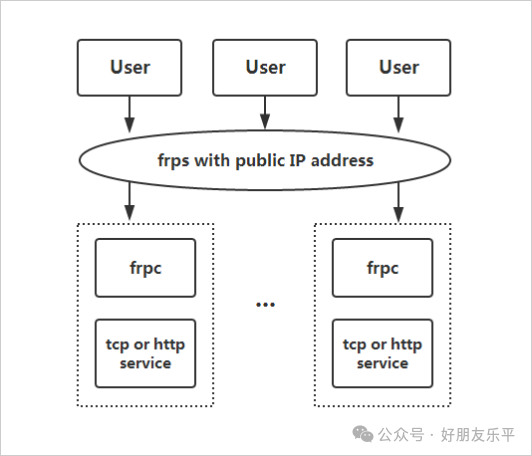
frp stands for Fast Reverse Proxy, a high-performance reverse proxy application focused on intranet penetration. In simple terms, it helps you expose services hidden behind routers and firewalls to the internet through a server with a public IP, allowing you to access them from anywhere.
This project has garnered nearly 100,000 stars on GitHub, which speaks volumes about its status among developers. Most importantly, it is completely open-source and free, following the Apache 2.0 license, so you can use it with confidence.
Core Features Unveiled
Comprehensive Protocol Support
frp is not a half-baked tool that can only handle HTTP; it supports multiple protocols including TCP, UDP, HTTP, and HTTPS. This means whether you need to penetrate SSH, remote desktop, web services, game servers, or any other network service, frp can handle it with ease.
For example, if you want to SSH into your home computer from outside, you just need to configure it simply, and you can connect directly using the public IP and port, as if your computer were on the public internet.
Flexible Port Management
frp supports port range mapping, allowing you to map multiple consecutive ports at once. If you have a game server cluster that needs to open ports from 6000 to 6010, traditional methods require configuring each one individually, while frp can handle it all at once using range syntax.
Even more impressive, it supports port reuse. HTTP and HTTPS services can share the same port, and frp will intelligently identify the protocol type and forward correctly. This is a lifesaver in environments where port resources are tight.
Robust Security Authentication
As a tool that exposes intranet services to the public, security is of utmost importance. frp offers various authentication methods, including traditional Token authentication and modern OIDC (OpenID Connect) authentication.
Token authentication is straightforward; you just need to configure the same key on both the server and client. OIDC authentication is more enterprise-level, allowing integration with your existing identity authentication system for unified permission management.
Advanced Features That You Will Love
P2P Direct Connection Mode
This is a black technology feature of frp. Most intranet penetration tools require data to be relayed through a server, which not only increases latency but also consumes server bandwidth. However, frp’s P2P mode allows two intranet devices to establish a direct connection, making data transfer as fast as if they were on the same local area network.
Of course, whether P2P can successfully establish a connection depends on the NAT type; if it fails, frp will automatically fall back to the traditional server relay mode to ensure connection reliability.
Load Balancing and High Availability
For scenarios with multiple servers, frp provides load balancing functionality. You can group multiple servers providing the same service, and frp will automatically distribute requests to different servers, enhancing both performance and reliability.
Combined with health check functionality, if a server encounters issues, frp will automatically remove it from the load balancing pool, ensuring high availability of services. Such enterprise-level features are rare in open-source software.
Data Transmission Encryption and Compression
frp supports encrypting and compressing transmitted data. Encryption ensures the security of data during public transmission, while compression significantly reduces bandwidth usage, especially effective for text data.
Moreover, frp enables TLS encryption by default, so you can enjoy secure data transmission without additional configuration.
Web Management Interface: Say Goodbye to Command Line Phobia
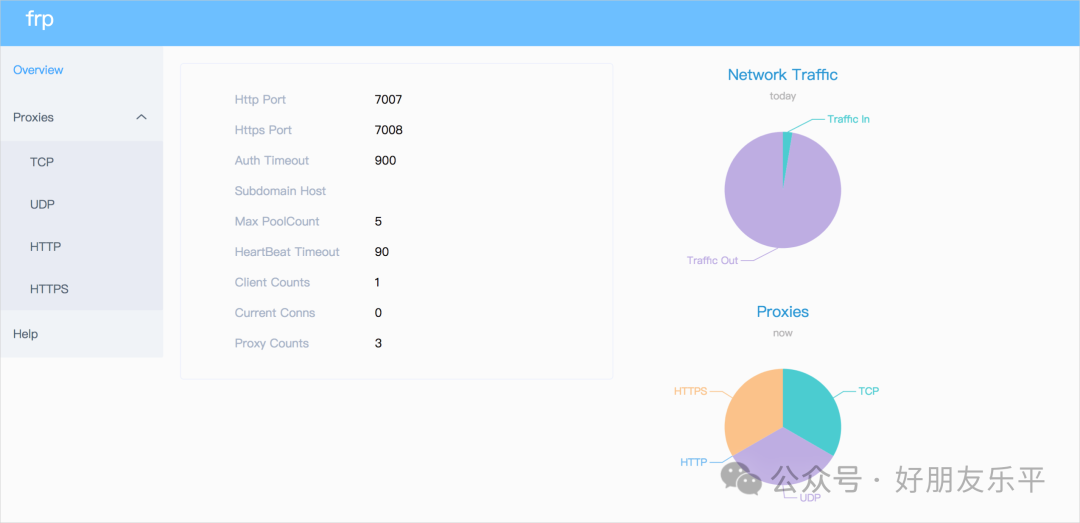
Many intranet penetration tools are purely command-line based, which can be unfriendly for beginners. frp thoughtfully provides a Web management interface, including a server Dashboard and a client Admin UI.
Through the Dashboard, you can view the status of all proxies, connection counts, traffic statistics, and more in real-time, all at a glance. It also supports Prometheus monitoring, allowing integration with your existing monitoring system.
The Admin UI makes client management easy; you can view and manage local proxy configurations through a web page, and it even supports hot reloading of configurations, allowing changes to take effect without restarting.
Unimaginable Configuration Flexibility
Support for Multiple Configuration File Formats
frp supports TOML, YAML, and JSON configuration formats, allowing you to choose the one you are most comfortable with. Configuration files also support environment variable references, making it easy to switch between different environments.
Even more powerful, you can split configurations into multiple files, with the main configuration file referencing other configuration files through the include directive, making it very convenient to manage a large number of proxies.
Intelligent Domain Name Routing
For web services, frp provides intelligent routing based on domain names and URL paths. You can route different domain names or different paths under the same domain to different intranet services.
For example, blog.example.com can be routed to your blog server, api.example.com to the API server, and example.com/files can be routed to the file server. This flexibility allows you to build a complex web service architecture with a single public IP.
Practical Application Scenarios
Remote Work Essential
With frp, you can set up a complete development environment at home and access it through intranet penetration from the office, just like being local. SSH connections, web development servers, databases, all can be accessed through penetration.
Home Automation Hub
Many people now have NAS, cameras, and smart home devices at home, but these devices usually can only be accessed within the local network. With frp, you can check on your home situation and manage files on your NAS from outside at any time.
Development and Testing Tool
During development, it is often necessary to let colleagues or clients experience features that are still in development. Traditional methods require either deploying to a test server or setting up a complex VPN. With frp, you can make your local development server accessible in just a few minutes.
Enterprise-Level Features
Bandwidth Limiting and Traffic Control
frp supports setting bandwidth limits for each proxy to prevent a single service from consuming too much bandwidth and affecting others. Additionally, limits can be set separately for clients and servers to meet different needs.
Connection Pool Optimization
For scenarios with a large number of short connections, frp provides a connection pool feature. The server will pre-establish a certain number of connections, and when new requests arrive, it will reuse them, greatly reducing the overhead of establishing connections.
TCP Multiplexing
frp supports multiplexing multiple logical connections over a single TCP connection, similar to HTTP/2 multiplexing. This not only reduces the number of connections but also improves transmission efficiency, especially in environments with high network latency.
Broad Protocol Support
In addition to common TCP/UDP, frp also supports emerging protocols like KCP and QUIC. KCP is a reliable transport protocol based on UDP, which performs better than TCP in high packet loss environments. QUIC is the next-generation internet transport protocol, promoted by Google, offering faster connection establishment and better multiplexing performance.
Plugin System for Extensibility
frp comes with a rich set of built-in plugins, including HTTP proxy, SOCKS5 proxy, static file service, and Unix domain socket forwarding. These plugins make frp not just an intranet penetration tool, but a versatile network proxy platform.
If the built-in plugins do not meet your needs, you can also develop custom plugins. frp provides a plugin development framework, and there are many third-party plugins available in the community.
Simple Installation and Deployment
Deploying frp is very simple; just download the binary file for your platform, configure it, and you’re good to go. It supports major operating systems like Windows, Linux, and macOS, and there’s an ARM version that can run on Raspberry Pi.
The server only requires a machine with a public IP, which can be a cloud server, VPS, or even a machine at home with a dedicated line. The client should be installed on the intranet machine that needs to be accessed.
Active Community Ecosystem
As a mature open-source project, frp has an active community ecosystem. Issues on GitHub are responded to promptly, the Wiki documentation is detailed, and there are many derivative projects, such as lightweight clients and graphical configuration tools.
The project maintainers are also very responsible, with frequent version updates, timely bug fixes, and continuous addition of new features. The commit history of the project shows that it is a continuously active project.
Final Thoughts
When it comes to intranet penetration, there are actually many solutions on the market, but most are either paid or have limited functionality. As a completely open-source solution, frp is powerful and performs excellently, maintaining a good reputation in the tech community.
With cloud server prices dropping, setting up your own intranet penetration service with frp is cost-effective and efficient. Moreover, you have complete control over your data, making it more suitable for scenarios with security requirements.
The only thing to note is that when using intranet penetration tools, you must comply with relevant laws and regulations and not use them for illegal purposes. Additionally, when exposing intranet services to the public, ensure proper security measures are in place, encrypting where necessary and implementing authentication.
That concludes today’s sharing. If you are looking for a powerful intranet penetration solution, frp is definitely worth a try. It may change your perception of network access and make your development and life more convenient.
Download
Send8172to this public account to obtain download resourcesDon’t forget to give a “like👍” and “look❤️” if you find this helpful, thank you!
Follow our public account for more software insights!