
If you like it, follow me

 Unparalleled Martial Arts: Dugu Nine Swords (No Moves Defeats Moves, Suitable for Web Development, Highly Versatile)
 Dugu Nine Swords · General Techniques
 PART 01.RootK1tanaDjango Overview
01
Core Concepts
Django is a high-level web application framework based on Python, developed and maintained by the Django Software Foundation. It follows the DRY (Don’t Repeat Yourself) principle and the “Batteries Included” philosophy, aiming to enable developers to quickly build secure and scalable web applications.
In simple terms, Django is not a collection of scattered tools, but a full-stack web framework—it includes almost all the core components needed to develop web applications (ORM, form handling, authentication, admin backend, routing system, etc.), allowing developers to build infrastructure without starting from scratch.
02
Core Concepts of Frontend-Backend Separation
The frontend-backend separation model refers to a development architecture where the frontend (responsible for page display and interaction) and the backend (responsible for data processing and business logic) are completely decoupled:
-
The backend no longer renders HTML pages but provides data to the frontend through API interfaces (usually RESTful style), with formats often being JSON/XML.
-
The frontend is developed and runs independently, calling backend APIs to obtain data via HTTP requests, and then rendering the page itself.
In Django, the traditional MTV model is “backend-driven rendering,” while in the frontend-backend separation model, Django’s role shifts to that of an API server, focusing on data processing and interface provision.
03
Core Tools and Principles of Frontend-Backend Separation
Django itself provides basic API development capabilities, but a more efficient way is to use the Django REST Framework (DRF)—the most mainstream RESTful API development framework in the Django ecosystem, which extends Django’s functionality and provides essential tools for API development such as serialization, authentication, pagination, and filtering.
-
Core Components and Responsibilities
【Serializer】
Acts as a bridge connecting Django models (Model) and API data, responsible for converting Model instances to JSON (serialization) or converting JSON from the frontend into Model instances (deserialization), while supporting data validation.
【ViewSet/APIView】
Replaces traditional Views, specifically handling API requests and providing logic for HTTP methods such as GET/POST/PUT/DELETE.
【Router】
A tool provided by DRF for automatic route generation, allowing quick configuration of standard RESTful routes for ViewSets (e.g., /api/users/, /api/users/1/).
【Authentication and Permissions】
Built-in various authentication methods (such as Token authentication, JWT authentication) and permission controls to ensure the security of APIs.
04
Workflow of Frontend-Backend Separation
- The frontend (e.g., Vue/React/Angular) sends HTTP requests (GET/POST, etc.) to the Django backend API interface using tools like Axios/Fetch.
- The backend validates the request data through DRF’s Serializer and calls the Model to process business logic.
- The backend serializes the processing results into JSON data and returns it to the frontend.
- The frontend receives the JSON data and uses JavaScript to render the page and update interaction states.

 Dugu Nine Swords · Breaking Sword Technique
 PART 02.RootK1tanaViews and Routing
01
Views
View parameter 【request】 object:
The request is an object that stores all the content sent by the browser, as well as the routing information encapsulated by Django:
# All data related to the request
# Additional data added by Django
Get the current URL:
request.path_infoGet parameters passed in the URL:
request.GET.get("name")Get the request method:
request.methodGet data from the POST request body (raw data):
request.bodyGet data from the POST request body:
request.POST.get("name")Get file data:
request.FILES.get("filename")Get request headers:
request.headersGet special cookies from request headers:
request.COOKIESGet the current matching object:
request.resolver_matchGet Session:
request.sessionRedirect
from django.shortcuts import HttpResponse, redirect

def login(request):

    # Redirect
    return redirect("/web/users")
Return ValuesCommon return values:【HttpResponse】、【JsonResponse】、【render】、【redirect】
from django.shortcuts import HttpResponse

def login(request):

    # 1. Directly return data
    # Return: string, bytes, text data (image verification code)
    return HttpResponse("xxx")

    # 2. Return: JSON format data
    # (Frontend-backend separation, app mini-program backend, ajax request)
    data_dict = {"status": True, "data": [11,22,33]}
    return HttpResponse(JsonResponse(data_dict))
    # -----------------------------------------------------

    # 3. Render
    """
    - 1. Find login.html and read its content, question: where to find it?
    - - By default, first look in the path specified by 【settings.TEMPLATES.DIRS】 (generally where public resources are stored)
    - - Then, in the order of registration, look in each registered app's templates directory for login.html
    (Generally, the principle is: if the template is in an app, look for it in that app)
    - 2. Render
    """
    return render(request, "web/login.html")
Response Headers
from django.shortcuts import HttpResponse

def login(request):

    # Set response headers
    res = HttpResponse("login")

    # Method one
    res['name'] = 'huangshixiang'


    # Method two: Set cookie
    res.set_cookie('k1',"xxxx")
    res.set_cookie('k2',"xxxx")

return res【FBV】/【CBV】
-
【FBV】 Uses function-based views
Example:
Function View
def login(request):
    if request.method == 'GET':
        res = HttpResponse("login")
        return res
    else:
        res = HttpResponse("POST")
        return res
Routing
from django.urls import path from apps.web import views urlpatterns = [ path('users/', views.login, name='users'), ] -
【CBV】 Uses class-based views
Example:
Class View
from django.views import View

class UsersView(View):    # Must inherit from View class

    def get(self, request):
        # If the request method is GET, execute this function
        pass

    def post(self, request):
        # If the request method is POST, execute this function
        pass
Routing
from django.urls import path
from apps.web import views

urlpatterns = [
    # views.UsersView.as_view()
    path('users/', views.UsersView.as_view(), name='users'),
]
02
Routing
Traditional Routing Example: View
# Method one
def home(request):
    return HttpResponse("Success")

# Method two
def news(request, nid):
    print(nid)
    page = request.GET.get("page")
    return HttpResponse("News")
Routing
from django.urls import path
from apps.web import views

urlpatterns = [
    # Method one
    path('home/', views.home),

    # Method two
    path('news//', views.news),
]
Regular Routing
Example:
View
def users(request, xid):
    print(xid) # formats like z-1
    return HttpResponse("User")
Routing
from django.urls import re_path # To use regular routing, must import re_path module
from apps.web import views

urlpatterns = [
    # ?P: indicates binding a name to this parameter, do not match with the function's parameter name
    # Use re_path
    re_path(r'users/(?P\w+-d+)/', views.users),
]
Regular Routing – Grouped Routing
【Unnamed Group】
re_path(r'^books/(\\d+)/$', BookViewSet.as_view({'get': 'retrieve'}))【Named Group】
re_path(r'^books/(?P\\d+)/$', BookViewSet.as_view({'get': 'retrieve'}))【Does not support [Unnamed Group] views】
– ViewSet and its subclasses (like ModelViewSet)
Reason: ViewSet relies on Router to automatically generate URL routes, and DRF’s Router requires named groups (?Ppattern) to map parameters to view method parameter names
– Using @action decorator for custom methods
Reason: URLs generated by the @action decorator are registered through Router, which also relies on named groups
– Subclasses of GenericAPIView (like RetrieveAPIView)
Reason: GenericAPIView’s lookup_field and lookup_url_kwarg depend on named groups to clarify parameter names
Routing Dispatch
Using include + app (generally), to achieve routing dispatch
-
Main Routing 【urls.py】
from django.urls import path, include # To implement routing dispatch, must import include module

urlpatterns = [
    # Main routing
    # Routing dispatch
    path('web/', include("apps.web.urls")),
]
-
Sub Routing 【urls.py】
from django.urls import path
from apps.web import views

urlpatterns = [
    # Sub routing
    path('users/', views.users),
]
Routing Parameters
【name】
-
Function: Give a specified route a name
from django.urls import path
from apps.web import views

urlpatterns = [
    path('login/', views.login),
    # Define name parameter
    path('auth/', views.auth, name='auth'),
]
-
Application Scenario: In view functions, generate URLs for address redirection
from django.shortcuts import HttpResponse, redirect
from django.urls import reverse # reverse generates URL addresses

def auth(request):
    return HttpResponse("auth")

def login(request):
       # return redirect("/auth/")
       # Use name to reverse generate URL
       url = reverse("auth")
       return redirect(url)
【namespace】
-
Function: Assists the name attribute
from django.urls import path, include

urlpatterns = [
    # Main routing
    # Define namespace parameter
    path('web/', include("apps.web.urls", namespace='web')),
]
! Note: If a namespace is set, then the app_name must be set in the sub-routing, for example: app_name = “web” (generally, the namespace and app_name are set to be the same)
from django.urls import path
from apps.web import views

urlpatterns = [
    # Sub routing
    path('users/', views.users, name='users'),
]

app_name = "web"
Reverse generate URL through namespace:name
from django.urls import reverse
# Main routing path('web/', include("apps.web.urls", namespace='web'))
# Sub routing path('users/', views.users, name='users')

url = reverse("web:users")
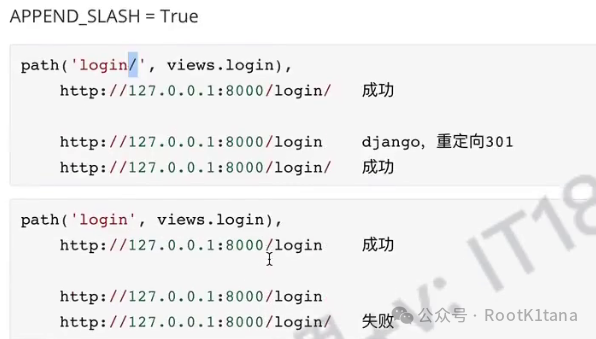
【slash】
When defining routing paths (uri), a 【 / 】 must be added at the end of the path
Routing Nesting
Extension: Routing nesting (manual dispatch)
# Many functions, many URLs
urlpatterns = [
    path('api/',(
        [
          path('login/', views.login, name='login'),
          path('auth/', views.auth, name='auth'),
          path('xxx/', ([
                    path('xx/', views.login, name='xx'),
                    path('oo/', views.login, name='oo'),
                   ], 'yy', 'yy')),
        ], 'x1', 'x2')),
]
The article is too long, see you next time!