🎯 Core Functionality
Send a string of data to a specified IP and port using the TCP protocol, including a timestamp and CRC check.
1. TCP Client Communication
-
Establish a TCP connection with the specified server
-
Continuously send structured data packets
-
Support automatic reconnection mechanism
-
Regularly send heartbeat packets to keep the connection alive
2. Data Packet Format
Each data packet contains the following information:
BATCH:123|TIME:14:30:25.456|DATA:1,2,3,4,5,6,7,8,9,10|CRC:3A7B-
Batch Number:Sequentially increasing number
-
Timestamp:Sending time accurate to milliseconds
-
Data Content:Sequence of numbers from 1 to 10
-
CRC Check:Data integrity verification (CRC16 algorithm)

🎯 Complete Code and Comments
#define _WINSOCK_DEPRECATED_NO_WARNINGS  // Disable deprecated API warnings#define _CRT_SECURE_NO_WARNINGS          // Disable security warnings
#include <stdio.h>#include <stdlib.h>#include <string.h>#include <winsock2.h>#include <windows.h>#include <signal.h>#include <conio.h>  // Include conio.h for _kbhit and _getch
#pragma comment(lib, "ws2_32.lib")  // Link Winsock library
// ========== Configurable Macros ==========#define DEFAULT_SERVER_IP "127.0.0.1"      // Default server IP address (localhost)#define DEFAULT_SERVER_PORT 8080           // Default server port number#define PACKET_COUNT 100                    // Number of packets to send each time (1-10)#define SEND_INTERVAL_MS 50              // Sending interval (milliseconds)#define RECONNECT_INTERVAL_MS 10          // Reconnect attempt interval (milliseconds)#define HEARTBEAT_INTERVAL_MS 300        // Heartbeat packet sending interval (milliseconds)#define BUFFER_SIZE 1024                   // Data buffer size// ==================================
volatile sig_atomic_t keepRunning = 1;     // Program running control flag
/*** @brief Signal handler function for handling Ctrl+C signal* @param signal Signal code */void signalHandler(int signal) {if (signal == SIGINT)  {printf("\nReceived termination signal, exiting...\n");        keepRunning = 0;  // Set running flag to false    }}
/*** @brief CRC16 checksum calculation function* @param data Pointer to the data to be checked* @param length Length of the data* @return CRC16 checksum value*/unsigned short calculateCRC16(const unsigned char* data, size_t length) {unsigned short crc = 0xFFFF;  // Initial CRC value
                                  // Iterate through each byte in the datafor (size_t i = 0; i < length; i++)  {        crc ^= (unsigned short)data[i] << 8;  // Shift byte to high and XOR with CRC
                                              // Process each bit of the bytefor (int j = 0; j < 8; j++)     {if (crc & 0x8000)           {  // Check if the highest bit is 1                crc = (crc << 1) ^ 0x1021;  // Shift left and XOR with polynomial            }else           {                crc <<= 1;  // Just shift left            }        }    }return crc;  // Return the calculated CRC value}
/*** @brief Get current time string* @param buffer Buffer to store the time string* @param bufferSize Size of the buffer*/void getCurrentTimeString(char* buffer, size_t bufferSize) {    SYSTEMTIME systemTime;           // System time structureGetLocalTime(&systemTime);       // Get local time
// Format as string: hour:minute:second.millisecondsprintf(buffer, "%02d:%02d:%02d.%03d",        systemTime.wHour,    // Hour        systemTime.wMinute,  // Minute        systemTime.wSecond,  // Second        systemTime.wMilliseconds);  // Milliseconds}
/*** @brief Establish TCP connection* @param ip Server IP address* @param port Server port number* @return Returns socket on success, INVALID_SOCKET on failure*/SOCKET establishConnection(const char* ip, int port) {    SOCKET sock = INVALID_SOCKET;  // Rename variable to avoid conflict with function namestruct sockaddr_in serverAddr;
// Create TCP socket - use variable name sock instead of socket    sock = socket(AF_INET, SOCK_STREAM, IPPROTO_TCP);if (sock == INVALID_SOCKET)  {printf("Failed to create socket: %ld\n", WSAGetLastError());return INVALID_SOCKET;    }
// Set send timeout option (5 seconds)int timeout = 5000;setsockopt(sock, SOL_SOCKET, SO_SNDTIMEO, (char*)&timeout, sizeof(timeout));// Set receive timeout option (5 seconds)setsockopt(sock, SOL_SOCKET, SO_RCVTIMEO, (char*)&timeout, sizeof(timeout));
// Set address reuse option for quick reconnectionint reuse = 1;setsockopt(sock, SOL_SOCKET, SO_REUSEADDR, (char*)&reuse, sizeof(reuse));
// Configure server address information    serverAddr.sin_family = AF_INET;           // IPv4 address family    serverAddr.sin_port = htons(port);         // Port number (host byte order to network byte order)    serverAddr.sin_addr.s_addr = inet_addr(ip); // IP address conversion
// Attempt to connect to serverif (connect(sock, (SOCKADDR*)&serverAddr, sizeof(serverAddr)) == SOCKET_ERROR)  {printf("Failed to connect to server: %ld\n", WSAGetLastError());closesocket(sock);  // Close socketreturn INVALID_SOCKET;    }
return sock;  // Return successful socket}
/*** @brief Send heartbeat packet to keep connection alive* @param socket Connected socket* @return Returns number of bytes sent on success, SOCKET_ERROR on failure*/int sendHeartbeat(SOCKET sock) {const char* heartbeat = "HEARTBEAT";  // Heartbeat packet contentreturn send(sock, heartbeat, (int)strlen(heartbeat), 0);  // Send heartbeat packet}
/*** @brief Main function* @return Program exit code*/int main() {    WSADATA wsaData;                  // Winsock initialization data    SOCKET clientSocket = INVALID_SOCKET;  // Client socketchar packetData[BUFFER_SIZE];     // Data packet bufferchar timeStr[32];                 // Time string bufferint iResult;                      // Function call resultint batchCount = 0;               // Sending batch counter    DWORD lastSendTime = 0;           // Last send time    DWORD lastHeartbeatTime = 0;      // Last heartbeat timeint connectionAttempts = 0;       // Connection attempt count
                                      // Register Ctrl+C signal handlersignal(SIGINT, signalHandler);
// Display program informationprintf("TCP Client - Continuously sending data (configurable interval)\n");printf("Server: %s:%d\n", DEFAULT_SERVER_IP, DEFAULT_SERVER_PORT);printf("Sending interval: %d milliseconds\n", SEND_INTERVAL_MS);printf("Number of data sent each time: %d\n", PACKET_COUNT);printf("Press Ctrl+C to terminate the program\n");printf("==================================================\n");
// Initialize Winsock library    iResult = WSAStartup(MAKEWORD(2, 2), &wsaData);if (iResult != 0)  {printf("WSAStartup failed: %d\n", iResult);return 1;  // Initialization failed, exit program    }
// Main loop - keep program running until termination signal is receivedwhile (keepRunning)  {    // Check if connection needs to be establishedif (clientSocket == INVALID_SOCKET)     {            connectionAttempts++;  // Increase connection attempt countprintf("Attempting to connect to server (Attempt %d)...\n", connectionAttempts);
// Attempt to establish connection            clientSocket = establishConnection(DEFAULT_SERVER_IP, DEFAULT_SERVER_PORT);if (clientSocket == INVALID_SOCKET)            {Sleep(RECONNECT_INTERVAL_MS);  // Wait and retrycontinue;            }
printf("Successfully connected to server\n");  // Remove ✓ symbol to avoid encoding issues            connectionAttempts = 0;  // Reset connection attempt counter
                                         // Set timestamp to send data immediately in the next loop            lastSendTime = GetTickCount() - SEND_INTERVAL_MS;            lastHeartbeatTime = GetTickCount();  // Record heartbeat time        }
        DWORD currentTime = GetTickCount();  // Get current time
                                                // Check if heartbeat packet needs to be sentif (currentTime - lastHeartbeatTime >= HEARTBEAT_INTERVAL_MS)     {        // Send heartbeat packet to check connection statusif (sendHeartbeat(clientSocket) == SOCKET_ERROR)            {printf("Heartbeat packet sending failed, connection may be lost\n");closesocket(clientSocket);                clientSocket = INVALID_SOCKET;  // Mark for reconnectioncontinue;            }            lastHeartbeatTime = currentTime;  // Update heartbeat timeprintf("Heartbeat packet sent\n");  // Remove ✓ symbol        }
// Check if sending interval time has been reachedif (currentTime - lastSendTime >= SEND_INTERVAL_MS)     {            lastSendTime = currentTime;  // Update last send time            batchCount++;                // Increase batch counter
                                         // Get current time stringgetCurrentTimeString(timeStr, sizeof(timeStr));
// Construct data packetint offset = 0;// Add header information: batch number and timestamp            offset += sprintf(packetData, "BATCH:%d|TIME:%s|DATA:", batchCount, timeStr);
// Add data content: 1 to PACKET_COUNTfor (int i = 1; i <= PACKET_COUNT; i++)            {                offset += sprintf(packetData + offset, "%d", i);// Add comma separator between numbers (not added for the last one)if (i < PACKET_COUNT)                {                    offset += sprintf(packetData + offset, ",");                }            }
// Calculate CRC check (for timestamp and data part)const char* crcData = strstr(packetData, "TIME:") + 5;  // Skip "TIME:" prefixunsigned short crc = calculateCRC16((const unsigned char*)crcData, (unsigned int)strlen(crcData));
// Add CRC check information            offset += sprintf(packetData + offset, "|CRC:%04X", crc);
// Send data to server            iResult = send(clientSocket, packetData, offset, 0);if (iResult == SOCKET_ERROR)            {int error = WSAGetLastError();  // Get error codeprintf("Sending failed (Error: %d), reconnecting...\n", error);closesocket(clientSocket);                clientSocket = INVALID_SOCKET;  // Mark for reconnection            }else            {// Display success messageprintf("[%04d] %s | Data:1-%d | CRC:%04X | Interval:%dms\n",                    batchCount, timeStr, PACKET_COUNT, crc, SEND_INTERVAL_MS);            }        }
// Check connection status (non-blocking mode)if (clientSocket != INVALID_SOCKET)     {char testBuffer[1];  // Test buffer                                    // Use MSG_PEEK mode to check connection status (does not actually receive data)if (recv(clientSocket, testBuffer, 1, MSG_PEEK) == SOCKET_ERROR)            {int error = WSAGetLastError();// If not "operation would block" error, connection has issuesif (error != WSAEWOULDBLOCK)                {printf("Connection check failed, reconnecting...\n");closesocket(clientSocket);                    clientSocket = INVALID_SOCKET;  // Mark for reconnection                }            }        }
Sleep(10);  // Short sleep to avoid high CPU usage    }
// Cleanup before program exitif (clientSocket != INVALID_SOCKET)     {printf("Closing connection...\n");closesocket(clientSocket);  // Close socket    }
WSACleanup();  // Clean up Winsock resources
                   // Display program run statisticsprintf("\nProgram has ended\n");printf("Total batches sent: %d\n", batchCount);printf("Press any key to exit...\n");
// Clear input buffer - use standard functionwhile (_kbhit()) _getch();getchar();  // Wait for user key press
}
🎯 Code Verification
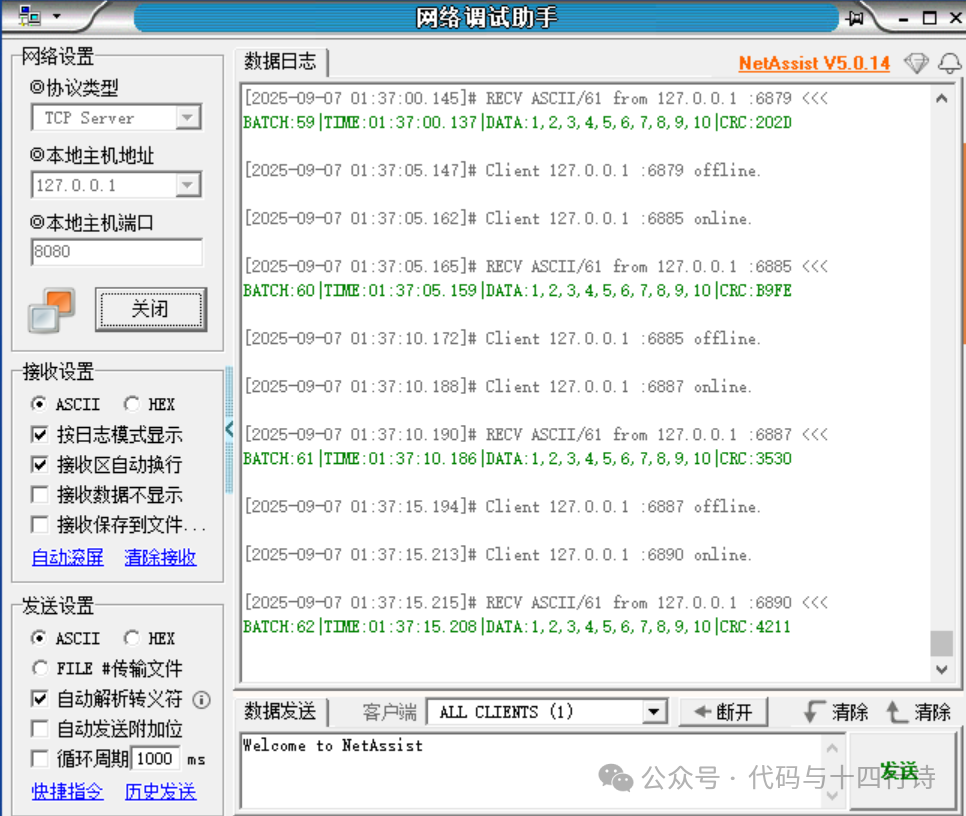
Auxiliary Tool: Network Debugging Assistant Use the Network Debugging Assistant to receivedata sent by the TCP client.Settings:1)❌ Do not manually configure the IP address on the local computer! (127.0.0.1 is the loopback address, automatically supported by all computers)2)Simply set the following content on the Network Debugging Assistant: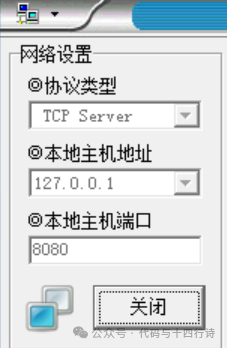 Loopback Address: 127.0.0.1 is a specialIPv4 address, known as the “loopback address”, which always points tothe local machine. The loopback address 127.0.0.1 is automatically supported by all computers. The IPv4 standard specifies127.0.0.0/8as the loopback network segment After setting up the Network Debugging Assistant, startthe debugging assistant and run the code.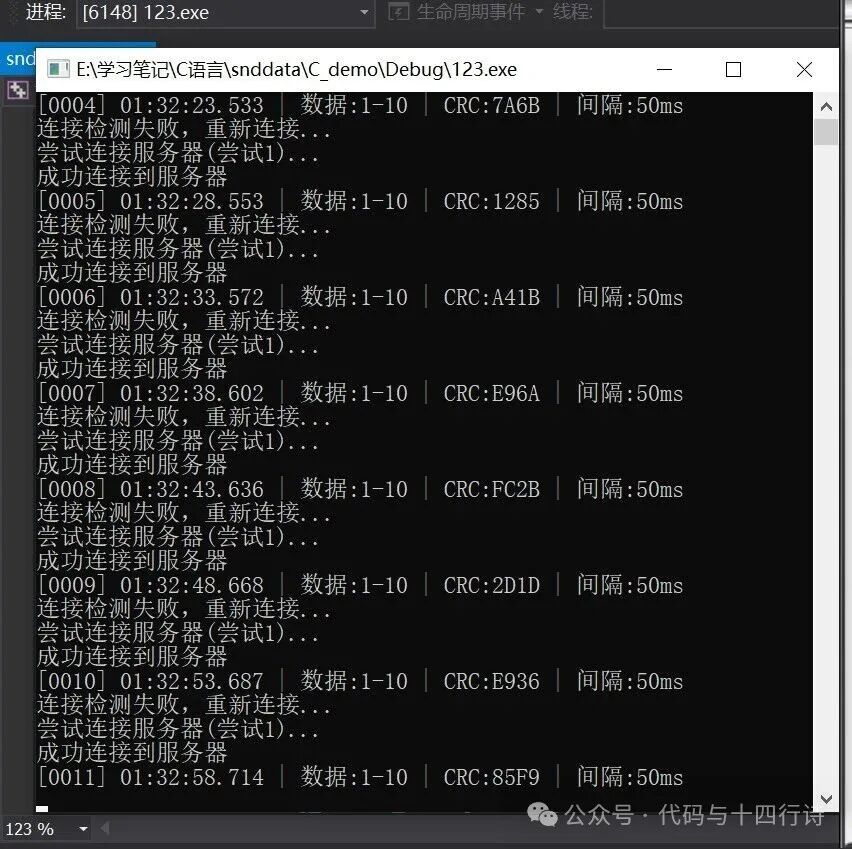
 “ Your support is my greatest motivation ”