Follow 👆 the public account and reply "python" to get a zero-based tutorial! Source from the internet, please delete if infringing.[Tutorial The acquisition method is at the end of the article!!]
1. Numbers
1. Get Absolute Value
Absolute value or modulus of a complex number.
In [1]: abs(-6)Out[1]: 62. Base Conversion
Convert decimal to binary:
In [2]: bin(10)Out[2]: '0b1010'Convert decimal to octal:
In [3]: oct(9)Out[3]: '0o11'Convert decimal to hexadecimal:
In [4]: hex(15)Out[4]: '0xf'3. Integer and ASCII Conversion
The ASCII character corresponding to the decimal integer.
In [1]: chr(65)Out[1]: 'A'Check the decimal number corresponding to a specific ASCII character.
In [1]: ord('A')Out[1]: 654. Check if All Elements are True
Returns True if all elements are true, otherwise False.
In [5]: all([1,0,3,6])Out[5]: FalseIn [6]: all([1,2,3])Out[6]: True5. Check if Any Element is True
Returns True if at least one element is true, otherwise False.
In [7]: any([0,0,0,[]])Out[7]: FalseIn [8]: any([0,0,1])Out[8]: True6. Check Truthiness
Test whether an object is True or False.
In [9]: bool([0,0,0])Out[9]: True
In [10]: bool([])Out[10]: False
In [11]: bool([1,0,1])Out[11]: True
7. Create a Complex Number
Create a complex number.
In [1]: complex(1,2)Out[1]: (1+2j)8. Get Quotient and Remainder
Get both the quotient and the remainder.
In [1]: divmod(10,3)Out[1]: (3, 1)9. Convert to Float Type
Convert an integer or numeric string to a float.
In [1]: float(3)Out[1]: 3.0If it cannot be converted to a float, it will raise a ValueError:
In [2]: float('a')# ValueError: could not convert string to float: 'a'10. Convert to Integer Type
int(x, base=10), where x can be a string or numeric value, converts x to a normal integer. If the argument is a string, it may contain a sign and decimal point. If it exceeds the representation range of a normal integer, a long integer is returned.
In [1]: int('12',16)Out[1]: 1811. Power
Returns base raised to the exp power; if mod is given, returns the remainder.
In [1]: pow(3, 2, 4)Out[1]: 112. Round
Round to the nearest, where ndigits represents how many decimal places to keep:
In [11]: round(10.0222222, 3)Out[11]: 10.022
In [12]: round(10.05,1)Out[12]: 10.1
13. Chained Comparison
i = 3
print(1 < i < 3)  # False
print(1 < i <= 3)  # True
2. Strings
14. String to Bytes
Convert a string to byte type.
In [12]: s = "apple"
In [13]: bytes(s,encoding='utf-8')Out[13]: b'apple'
15. Convert Any Object to String
In [14]: i = 100
In [15]: str(i)Out[15]: '100'
In [16]: str([])Out[16]: '[]'
In [17]: str(tuple())Out[17]: '()'
16. Execute Code Represented by String
Compile the string into code that Python can recognize or execute, and you can also read text as a string and then compile it.
In [1]: s  = "print('helloworld')"
In [2]: r = compile(s,"", "exec")
In [3]: rOut[3]: <code  at 0x0000000005DE75D0, file "", line 1>
In [4]: exec(r)helloworld
17. Calculate Expression
Treat the string str as a valid expression, evaluate it, and return the result of the calculation.
In [1]: s = "1 + 3 +5"
...: eval(s)
...:Out[1]: 9
18. String Formatting
Format the output string, format(value, format_spec) essentially calls the value’s __format__(format_spec) method.
In [104]: print("I am {0}, age {1}".format("tom",18))I am tom, age 18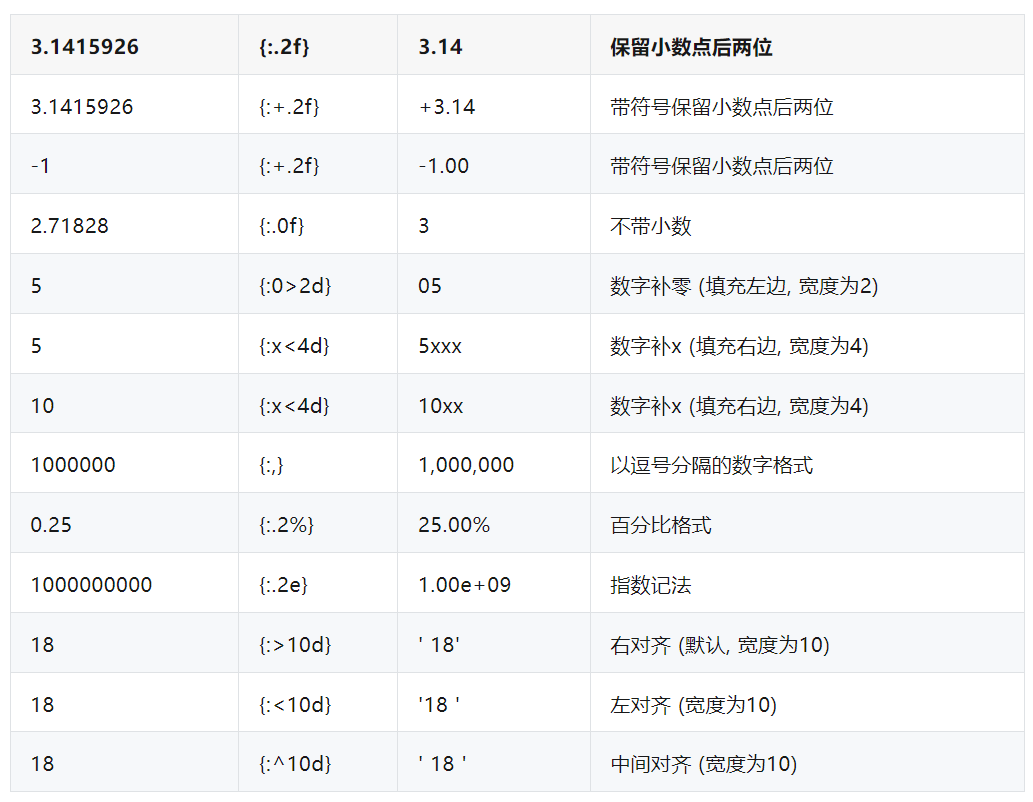
3. Functions
19. Ready-to-use Sorting Function
Sorting:
In [1]: a = [1,4,2,3,1]
In [2]: sorted(a,reverse=True)Out[2]: [4, 3, 2, 1, 1]
In [3]: a = [{'name':'xiaoming','age':18,'gender':'male'},{'name':'xiaohong','age':20,'gender':'female'}]
In [4]: sorted(a,key=lambda x: x['age'],reverse=False)Out[4]:[{'name': 'xiaoming', 'age': 18, 'gender': 'male'}, {'name': 'xiaohong', 'age': 20, 'gender': 'female'}]
20. Sum Function
Sum:
In [181]: a = [1,4,2,3,1]
In [182]: sum(a)Out[182]: 11
In [185]: sum(a,10) # Sum initial value is 10Out[185]: 21
21. Nonlocal in Nested Functions
The keyword nonlocal is often used in nested functions to declare the variable i as a non-local variable; if not declared, i+=1 indicates that i is a local variable within the wrapper function. Since i is not declared at the time of reference, it will raise an unreferenced variable error.
def excepter(f): i = 0 t1 = time.time() def wrapper(): try: f() except Exception as e: nonlocal i i += 1 print(f'{e.args[0]}: {i}') t2 = time.time() if i == n: print(f'spending time:{round(t2-t1,2)}') return wrapper22. Global Declaration of Global Variables
First, let’s answer why we need global. A variable referenced by multiple functions wants to be shared among all functions. Some may think this is simple, so they write:
i = 5
def f():    print(i)
def g():    print(i)    pass
f()
g()
Both functions f and g can share the variable i, and the program does not report an error, so they still do not understand why global is needed. However, if I want a function to increment i, like this:
def h():    i += 1
h()
At this point, when executing the program, bang, an error occurs! It throws an exception: UnboundLocalError, because the compiler interprets i+=1 as a local variable within the function h(), and clearly, the compiler cannot find the definition of variable i in this function, so it will report an error.
Global was proposed to solve this problem, explicitly telling the compiler that i is a global variable, and then the compiler will look for the definition of i outside the function. After executing i+=1, i remains a global variable, and its value is incremented:
i = 0
def h():    global i    i += 1
h()
print(i)
23. Swap Two Elements
def swap(a, b):    return b, a

print(swap(1, 0))  # (0,1)
24. Operate Function Objects
In [31]: def f():    ...:     print('I am f')    ...:
In [32]: def g():    ...:     print('I am g')    ...:
In [33]: [f,g][1]()I am g
Create a list of function objects and call them based on the desired index for unified invocation.
25. Generate Reverse Sequence
list(range(10,-1,-1)) # [10, 9, 8, 7, 6, 5, 4, 3, 2, 1, 0]The third parameter is negative, indicating that it starts from the first parameter and decreases, terminating at the second parameter (excluding this boundary).
26. Examples of Five Types of Function Parameters
Python has five types of parameters: positional parameters, keyword parameters, default parameters, and variable positional or keyword parameters.
def f(a,*b,c=10,**d): print(f'a:{a},b:{b},c:{c},d:{d}')The default parameter c cannot be placed after the variable keyword parameter d. Call f:
In [10]: f(1,2,5,width=10,height=20)a:1,b:(2, 5),c:10,d:{'width': 10, 'height': 20}The variable positional parameter b’s actual parameter is parsed as a tuple (2,5); c gets the default value of 10; d is parsed as a dictionary.
Call f again:
In [11]: f(a=1,c=12)a:1,b:(),c:12,d:{}When a=1 is passed, a is a keyword parameter, and both b and d are not passed, while c is passed as 12 instead of the default value.
Observe the parameter a, which can be passed as both f(1) and f(a=1), with better readability for the latter, so it is recommended to use f(a=1). If you want to enforce the use of f(a=1), you need to add an asterisk in front:
def f(*,a,**b): print(f'a:{a},b:{b}')At this point, calling f(1) will report an error: TypeError: f() takes 0 positional arguments but 1 was given.
Only f(a=1) will work.
This shows that the preceding * plays a role, making it only allow passing keyword parameters. How to check the type of this parameter? Use Python’s inspect module:
In [22]: for name,val in signature(f).parameters.items(): ...: print(name,val.kind) ...:a KEYWORD_ONLYb VAR_KEYWORDYou can see that the type of parameter a is KEYWORD_ONLY, meaning it is only a keyword parameter.
However, if f is defined as:
def f(a,*b): print(f'a:{a},b:{b}')Check the parameter types:
In [24]: for name,val in signature(f).parameters.items(): ...: print(name,val.kind) ...:a POSITIONAL_OR_KEYWORDb VAR_POSITIONALYou can see that parameter a can be either a positional parameter or a keyword parameter.
27. Using Slice Objects
Generate a sequence about cake1:
In [1]: cake1 = list(range(5,0,-1))
In [2]: b = cake1[1:10:2]
In [3]: bOut[3]: [4, 2]
In [4]: cake1Out[4]: [5, 4, 3, 2, 1]
Generate another sequence:
In [5]: from random import randint ...: cake2 = [randint(1,100) for _ in range(100)] ...: # Similarly slice the first 10 elements with an interval of 2 to get slice d ...: d = cake2[1:10:2]In [6]: dOut[6]: [75, 33, 63, 93, 15]You see, we used the same slicing method to slice two cakes, cake1 and cake2. Later, we found this slicing method to be classic, so we used it to slice more container objects.
So, why not encapsulate this slicing method as an object? Thus, the slice object was created.
Defining a slice object is very simple, such as defining the above slicing method as a slice object:
perfect_cake_slice_way = slice(1,10,2)# to slice cake1
cake1_slice = cake1[perfect_cake_slice_way]
cake2_slice = cake2[perfect_cake_slice_way]
In [11]: cake1_sliceOut[11]: [4, 2]
In [12]: cake2_sliceOut[12]: [75, 33, 63, 93, 15]
Consistent with the above results. For reverse sequence slicing, the slice object is also feasible:
a = [1,3,5,7,9,0,3,5,7]
a_ = a[5:1:-1]
named_slice = slice(5,1,-1)
a_slice = a[named_slice]
In [14]: a_Out[14]: [0, 9, 7, 5]
In [15]: a_sliceOut[15]: [0, 9, 7, 5]
Frequently using the same slicing operation can use the slice object to extract, reusing it while improving code readability.
28. Animation Demonstration of Lambda Functions
Some readers reflect that they do not know how to use lambda functions and ask if I can explain it.
For example, to find the maximum length of the following lambda function:
def max_len(*lists): return max(*lists, key=lambda v: len(v))There are two points of confusion:
-
What are the possible values of parameter v?
-
Does the lambda function have a return value? If so, what is it?
Call the above function to find the longest list among the following three:
r = max_len([1, 2, 3], [4, 5, 6, 7], [8])
print(f'The longer list is {r}')
The complete running process of the program is as follows:
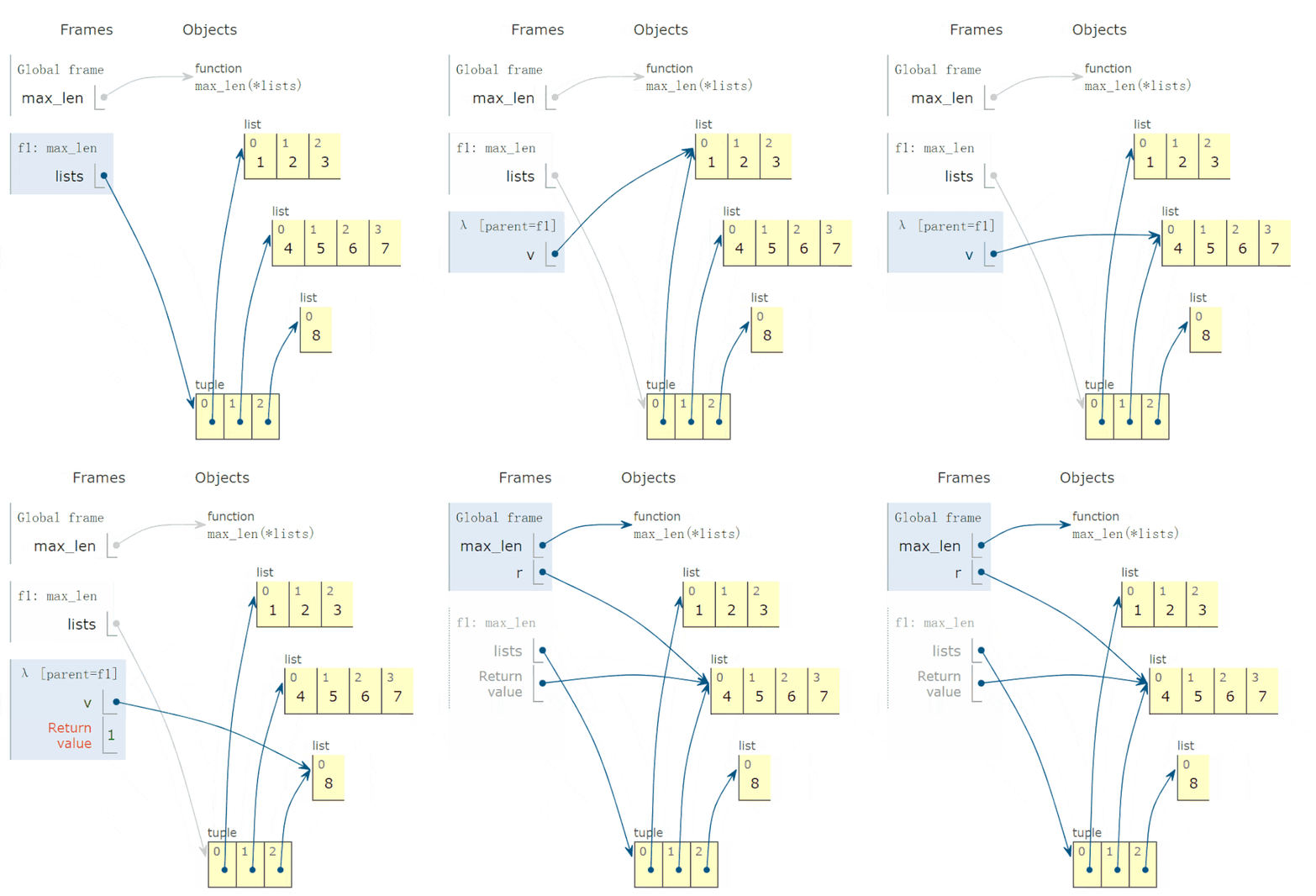
Conclusion:
-
The possible value of parameter v is *lists, which is an element of the tuple.
-
The return value of the lambda function equals the return value of the expression after lambda v colon.
4. Data Structures
29. Convert to Dictionary
Create a data dictionary.
In [1]: dict()Out[1]: {}
In [2]: dict(a='a',b='b')Out[2]: {'a': 'a', 'b': 'b'}
In [3]: dict(zip(['a','b'],[1,2]))Out[3]: {'a': 1, 'b': 2}
In [4]: dict([('a',1),('b',2)])Out[4]: {'a': 1, 'b': 2}
30. Frozen Set
Create an unmodifiable set.
In [1]: frozenset([1,1,3,2,3])Out[1]: frozenset({1, 2, 3})Because it is unmodifiable, it does not have methods like add and pop like set.
31. Convert to Set Type
Returns a set object; sets do not allow duplicate elements:
In [159]: a = [1,4,2,3,1]
In [160]: set(a)Out[160]: {1, 2, 3, 4}
32. Convert to Slice Object
class slice(start, stop[, step]) returns a slice object representing the indices specified by range(start, stop, step), which improves code readability and maintainability.
In [1]: a = [1,4,2,3,1]
In [2]: my_slice_meaning = slice(0,5,2)
In [3]: a[my_slice_meaning]Out[3]: [1, 2, 1]
33. Convert to Tuple
tuple() converts an object to an immutable sequence type.
In [16]: i_am_list = [1,3,5]
In [17]: i_am_tuple = tuple(i_am_list)
In [18]: i_am_tupleOut[18]: (1, 3, 5)
5. Classes and Objects
34. Check if Callable
Check if an object can be called.
In [1]: callable(str)Out[1]: True
In [2]: callable(int)Out[2]: True
In [18]: class Student():    ...:     def __init__(self,id,name):    ...:         self.id = id    ...:         self.name = name    ...:     def __repr__(self):    ...:         return 'id = '+self.id +', name = '+self.name    ...:
In [19]: xiaoming = Student('001','xiaoming')
In [20]: callable(xiaoming)Out[20]: False
If you can call xiaoming(), you need to rewrite the __call__ method of the Student class:
In [1]: class Student():    ...:     def __init__(self,id,name):    ...:         self.id = id    ...:         self.name = name    ...:     def __repr__(self):    ...:         return 'id = '+self.id +', name = '+self.name    ...:     def __call__(self):    ...:         print('I can be called')    ...:         print(f'my name is {self.name}')    ...:
In [2]: t = Student('001','xiaoming')
In [3]: t()I can be calledmy name is xiaoming
35. Display Object as ASCII
Call the object’s repr method to obtain the return value of that method, as shown in the following example, which returns a string.
>>> class Student(): def __init__(self,id,name): self.id = id self.name = name def __repr__(self): return 'id = '+self.id +', name = '+self.nameCall:
>>> xiaoming = Student(id='1',name='xiaoming')>>> xiaomingid = 1, name = xiaoming>>> ascii(xiaoming)'id = 1, name = xiaoming'36. Class Method
The classmethod decorator corresponds to a function that does not need to be instantiated and does not require a self parameter, but the first parameter must be a cls parameter representing the class itself, which can call class properties, class methods, instantiate objects, etc.
In [1]: class Student(): ...: def __init__(self,id,name): ...: self.id = id ...: self.name = name ...: def __repr__(self): ...: return 'id = '+self.id +', name = '+self.name ...: @classmethod ...: def f(cls): ...: print(cls)37. Dynamically Delete Attributes
Delete an attribute of an object.
In [1]: delattr(xiaoming,'id')
In [2]: hasattr(xiaoming,'id')Out[2]: False
38. View All Methods of an Object
When called without parameters, it returns a list of variables, methods, and defined types in the current scope; when called with parameters, it returns the attribute and method list of the parameter.
In [96]: dir(xiaoming)Out[96]:['__class__', '__delattr__', '__dict__', '__dir__', '__doc__', '__eq__', '__format__', '__ge__', '__getattribute__', '__gt__', '__hash__', '__init__', '__init_subclass__', '__le__', '__lt__', '__module__', '__ne__', '__new__', '__reduce__', '__reduce_ex__', '__repr__', '__setattr__', '__sizeof__', '__str__', '__subclasshook__', '__weakref__', 'name']39. Dynamically Get Object Attributes
Get the attributes of an object.
In [1]: class Student():   ...:     def __init__(self,id,name):   ...:         self.id = id   ...:         self.name = name   ...:     def __repr__(self):   ...:         return 'id = '+self.id +', name = '+self.name
In [2]: xiaoming = Student(id='001',name='xiaoming')
In [3]: getattr(xiaoming,'name') # Get the name attribute value of the xiaoming instanceOut[3]: 'xiaoming'
40. Check if Object Has This Attribute
In [1]: class Student():   ...:     def __init__(self,id,name):   ...:         self.id = id   ...:         self.name = name   ...:     def __repr__(self):   ...:         return 'id = '+self.id +', name = '+self.name
In [2]: xiaoming = Student(id='001',name='xiaoming')
In [3]: hasattr(xiaoming,'name')Out[3]: True
In [4]: hasattr(xiaoming,'address')Out[4]: False
41. Object Memory Address
Returns the memory address of the object.
In [1]: id(xiaoming)Out[1]: 9823420842. isinstance
Determine if object is an instance of class classinfo, returns true if so.
In [1]: class Student():   ...:     def __init__(self,id,name):   ...:         self.id = id   ...:         self.name = name   ...:     def __repr__(self):   ...:         return 'id = '+self.id +', name = '+self.name
In [2]: xiaoming = Student(id='001',name='xiaoming')
In [3]: isinstance(xiaoming,Student)Out[3]: True
43. Parent-Child Relationship Identification
In [1]: class undergraduate(Student):    ...:     def studyClass(self):    ...:         pass    ...:     def attendActivity(self):    ...:         pass
In [2]: issubclass(undergraduate,Student)Out[2]: True
In [3]: issubclass(object,Student)Out[3]: False
In [4]: issubclass(Student,object)Out[4]: True
If the class is a subclass of any element in the classinfo tuple, it will also return True.
In [1]: issubclass(int,(int,float))Out[1]: True44. Root of All Objects
object is the base class of all classes.
In [1]: o = object()
In [2]: type(o)Out[2]: object
45. Two Ways to Create Attributes
Returns the property attribute, typical usage:
class C:    def __init__(self):        self._x = None
    def getx(self):        return self._x
    def setx(self, value):        self._x = value
    def delx(self):        del self._x    # Create property attribute using property class    x = property(getx, setx, delx, "I'm the 'x' property.")
Using Python decorators, achieve the same effect as above:
class C:    def __init__(self):        self._x = None
    @property    def x(self):        return self._x
    @x.setter    def x(self, value):        self._x = value
    @x.deleter    def x(self):        del self._x
46. View Object Type
class type(name, bases, dict)
When passing one parameter, returns the type of object:
In [1]: class Student():   ...:     def __init__(self,id,name):   ...:         self.id = id   ...:         self.name = name   ...:     def __repr__(self):   ...:         return 'id = '+self.id +', name = '+self.name   ...:
In [2]: xiaoming = Student(id='001',name='xiaoming')
In [3]: type(xiaoming)Out[3]: __main__.Student
In [4]: type(tuple())Out[4]: tuple
47. Metaclass
xiaoming, xiaohong, xiaozhang are all students, this group is called Student.
Common methods for defining classes in Python use the keyword class.
In [36]: class Student(object): ...: passxiaoming, xiaohong, xiaozhang are instances of the class, thus:
xiaoming = Student()
xiaohong = Student()
xiaozhang = Student()
After creation, the class attribute of xiaoming returns the Student class.
In [38]: xiaoming.__class__Out[38]: __main__.StudentThe problem is that the Student class has a _class_ attribute; if so, what does it return?
In [39]: xiaoming.__class__.__class__Out[39]: typeWow, the program does not report an error, and returns type, so we can guess: the Student class’s type is type, in other words, the Student class is an object, and its type is type, so in Python, everything is an object, including classes.
The class that describes the Student class is called a metaclass.
Extending this logic, the class that describes the metaclass is called a metaclass, just kidding~ The class that describes the metaclass is also called a metaclass.
Smart friends will ask, since the Student class can create instances, can the type class create instances? If it can, the created instance is called: class. You are really smart!
That’s right, the type class can indeed create instances, such as the Student class.
In [40]: Student = type('Student',(),{})
In [41]: StudentOut[41]: __main__.Student
It is exactly the same as the Student class created using the class keyword.
Because Python classes are also objects, they are similar in operation to the objects xiaoming and xiaohong. They support:
-
Assignment
-
Copying
-
Adding Attributes
-
As Function Parameters
In [43]: StudentMirror = Student # Class direct assignment # Class direct assignment
In [44]: Student.class_property = 'class_property' # Add class attribute
In [46]: hasattr(Student, 'class_property')Out[46]: True
The metaclass is indeed not used very often, but perhaps understanding these can help in some situations. Even Tim Peters, the leader of the Python community, said:
“Metaclasses are deep magic, and 99% of users should not worry about them at all.
6. Tools
48. Enumerate Objects
Returns an object that can be enumerated, the object’s next() method will return a tuple.
In [1]: s = ["a","b","c"] ...: for i ,v in enumerate(s,1): ...: print(i,v) ...:1 a2 b3 c49. View the Number of Bytes Occupied by Variables
In [1]: import sys
In [2]: a = {'a':1,'b':2.0}
In [3]: sys.getsizeof(a) # Occupies 240 bytesOut[3]: 240
50. Filter
Set filtering conditions in functions, iterate elements, and retain those with return values of True:
In [1]: fil = filter(lambda x: x>10,[1,11,2,45,7,6,13])
In [2]: list(fil)Out[2]: [11, 45, 13]
51. Return the Hash Value of an Object
Returns the hash value of an object; it is worth noting that custom instances are hashable, while mutable objects like list, dict, set are unhashable.
In [1]: hash(xiaoming)Out[1]: 6139638
In [2]: hash([1,2,3])
# TypeError: unhashable type: 'list'
52. One-key Help
Returns the documentation of an object.
In [1]: help(xiaoming)Help on Student in module __main__ object:
class Student(builtins.object) |  Methods defined here: | |  __init__(self, id, name) | |  __repr__(self) | |  Data descriptors defined here: | |  __dict__ |      dictionary for instance variables (if defined) | |  __weakref__ |      list of weak references to the object (if defined)
53. Get User Input
Get user input content.
In [1]: input()aaOut[1]: 'aa'54. Create Iterator Type
Use iter(obj, sentinel) to return an iterable object; sentinel can be omitted (once iterated to this element, it will terminate immediately).
In [1]: lst = [1,3,5]
In [2]: for i in iter(lst):    ...:     print(i)    ...:135In [1]: class TestIter(object):    ...:     def __init__(self):    ...:         self.l=[1,3,2,3,4,5]    ...:         self.i=iter(self.l)    ...:     def __call__(self):  # The instance of the class that defines the __call__ method is callable    ...:         item = next(self.i)    ...:         print ("__call__ is called, which would return",item)    ...:         return item    ...:     def __iter__(self): # Support iteration protocol (i.e., define __iter__() function)    ...:         print ("__iter__ is called!!")    ...:         return iter(self.l)
In [2]: t = TestIter()
In [3]: t() # Since it implements __call__, the instance can be called__call__ is called, which would return 1Out[3]: 1
In [4]: for e in TestIter(): # Since it implements __iter__, it can be iterated    ...:     print(e)    ...:__iter__ is called!!132345
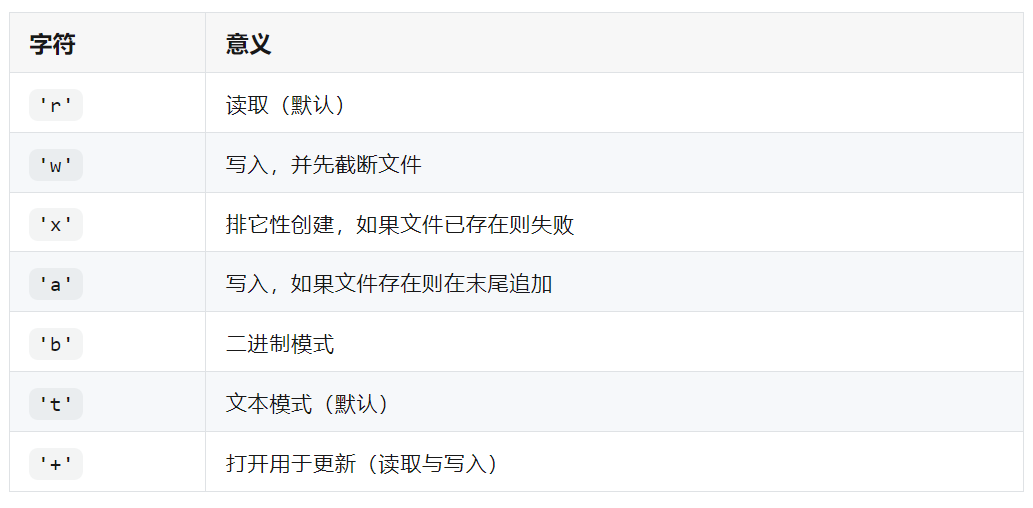
55. Open File
Returns a file object.
In [1]: fo = open('D:/a.txt',mode='r', encoding='utf-8')
In [2]: fo.read()Out[2]: '\ufefflife is not so long,\nI use Python to play.'
mode value table:
56. Create Range Sequence
range(stop)
range(start, stop[,step])
Generates an immutable sequence:
In [1]: range(11)Out[1]: range(0, 11)
In [2]: range(0,11,1)Out[2]: range(0, 11)
57. Reverse Iterator
In [1]: rev = reversed([1,4,2,3,1])
In [2]: for i in rev:     ...:     print(i)     ...:13241
58. Aggregate Iterator
Create an iterator that aggregates elements from each iterable object:
In [1]: x = [3,2,1]
In [2]: y = [4,5,6]
In [3]: list(zip(y,x))Out[3]: [(4, 3), (5, 2), (6, 1)]
In [4]: a = range(5)
In [5]: b = list('abcde')
In [6]: bOut[6]: ['a', 'b', 'c', 'd', 'e']
In [7]: [str(y) + str(x) for x,y in zip(a,b)]Out[7]: ['a0', 'b1', 'c2', 'd3', 'e4']
59. Chained Operations
from operator import (add, sub)

def add_or_sub(a, b, oper):    return (add if oper == '+' else sub)(a, b)

add_or_sub(1, 2, '-')  # -1
60. Object Serialization
Object serialization refers to the process of converting an object in memory into a format that can be stored or transmitted. In many scenarios, directly transmitting a class object is inconvenient.
However, once the object is serialized, it becomes much more convenient, as it is customary for interface calls or web requests to generally use JSON strings for transmission.
In actual usage, serialization is generally done on class objects. First, create a type Student and create two instances.
class Student():    def __init__(self,**args):        self.ids = args['ids']        self.name = args['name']        self.address = args['address']
xiaoming = Student(ids = 1,name = 'xiaoming',address = 'Beijing')
xiaohong = Student(ids = 2,name = 'xiaohong',address = 'Nanjing')
Import the JSON module and call the dump method to serialize the list object [xiaoming,xiaohong] into the file json.txt.
import json
with open('json.txt', 'w') as f:    json.dump([xiaoming,xiaohong], f, default=lambda obj: obj.__dict__, ensure_ascii=False, indent=2, sort_keys=True)
The generated file content is as follows:
[
    {
        "address":"Beijing",
        "ids":1,
        "name":"xiaoming"
    },
    {
        "address":"Nanjing",
        "ids":2,
        "name":"xiaohong"
    }
]
Acquisition Method:
-
Like + See Again
-
Reply in the public account: “python”
Get the latest Python zero-based learning materials for 2024,Reply in the background:Python