No matter what reason brought you to C programming, once you start, you might feel that it is too difficult. Yes, it is. However, many people online say, “C is easy, C is useless, C is outdated…” Do not take these opinions seriously; everyone has a different level of understanding.What I want to tell you is that C is capable of many things, but you (including myself) can only use it to complete learning tasks, pass exams, and lay the foundation for learning other programming languages. In fact, that is enough; that is my goal.
My programming environment is Dev C++ on Windows 10. This is very beginner-friendly, and if your environment is different, it doesn’t matter; the coding principles remain unchanged.
The First C Program
#include <stdio.h>int main(){printf("Hello, world!");return 0;}After writing the above code, compile and execute it, and you will get the following result.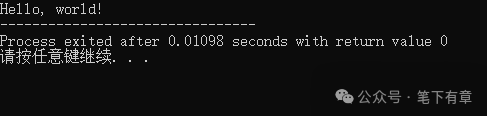 Indeed, this program outputs the string “Hello, world!” on your screen. It is the most famous program in the world.Code Explanation
#include <stdio.h>This line is called a file inclusion; you can think of it as the starting position of a typical C program. Its essence is to indicate “integrate the code declared in the stdio.h file into my program.” This way, you have access to some pre-written code by the system, and this “stdio.h” file contains the system’s pre-written input, output functions, and some basic definitions. We do not need to delve into this deeply. Some people prefer to include stdio.h in double quotes (like: “stdio.h”), which is also fine, but it ultimately means the same as using angle brackets <stdio.h>.In the code, #include indicates file inclusion, remember this. In the future, we will also include some other code files provided by the system.
int main()This line of code defines a main function; in C, the main function is fixed as main(). There can be only one such function in the same program, which is why it is called the “main function.” The preceding int indicates that after this function executes, it will return an integer to the operating system, which can understand the program’s execution status based on this integer.
{printf("Hello, world!");return 0;}The pair of { } in the above code indicates the function body, which is the code block of the function. In fact, in C, {} represents a code block. We just need to remember that what is included in the { } after the function is the function body; this is also a basic syntax rule in C. Additionally, { } can occupy a line by itself or be placed at the end of the previous line or the beginning of the next line. However, I do not advocate this; occupying a line by itself enhances code readability.
printf("Hello, world!");This indicates displaying the string “Hello, world!” on the screen; we can place the content to be displayed within a pair of double quotes. printf has many other usages; you can try changing the content inside the quotes and see the results. We will introduce this function in detail later. The semicolon at the end indicates the end of a statement, which means that after the program completes an action, it needs an end marker. Thus, we consider a semicolon as a statement (it can complete an action).
return 0;The return in the above code is read as “return,” meaning that after the code execution is complete, what result it produces is called the “return value.” The return value of the main function main() is received by the operating system, which will understand whether the program ended normally based on this value. If it receives 0, it indicates a normal end; a non-zero value indicates an abnormal end (i.e., the program was terminated due to some unexpected issue). For now, we only need to understand this point.Final NoteIf you really do not want to delve into the details, you only need to remember: for now, when we write programs, we only need to change the code inside the { } after the main() function. You can consider this Hello, world! program as a basic framework for a C program.
If you need study reference books or exercise workbooks, I have two recommendations for you; feel free to purchase them as needed.
Happy learning!