In the production and collection activities of natural resource geographic information data, ArcGIS and ArcGIS Pro are possibly the most widely used GIS software. Correspondingly, Geodatabase databases (File GDB, Personal GDB) are also the most widely used formats for data production and aggregation. In the geographic information data collection and mapping production activities based on ArcGIS software, standardized management of GDB database structure is the core foundation for ensuring efficient project advancement and data quality. As a carrier for the storage, management, and analysis of spatial data, the scientific and consistent structure of the geodatabase directly affects the efficiency of data production, sharing, updating, and long-term maintenance. Therefore, standardized management of GDB library structure is of great significance:
1) Improve data production efficiency
Unified naming conventions for feature classes, field definitions, and topology design can reduce data redundancy and duplicate entries. Field collection personnel can quickly locate target layers based on preset templates, while internal processing personnel can perform batch operations on attributes through standardized fields, significantly shortening the data processing cycle.
2) Ensure data quality and consistency
By defining domains (Domains), subtypes (Subtypes), etc., constraints on attribute value ranges and spatial logical relationships (e.g., roads not intersecting, parcels without gaps) can be enforced, avoiding human entry errors from the source and ensuring data compliance with industry standards.
3) Enhance system compatibility and sharing capabilities
A standardized structure facilitates collaboration among multiple departments, avoiding data conversion failures due to field ambiguities or format differences. At the same time, data models that comply with standards can seamlessly connect with higher-level platforms or third-party systems, supporting data fusion applications.
Generally, before data production and collection, it is necessary to clarify the feature classification system, field types/length, and coordinate system based on project requirements and standards, ensuring that the design meets the needs of the entire process of collection, quality inspection, and database establishment. Large-scale surveying and mapping projects led by provincial and ministerial authorities, such as the Third National Land Survey and National Conditions Census, will have accompanying standards and corresponding template libraries, while general data collection activities will require self-prepared specifications and the creation of GDB template libraries.
Regarding the standardization and processing conversion of GDB, we have previously provided some tools to assist in generating standardized GDB. Considering the frequent use of attribute domains in data collection and editing, we have upgraded some tools to add support for importing and exporting attribute domains, and supplemented some tools, mainly including the following:
1)Export library table structure to Excel: Export the table structure from an existing GDB to an Excel file. After modifying the Excel file, you can form your own standard library. During export, you can choose to export attribute domain definitions and the attributes associated with fields.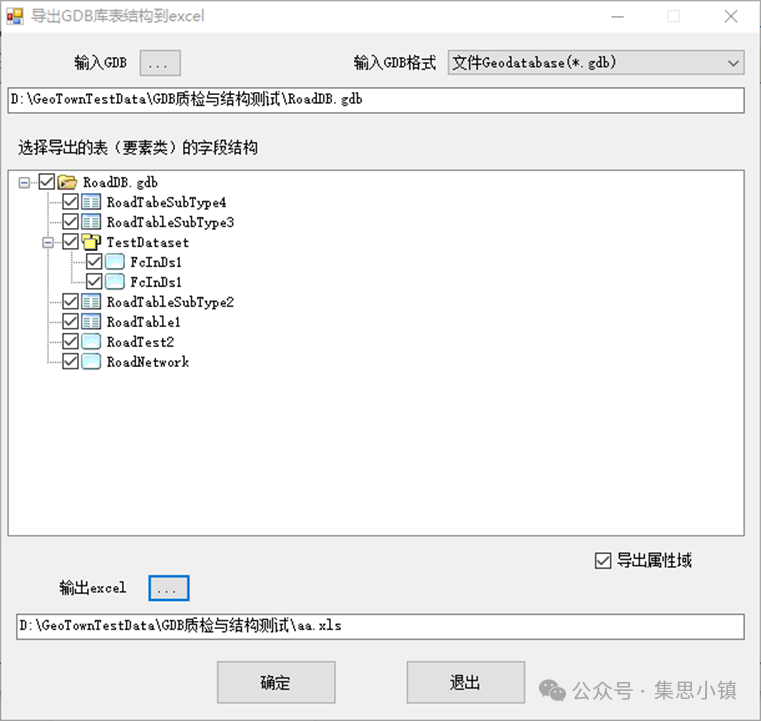
2)Import library table structure from Excel: Import the table structure from Excel to generate a new GDB as a template for data collection production. During import, you can specify whether to import attribute domain definitions and define the projection of the GDB layers.
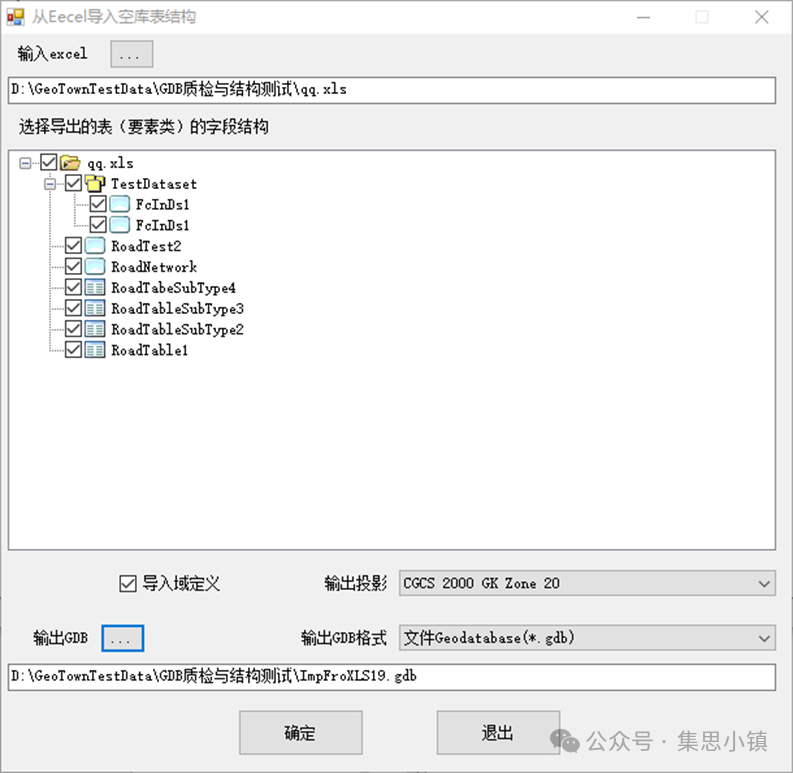
3)Import library table structure from an existing GDB: Import an empty library table structure from an existing GDB, during import, you can reselect the projection and choose whether to import domain definitions and the associated domains of fields.
4)Batch add fields: For existing tables and layers, if fields are missing, you can enter fields according to the requirements of the field template into Excel, and then batch append them to the corresponding layers.
In addition to GDB library table structure management, we also provide some tools for GDB processing and quality inspection, including:
1)Batch merge libraries: Merge multiple input GDB(MDB) into one. During merging, the handling of Z, M values, and data projection conversion is considered. For more flexible processing, separate tools for batch merging layers (feature classes) and batch merging tables are also provided.
2)Group split library: Split a GDB into multiple GDB based on attribute field values or input polygon layers. Similarly, for more flexible processing, tools for layer splitting and attribute table splitting are also provided.
3)Batch conversion: Achieve batch mutual conversion between GDB and MDB formats.
4)GDB structure normative check: Use standard GDB to batch check whether the library structure of GDB results (integrity of GDB, layer and table names, fields, projections, etc.) comply with standards.
5)Batch check of field attribute values in GDB: Use standard GDB to batch check whether the field values of layers and tables in GDB results comply with the plan, including whether they are empty, field length, decimal places, compliance checks of attribute values, etc.
6)GDB layer element statistics (empty layer check): Count the number of elements and records of all layers and tables in GDB(MDB) and output to Excel, for empty layers (layers with a record count of 0), empty layers and tables can be output separately to check for empty layers.
Interested students can download and use.
