Author Introduction: There is not a single proficient operations engineer on the resume.Please click the blue “Operations Path” above to follow me, the mind map below is also the expected updated content and current progress (updated irregularly).
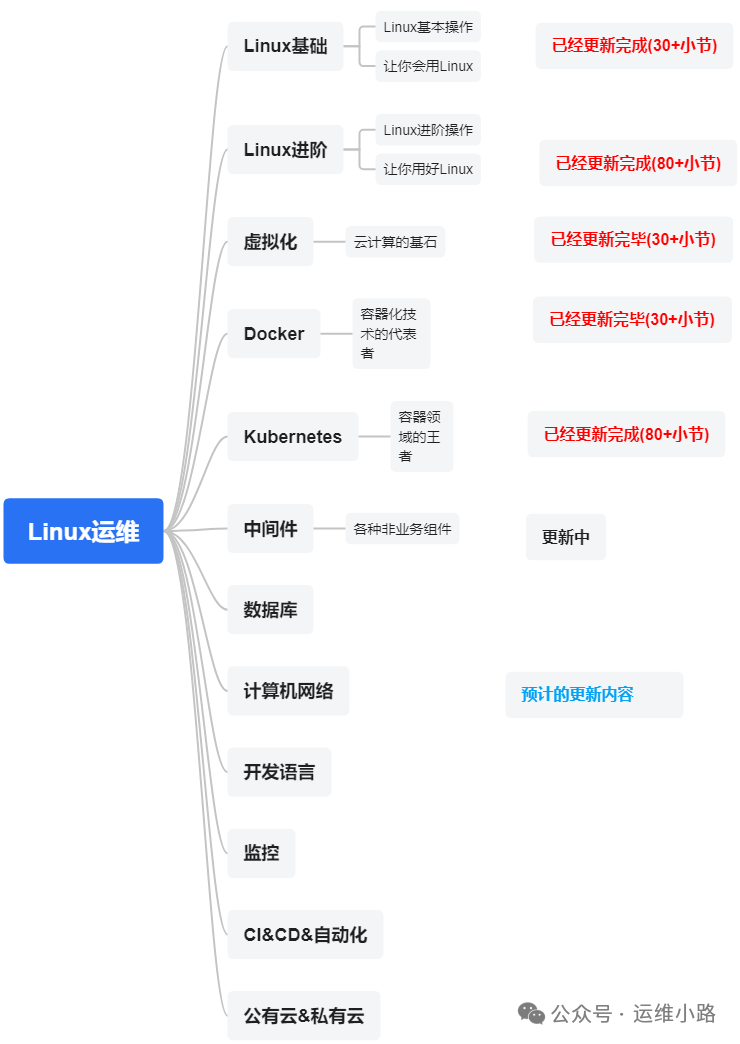
Middleware, I define it as software that depends on certain business functions, including the following parts:
Web Server
Proxy Server
ZooKeeper
Kafka
RabbitMQ (this chapter)
Ultimate Guide to RabbitMQ Management HTTP API
RabbitMQ provides a RESTful interface formanaging clusters, monitoring status, and operating resources without logging into the Web console. It is suitable for automated operations, integrated monitoring systems (such as Prometheus/Zabbix) or custom management tools.
1. Enable and Authenticate
Enable the plugin, as the HTTP interface is exposed only after enabling the plugin.
rabbitmq-plugins enable rabbitmq_management2. Authentication Methods
Enabling the web plugin involves account and password issues we discussed earlier.
All API requests must include the Basic Auth header, which can also be another defined admin account.
# This operation can only be executed locallycurl -u guest:guest http://localhost:15672/api/overview3. Main Functions
3.1 Cluster Management
| Endpoint | Method | Description |
|---|---|---|
<span>/api/nodes</span> |
GET | Get information about all nodes |
<span>/api/nodes/{name}</span> |
GET | Get detailed information about a specific node |
<span>/api/cluster-name</span> |
GET | Get the cluster name |
<span>/api/healthchecks/node</span> |
GET | Node health check |
3.2 Virtual Host (vhost) Management
| Endpoint | Method | Description |
|---|---|---|
<span>/api/vhosts</span> |
GET | List all virtual hosts |
<span>/api/vhosts/{vhost}</span> |
PUT | Create a virtual host |
<span>/api/vhosts/{vhost}</span> |
DELETE | Delete a virtual host |
3.3 Queue Operations
| Endpoint | Method | Description |
|---|---|---|
<span>/api/queues</span> |
GET | Get all queues |
<span>/api/queues/{vhost}/{queue}</span> |
PUT | Declare a queue |
<span>/api/queues/{vhost}/{queue}/contents</span> |
DELETE | Clear queue messages |
<span>/api/queues/{vhost}/{queue}/bindings</span> |
GET | Get queue binding relationships |
3.4 Exchange Management
| Endpoint | Method | Description |
|---|---|---|
<span>/api/exchanges</span> |
GET | List all exchanges |
<span>/api/exchanges/{vhost}/{exchange}</span> |
PUT | Create an exchange |
<span>/api/exchanges/{vhost}/{exchange}</span> |
DELETE | Delete an exchange |
3.5 Message Operations
| Endpoint | Method | Description |
|---|---|---|
<span>/api/queues/{vhost}/{queue}/get</span> |
POST | Consume messages (pull mode) |
<span>/api/exchanges/{vhost}/{exchange}/publish</span> |
POST | Publish messages |
4. Key Usage Examples
4.1 Create Virtual Host
curl -u "guest:guest" \ -X PUT \ -H "Content-Type: application/json" \ -d '{"description": "My custom VHost"}' \ http://localhost:15672/api/vhosts/my_vhost4.2 Create Exchange
curl -u "guest:guest" \ -X PUT \ -H "Content-Type: application/json" \ -d '{ "type": "direct", "durable": true }' \ http://localhost:15672/api/exchanges/my_vhost/orders.direct4.3 Create Queue
curl -u "guest:guest" \ -X PUT \ -H "Content-Type: application/json" \ -d '{ "auto_delete": false, "durable": true }' \ http://localhost:15672/api/queues/my_vhost/my_queue4.4 Bind
curl -u "guest:guest" \ -X POST \ -H "Content-Type: application/json" \ -d '{ "routing_key": "order.created", "arguments": {} }' \ http://localhost:15672/api/bindings/my_vhost/e/orders.direct/q/my_queue4.5 Publish Message
curl -u "guest:guest" \ -X POST \ -H "Content-Type: application/json" \ -d '{ "properties": {}, "routing_key": "order.created", "payload": "Hello World", "payload_encoding": "string" }' \ http://localhost:15672/api/exchanges/my_vhost/orders.direct/publish4.6 Consume Message
curl -u "guest:guest" \ -X POST \ -H "Content-Type: application/json" \ -d '{ "count": 5, "ackmode": "ack_requeue_true", "encoding": "auto", "truncate": 50000 }' \ http://localhost:15672/api/queues/my_vhost/my_queue/getNo ACK confirmation was sent here. Of course, only a portion of the functions are listed here; I hope everyone tries more features.
Recommended Historical Content
Kafka – Cluster deployment, Topic, Partition, Replica, Producer, Consumer (Group), Persistence, Sequential Read/Write, Zero-Copy, Scaling
ZooKeeper – Cluster deployment and election, Read/Write process, Transaction log, Data and snapshot, ACL, 4-letter commands, Monitoring and backup, etc.
Squid, HAProxy, LVS, Keepalived, Internal network penetration FRP.
Web Server – Nginx reverse proxy, Load balancing, Security configuration, Logging, Traffic mirroring, WebSocket, Cross-origin, etc.
Kubernetes (k8s) – Basic concepts, Deployment, Workloads, Services, Networking, Storage, Configuration, Scheduling, Certificates, Monitoring, etc.
Docker – Basic information, Basic commands, Dockerfile, Principles, Repository, Storage network logs, Special topics
Cloud Computing & Virtualization – Including server purchasing, Introduction to virtualization, Virtual disks, Virtual networks, Creating virtual machines, Installing virtual machines, Dashboard, XML explanation, Cloning, Snapshots, Initialization, Introduction to ESXi.
Advanced Linux – Including hardware, Daily operations, Basic software, Logs, Advanced commands, Firewalls, Shell programming, Kernel, Linux systems and initialization..
Basic Linux – Including file CRUD, Disk management, Network configuration, User configuration, Permission configuration..