This article mainly introduces the setup of MongoDB replica set mode in a Linux environment (one primary, one secondary, and one arbiter), including setup steps, primary-secondary switching, high availability testing, etc.
Architecture Diagram
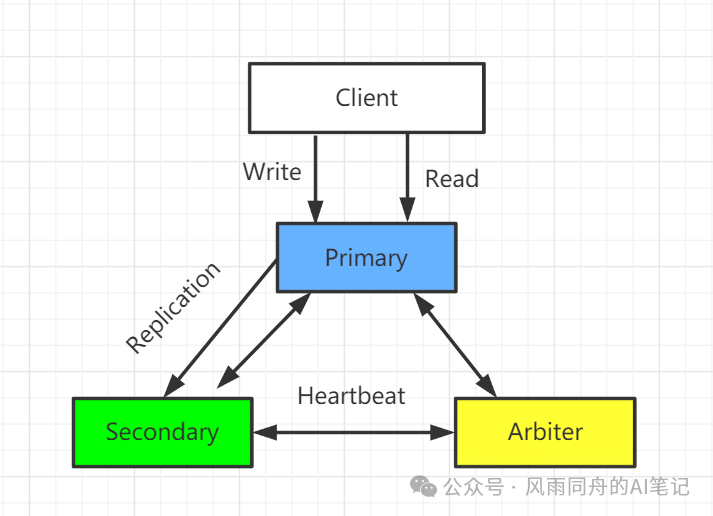
Environment
- Ubuntu 5.4.0-6ubuntu1~16.04.12
- mongodb-linux-x86_64-ubuntu1604-4.2.8.tgz
Steps
Create Primary Node
- Create directories for data and logs
# Primary Node
mkdir -p /mongodb/replica_sets/rs_27017/log
mkdir -p /mongodb/replica_sets/rs_27017/data/db
- Or modify the configuration file
vim /mongodb/replica_sets/rs_27017/mongod.conf
systemLog:
    # Specify the target for all log output from MongoDB to be a file
    destination: file
    # Path to the log file where mongod or mongos should send all diagnostic log information
    path: "/mongodb/replica_sets/rs_27017/log/mongod.log"
    # When mongos or mongod instances restart, they will append new entries to the end of the existing log file
    logAppend: true
storage:
    # Directory where mongod instance stores its data. The storage.dbPath setting only applies to mongod
    dbPath: "/mongodb/replica_sets/rs_27017/data/db"
    journal:
         # Enable or disable persistent logging to ensure data files remain valid and recoverable.
        enabled: true
processManagement:
    # Enable daemon mode to run mongos or mongod processes in the background.
    fork: true
    # Specify the file location for saving the process ID of the mongos or mongod process, where mongos or mongod will write its PID
    pidFilePath: "/mongodb/replica_sets/rs_27017/log/mongod.pid"
net:
    # Service instance binds to all IPs, has side effects, during replica set initialization, the node name will be automatically set to the local domain name instead of the IP
    #bindIpAll: true
    # IP bound by the service instance
    bindIp: localhost,192.168.30.129
    #bindIp
    # Bound port
    port: 27017
replication:
    # Name of the replica set
    replSetName: kwz_rs
- Start the node service: /usr/local/mongodb/bin/mongod -f /mongodb/replica_sets/rs_27017/mongod.conf
 There is an error here: Error parsing YAML config file: yaml-cpp: error at line 2, column 13: illegal map value, related to YAML format spacing issues, refer to this article for resolution
Create Secondary Node
- Create directories for data and logs
# Secondary Node
mkdir -p /mongodb/replica_sets/rs_27018/log
mkdir -p /mongodb/replica_sets/rs_27018/data/db
- Or modify the configuration file
vim /mongodb/replica_sets/rs_27018/mongod.conf
systemLog:
    # Specify the target for all log output from MongoDB to be a file
    destination: file
    # Path to the log file where mongod or mongos should send all diagnostic log information
    path: "/mongodb/replica_sets/rs_27018/log/mongod.log"
    # When mongos or mongod instances restart, they will append new entries to the end of the existing log file
    logAppend: true
storage:
    # Directory where mongod instance stores its data. The storage.dbPath setting only applies to mongod
    dbPath: "/mongodb/replica_sets/rs_27018/data/db"
    journal:
         # Enable or disable persistent logging to ensure data files remain valid and recoverable.
        enabled: true
processManagement:
    # Enable daemon mode to run mongos or mongod processes in the background.
    fork: true
    # Specify the file location for saving the process ID of the mongos or mongod process, where mongos or mongod will write its PID
    pidFilePath: "/mongodb/replica_sets/rs_27018/log/mongod.pid"
net:
    # Service instance binds to all IPs, has side effects, during replica set initialization, the node name will be automatically set to the local domain name instead of the IP
    #bindIpAll: true
    # IP bound by the service instance
    bindIp: localhost,192.168.30.129
    #bindIp
    # Bound port
    port: 27018
replication:
    # Name of the replica set
    replSetName: kwz_rs
- Start the node service: /usr/local/mongodb/bin/mongod -f /mongodb/replica_sets/rs_27018/mongod.conf

Create Arbiter Node
- Create directories for data and logs
# Arbiter Node
mkdir -p /mongodb/replica_sets/rs_27019/log
mkdir -p /mongodb/replica_sets/rs_27019/data/db
- Or modify the configuration file
vim /mongodb/replica_sets/rs_27019/mongod.conf
systemLog:
    # Specify the target for all log output from MongoDB to be a file
    destination: file
    # Path to the log file where mongod or mongos should send all diagnostic log information
    path: "/mongodb/replica_sets/rs_27018/log/mongod.log"
    # When mongos or mongod instances restart, they will append new entries to the end of the existing log file
    logAppend: true
storage:
    # Directory where mongod instance stores its data. The storage.dbPath setting only applies to mongod
    dbPath: "/mongodb/replica_sets/rs_27018/data/db"
    journal:
         # Enable or disable persistent logging to ensure data files remain valid and recoverable.
        enabled: true
processManagement:
    # Enable daemon mode to run mongos or mongod processes in the background.
    fork: true
    # Specify the file location for saving the process ID of the mongos or mongod process, where mongos or mongod will write its PID
    pidFilePath: "/mongodb/replica_sets/rs_27018/log/mongod.pid"
net:
    # Service instance binds to all IPs, has side effects, during replica set initialization, the node name will be automatically set to the local domain name instead of the IP
    #bindIpAll: true
    # IP bound by the service instance
    bindIp: localhost,192.168.30.129
    #bindIp
    # Bound port
    port: 27018
replication:
    # Name of the replica set
    replSetName: kwz_rs
- Start the node service: /usr/local/mongodb/bin/mongod -f /mongodb/replica_sets/rs_27018/mongod.conf

Initialize Replica Set Configuration and Primary Node
Connect to the primary node (27017) using the client: /usr/local/mongodb/bin/mongo –host=localhost –port=27017 After a successful connection, many commands cannot be used; the replica set must be initialized first using the default configuration: rs.initiate()
{
        "info2" : "no configuration specified. Using a default configuration for the set",
        "me" : "localhost:27017",
        "ok" : 1,
        "$clusterTime" : {
                "clusterTime" : Timestamp(1601049270, 1),
                "signature" : {
                        "hash" : BinData(0,"AAAAAAAAAAAAAAAAAAAAAAAAAAA="),
                        "keyId" : NumberLong(0)
                }
        },
        "operationTime" : Timestamp(1601049270, 1)
}
kwz_rs:SECONDARY>
kwz_rs:SECONDARY>
kwz_rs:PRIMARY>
- If the value of “ok” is 1, it indicates successful creation
- The command line prompt changes to a secondary node role, and at this point, it cannot read or write by default. Wait a moment, press Enter, and it will change to the primary node, as shown in the above image. At this time, executing show dbs will show data:
kwz_rs:PRIMARY> show dbs;
admin   0.000GB
config  0.000GB
local   0.000GB
View Replica Set Configuration
Execute the command to view the current node’s default configuration in the replica set on 27017
kwz_rs:PRIMARY> rs.config()
{
  # Primary key value for storing replica set configuration data, default is the name of the replica set
        "_id" : "kwz_rs",
        "version" : 1,
        "protocolVersion" : NumberLong(1),
        "writeConcernMajorityJournalDefault" : true,
        # Array of replica set members, currently only one at 27017
        "members" : [
                {
                        "_id" : 0,
                        "host" : "localhost:27017",
                        # This member is not an arbiter node
                        "arbiterOnly" : false,
                        "buildIndexes" : true,
                        "hidden" : false,
                        # Priority (weight value)
                        "priority" : 1,
                        "tags" : {

                        },
                        "slaveDelay" : NumberLong(0),
                        "votes" : 1
                }
        ],
        # Configuration parameters for the replica set
        "settings" : {
                "chainingAllowed" : true,
                "heartbeatIntervalMillis" : 2000,
                "heartbeatTimeoutSecs" : 10,
                "electionTimeoutMillis" : 10000,
                "catchUpTimeoutMillis" : -1,
                "catchUpTakeoverDelayMillis" : 30000,
                "getLastErrorModes" : {

                },
                "getLastErrorDefaults" : {
                        "w" : 1,
                        "wtimeout" : 0
                },
                "replicaSetId" : ObjectId("5f6e12b681a01e73db9b210a")
        }
}
It is worth noting that the command to view the replica set rs.conf() essentially queries the data in the system.replset table, which is under the local database
View Replica Set Status
Check the status of the replica set, the data obtained from heartbeat packets sent by other members reflects the current status of the replica set, view the replica set status on 27017 using the command rs.status():
kwz_rs:PRIMARY> rs.status()
{
  # Name of the replica set
        "set" : "kwz_rs",
        "date" : ISODate("2020-09-25T16:38:25.293Z"),
        # Status is normal
        "myState" : 1,
        "term" : NumberLong(1),
        "syncingTo" : "",
        "syncSourceHost" : "",
        "syncSourceId" : -1,
        "heartbeatIntervalMillis" : NumberLong(2000),
        "majorityVoteCount" : 1,
        "writeMajorityCount" : 1,
        "optimes" : {
                "lastCommittedOpTime" : {
                        "ts" : Timestamp(1601051900, 1),
                        "t" : NumberLong(1)
                },
                "lastCommittedWallTime" : ISODate("2020-09-25T16:38:20.800Z"),
                "readConcernMajorityOpTime" : {
                        "ts" : Timestamp(1601051900, 1),
                        "t" : NumberLong(1)
                },
                "readConcernMajorityWallTime" : ISODate("2020-09-25T16:38:20.800Z"),
                "appliedOpTime" : {
                        "ts" : Timestamp(1601051900, 1),
                        "t" : NumberLong(1)
                },
                "durableOpTime" : {
                        "ts" : Timestamp(1601051900, 1),
                        "t" : NumberLong(1)
                },
                "lastAppliedWallTime" : ISODate("2020-09-25T16:38:20.800Z"),
                "lastDurableWallTime" : ISODate("2020-09-25T16:38:20.800Z")
        },
        "lastStableRecoveryTimestamp" : Timestamp(1601051850, 1),
        "lastStableCheckpointTimestamp" : Timestamp(1601051850, 1),
        "electionCandidateMetrics" : {
                "lastElectionReason" : "electionTimeout",
                "lastElectionDate" : ISODate("2020-09-25T15:54:30.537Z"),
                "electionTerm" : NumberLong(1),
                "lastCommittedOpTimeAtElection" : {
                        "ts" : Timestamp(0, 0),
                        "t" : NumberLong(-1)
                },
                "lastSeenOpTimeAtElection" : {
                        "ts" : Timestamp(1601049270, 1),
                        "t" : NumberLong(-1)
                },
                "numVotesNeeded" : 1,
                "priorityAtElection" : 1,
                "electionTimeoutMillis" : NumberLong(10000),
                "newTermStartDate" : ISODate("2020-09-25T15:54:30.567Z"),
                "wMajorityWriteAvailabilityDate" : ISODate("2020-09-25T15:54:30.580Z")
        },
        # Array of replica set members
        "members" : [
                {
                        "_id" : 0,
                        "name" : "localhost:27017",
                        # Healthy
                        "health" : 1,
                        "state" : 1,
                        # Primary node
                        "stateStr" : "PRIMARY",
                        "uptime" : 89235,
                        "optime" : {
                                "ts" : Timestamp(1601051900, 1),
                                "t" : NumberLong(1)
                        },
                        "optimeDate" : ISODate("2020-09-25T16:38:20Z"),
                        "syncingTo" : "",
                        "syncSourceHost" : "",
                        "syncSourceId" : -1,
                        "infoMessage" : "",
                        "electionTime" : Timestamp(1601049270, 2),
                        "electionDate" : ISODate("2020-09-25T15:54:30Z"),
                        "configVersion" : 1,
                        "self" : true,
                        "lastHeartbeatMessage" : ""
                }
        ],
        "ok" : 1,
        "$clusterTime" : {
                "clusterTime" : Timestamp(1601051900, 1),
                "signature" : {
                        "hash" : BinData(0,"AAAAAAAAAAAAAAAAAAAAAAAAAAA="),
                        "keyId" : NumberLong(0)
                }
        },
        "operationTime" : Timestamp(1601051900, 1)
}
Add Replica Secondary Node
Add the secondary node to the replica set, adding the 27018 replica node to the replica set:
kwz_rs:PRIMARY> rs.add("localhost:27018")
{
  # Indicates successful addition
        "ok" : 1,
        "$clusterTime" : {
                "clusterTime" : Timestamp(1601053665, 1),
                "signature" : {
                        "hash" : BinData(0,"AAAAAAAAAAAAAAAAAAAAAAAAAAA="),
                        "keyId" : NumberLong(0)
                }
        },
        "operationTime" : Timestamp(1601053665, 1)
}
Now check the status of the replica set again:
kwz_rs:PRIMARY> rs.status()
{
        "set" : "kwz_rs",
        "date" : ISODate("2020-09-25T17:09:34.680Z"),
        "myState" : 1,
        "term" : NumberLong(1),
        "syncingTo" : "",
        "syncSourceHost" : "",
        "syncSourceId" : -1,
        "heartbeatIntervalMillis" : NumberLong(2000),
        "majorityVoteCount" : 2,
        "writeMajorityCount" : 2,
        "optimes" : {
                "lastCommittedOpTime" : {
                        "ts" : Timestamp(1601053770, 1),
                        "t" : NumberLong(1)
                },
                "lastCommittedWallTime" : ISODate("2020-09-25T17:09:30.959Z"),
                "readConcernMajorityOpTime" : {
                        "ts" : Timestamp(1601053770, 1),
                        "t" : NumberLong(1)
                },
                "readConcernMajorityWallTime" : ISODate("2020-09-25T17:09:30.959Z"),
                "appliedOpTime" : {
                        "ts" : Timestamp(1601053770, 1),
                        "t" : NumberLong(1)
                },
                "durableOpTime" : {
                        "ts" : Timestamp(1601053770, 1),
                        "t" : NumberLong(1)
                },
                "lastAppliedWallTime" : ISODate("2020-09-25T17:09:30.959Z"),
                "lastDurableWallTime" : ISODate("2020-09-25T17:09:30.959Z")
        },
        "lastStableRecoveryTimestamp" : Timestamp(1601053770, 1),
        "lastStableCheckpointTimestamp" : Timestamp(1601053770, 1),
        "electionCandidateMetrics" : {
                "lastElectionReason" : "electionTimeout",
                "lastElectionDate" : ISODate("2020-09-25T15:54:30.537Z"),
                "electionTerm" : NumberLong(1),
                "lastCommittedOpTimeAtElection" : {
                        "ts" : Timestamp(0, 0),
                        "t" : NumberLong(-1)
                },
                "lastSeenOpTimeAtElection" : {
                        "ts" : Timestamp(1601049270, 1),
                        "t" : NumberLong(-1)
                },
                "numVotesNeeded" : 1,
                "priorityAtElection" : 1,
                "electionTimeoutMillis" : NumberLong(10000),
                "newTermStartDate" : ISODate("2020-09-25T15:54:30.567Z"),
                "wMajorityWriteAvailabilityDate" : ISODate("2020-09-25T15:54:30.580Z")
        },
        # Now there are two members in the replica set member array
        "members" : [
                {
                        "_id" : 0,
                        "name" : "localhost:27017",
                        "health" : 1,
                        "state" : 1,
                        "stateStr" : "PRIMARY",
                        "uptime" : 91104,
                        "optime" : {
                                "ts" : Timestamp(1601053770, 1),
                                "t" : NumberLong(1)
                        },
                        "optimeDate" : ISODate("2020-09-25T17:09:30Z"),
                        "syncingTo" : "",
                        "syncSourceHost" : "",
                        "syncSourceId" : -1,
                        "infoMessage" : "",
                        "electionTime" : Timestamp(1601049270, 2),
                        "electionDate" : ISODate("2020-09-25T15:54:30Z"),
                        "configVersion" : 2,
                        "self" : true,
                        "lastHeartbeatMessage" : ""
                },
                {
                        "_id" : 1,
                        # Name of the second node
                        "name" : "localhost:27018",
                        "health" : 1,
                        "state" : 2,
                        # Its role is SECONDARY
                        "stateStr" : "SECONDARY",
                        "uptime" : 109,
                        "optime" : {
                                "ts" : Timestamp(1601053770, 1),
                                "t" : NumberLong(1)
                        },
                        "optimeDurable" : {
                                "ts" : Timestamp(1601053770, 1),
                                "t" : NumberLong(1)
                        },
                        "optimeDate" : ISODate("2020-09-25T17:09:30Z"),
                        "optimeDurableDate" : ISODate("2020-09-25T17:09:30Z"),
                        "lastHeartbeat" : ISODate("2020-09-25T17:09:33.236Z"),
                        "lastHeartbeatRecv" : ISODate("2020-09-25T17:09:34.403Z"),
                        "pingMs" : NumberLong(0),
                        "lastHeartbeatMessage" : "",
                        "syncingTo" : "localhost:27017",
                        "syncSourceHost" : "localhost:27017",
                        "syncSourceId" : 0,
                        "infoMessage" : "",
                        "configVersion" : 2
                }
        ],
        "ok" : 1,
        "$clusterTime" : {
                "clusterTime" : Timestamp(1601053770, 1),
                "signature" : {
                        "hash" : BinData(0,"AAAAAAAAAAAAAAAAAAAAAAAAAAA="),
                        "keyId" : NumberLong(0)
                }
        },
        "operationTime" : Timestamp(1601053770, 1)
}
Add Arbiter Node
Add 27019 as an arbiter node to the replica set:
kwz_rs:PRIMARY> rs.addArb("localhost:27019")
{
        "ok" : 1,
        "$clusterTime" : {
                "clusterTime" : Timestamp(1601054101, 1),
                "signature" : {
                        "hash" : BinData(0,"AAAAAAAAAAAAAAAAAAAAAAAAAAA="),
                        "keyId" : NumberLong(0)
                }
        },
        "operationTime" : Timestamp(1601054101, 1)
}
View the status of the replica set:
kwz_rs:PRIMARY> rs.status()
{
        "set" : "kwz_rs",
        "date" : ISODate("2020-09-25T17:15:46.933Z"),
        "myState" : 1,
        "term" : NumberLong(1),
        "syncingTo" : "",
        "syncSourceHost" : "",
        "syncSourceId" : -1,
        "heartbeatIntervalMillis" : NumberLong(2000),
        "majorityVoteCount" : 2,
        "writeMajorityCount" : 2,
        "optimes" : {
                "lastCommittedOpTime" : {
                        "ts" : Timestamp(1601054140, 1),
                        "t" : NumberLong(1)
                },
                "lastCommittedWallTime" : ISODate("2020-09-25T17:15:40.991Z"),
                "readConcernMajorityOpTime" : {
                        "ts" : Timestamp(1601054140, 1),
                        "t" : NumberLong(1)
                },
                "readConcernMajorityWallTime" : ISODate("2020-09-25T17:15:40.991Z"),
                "appliedOpTime" : {
                        "ts" : Timestamp(1601054140, 1),
                        "t" : NumberLong(1)
                },
                "durableOpTime" : {
                        "ts" : Timestamp(1601054140, 1),
                        "t" : NumberLong(1)
                },
                "lastAppliedWallTime" : ISODate("2020-09-25T17:15:40.991Z"),
                "lastDurableWallTime" : ISODate("2020-09-25T17:15:40.991Z")
        },
        "lastStableRecoveryTimestamp" : Timestamp(1601054130, 1),
        "lastStableCheckpointTimestamp" : Timestamp(1601054130, 1),
        "electionCandidateMetrics" : {
                "lastElectionReason" : "electionTimeout",
                "lastElectionDate" : ISODate("2020-09-25T15:54:30.537Z"),
                "electionTerm" : NumberLong(1),
                "lastCommittedOpTimeAtElection" : {
                        "ts" : Timestamp(0, 0),
                        "t" : NumberLong(-1)
                },
                "lastSeenOpTimeAtElection" : {
                        "ts" : Timestamp(1601049270, 1),
                        "t" : NumberLong(-1)
                },
                "numVotesNeeded" : 1,
                "priorityAtElection" : 1,
                "electionTimeoutMillis" : NumberLong(10000),
                "newTermStartDate" : ISODate("2020-09-25T15:54:30.567Z"),
                "wMajorityWriteAvailabilityDate" : ISODate("2020-09-25T15:54:30.580Z")
        },
        # Now there are three members in the replica set member array
        "members" : [
                {
                        "_id" : 0,
                        "name" : "localhost:27017",
                        "health" : 1,
                        "state" : 1,
                        "stateStr" : "PRIMARY",
                        "uptime" : 91476,
                        "optime" : {
                                "ts" : Timestamp(1601054140, 1),
                                "t" : NumberLong(1)
                        },
                        "optimeDate" : ISODate("2020-09-25T17:15:40Z"),
                        "syncingTo" : "",
                        "syncSourceHost" : "",
                        "syncSourceId" : -1,
                        "infoMessage" : "",
                        "electionTime" : Timestamp(1601049270, 2),
                        "electionDate" : ISODate("2020-09-25T15:54:30Z"),
                        "configVersion" : 3,
                        "self" : true,
                        "lastHeartbeatMessage" : ""
                },
                {
                        "_id" : 1,
                        "name" : "localhost:27018",
                        "health" : 1,
                        "state" : 2,
                        "stateStr" : "SECONDARY",
                        "uptime" : 481,
                        "optime" : {
                                "ts" : Timestamp(1601054140, 1),
                                "t" : NumberLong(1)
                        },
                        "optimeDurable" : {
                                "ts" : Timestamp(1601054140, 1),
                                "t" : NumberLong(1)
                        },
                        "optimeDate" : ISODate("2020-09-25T17:15:40Z"),
                        "optimeDurableDate" : ISODate("2020-09-25T17:15:40Z"),
                        "lastHeartbeat" : ISODate("2020-09-25T17:15:45.481Z"),
                        "lastHeartbeatRecv" : ISODate("2020-09-25T17:15:45.505Z"),
                        "pingMs" : NumberLong(0),
                        "lastHeartbeatMessage" : "",
                        "syncingTo" : "localhost:27017",
                        "syncSourceHost" : "localhost:27017",
                        "syncSourceId" : 0,
                        "infoMessage" : "",
                        "configVersion" : 3
                },
                {
                        "_id" : 2,
                        "name" : "localhost:27019",
                        "health" : 1,
                        "state" : 7,
                        "stateStr" : "ARBITER",
                        "uptime" : 45,
                        "lastHeartbeat" : ISODate("2020-09-25T17:15:45.492Z"),
                        "lastHeartbeatRecv" : ISODate("2020-09-25T17:15:45.510Z"),
                        "pingMs" : NumberLong(0),
                        "lastHeartbeatMessage" : "",
                        "syncingTo" : "",
                        "syncSourceHost" : "",
                        "syncSourceId" : -1,
                        "infoMessage" : "",
                        "configVersion" : 3
                }
        ],
        "ok" : 1,
        "$clusterTime" : {
                "clusterTime" : Timestamp(1601054140, 1),
                "signature" : {
                        "hash" : BinData(0,"AAAAAAAAAAAAAAAAAAAAAAAAAAA="),
                        "keyId" : NumberLong(0)
                }
        },
        "operationTime" : Timestamp(1601054140, 1)
}
Replica Set Data Read and Write Testing
Write and Read Data on Primary Node
Log in to the primary node 27017 to perform write and read operations:
/usr/local/mongodb/bin/mongo --host localhost --port 27017
kwz_rs:PRIMARY> use article
switched to db article
kwz_rs:PRIMARY> db
article
kwz_rs:PRIMARY> db.comment.insert({"articleid":"001","content":"This article is purely fictional","userId":"1001","nickName":"hanhan","createDatetime":new Date()})
WriteResult({ "nInserted" : 1 })
kwz_rs:PRIMARY> db.comment.find()
{ "_id" : ObjectId("5f6f07a88c6d2fbab4118f14"), "articleid" : "001", "content" : "This article is purely fictional", "userId" : "1001", "nickName" : "hanhan", "createDatetime" : ISODate("2020-09-26T09:19:36.729Z") }
As shown above, we performed insert and read operations on the primary node 27017, both of which were successful.
Write and Read Data on Secondary Node
Log in to the secondary node 27018 to perform write and read operations
/usr/local/mongodb/bin/mongo --host localhost --port 27018
kwz_rs:SECONDARY> show dbs
2020-09-26T17:27:32.202+0800 E  QUERY    [js] uncaught exception: Error: listDatabases failed:{
        "operationTime" : Timestamp(1601112444, 1),
        "ok" : 0,
        "errmsg" : "not master and slaveOk=false",
        "code" : 13435,
        "codeName" : "NotMasterNoSlaveOk",
        "$clusterTime" : {
                "clusterTime" : Timestamp(1601112444, 1),
                "signature" : {
                        "hash" : BinData(0,"AAAAAAAAAAAAAAAAAAAAAAAAAAA="),
                        "keyId" : NumberLong(0)
                }
        }
} :
_getErrorWithCode@src/mongo/shell/utils.js:25:13
Mongo.prototype.getDBs/<@src/mongo/shell/mongo.js:135:19
Mongo.prototype.getDBs@src/mongo/shell/mongo.js:87:12
shellHelper.show@src/mongo/shell/utils.js:906:13
shellHelper@src/mongo/shell/utils.js:790:15
@(shellhelp2):1:1
It can be seen that the collection data cannot be read, with an “errmsg” : “not master and slaveOk=false”, indicating that the current node is just a backup of the data and is not a slave node, thus cannot read data, and writing is of course not possible. By default, secondary nodes do not have read and write permissions, but read permissions can be increased with settings. To allow read operations on secondary members:
rs.slaveOk() or rs.slaveOk(true)
Similarly, if you want to cancel read permissions on the secondary node, set it to:
rs.slaveOk(false)
kwz_rs:SECONDARY> show dbs
admin    0.000GB
article  0.000GB
config   0.000GB
local    0.000GB
kwz_rs:SECONDARY> use article
switched to db article
kwz_rs:SECONDARY> show collections
comment
kwz_rs:SECONDARY> db.comment.find()
{ "_id" : ObjectId("5f6f07a88c6d2fbab4118f14"), "articleid" : "001", "content" : "This article is purely fictional", "userId" : "1001", "nickName" : "hanhan", "createDatetime" : ISODate("2020-09-26T09:19:36.729Z") }
kwz_rs:SECONDARY> db.comment.insert({"articleid":"002","content":"This article is purely fictional","userId":"1001","nickName":"hanhan","createDatetime":new Date()})
WriteCommandError({
        "operationTime" : Timestamp(1601112924, 1),
        "ok" : 0,
        "errmsg" : "not master",
        "code" : 10107,
        "codeName" : "NotMaster",
        "$clusterTime" : {
                "clusterTime" : Timestamp(1601112924, 1),
                "signature" : {
                        "hash" : BinData(0,"AAAAAAAAAAAAAAAAAAAAAAAAAAA="),
                        "keyId" : NumberLong(0)
                }
        }
})
View Arbiter Node
Log in to the arbiter node 27019
kwz_rs:ARBITER> rs.slaveOk()
kwz_rs:ARBITER> show dbs
local  0.000GB
kwz_rs:ARBITER> use local
switched to db local
kwz_rs:ARBITER> show collections
replset.election
replset.minvalid
replset.oplogTruncateAfterPoint
startup_log
system.replset
system.rollback.id
kwz_rs:ARBITER>
It can be seen that the arbiter node does not store any business data, only configuration data for the replica set, etc.
Election Principles of the Primary Node
In MongoDB, the primary node election in the replica set occurs automatically, and the conditions that trigger the primary node election are mainly three:
- Primary node failure
- Primary node network unreachable (the default heartbeat time is 10s, exceeding 10s is considered unreachable)
- Manual intervention
Once an election is triggered, the primary node is elected based on certain rules, which are determined by the number of votes.
- The highest number of votes wins
- If the votes are tied, and both have received the support of a “majority” of members, the newer data node will win, with the new and old data compared through the operation log oplog.
The priority in the replica set configuration significantly affects the voting election; generally, the default is 1, and the optional range is 0-1000, which effectively adds 0-1000 votes. A higher value makes a member more eligible to become the primary member, while a lower value makes a member less eligible. The priority configuration of the cluster can be seen through rs.conf(). Generally, the primary and secondary nodes each have a priority of 1, and both have one vote, while the priority of the arbiter node must be 0 and cannot be any other value. It does not have the right to be elected but has the right to vote (this is understandable, as the arbiter node has no data, how could it have the right to be elected?).
Setting Priority
- View the replica set configuration
kwz_rs:PRIMARY> rs.conf()
{
        "_id" : "kwz_rs",
        "version" : 3,
        "protocolVersion" : NumberLong(1),
        "writeConcernMajorityJournalDefault" : true,
        "members" : [
                {
                        "_id" : 0,
                        "host" : "localhost:27017",
                        "arbiterOnly" : false,
                        "buildIndexes" : true,
                        "hidden" : false,
                        "priority" : 1,
                        "tags" : {

                        },
                        "slaveDelay" : NumberLong(0),
                        "votes" : 1
                },
                {
                        "_id" : 1,
                        "host" : "localhost:27018",
                        "arbiterOnly" : false,
                        "buildIndexes" : true,
                        "hidden" : false,
                        "priority" : 1,
                        "tags" : {

                        },
                        "slaveDelay" : NumberLong(0),
                        "votes" : 1
                },
                {
                        "_id" : 2,
                        "host" : "localhost:27019",
                        "arbiterOnly" : true,
                        "buildIndexes" : true,
                        "hidden" : false,
                        "priority" : 0,
                        "tags" : {

                        },
                        "slaveDelay" : NumberLong(0),
                        "votes" : 1
                }
        ],
        "settings" : {
                "chainingAllowed" : true,
                "heartbeatIntervalMillis" : 2000,
                "heartbeatTimeoutSecs" : 10,
                "electionTimeoutMillis" : 10000,
                "catchUpTimeoutMillis" : -1,
                "catchUpTakeoverDelayMillis" : 30000,
                "getLastErrorModes" : {

                },
                "getLastErrorDefaults" : {
                        "w" : 1,
                        "wtimeout" : 0
                },
                "replicaSetId" : ObjectId("5f6e12b681a01e73db9b210a")
        }
}
You can see that the priority of the 27018 secondary node was originally 1, and now we will change it to 2, giving it a default of 2 votes.
- Import the configuration into conf_temp
conf_temp=rs.config()
- Set the priority of the 27018 secondary node to 2 (the index of the array starts from 0 by default)
conf_temp.members[1].priority=2
- Reload the conf_temp configuration
kwz_rs:PRIMARY> rs.reconfig(conf_temp)
{
        "ok" : 1,
        "$clusterTime" : {
                "clusterTime" : Timestamp(1601130737, 1),
                "signature" : {
                        "hash" : BinData(0,"AAAAAAAAAAAAAAAAAAAAAAAAAAA="),
                        "keyId" : NumberLong(0)
                }
        },
        "operationTime" : Timestamp(1601130737, 1)
}
- Check the replica set configuration information again
kwz_rs:PRIMARY> rs.conf()
{
        "_id" : "kwz_rs",
        "version" : 4,
        "protocolVersion" : NumberLong(1),
        "writeConcernMajorityJournalDefault" : true,
        "members" : [
                {
                        "_id" : 0,
                        "host" : "localhost:27017",
                        "arbiterOnly" : false,
                        "buildIndexes" : true,
                        "hidden" : false,
                        "priority" : 1,
                        "tags" : {

                        },
                        "slaveDelay" : NumberLong(0),
                        "votes" : 1
                },
                {
                        "_id" : 1,
                        "host" : "localhost:27018",
                        "arbiterOnly" : false,
                        "buildIndexes" : true,
                        "hidden" : false,
                        "priority" : 2,
                        "tags" : {

                        },
                        "slaveDelay" : NumberLong(0),
                        "votes" : 1
                },
                {
                        "_id" : 2,
                        "host" : "localhost:27019",
                        "arbiterOnly" : true,
                        "buildIndexes" : true,
                        "hidden" : false,
                        "priority" : 0,
                        "tags" : {

                        },
                        "slaveDelay" : NumberLong(0),
                        "votes" : 1
                }
        ],
        "settings" : {
                "chainingAllowed" : true,
                "heartbeatIntervalMillis" : 2000,
                "heartbeatTimeoutSecs" : 10,
                "electionTimeoutMillis" : 10000,
                "catchUpTimeoutMillis" : -1,
                "catchUpTakeoverDelayMillis" : 30000,
                "getLastErrorModes" : {

                },
                "getLastErrorDefaults" : {
                        "w" : 1,
                        "wtimeout" : 0
                },
                "replicaSetId" : ObjectId("5f6e12b681a01e73db9b210a")
        }
}
You can see that the priority of the 27018 node has changed to 2.
High Availability Testing
Testing Election of Secondary Node as Primary Node
As shown above, when the priority of the secondary node is greater than that of the primary node, the primary node 27017 will automatically downgrade to a secondary node, while the secondary node 27018 will be elected as the primary node, completing the switch.
Testing Secondary Node Failure
Shut down the secondary node 27018; at this point, the primary node is still active, and no election operation is triggered. Insert data into the primary node:
db.comment.insert({"_id":"4","articleid":"100001","content":"The first cup of milk tea in autumn","userId":"1002","nickName":"Let's go to Suzhou together","createDatetime":new Date("2019-0805T22:08:15.522Z"),"likeNum":NumberInt(1000)})
WriteResult({ "nInserted" : 1 })
Restart the secondary node 27018:
/usr/local/mongodb/bin/mongod -f /mongodb/replica_sets/rs_27018/mongod.conf
At this point, the data previously synchronized from the primary node 27017 has been synchronized over.
kwz_rs:SECONDARY> db.comment.find()
{ "_id" : "4", "articleid" : "100001", "content" : "The first cup of milk tea in autumn", "userId" : "1002", "nickName" : "Let's go to Suzhou together", "createDatetime" : ISODate("1970-01-01T00:00:00Z"), "likeNum" : 1000 }
{ "_id" : ObjectId("5f6f5dc39ef50a5bad627ea5") }
{ "_id" : ObjectId("5f6f5db29ef50a5bad627ea4") }
Testing Primary Node Failure
At this point, shut down the primary node 27017; the secondary node and arbiter node will fail to send heartbeats to 27017. When the failure exceeds 10 seconds, since there is no primary node, an automatic vote will be initiated to select a primary node. The secondary node only has 27018, and the arbiter node 27019 only has voting rights without election rights. Therefore, the arbiter node 27019 votes for 27018, which has one vote, totaling two votes. It is elected as the primary node and now has read and write capabilities, as follows:
kwz_rs:PRIMARY> db.comment.insert({"_id":"5","articleid":"100001","content":"The first cup of milk tea in autumn","userId":"1002","nickName":"Let's go to Suzhou together","createDatetime":new Date("2019-0805T22:08:15.522Z"),"likeNum":NumberInt(1000)})
WriteResult({ "nInserted" : 1 })
Testing Failure of Arbiter Node and Primary Node
Demonstrate the failure of the arbiter node and primary node, steps are as follows:
- First restore one primary, one secondary, and one arbiter
- Shut down the arbiter node 27019
- Shut down the primary node 27018
At this point, log in to the 27017 node and find that 27017 is still a secondary node. The replica set now has no primary node, and the replica set is in read-only status, unable to perform write operations. If you want to trigger the election of a primary node, just add another member.
- If you only add the 27019 arbiter node, then the primary node must be 27017, as there is no other option; the arbiter node does not participate in the election but does participate in voting.
- If you only add the 27018 node, an election will be initiated. Since both 27017 and 27018 have two votes, the one with the newer data will become the primary node.
Testing Failure of Arbiter Node and Secondary Node
- First restore one primary, one secondary, and one arbiter
- Shut down the arbiter node 27019
- Shut down the current secondary node 27018
After waiting for 10 seconds, the primary node 27017 will automatically downgrade to a secondary node.
Conclusion
This article mainly introduces the steps to set up MongoDB 4 replica set mode in a Linux environment and its election rules. After the setup, high availability testing was also conducted.
References:
- https://www.bilibili.com/video/BV14Z4y1p7Xu?p=29
- https://github.com/nuptkwz/notes/tree/master/technology/mongo