In Linux, it is common to encounter issues with excessive buff/cache memory usage, especially when using cloud servers. Since many of these are virtual memory, if buff/cache occupies too much, there will be very little free memory available, which affects usability.
The typical memory relationship is:
Regular machines: total=used+free
Virtual machines : total=used+free+buff/cache
For example, using Alibaba Cloud servers, the equation is total=used+free+buff/cache, as shown in the image below:

At this point, it can be seen that the memory occupied by buff/cache is very large.
At this time, you can use the following commands to clear the cache memory:
echo 1 > /proc/sys/vm/drop_caches
echo 2 > /proc/sys/vm/drop_caches
echo 3 > /proc/sys/vm/drop_caches
The value of drop_caches can be a number between 0-3, representing different meanings: 0: do not release (system default value) 1: release page cache 2: release dentries and inodes 3: release all caches
As shown in the image below:
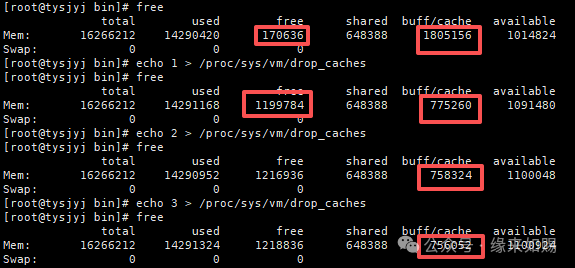 It can be seen that after three clearances, the free memory increased from 170636 to 1218836, and the free memory has increased! The cached data has significantly decreased.
Technical accumulation, meeting is fate