Teaching Objectives
1. Understand the core concept of the refresh frequency of seven-segment displays, clarify its definition, the human eye’s perception threshold, and the impact of refresh frequency on the display of seven-segment displays.
2. Master the principles of dynamic scanning technology for seven-segment displays and the logic behind its implementation.
3. Analyze the calculation method of the refresh frequency of seven-segment displays in conjunction with specific code examples.
What is the Refresh Frequency of a Seven-Segment Display?
The refresh frequency is the number of times the content displayed on a seven-segment display is updated per second. When the refresh frequency is too low, the display will exhibit noticeable flickering. This is because the human eye has a certain sensitivity to changes in light; when the interval between two refreshes is too long, the eye can perceive changes in brightness, resulting in a flickering sensation. For example, in some older electronic devices, the refresh frequency of the seven-segment display may be low, causing the displayed numbers or characters to flicker continuously, which not only affects the visual experience but can also lead to dizziness.
A refresh frequency that is too high, while stabilizing the display effect, can also bring some negative impacts. On one hand, it increases the burden on the microcontroller. A higher refresh frequency means the microcontroller must send segment selection and digit selection signals to the display more frequently, performing data updates and scanning operations, which consumes a lot of time and resources, affecting the microcontroller’s ability to handle other tasks. On the other hand, a high refresh frequency can also lead to increased power consumption. The frequent turning on and off of the display consumes more electrical energy, which can significantly shorten the battery life of battery-powered devices. For instance, in a battery-powered portable electronic clock, if the refresh frequency of the seven-segment display is set too high, the battery that could originally last a week may only last two to three days.
How can we determine the optimal refresh frequency for a seven-segment display? This requires a comprehensive consideration of actual needs and hardware conditions. Generally, a refresh frequency in the range of tens to hundreds of hertz is appropriate. For most ordinary application scenarios, such as digital clocks and calculators, a refresh frequency of 50Hz to 100Hz is sufficient to meet the needs, as the human eye can hardly perceive flickering. In these devices, the content displayed on the seven-segment display is relatively simple and changes infrequently, allowing for a lower refresh frequency that ensures display quality while reducing power consumption and the burden on the microcontroller. For example, common digital watches typically set the refresh frequency of their seven-segment displays around 60Hz, which allows for clear time display while extending battery life.
Interrupts or delay functions can also cause flickering in the seven-segment display. If a long delay function is used in the program, the display cannot refresh in time during the delay, leading to unstable display conditions. To avoid this issue, we can use shorter delays or employ timer interrupts to refresh the display. Timer interrupts can run in the background without blocking the main program, ensuring stable refresh of the display. For instance, we can configure a timer to trigger an interrupt every 1ms, performing the scanning and refreshing operations of the seven-segment display in the interrupt service routine.
Additionally, conflicts in microcontroller I/O port operations can also cause flickering. When operating the digit selection and segment selection of the seven-segment display, improper operation order may lead to momentary display errors or flickering. For example, if the segment selection is not turned off before turning off the digit selection, ghosting may occur, making it appear as if the display is flickering. To avoid this situation, we need to turn off the segment selection before switching the digit selection, perform a blanking operation, and then switch the digit selection, followed by updating the segment selection data. In the code, we can set the segment selection port to 0xFF or 0x00 (turning off all segments) before each digit selection switch in the dynamic scanning function, and then proceed with the digit and segment selection operations.
What is Dynamic Scanning?
Dynamic scanning is a technique that utilizes the persistence of vision principle of the human eye to achieve display on seven-segment displays. The persistence of vision characteristic of the human eye means that when objects move quickly or images switch rapidly, the eye retains a brief impression of the object or image on the retina, with this retention time being approximately 0.1 seconds. In other words, as long as the switching frequency of the display is higher than 10 times per second (i.e., the refresh cycle is less than 0.1 seconds), the human eye cannot discern the changes in the display, thus perceiving the display as continuous and stable.
In dynamic scanning of seven-segment displays, suppose we have a four-digit display showing “1234”; the controller does not light up all four displays simultaneously to show the numbers. Instead, it quickly lights up each display in turn. In the first moment, the controller selects the first display using the digit selection signal and sends the segment code corresponding to the number “1” to this display, making it show the number “1”. This display process is very brief, possibly only a few milliseconds. Next, the first display is quickly turned off, the second display is selected, and the segment code for the number “2” is sent to it, making it show the number “2”. Similarly, after a brief display, the second display is turned off, the third display is selected to show “3”, and finally, the fourth display is selected to show “4”. This process repeats continuously. Due to the extremely fast switching speed, before the human eye has time to perceive the changes in the lighting and extinguishing of the displays, a complete scan has already been completed, creating the illusion that all four displays are showing “1234” simultaneously.
Dynamic Scanning Experiment with Seven-Segment Displays
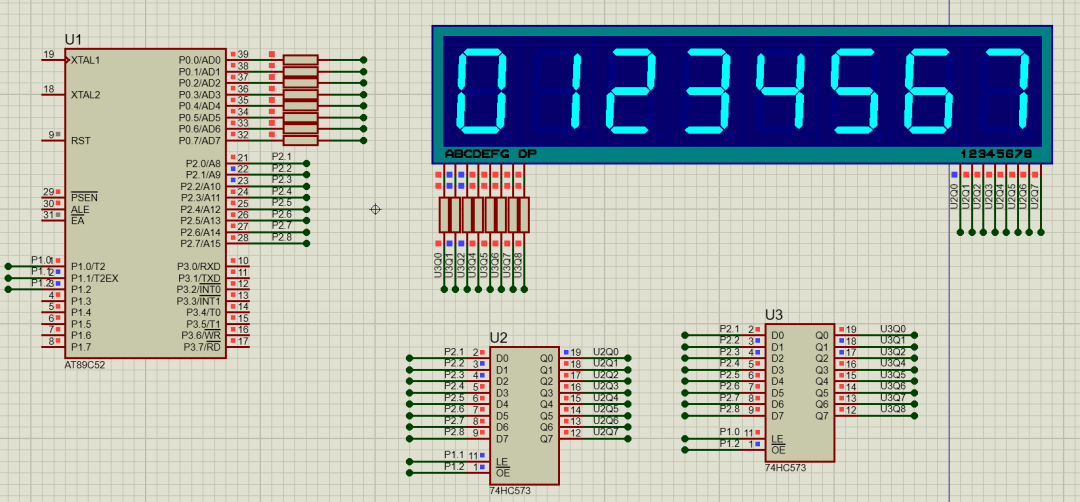
In the course “Application and Programming Implementation of Seven-Segment Displays and Latches”, we have already implemented the function of displaying single digits sequentially on an 8-digit seven-segment display. Based on the previous experimental circuit and code, we will modify the relevant code to allow the 8-digit display to show numbers 0 to 7 simultaneously without flickering.
1. Calculate the Refresh Frequency of the Original Code
The following code is related to the previous course experiment, and we will analyze this code regarding the refresh frequency of the seven-segment display.
void display_digit(unsigned char pos, unsigned char num) { // Disable interrupts to avoid timing interference EA = 0; // Write segment selection signal DATA_PORT = seg_code[num]; // Output segment code SEG_LOCK = 1; // Latch segment selection data delay_us(1); // Delay to ensure data stability SEG_LOCK = 0; // Return to hold state // Write digit selection signal DATA_PORT = bit_mask[pos]; // Output digit selection signal BIT_LOCK = 1; // Latch digit selection data delay_us(1); // Delay to ensure data stability BIT_LOCK = 0; // Return to hold state // Hold display for a period of time (100-200us) delay_ms(500); // Adjust this value to control the display time of a single seven-segment display //delay_us(200); // Optional: Set data port to high impedance to reduce power consumption DATA_PORT = 0xFF; // Re-enable interrupts EA = 1;} // Loop to refresh 8-digit seven-segment displayvoid refresh_display() { unsigned char i; for(i = 0; i < 8; i++) { display_digit(i, display_buf[i]); }} // Main functionvoid main() { init_display(); // Initialize configuration while(1) { refresh_display(); // Loop to refresh display //DATA_PORT = 0x82; }} 1. Display Time of a Single Seven-Segment Display
In the display_digit() function, the display time of a single seven-segment display consists of the following parts:
(1) Segment selection latching time: delay_us(1) → approximately 1μs;
(2) Digit selection latching time: delay_us(1) → approximately 1μs;
(3) Hold display time: delay_ms(500) → fixed at 500ms (this is the core time-consuming part);
(4) Other instruction execution time: I/O port operations, loop checks, etc., approximately a few microseconds (can be ignored);
The actual display time of a single seven-segment display is approximately 500ms (since the time consumed by other steps is much less than 500ms).
2. Total Refresh Cycle of the 8-Digit Seven-Segment Display
The refresh_display() function refreshes the 8-digit seven-segment display in a loop, thus:
Total refresh cycle = Display time of a single seven-segment display × 8
Substituting data: 500ms × 8 = 4000ms = 4 seconds
3. Final Refresh Frequency
Refresh frequency refers to the number of complete refreshes completed per second, calculated as:
Refresh frequency = 1 second ÷ Total refresh cycle
Substituting data: 1 second ÷ 4 seconds = 0.25Hz
The refresh frequency of the above code is only 0.25Hz, far below the 24Hz required for the human eye’s persistence of vision, resulting in the following phenomena:
(1) The seven-segment display flickers noticeably, failing to create a “simultaneous display” visual effect;
(2) Only one digit of the seven-segment display can be seen lit at a time, while the others are in the off state.
2. Modify the Code to Increase the Refresh Frequency to 60Hz
To increase the refresh frequency to 60Hz, we need to adjust the display time of a single seven-segment display. 60Hz means that 60 complete refreshes need to be completed per second, so each complete cycle is approximately 16.67ms (1/60 seconds).
Code modification explanation:
1. Core calculations:
(1) Target frequency: 60Hz, meaning 60 complete refreshes per second;
(2) Time for a single complete cycle: 1/60 ≈ 16.67ms
(3) Average display time per digit on the 8-digit display: 16.67ms / 8 ≈ 2.08ms.
2. Key modifications:
Change delay_ms(500) to delay_us(2000), where 2000 microseconds = 2 milliseconds. Adding the time for other operations, the total cycle is approximately 16ms, resulting in an actual refresh frequency of about 1/0.016 ≈ 62.5Hz, close to the target of 60Hz.
3. Effect:
A refresh frequency of 60Hz is well above the human eye’s persistence of vision threshold (approximately 24Hz), allowing for a stable visual effect of simultaneous display on the 8-digit seven-segment display, avoiding flickering issues caused by slow refresh rates.
Below is the modified code:
// Display a single seven-segment display// pos: position (0-7), num: number to display (0-F)void display_digit(unsigned char pos, unsigned char num) { // Disable interrupts to avoid timing interference EA = 0; // Turn off all seven-segment displays SEG_LOCK = 0; P2 = 0x00; // Digit selection output 0 SEG_LOCK = 1; // Write segment selection signal DATA_PORT = seg_code[num]; // Output segment code SEG_LOCK = 1; // Latch segment selection data delay_us(1); // Delay to ensure data stability SEG_LOCK = 0; // Return to hold state // Write digit selection signal DATA_PORT = bit_mask[pos]; // Output digit selection signal BIT_LOCK = 1; // Latch digit selection data delay_us(1); // Delay to ensure data stability BIT_LOCK = 0; // Return to hold state // Hold display for a period of time // To achieve a 60Hz refresh frequency, the total cycle for 8 digits is approximately 16.67ms, each digit approximately 2.08ms delay_us(2000); // 2000 microseconds = 2 milliseconds, after adjustment total cycle is approximately 16ms // Re-enable interrupts EA = 1;} // Loop to refresh 8-digit seven-segment displayvoid refresh_display() { unsigned char i; for(i = 0; i < 8; i++) { display_digit(i, display_buf[i]); }} // Main functionvoid main() { init_display(); // Initialize configuration while(1) { refresh_display(); // Loop to refresh display }}The experimental results are shown in the figure below.