1.Strings in Python
1.1 String Formatting
Strings are the most commonly used data type in Python. We can create strings using quotes (‘ or “).
Creating a string is simple; just assign a value to a variable. For example:
var1 = 'Hello yuque!'
var2 = "Python"- Data within double or single quotes is a string.
1.2 Accessing Values in Strings
In [57]: var1 = 'Hello yuque!'
...: var2 = "Python string"
...:         # Accessing string values by index
In [58]: print("var1[0]:{}".format(var1[0]))
var1[0]:H
In [59]: print("var2[1:3]:{}".format(var1[1:6]))
var2[1:3]:ello
1.3 Escape Characters
When special characters need to be used in a string, Python uses a backslash (\) to escape characters. See the table below:
|
Escape Character |
Description |
|
\ |
Line continuation character (at the end of a line) |
|
\\ |
Backslash character |
|
\’ |
Single quote |
|
\” |
Double quote |
|
\a |
Bell |
|
\b |
Backspace |
|
\e |
Escape |
|
\000 |
Null |
|
\n |
Newline |
|
\v |
Vertical tab |
|
\t |
Horizontal tab |
|
\r |
Carriage return |
|
\f |
Form feed |
|
\oyy |
Octal number, where yy represents the character, e.g., \o12 represents newline |
|
\xyy |
Hexadecimal number, where yy represents the character, e.g., \x0a represents newline |
|
\other |
Other characters are output in normal format |
1.4 String Operators
The following table shows examples with variable a having the string value “Hello” and variable b having the value “Python”:
|
Operator |
Description |
Example |
|
+ |
String concatenation |
>>>a + b‘HelloPython‘ |
|
* |
Repeating a string |
>>>a * 2‘HelloHello‘ |
|
[] |
Accessing a character in a string by index |
>>>a[1]‘e‘ |
|
[ : ] |
Slicing a portion of a string |
>>>a[1:4]‘ell‘ |
|
in |
Membership operator – returns True if the given character is in the string |
>>>“H“inaTrue |
|
not in |
Membership operator – returns True if the given character is not in the string |
>>>“M“notinaTrue |
|
r/R |
Raw string – A raw string treats all characters literally, without escaping special or non-printable characters. A raw string is defined by adding the letter “r” (case insensitive) before the first quote. |
>>>printr‘\n‘\n>>> printR‘\n‘\n |
|
% |
Formatted string |
See 1.4 Output and Input |
1.5 Triple Quotes
While single or double quotes can be used to define strings, they are not convenient when special characters like newline characters need to be included. Python’s triple quotes are designed to solve this problem,
allowing a string to span multiple lines, including newline characters, tabs, and other special characters:
errHTML = '''<HTML><HEAD><TITLE>Friends CGI Demo</TITLE></HEAD><BODY><H3>ERROR</H3><B>%s</B><P><FORM><INPUT TYPE=button VALUE=Back ONCLICK="window.history.back()"></FORM></BODY></HTML>'''
cursor.execute('''CREATE TABLE users (  login VARCHAR(8), uid INTEGER, prid INTEGER)''')
1.6 Unicode Strings
Defining a Unicode string in Python is as simple as defining a regular string:
In [60]: u'Hello yuque !'
Out[60]: u'Hello yuque !'
The lowercase “u” before the quotes indicates that a Unicode string is being created. If you want to include a special character, you can use Python’s Unicode-Escape encoding. For example:
In [61]: u'Hello\u0020yuque !'
Out[61]: u'Hello yuque !'
1.7 Format Function
# By position
print '{0},{1}'.format('yuque',20)
print '{},{}'.format('yuque',20)
print '{1},{0},{1}'.format('yuque',20)
# By keyword arguments
print '{name},{age}'.format(age=18,name='yuque')
class Person:
    def __init__(self,name,age):
        self.name = name
        self.age = age
    def __str__(self):
        return 'This guy is {self.name}, is {self.age} years old'.format(self=self)
print str(Person('yuque',18))
# By mapping
a_list = ['yuque',20,'china']
print 'my name is {0[0]}, from {0[2]}, age is {0[1]}'.format(a_list) # my name is yuque, from china, age is 20
# By mapping dict
b_dict = {'name':'yuque','age':20,'province':'zhejiang'}
print 'my name is {name}, age is {age}, from {province}'.format(**b_dict) # my name is yuque, age is 20, from zhejiang
# Padding and alignment
print '{:>8}'.format('189') #     189
print '{:0>8}'.format('189') #00000189
print '{:a>8}'.format('189') #aaaaa189
# Precision and type
# Keep two decimal places
print '{:.2f}'.format(321.33345) #321.33
# Use comma as thousands separator
print '{:,}'.format(1234567890) #1,234,567,890
# Other types mainly involve bases, b, d, o, x represent binary, decimal, octal, hexadecimal.
print '{:b}'.format(18) # Binary 10010
print '{:d}'.format(18) # Decimal 18
print '{:o}'.format(18) # Octal 22
print '{:x}'.format(18) # Hexadecimal 12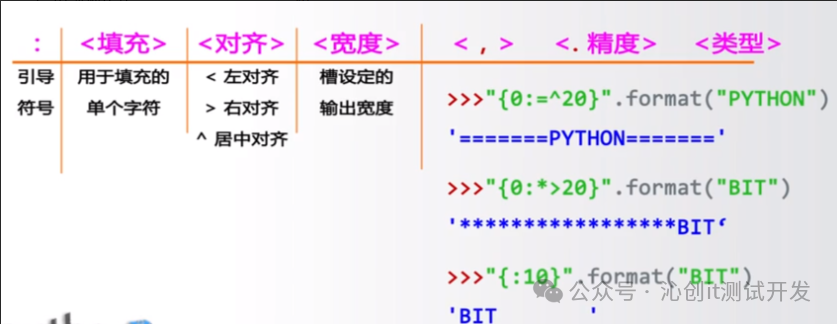
2. Common String Operations
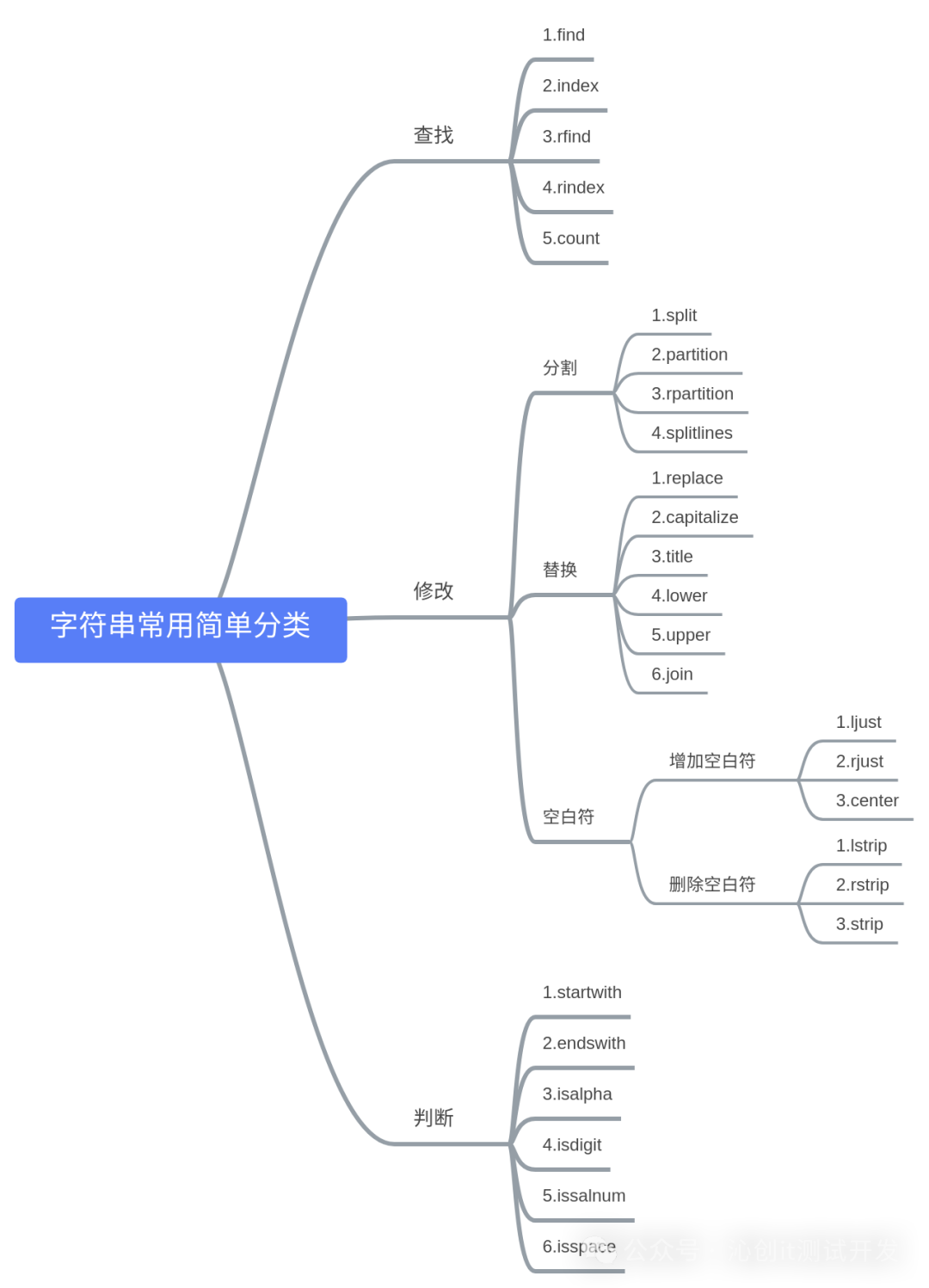
These methods implement most of the methods in the string module, as shown in the table below, which lists the currently supported built-in string methods, all of which include support for Unicode, with some specifically for Unicode.
|
Method |
Description |
|
string.capitalize() |
Capitalizes the first character of the string |
|
string.center(width) |
Returns a new string centered in the original string, padded with spaces to the specified width |
|
string.count(str, beg=0, end=len(string)) |
Returns the number of occurrences of str in string; if beg or end is specified, returns the count within the specified range |
|
string.decode(encoding=’UTF-8′, errors=’strict’) |
Decodes string using the specified encoding format; if an error occurs, a ValueError is raised by default unless errors is specified as ‘ignore’ or ‘replace’ |
|
string.encode(encoding=’UTF-8′, errors=’strict’) |
Encodes string using the specified encoding format; if an error occurs, a ValueError is raised by default unless errors is specified as ‘ignore’ or ‘replace’ |
|
string.endswith(obj, beg=0, end=len(string)) |
Checks if the string ends with obj; if beg or end is specified, checks within the specified range; returns True if it does, otherwise returns False. |
|
string.expandtabs(tabsize=8) |
Converts tab characters in the string to spaces, with a default of 8 spaces per tab. |
|
string.find(str, beg=0, end=len(string)) |
Checks if str is contained in string; if beg and end are specified, checks within the specified range; returns the starting index if found, otherwise returns -1 |
|
string.format() |
Formats the string |
|
string.index(str, beg=0, end=len(string)) |
Similar to find(), but raises an exception if str is not found in string. |
|
string.isalnum() |
Returns True if string contains at least one character and all characters are alphanumeric; otherwise returns False |
|
string.isalpha() |
Returns True if string contains at least one character and all characters are alphabetic; otherwise returns False |
|
string.isdecimal() |
Returns True if string contains only decimal digits; otherwise returns False. |
|
string.isdigit() |
Returns True if string contains only digits; otherwise returns False. |
|
string.islower() |
Returns True if string contains at least one case-sensitive character and all such characters are lowercase; otherwise returns False |
|
string.isnumeric() |
Returns True if string contains only numeric characters; otherwise returns False |
|
string.isspace() |
Returns True if string contains only whitespace; otherwise returns False. |
|
string.istitle() |
Returns True if string is title-cased (see title()); otherwise returns False |
|
string.isupper() |
Returns True if string contains at least one case-sensitive character and all such characters are uppercase; otherwise returns False |
|
string.join(seq) |
Joins all elements in seq (as string representations) into a new string, using string as the separator |
|
string.ljust(width) |
Returns a new string left-aligned in the original string, padded with spaces to the specified width |
|
string.lower() |
Converts all uppercase characters in string to lowercase. |
|
string.lstrip() |
Removes whitespace from the left side of string |
|
string.maketrans(intab, outtab) |
maketrans() method creates a character mapping translation table; the first parameter is a string of characters to be converted, and the second parameter is a string of characters representing the target. |
|
max(str) |
Returns the largest letter in the string str. |
|
min(str) |
Returns the smallest letter in the string str. |
|
string.partition(str) |
Similar to find() and split(), it splits the string into a 3-element tuple (string_pre_str, str, string_post_str) starting from the first occurrence of str; if str is not found, string_pre_str == string. |
|
string.replace(str1, str2, num=string.count(str1)) |
Replaces str1 in string with str2; if num is specified, replaces no more than num times. |
|
string.rfind(str, beg=0,end=len(string)) |
Similar to find(), but searches from the right. |
|
string.rindex(str, beg=0,end=len(string)) |
Similar to index(), but searches from the right. |
|
string.rjust(width) |
Returns a new string right-aligned in the original string, padded with spaces to the specified width |
|
string.rpartition(str) |
Similar to partition(), but searches from the right. |
|
string.rstrip() |
Removes whitespace from the end of the string. |
|
string.split(str=””, num=string.count(str)) |
Splits string using str as the delimiter; if num is specified, only splits num substrings |
|
string.splitlines([keepends]) |
Splits by line (‘\r’, ‘\r\n’, ‘\n’), returning a list of each line as elements; if keepends is False, does not include newline characters; if True, retains newline characters. |
|
string.startswith(obj, beg=0,end=len(string)) |
Checks if the string starts with obj; returns True if it does, otherwise returns False. If beg and end are specified, checks within the specified range. |
|
string.strip([obj]) |
Performs lstrip() and rstrip() on string |
|
string.swapcase() |
Reverses the case of characters in string |
|
string.title() |
Returns a “title-cased” string, meaning all words start with uppercase and the rest are lowercase (see istitle()) |
|
string.translate(str, del=””) |
Translates characters in string based on the table given by str (containing 256 characters); characters to be filtered out are placed in the del parameter |
|
string.upper() |
Converts lowercase letters in string to uppercase |
|
string.zfill(width) |
Returns a string of length width, right-aligned, with the original string padded with zeros |