The C language can be used to write operating systems, drivers, and applications. When developing with C, we first write the source code, then compile and link the dependent libraries, and finally generate an executable program. Taking the gcc compiler as an example, as shown in the figure below: In actual projects, there will be multiple source files, divided into header files and source files, and they need to be combined with third-party libraries to generate an executable program. When the number of files exceeds 100 or 1000, the build process becomes a system engineering task. Here, we introduce a popular cross-platform build tool, CMake. As shown in the figure below:
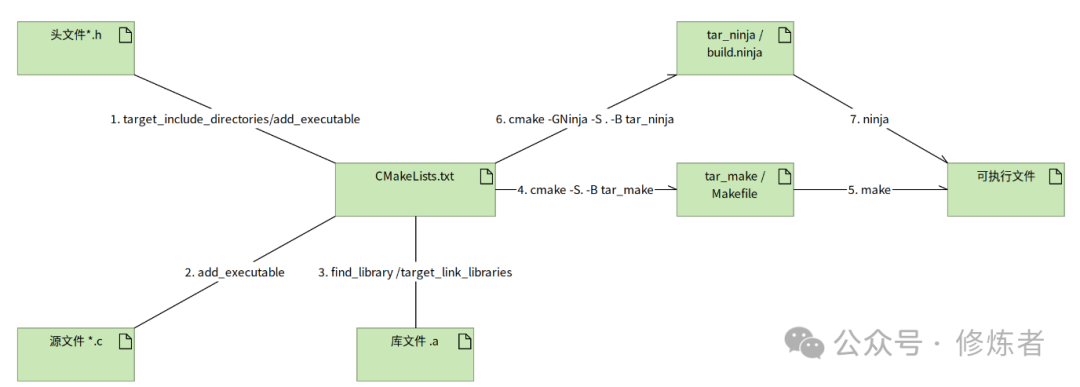 CMake relies on a key file, CMakeLists.txt, to build the project. Through the commands defined by CMake, it incorporates .h, .c, .a, and .so files into the project, and then executes the CMake command to generate a makefile based on make, or a build.ninja driven by ninja.The commonly used CMake commands are as follows:
| 1 | <span><span>CMAKE_MINIMUM_REQUIRED</span></span> |
Specifies the required minimum version of CMake.
|
| 2 | <span><span>PROJECT</span></span> |
Defines the project name and can specify the languages used (default is C and C++).
|
| 3 | <span><span>ADD_EXECUTABLE</span></span> |
Adds a build rule for an executable file.
|
| 4 | <span><span>ADD_LIBRARY</span></span> |
Adds a build rule for a library.
|
| 5 | <span><span>INCLUDE_DIRECTORIES</span></span> |
Specifies the search directory for header files, used for<span><span>#include</span></span> directives to find header files.
|
| 6 | <span><span>TARGET_LINK_LIBRARIES</span></span> |
Links library files to the target (executable or other libraries).
|