In Python, strings (str) are one of the most commonly used data types. In addition to directly storing and printing, strings also support quick access, extraction, or combination of substrings through indexing and slicing. Understanding these two operations is key to mastering string manipulation in Python.
In Python, the [] operator is specifically used for indexing and slicing (unlike array syntax in C language).
1. String Indexing
Python strings can be viewed as an ordered sequence of characters, with each character corresponding to a position number (index). The index is used to access individual characters in the string.
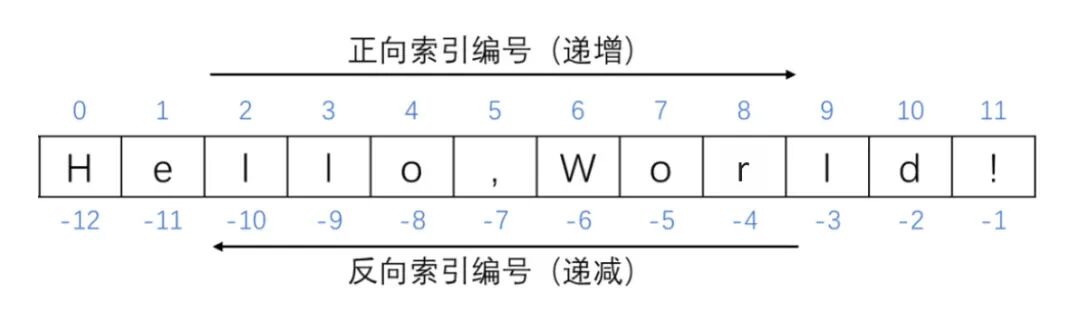
1. Positive Indexing
Numbering from left to right, starting from 0.
The index of the first character is 0, the second is 1, and so on.
s = "Python"
print(s[0])   # P
print(s[5])   # n
2. Negative Indexing
Numbering from right to left, starting from -1.
The index of the last character is -1, the second to last is -2, and so on.
s = "Python"
print(s[-1])  # n
print(s[-6])  # P
Note:
If the index is out of range, an IndexError exception will be raised.
2. String Slicing
Slicing is a method of extracting substrings based on indices, allowing for the extraction of a range of characters or characters at specific intervals.
Basic syntax:
s[start:end:step]
🔹 start: Starting index (inclusive).
🔹 end: Ending index (exclusive).
🔹 step: Step size. Defaults to +1, can be negative.
When using slicing, at least one colon : must be included; otherwise, it is a normal indexing operation..
The direction of slicing depends on the sign of the step.
1. When step is positive
When the step is a positive number (e.g., default is 1), it indicates “taking elements from left to right”.
If start is omitted, it defaults to starting from the first character of the string.
If end is omitted, it defaults to taking elements from the specified start position to the last character of the string.
If step is omitted, it defaults to 1.
When step is positive, regardless of whether positive or negative indexing is used, start must be less than end; otherwise, an empty string will be returned.
# Using positive indexing
s = "Python"
# Extracting the first characters
print(s[0:4])   # Pyth   (index 0 to 3)
print(s[:4])    # Pyth   (omit start, start from the first character)
# Extracting the last characters
print(s[2:])    # thon   (omit end, until the last character)
print(s[12:])   # Output: '' (empty string)
# Extracting middle characters
print(s[2:4])   # th
# step is 2
print(s[1::2])  # yhn  (starting from index 1, take every 2nd character)
# Using negative indexing
s = "Hello,world!"
print(s[-1]) # Output: !
print(s[-3:-1]) # Output: ld
print(s[-12:]) # Output: Hello,world! (out of bounds will not raise an error, will automatically truncate)
print(s[-1:-4]) # Output: '' (empty string)
# Also can mix positive and negative indexing
print(s[-12:5]) # Hello2. When step is negative
When the step is a negative number, the direction of slicing is reversed, i.e., elements are taken from right to left..
If start is omitted, it defaults to starting from the last character of the string.
If end is omitted, it defaults to taking elements from the specified start position to the first character of the string.
When step is negative, regardless of whether positive or negative indexing is used, start must be greater than end; otherwise, an empty string will be returned.
# Using positive indexing
s = "Hello,world!"
print(s[5:2:-1])    # ,ol  (taking from index 5 backwards to index 3)
print(s[4::-1])     # olleH
# Using negative indexing
print(s[-2:-7:-2])  # drw
# Also can mix positive and negative indexing
print(s[-2:5:-1])   # dlrow
3. Tips for String Slicing Applications
1. String Copying and Reversing
s = "Hello, Python!"
print(s[:])     # Hello, Python!
print(s[::-1])  # !nohtyP ,olleH
# Checking for palindrome
s = "madam"
print(s == s[::-1])  # True
2. Masking Sensitive Information
phone = "13812345678"
print(phone[:3] + "****" + phone[-4:])  # 138****5678
3. Extracting File Extensions
filename = "photo.jpg"
ext = filename.split('.')[-1]
print(ext)  # jpg
4. Extracting Odd/Even Indexed Characters
s = "123456789"
print(s[::2])  # 13579
print(s[1::2]) # 2468
5. Symmetrical Slicing and Reversing
s = "[mediaTEA]"
print(s[1:-1])     # mediaTEA
# Symmetrical slicing + reversing
s = "mediaTEA"
print(s[5:8][::-1])  # AET
6. Dynamic Slicing with len()
s = "Hello, Python!"
print(s[:len(s)//2])  # First half Hello,
print(s[len(s)//2:])  # Second half Python!
7. Simulating Character Deletion (via Concatenation)
s = "abcdef"
print(s[:2] + s[3:])  # Delete character at index 2 → abdef
print(s[1::2])        # Delete all even indexed characters → bdf
8. Advanced Reversing Techniques
# Reversing by word (using split and slicing):
s = "I love Python"
print(" ".join(s.split()[::-1]))  # Python love I
# Partial reversing:
s = "abcdefgh"
print(s[:4][::-1] + s[4:])  # dcbaefgh
9. Indirectly Modifying Strings Using List Slicing
s = "Python"
lst = list(s)
lst[2:4] = ["X", "Y"]
print("".join(lst))  # PyXYon
Note:
Since strings are immutable, they must first be converted to a list for modification, and then concatenated back to a string.
4. Additional Notes
1. Slicing does not modify the original string
Python strings are immutable objects; slicing returns a new string, leaving the original string unchanged.
Thus, this new string can be sliced again.
2. Step in slicing cannot be 0
The step in slicing cannot be 0, otherwise it will trigger a ValueError.
3. Out of Bounds Handling
Index operations: Out of bounds raises an exception.
Slicing operations: Out of bounds will not raise an error, but will automatically truncate.
s = "abc"
# print(s[5])     # ❌ IndexError
print(s[0:10])    # abc
4. Generality of Indexing and Slicing
Indexing and slicing are applicable not only to strings but also to all sliceable sequence types, such as lists (list), tuples (tuple), range objects, etc.
lst = [1, 2, 3, 4, 5]
print(lst[1:4])    # [2, 3, 4]
📘 Summary
In Python, indexing can be used to access individual characters in a string, while slicing allows for flexible extraction of substrings, supporting omitted parameters, negative indexing, step sizes, and out-of-bounds safety features. These operations are applicable not only to strings but also to lists, tuples, and other sequences.
Mastering indexing and slicing operations enables easy implementation of string copying, reversing, slicing, deleting, masking, splitting, and concatenating, among other text processing needs. These operations are commonly used in text parsing, data cleaning, and other scenarios.
 “Likes are meaningful, appreciation is encouragement”