Python Basics 02 — Fundamental Data Types and Input/Output

1. Fundamental Data Types
Data + Algorithm = Program; data is the core of a program, and data types are classifications and definitions of data. For example, the game coins you see are an integer, and the name of the game character is a string; these are manifestations of data types.
1. Integers, Floating-Point Numbers, Strings
Common data types in Python include: integers (int), floating-point numbers (float), and strings (str).
- 1. An integer is a common number in our lives, such as -1, 0, 111, 9999.
- 2. A floating-point number is a decimal, such as -1.1, 1.111, 9999.9999.
- 3. A string is a sequence of characters, which can include letters, numbers, symbols, etc., such as “Hello, World!”, “Python3.11”, “1.1”, “10”.
Note: Characters in a string must be enclosed in quotes; otherwise, Python will consider it a variable.
2. Variables
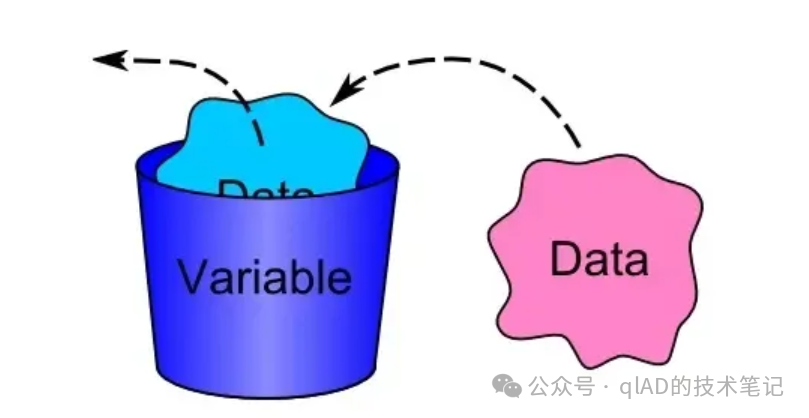
A variable is a place in a program where data is stored. A variable can hold any type of data, such as integers, floating-point numbers, strings, etc. Moreover, as the name suggests, a variable is a quantity that can change.
You can think of a variable as a box that can hold data.
The format for using a variable is: variable_name = value
# Define an integer variable
age = 18

# Define a floating-point variable
height = 1.75

# Define a string variable
name = "Alice"
The value in a variable can change, and this change is a form of overwriting assignment.
# Define an integer variable representing age
age = 18

# Directly change the value of age
age = 19

# Change the value of age through calculation and assign it to new_age
new_age = age + 1

# Change the value of age through calculation and assign it to age itself
age = age + 1
The name of a variable is also called an identifier, and the naming rules are as follows:
- 1. The first character must be a letter (a-z, A-Z) or an underscore
<span>_</span>. - 2. The other parts of the identifier can consist of letters, numbers, and underscores.
- 3. Identifiers are case-sensitive; count and Count are different identifiers.
- 4. There is no strict limit on the length of identifiers, but it is recommended to keep them concise (generally no more than 20 characters).
- 5. Reserved keywords such as if, for, class, etc., cannot be used as identifiers.
It is recommended to use “lowercase letters + underscores” (snake_case) for variable names, such as user_name, total_score (instead of username or TotalScore);
In Python, # is used for comments; the content after # will be ignored by Python and will not be executed.
3. Introduction to the print() Function
After understanding common data types, how do we use this data?
The simplest way is to print it out directly. The print() function is used in Python to output information to the console and can output strings, numbers, variables, etc.
# Output a string
print("Hello, World!")

# Output an integer
print(123)

# Output a variable
name = "Alice"
print(name)
Of course, you can also output calculations.
# Output the result of a calculation
print(1 + 1)
Strings can be enclosed in single quotes (‘Python’), double quotes (“Python”), or triple quotes (”’multi-line string”’/”””multi-line string”””). There is no essential difference between single and double quotes, and they can be nested (e.g., “He said ‘Hello'”); triple quotes are used for multi-line text (such as paragraphs, code comments) and support direct line breaks.
# Example of triple quotes (multi-line string)
poem = '''The bright moonlight before my bed,
I suspect it is frost on the ground.
I raise my head to gaze at the bright moon,
And lower my head to think of my hometown.'''
print(poem)  # Directly output in line break format
4. Arithmetic Operators
Next, let’s try some more calculations.
Arithmetic operators are the most commonly used operators in Python, used for performing calculations on numbers. Similar to mathematical operators, Python’s arithmetic operators include addition (+), subtraction (-), multiplication (*), division (/), etc.
Now, we have two variables <span>a = 10</span> and <span>b = 21</span>, and we can perform the following calculations:
| Operator | Description | Example |
|---|---|---|
<span>+</span> |
Addition | <span>a + b = 31</span> |
<span>-</span> |
Subtraction | <span>a - b = -11</span> |
<span>*</span> |
Multiplication | <span>a * b = 210</span> |
<span>/</span> |
Division | <span>b / a = 2.1</span> |
<span>%</span> |
Modulus | <span>b % a = 1</span> |
<span>**</span> |
Exponentiation | <span>a ** b = 100000000000000000000</span> |
<span>//</span> |
Floor Division | <span>9 // 2 = 4</span> |
Among these, the table’s // (floor division) and % (modulus) can be confusing for beginners.
🌟 Common Mistake Reminder:
// (floor division): The result is rounded down (regardless of positive or negative), e.g., 9//2=4, -9//2=-5 (not -4);
% (modulus): The result’s sign is consistent with the “divisor”; e.g., 9%2=1, 9%-2=-1, -9%2=1.
Precedence: Just like in mathematics, multiplication and division are calculated before addition and subtraction. The precedence of arithmetic operators in Python, from high to low, is as follows (operators of the same precedence are calculated from left to right):
- 1.
<span>**</span>Exponentiation - 2.
<span>*</span>Multiplication,<span>/</span>Division,<span>%</span>Modulus,<span>//</span>Floor Division - 3.
<span>+</span>Addition,<span>-</span>Subtraction
For example:
# Define two variables
result = (3 + 4 * 2 - 1) ** 2 / (5 % 3) + 10 // 3
print(result)
2. Input and Output in Python
In programming, input and output are very important operations. Input refers to obtaining data from external sources, while output refers to displaying data to the user. Additionally, the English term for input is “input”, and for output, it is “output”.
Similar to the functions discussed earlier, the input() function and the print() function can also accept parameters, and the format of using these functions is called syntax, which is detailed below:
1. print() Function
The print() function is used in Python to output information to the console and can output strings, numbers, variables, etc. The syntax format is as follows:
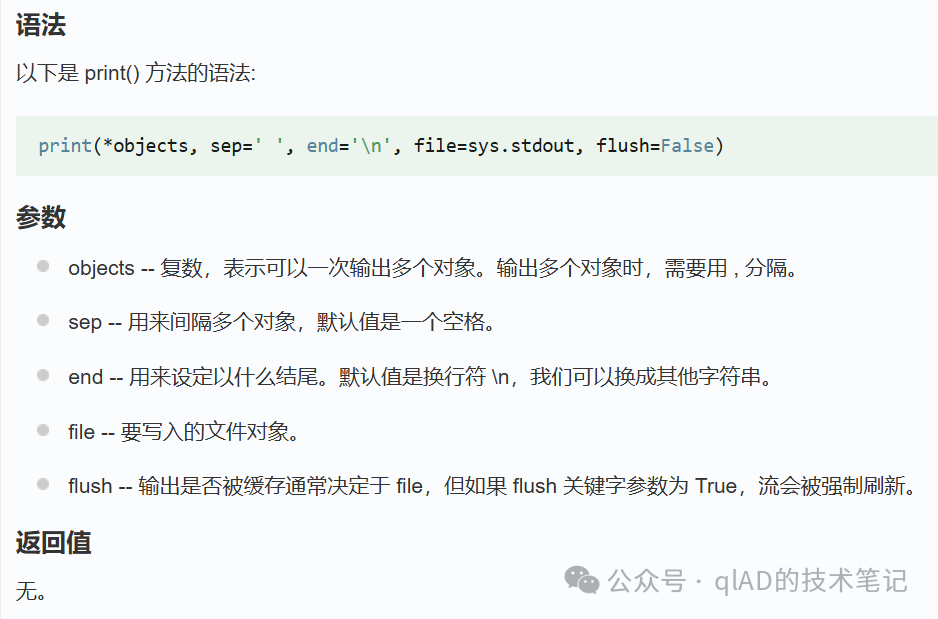
Example:
# Output a string
print("Hello, World!")

# Output a number
print(123)

# Output a calculation
print(1 + 1)

# Output multiple variables
name = "Alice"
age = 18
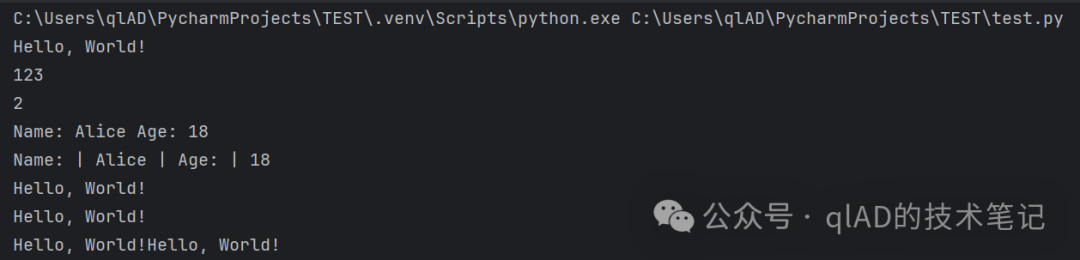
print("Name:", name, "Age:", age)

# Output multiple data and variables with a custom separator
print("Name:", name, "Age:", age, sep=" | ")

# Custom end character
print("Hello, World!")
print("Hello, World!")
print("Hello, World!", end="")
print("Hello, World!")
Output result:
When outputting multiple data, you can also use f-string formatting for output (more readable), syntax:<span>print(f"Text {variable} Text")</span>
name = "Alice"
age = 18
# Original method
print("Name:", name, "Age:", age)  # Output: Name: Alice Age: 18
# f-string method (more intuitive)
print(f"My name is {name}, and I am {age} years old.")  # Output: My name is Alice, and I am 18 years old.
# Supports calculations and formatting control (e.g., keeping 2 decimal places)
height = 1.753
print(f"My height is {height:.2f} meters.")  # Output: My height is 1.75 meters.
2. input() Function
The input() function is used in Python to obtain input from the console, and the syntax format is as follows:
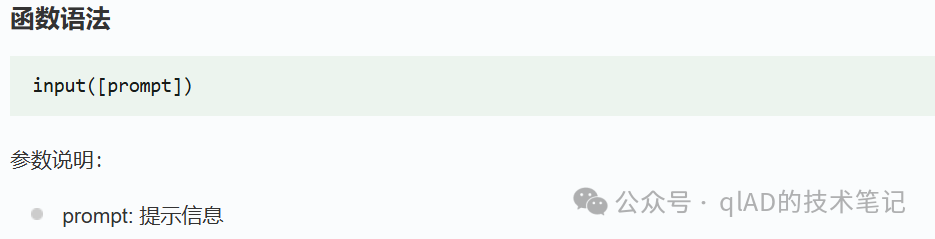
So where does the data we input go? How do we save the data we input?
The input data will be saved in a variable, for example:
name = input("Please enter your name:")
print("Hello,", name)
The input() function can also accept multiple data and save them into multiple variables, for example:
name, age = input("Please enter your name and age, separated by a space:").split()
print("Name:", name, "Age:", age)
The split() function is a string method used to split a string based on a specified delimiter, with the default being a space. If you input “Alice 18”, then name will be “Alice” and age will be “18”.
However, if you do not write the split() function, the input() function can only accept one piece of data and save it to one variable, for example:
name, age = input("Please enter your name and age, separated by a space:")
print("Name:", name, "Age:", age)
When you input “Alice 18”, Python will throw an error because the input() function can only accept one piece of data and save it to one variable, while you are trying to save two pieces of data into two variables.
Now let’s write a simple program to calculate the area of a triangle. The formula for the area of a triangle is given by Heron’s formula:
where p = (a + b + c) / 2, and a, b, c are the three sides of the triangle.
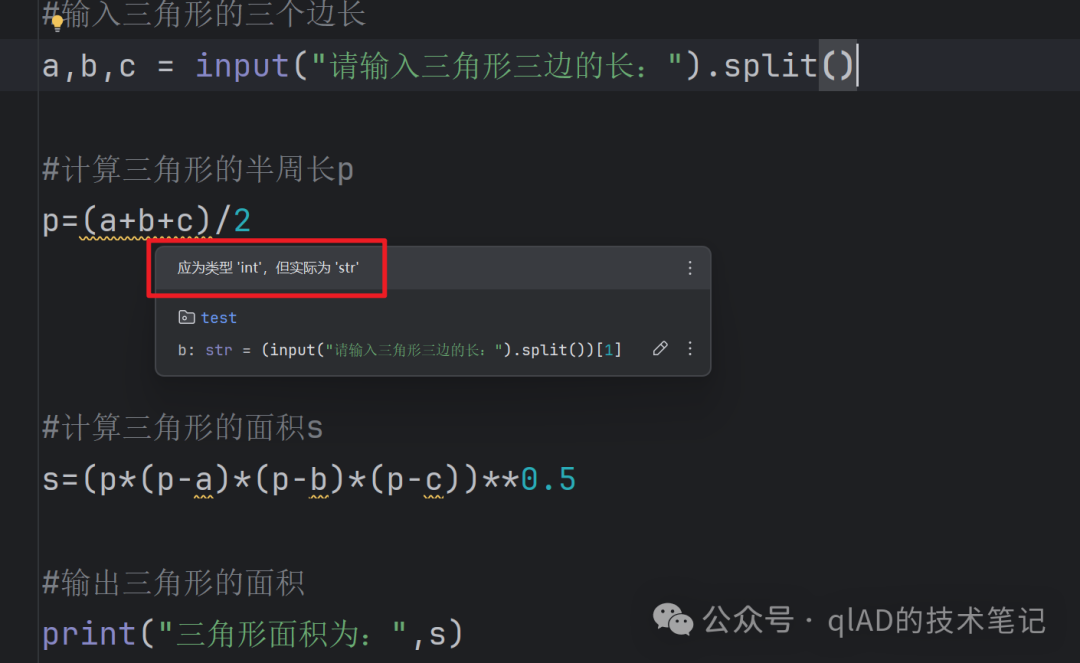
Key Reminder: The input() function returns a string regardless of what is input! It must be manually converted to the target type (int/float) to perform numerical calculations.
Complete code example:
import math  # Import the math module for the sqrt() function to calculate the square root

# 1. Input three sides (convert to float to support decimals)
a = float(input("Please enter the first side of the triangle:"))
b = float(input("Please enter the second side of the triangle:"))
c = float(input("Please enter the third side of the triangle:"))

# 2. Calculate the semi-perimeter p
p = (a + b + c) / 2

# 3. Calculate the area using Heron's formula
area = math.sqrt(p * (p - a) * (p - b) * (p - c))

# 4. Output the result (keeping 3 decimal places)
print(f"The area of the triangle is: {area:.3f}")
3. Possible Issues
1. What is the console?
The console is an input-output interface provided by the Python runtime environment, used to receive user input and display output results. When first learning Python, you typically input code in a dark and unattractive console, run the code, and check the output results.
2. Is Python’s data type dynamic?
Isn’t Python’s data type dynamic? Why didn’t it automatically convert when calculating Heron’s formula?
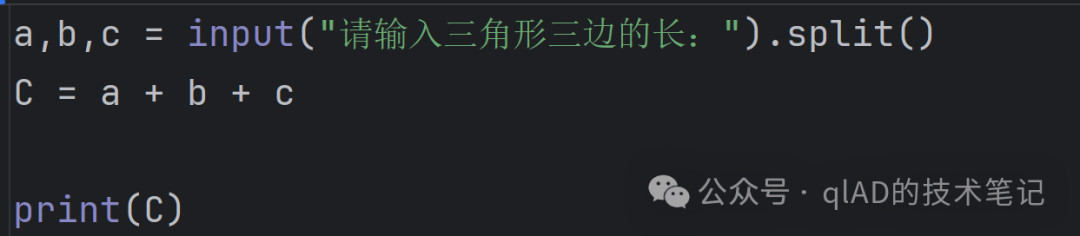
Python’s data types are dynamic, meaning the variable type is determined at runtime, but explicit conversion is still required to perform numerical calculations. In other words, Python automatically determines the data type based on the content of the data. You can use the type() function to check the data type.
a = 10
b = "10"
print(type(a))
print(type(b))
#print(a + b)
print(a + int(b))
However, Python’s data type conversion is not automatic; we need to perform the conversion manually.
Moreover, the data type of the input obtained from the input() function is always a string, and strings can also be added; string addition concatenates strings rather than performing numerical addition.
Conversion example:
# Error: Directly using a string for numerical calculations (common mistake for beginners)
age = input("Please enter your age:")  # Input 18, age is actually "18" (string)
print(age + 1)  # Error: Cannot add a string and an integer

# Correct: First convert to int type
age = int(input("Please enter your age:"))  # Input 18, age becomes 18 (integer)
print(age + 1)  # Output 19 (correct)

# If inputting a decimal (e.g., height), use float conversion
height = float(input("Please enter your height (meters):"))  # Input 1.75, height is 1.75 (float)
print(height * 2)  # Output 3.5 (correct)
3. How does Python handle errors?
In the console output, your erroneous code will be marked with <span>~~~^^^</span>, and the error generally occurs near this segment of code.
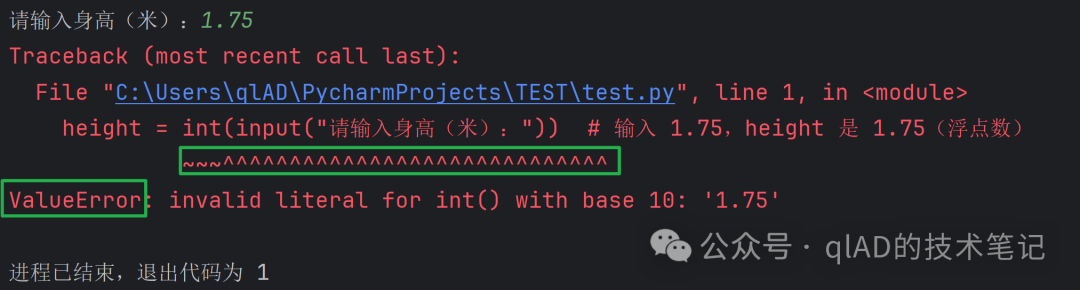
Next, it will generally prompt you with the type of error and the error message, such as: ValueError, etc.
4. Homework
1. Basic Consolidation
Multiple choice question: Which of the following variable names is illegal?
- 1.
<span>_score</span> - 2.
<span>2ndName</span> - 3.
<span>level_1</span> - 4.
<span>MAX_SPEED</span>
2. Concept Understanding
True or False: In Python, “5” + 5 will output 10. Is this correct? If not, please explain why and provide the correct way to calculate 10.
3. Programming Practice
Write a program: Allow the user to input the radius of a circle (float), and output the area and circumference (keeping 2 decimal places).
Tips:
- 1. π can be approximated as 3.1415926;
- 2. Formulas: Area = π × radius² (use
<span>radius ** 2</span>to represent square), Circumference = 2 × π × radius; - 3. To keep 2 decimal places, refer to f-string format
<span>{variable:.2f}</span>.
4. Comprehensive Application
If you haven’t learned control structures, you can skip this.
Upgraded version of Heron’s formula: Input three sides, first check if they can form a triangle; if they can, output the area (keeping 3 decimal places); otherwise, output “Cannot form a triangle”.