1. What is C Language?
-
C language is a general-purpose programming language widely used in low-level development. The design goal of C language is to provide a programming language that can be easily compiled, handle low-level memory, generate minimal machine code, and run without any runtime environment support.
-
Although C language provides many low-level processing capabilities, it still maintains good cross-platform characteristics. A C program written according to a standard specification can be compiled on many computer platforms, including some embedded processors (microcontrollers or MCUs) and supercomputers.
-
In the 1980s, to avoid differences in C language syntax used by various development vendors, the American National Standards Institute established a complete set of American national standard syntax for C language, known as ANSI C, as the initial standard for C language. Currently, the C11 standard released by the International Organization for Standardization (ISO) and the International Electrotechnical Commission (IEC) on December 8, 2011, is the third official standard for C language and the latest standard, which better supports Chinese character function names and Chinese character identifiers, achieving a certain degree of Chinese programming.
-
C language is a procedural-oriented programming language, which differs from object-oriented programming languages such as C++ and Java.
2. The History and Glory of C Language
- C language was originally invented as a development tool for the Unix system.
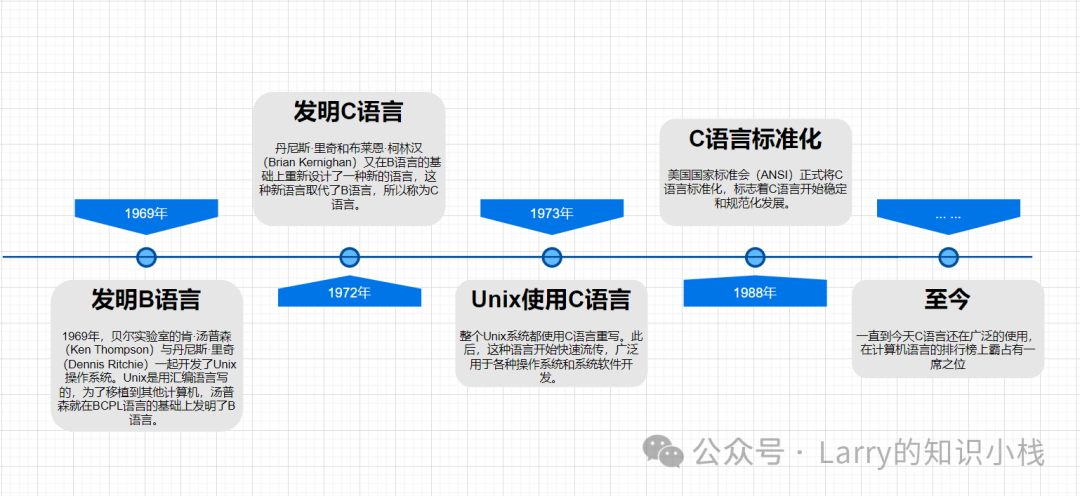 Figure 1. The Development History of C Language
3. Compiler Selection: VS2022
-
C language is a compiled programming language, and the source code of C language is in text files, which cannot be executed directly. It must be translated by a compiler and linked by a linker to generate a binary executable file, which can then be executed.
-
C language code is placed in files with a .c suffix. To obtain the final executable program, it must go through two processes: compilation and linking.
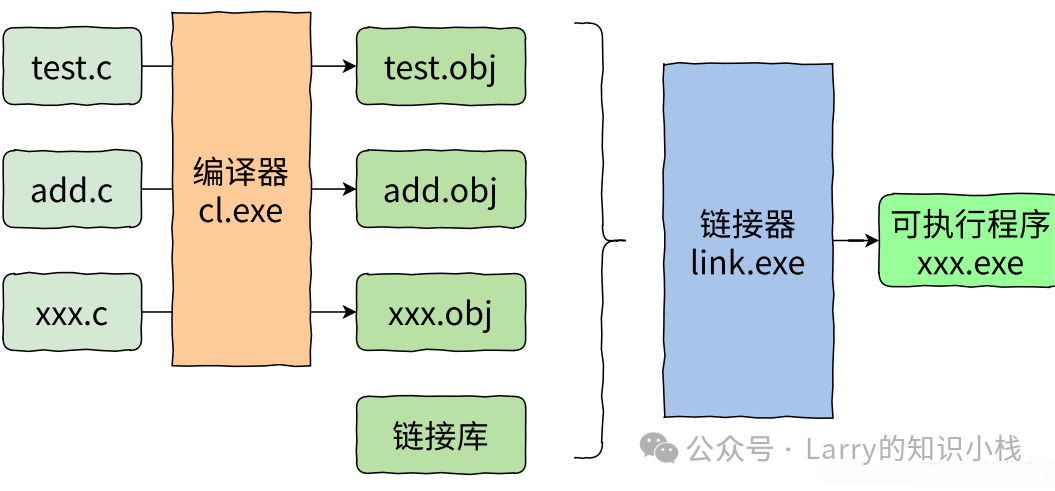
Figure 2. Compiler and Linker
Note: 1. Each source file (.c) is processed separately by the compiler to generate the corresponding object file (.obj). 2. Multiple object files and library files are processed by the linker to generate the corresponding executable program (.exe).
3.1 Comparison of Compilers
-
C language is a compiled programming language that relies on compilers to convert the programming language into machine instructions that the computer can execute. What are some common C language compilers?
- For example: msvc, clang, gcc are some common compilers. There are also some Integrated Development Environments (IDEs) such as: VS2022, XCode, CodeBlocks, DevC++, Clion, etc.
- An Integrated Development Environment (IDE) is an application that provides a programming development environment, generally including a code editor, compiler, debugger, and graphical user interface tools. It integrates code writing, analysis, compilation, debugging, and other functions into a unified development software service suite.
-
VS2022 integrates MSVC (the installation package is relatively large, installation is simple, no additional configuration is required, and it is very convenient to use).
-

-
XCode integrates clang (the development tool on Apple computers).
-

-
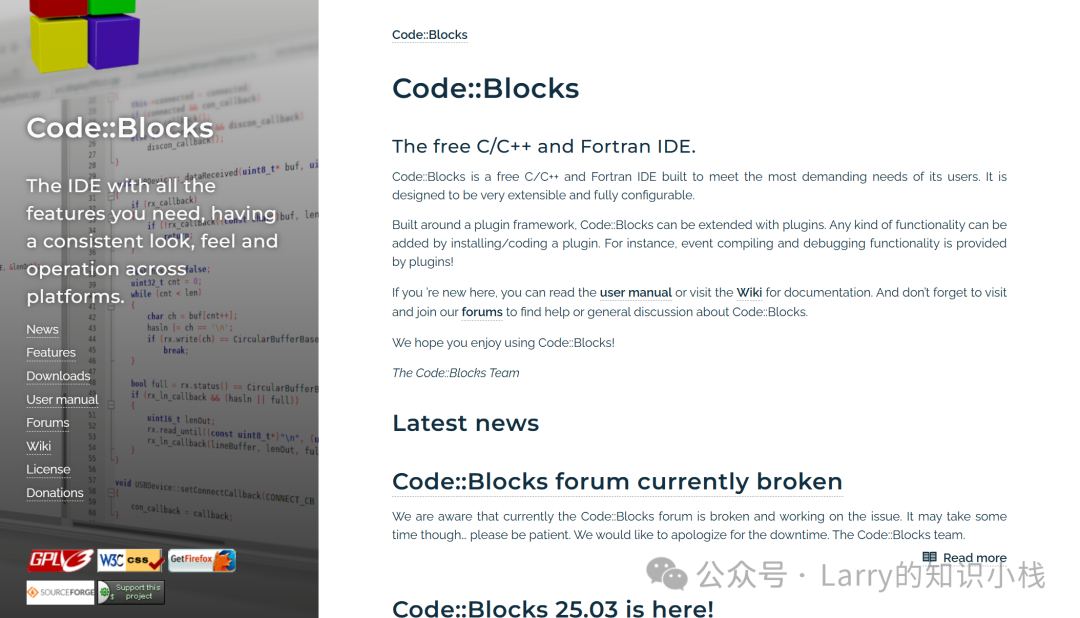
CodeBlocks integrates gcc (this tool is relatively niche and requires environment configuration, not highly recommended).
-
-
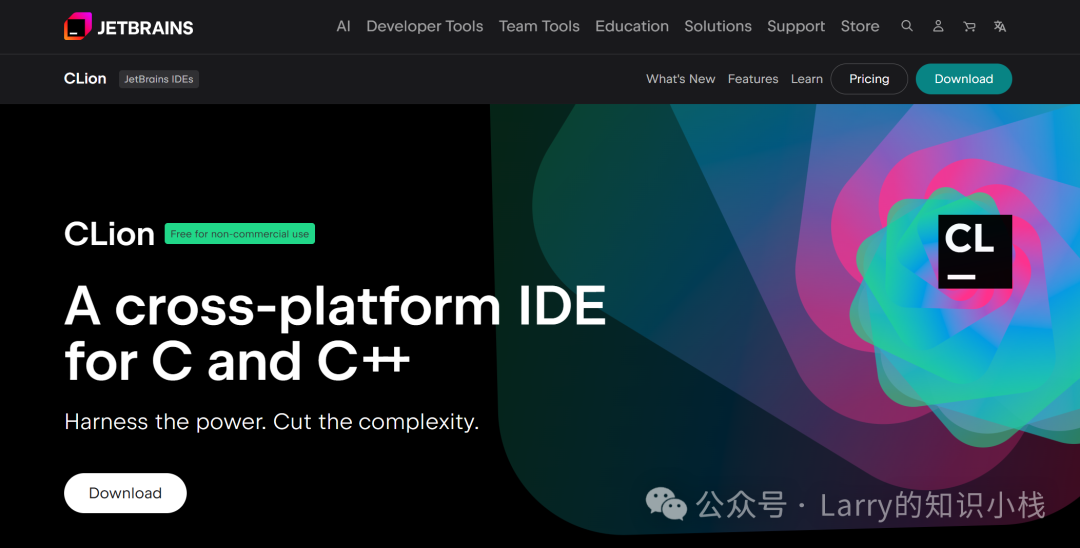
Clion uses CMake by default, and the compiler can be configured; the tool is paid.
-
-
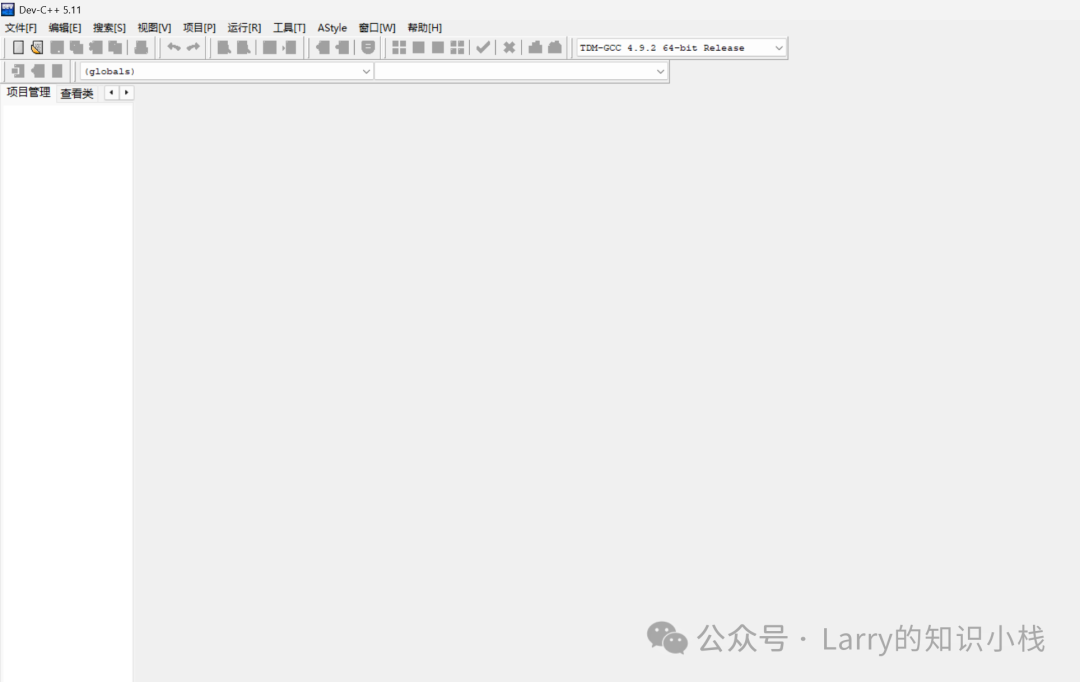
DevC++ integrates gcc (small, but the tool is too simple, not good for developing coding style, used in some competitions).
-
3.2 Advantages and Disadvantages of VS2022
- Advantages:
- VS2022 is a mainstream integrated development environment, commonly used in enterprises.
- VS2022 includes: editor + compiler + debugger, powerful functions, and seamless collaboration of various tools to support multi-scenario development.
- It can be used directly after installation, with minimal additional configuration required, easy to get started, and one-click installation saves tedious steps.
- The default interface is in Chinese, which is friendly for beginners, reducing language barriers, and the operation guidance is clear and easy to understand.
- Disadvantages:
- Rich in features, the installation package is large, occupying a lot of space, which puts pressure on low-end devices.
4. Introduction to VS Projects, Source Files, and Header Files
-
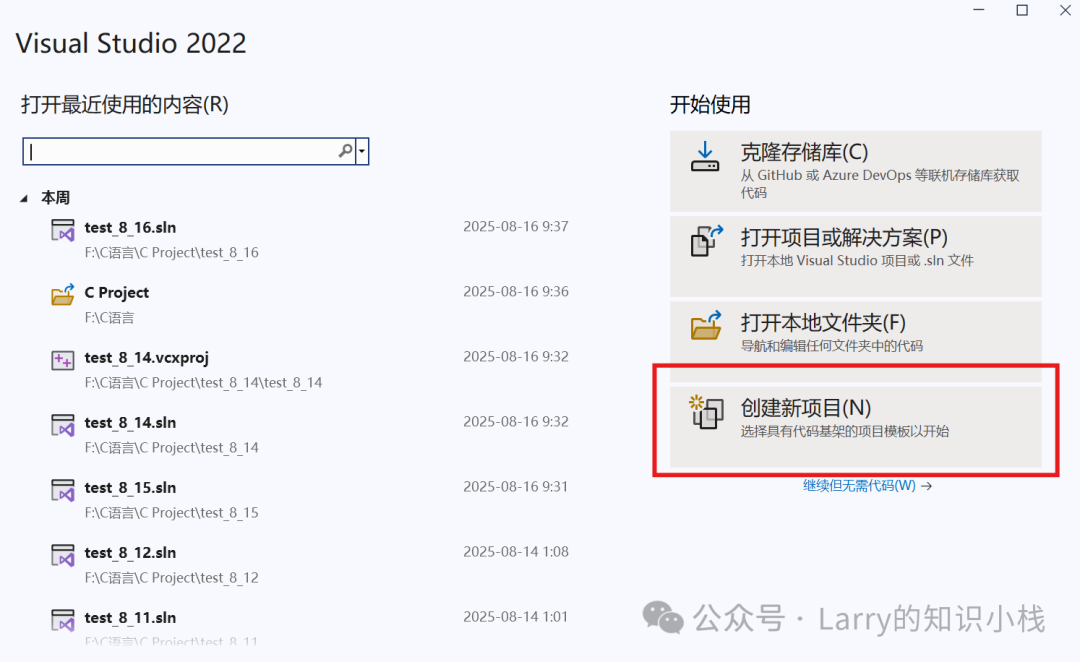
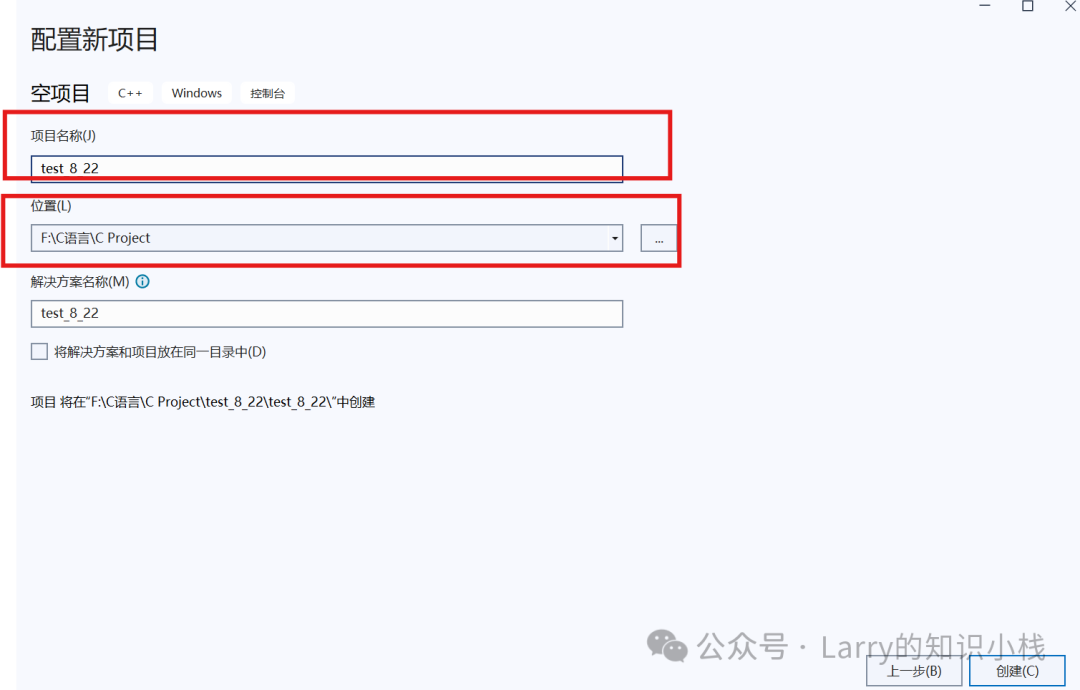
When writing code in VS, we need to create a project, which can be done by simply clicking to create a new project.
-
-
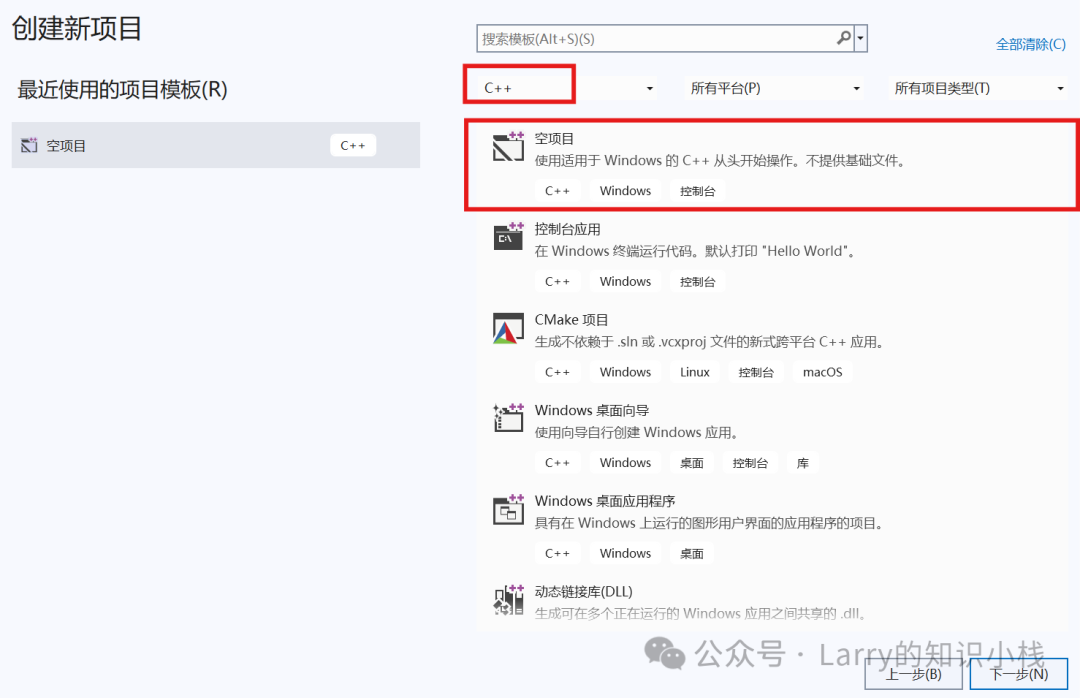
Then select C++ and click to create an empty project.
-
-
Fill in the project name and modify the location as needed.
-
-
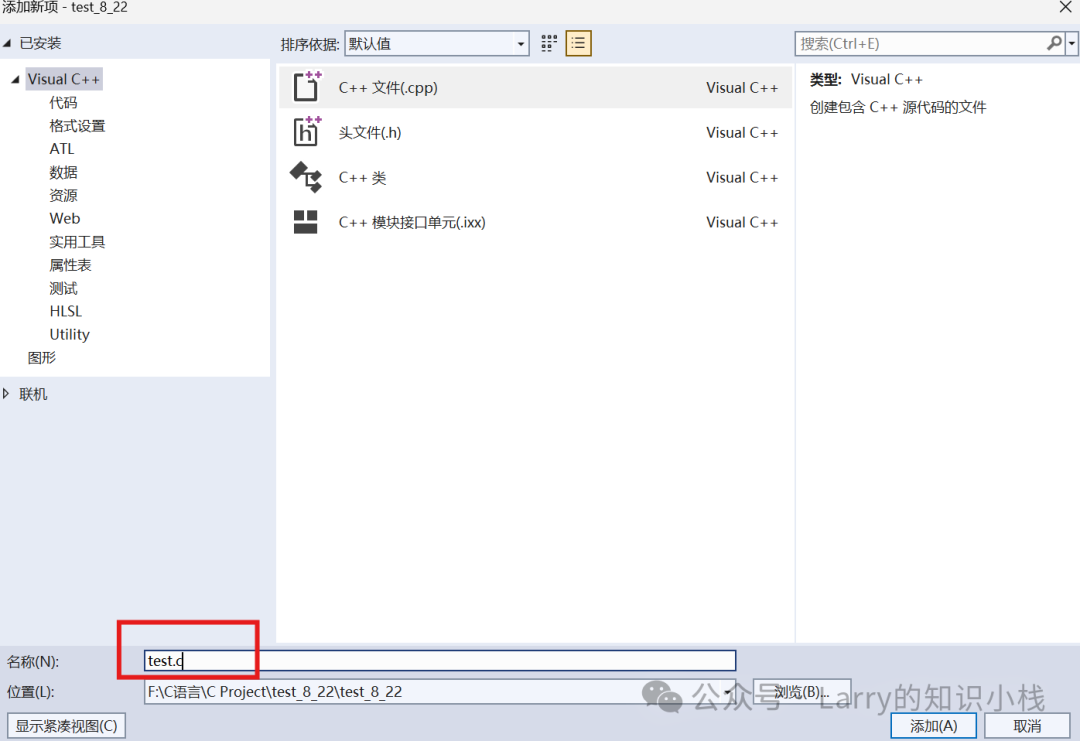
In the project, you can add source files and header files.
-
-
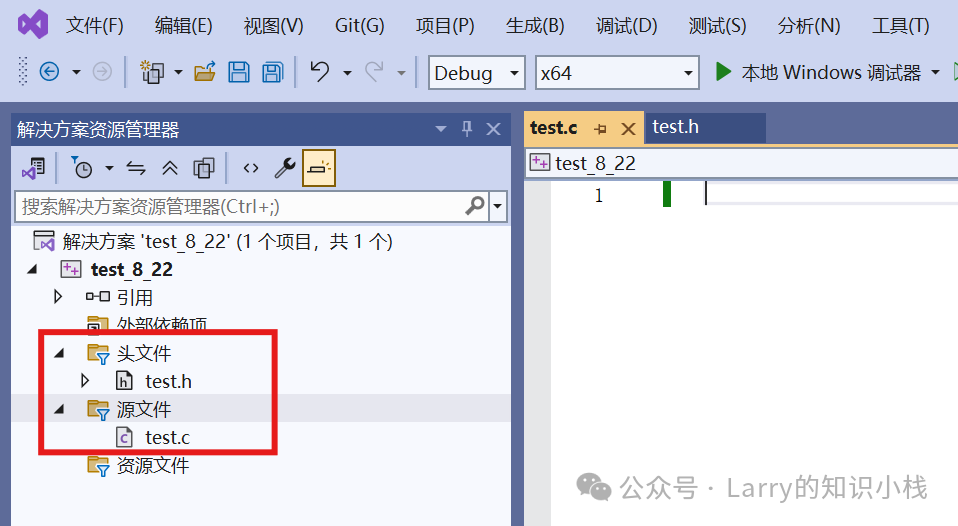
In C language, files with a .c suffix are called source files, and files with a .h suffix are called header files.
-
5. The First C Language Program
- Print hello C
#include <stdio.h>
int main()
{
 printf("hello C\n");
 return 0;
}- The process of creating a project and writing C code in VS2022, and running the result.
- The shortcut key to run code in VS2022 is:
<span>Ctrl + F5</span>
6. The main Function
Every C language program, regardless of how many lines of code it has, starts execution from the <span>main</span> function, which is the entry point of the program. The main function is also called the primary function. The int before main indicates that the main function returns an integer value when it finishes executing. Therefore, at the end of the main function, we write <span>return 0;</span> to correspond with the beginning.
- The main function is the entry point of the program.
- There is only one main function.
- Even if a project has multiple .c files, there can only be one main function (because there can only be one entry point for the program).
Common errors when writing code for the first time:
- main is written as mian.
- The () after main is missing.
- Chinese symbols cannot be used in the code, such as parentheses and semicolons.
- Each statement must end with a semicolon.
7. printf and Library Functions
7.1 printf
printf("hello C\n");- The code uses the
<span>printf</span>function to print information on the screen. - Here is a brief introduction to printf: printf is a library function that prints information on the standard output device (usually the screen). The above code uses the printf function to print a string. Just put the string you want to print in double quotes and pass it to the printf function to print. The printf function can also be used to print other types of data, such as:
int n = 100;
printf("%d\n", n);   // printf prints integer
printf("%c\n", 'q'); // printf prints character
printf("%lf\n", 3.14); // printf prints double precision floating point- Here,
<span>%d</span>,<span>%c</span>, etc. are placeholders that will be replaced by the values that follow. - At the same time, when using library functions, we need to include header files. For example, the
<span>printf</span>function requires including the<span>stdio.h</span>(Standard Input and Output Header) header file, specifically as follows:
#include <stdio.h>7.2 Library Functions
📌 So what are library functions?
-
To avoid re-implementing common code and to improve development efficiency, the C language standard specifies a set of functions that are implemented by different compiler vendors according to the standard and provided for programmers to use. These functions make up a function library, known as the standard library, and these functions are also referred to as library functions.
-
A series of library functions are generally declared in the same header file, so using library functions requires including the corresponding header file.
-
There are many library functions, which will be introduced gradually later. For early understanding, you can refer to the link: cplusplus.
8. Data Types
char      // Character data type
short     // Short integer
int       // Integer
long      // Long integer
long long // Longer integer
float     // Single precision floating point
double    // Double precision floating point
// Does C language have a string type? - Why are there so many types?
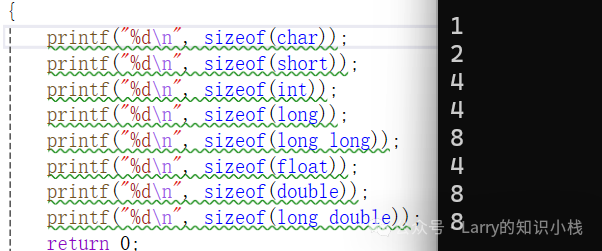
- What is the size of each type?
#include <stdio.h>
int main()
{
    printf("%d\n", sizeof(char));
    printf("%d\n", sizeof(short));
    printf("%d\n", sizeof(int));
    printf("%d\n", sizeof(long));
    printf("%d\n", sizeof(long long));
    printf("%d\n", sizeof(float));
    printf("%d\n", sizeof(double));
    printf("%d\n", sizeof(long double));
    return 0;
}-
-
Note: The existence of so many types is actually to express various values in life more richly.
-
Usage of types
char ch = 'w';
int weight = 120;
int salary = 20000;
9. Variables and Constants
- Some values in life are constant (for example: pi, gender (?), ID number, blood type, etc.)
- Some values are variable (for example: age, weight, salary).
📌 Constant values in C language are represented by the concept of constants, while variable values are represented by variables.
9.1 Classification of Variables
- Local variables
- Global variables
#include <stdio.h>

int global = 2025; // Global variable
int main()
{
    int local = 2026; // Local variable
    // Will the global defined below have a problem?
    int global = 2027; // Local variable
    printf("global = %d\n", global);
    return 0;
} - Summary:
- The definition of the local variable
<span>global</span>above is actually not a problem! - When a local variable and a global variable have the same name, the local variable takes precedence.
9.2 Usage of Variables
#include <stdio.h>
int main()
{
int num1 = 0;
int num2 = 0;
int sum = 0;
printf("Input two operands:> ");
scanf("%d %d", &a, &b);
sum = num1 + num2;
printf("sum = %d\n", sum);
return 0;
} 9.3 Scope and Lifetime of Variables
-
Scope
- Scope (scope) is a programming design concept. Generally, the names used in a piece of code are not always valid and available.
- The range of code that limits the availability of this name is the scope of this name.
- The scope of a local variable is the local range where the variable is located, while the scope of a global variable is the entire project.
-
Lifetime
- The lifetime of a variable refers to the time period from the creation of the variable to its destruction.
- The lifetime of a local variable is: the lifetime starts when it enters the scope and ends when it exits the scope.
- The lifetime of a global variable is: the entire lifetime of the program.
9.4 Constants
-
The definition of constants in C language differs from that of variables.
-
📌 Constants in C language can be divided into the following types:
- Literal constants
<span>const</span>modified constant variables<span>#define</span>defined identifier constants- Enumeration constants
#include <stdio.h>
#define MAX 100  // #define defines identifier constant

// Enumeration constant definition
enum Sex
{
    MALE,      // Enumeration constant, default value is 0
    FEMALE,    // Enumeration constant, default value is 1
    SECRET     // Enumeration constant, default value is 2
};

int main()
{
    // 1. Literal constant: directly written constant value (number, character, string, etc.)
    printf("----- 1. Literal Constant Example -----\n");
    printf("Numerical literal constant: %f (floating point), %d (integer)\n", 3.14, 1000);
    printf("Character literal constant: %c\n", '!');            // Single character
    printf("String literal constant: %s\n", "Literal");   // String (character array)


    // 2. const modified constant variable: a variable whose value cannot be modified (essentially a variable, still occupies memory)
    printf("\n----- 2. const modified constant variable example -----\n");
    const float pai = 3.14f;  // Define constant variable pai
    // pai = 5.14;            // Error! The value of a constant variable cannot be modified (compilation error)
    printf("const constant variable pai's value: %f\n", pai);


    // 3. #define defined identifier constant: replaced during preprocessing, has no type
    printf("\n----- 3. #define identifier constant example -----\n");
    printf("MAX's value: %d\n", MAX);  // MAX will be replaced by 100
    int arr[MAX] = {0};           // Can be used as array size (considered as 100 at compile time)
    printf("Size of array arr: %zu bytes\n", sizeof(arr));  // 100*4=400 (int occupies 4 bytes)


    // 4. Enumeration constant: constant defined by enum, values start from 0 by default
    printf("\n----- 4. Enumeration constant example -----\n");
    enum Sex gender = MALE;  // Define enumeration variable, assign enumeration constant
    printf("MALE's value: %d\n", MALE);      // Output 0
    printf("FEMALE's value: %d\n", FEMALE);  // Output 1
    printf("SECRET's value: %d\n", SECRET);  // Output 2
    printf("Enumeration variable gender's value: %d\n", gender);  // Output 0 (equal to MALE)

    return 0;
}
10. Strings + Escape Characters + Comments
10.1 Strings
-
A string of characters enclosed in double quotes is called a string literal, or simply a string.
-
Note:
- The end of a string will hide a
<span>\0</span>escape character, which is the end marker of the string (not counted as part of the string content).
Code example (comparing the effect of <span>\0</span>):
#include <stdio.h>
// Where is the difference in the following strings? Why? (Analyze in conjunction with the meaning of '\0')
int main()
{
    char arr1[] = "bit";
    char arr2[] = {'b', 'i', 't'};
    char arr3[] = {'b', 'i', 't', '\0'};
    printf("%s\n", arr1);
    printf("%s\n", arr2);
    printf("%s\n", arr3);
    return 0;
}
10.2 Escape Characters
- Escape characters: Change the original meaning of a character through a backslash
<span>\</span>(e.g., make special characters ordinary, or give ordinary characters special functions).
Problematic code (not escaped, abnormal output):
#include <stdio.h>
int main()
{
    printf("c:\code\test.c\n");
    return 0;
}
(Running may output garbled text because <span>\c</span> and <span>\t</span> are parsed as escape characters).
Corrected code (using <span>\</span> to escape, restoring the path):
#include <stdio.h>
int main()
{
    printf("c:\\code\\test.c\n");
    return 0;
}
Example of running result:
c:	est.c
Press any key to continue...- Explanation:
- After escaping,
<span>\</span>is no longer parsed as an escape character, but as a normal path separator, outputting a normal string.
📌 Common escape characters are as follows:
| Escape Character | Meaning |
|---|---|
| \? | Used when writing multiple consecutive question marks to prevent them from being parsed as a three-letter word. |
| \’ | Used to represent the character constant ‘ |
| “ | Used to represent a double quote inside a string. |
| \\ | Used to represent a backslash, preventing it from being interpreted as an escape sequence. |
| \a | Warning character, beep. |
| \b | Backspace character. |
| \f | Form feed character. |
| \n | New line. |
| \r | Carriage return. |
| \t | Horizontal tab character. |
| \v | Vertical tab character. |
| \ddd | ddd represents 1-3 octal digits, e.g., \130 X. |
| \xdd | dd represents 2 hexadecimal digits, e.g., \x30 0. |
#include <stdio.h>
int main()
{
    // Question 1: How to print a single quote on the screen?
    // Question 2: How to print a string whose content is a double quote on the screen?
    printf("%c\n", '\');
    printf("%s\n", "\"");
    return 0;
}
// What does the program output?
#include <stdio.h>
#include <string.h>
int main()
{
printf("%d\n", strlen("abcdef"));
// \32 is parsed as an escape character, not \328.
printf("%d\n", strlen("c:\test\328\test.c"));
return 0;
}// Answer
6
1410.3 Comments
#include <stdio.h>

int Add(int x, int y)
{
    return x+y;
}
/* C language style comment
int Sub(int x, int y)
{
    return x-y;
}
*/
int main()
{
    // C++ style comment
    // int a = 10;
    // Call Add function to complete addition
    printf("%d\n", Add(1, 21));
    return 0;
}- There are two styles of comments:
- Can comment one line or multiple lines.
- Disadvantage: Cannot nest comments.
- C language style comments
<span>/*xxxxxx*/</span> - C++ style comments
<span>//xxxxxxx</span>
11. Selection Statements
- In C language, there are mainly three types of selection statements: Single branch
<span>if</span>statement, Double branch<span>if-else</span>statement, and Multi-branch<span>switch</span>statement. The following are examples of each in practical scenarios:
11.1 Single Branch <span>if</span> Statement
-
Function: Executes the corresponding code block when the specified condition is “true” (non-zero); does not execute any operation when the condition is “false” (zero).
-
Syntax:
if (condition expression) {
    // Code executed when condition is true
}- Example: Determine if an integer is positive.
#include <stdio.h>

int main() {
    int num = 15;
    // Single branch if: only executes print when num>0
    if (num > 0) {
        printf("%d is positive\n", num);  // Output: 15 is positive
    }
    return 0;
}
11.2 Double Branch <span>if-else</span> Statement
-
Function: Executes the code in the
<span>if</span>block when the condition is “true”; executes the code in the<span>else</span>block when the condition is “false” (one of the two branches must be executed). -
Syntax:
if (condition expression) {
    // Code executed when condition is true
} else {
    // Code executed when condition is false
}- Example: Determine if an integer is even or odd.
#include <stdio.h>

int main() {
    int num = 7;
    // Double branch if-else: executes one of the two
    if (num % 2 == 0) {  // If divisible by 2
        printf("%d is even\n", num);
    } else {  // Otherwise
        printf("%d is odd\n", num);  // Output: 7 is odd
    }
    return 0;
}
11.3 Multi-branch switch Statement
-
Function: Executes the corresponding
<span>case</span>branch by matching the value of the “constant expression”; if there is no matching case, the<span>default</span>branch (optional) is executed. -
Note: Each case must end with
<span>break</span>to terminate the current branch; otherwise, “fall-through” (continuing to execute the next case) will occur. -
Syntax:
switch (expression) {  // Expression must be of integer/character/enumeration type
    case constant1:
        // Code executed when constant1 matches
        break;
    case constant2:
        // Code executed when constant2 matches
        break;
    // ... More cases
    default:
        // Code executed when there is no match (optional)
        break;
}- Example: Output rating based on score (0-100).
#include <stdio.h>

int main() {
    int score = 85;
    // Simplify score to a range of 10 (85→8)
    int grade = score / 10;

switch (grade) {
        case 10:  // 100 points
        case 9:   // 90-99 points
            printf("Score rating: A (Excellent)\n");
            break;
        case 8:   // 80-89 points
            printf("Score rating: B (Good)\n");  // Output: Score rating: B (Good)
            break;
        case 7:   // 70-79 points
        case 6:   // 60-69 points
            printf("Score rating: C (Pass)\n");
            break;
        default:  // 0-59 points
            printf("Score rating: D (Fail)\n");
            break;
    }

    return 0;
}
11.4 Summary
| Statement Type | Applicable Scenario | Core Feature |
|---|---|---|
Single Branch <span>if</span> |
Only need to handle the “satisfied condition” case | Does not execute any operation when the condition is false |
Double Branch <span>if-else</span> |
Need to choose one of two mutually exclusive situations | Must execute and only execute one branch |
Multi-branch <span>switch</span> |
Multi-condition matching based on constant values | More efficient than nested <span>if-else</span>, but only supports specific types |
12. Loop Statements
- How to implement loops in C language?
- while statement
- for statement
- do … while statement
12.1 while Statement Example
- Syntax:
<span>while (condition expression) { loop body }</span> - Logic: First check the condition; if true, execute the loop body (the loop body may not execute at all if the condition is false).
#include <stdio.h>
int main() {
    int i = 1;       // Initialize counter
    int sum = 0;     // Initialize cumulative sum
    while (i <= 10) { // Condition: i does not exceed 10
        sum += i;    // Accumulate the value of i
        i++;         // Update counter (must, otherwise will loop infinitely)
    }
    printf("Sum of 1-10: %d\n", sum); // Output: 55
    return 0;
}
12.2 for Statement Example
- Syntax:
<span>for (initialization expression; condition expression; update expression) { loop body }</span> - Logic: Initialization, condition check, and update operation are defined together, suitable for scenarios with known loop counts.
#include <stdio.h>
int main() {
    int sum = 0;
    // ① Initialize i=1  ② Check i<=10  ③ i++ after each loop
    for (int i = 1; i <= 10; i++) {
        sum += i; // Accumulate the value of i
    }
    printf("Sum of 1-10: %d\n", sum); // Output: 55
    return 0;
}
12.3 do…while Statement Example
- Syntax:
<span>do { loop body } while (condition expression);</span> - Logic: First execute the loop body, then check the condition (the loop body is executed at least once).
#include <stdio.h>
int main() {
int num;
do {
printf("Please enter a positive number:");
scanf("%d", &num); // First execute input operation
} while (num <= 0); // Then check: if a non-positive number is entered, repeat the loop
printf("You entered a positive number: %d\n", num);
return 0;
}12.4 Summary
| Loop Statement | Execution Order | Minimum Execution Count of Loop Body | Typical Applicable Scenario |
|---|---|---|---|
<span>while</span> |
Check first, then execute | 0 times | Unknown loop count (e.g., waiting for user input) |
<span>do...while</span> |
Execute first, then check | 1 time | Scenarios that must be executed at least once (e.g., input validation) |
<span>for</span> |
Initialization → Check → Execute → Update | 0 times | Known loop count (e.g., traversing a fixed range) |
From definitions, history, to compilers, and then to data types, flow control, and other core syntax, this comprehensive guide to C language basics helps you easily embark on your programming journey!