Click the blue text
PLC Automation Exchange
Follow us
In automation equipment, multi-station rotary table mechanisms are a classic design for improving production efficiency. Today, we will delve into a real project case—the 6-station rotary table automatic drilling and tapping machine—analyzing how to use the Xinjie PLC as the core controller to complete the full set of solutions from electrical circuit design, PLC logic programming to human-machine interface design.
1. Project Requirements and Function Analysis
First, we clarify the core requirements of the system:
-
Device Function: A 6-station rotary table, with station 1 as the loading/unloading station, station 2 as the drilling station, station 3 as the tapping station, and the remaining stations being idle or reserved. The rotary table is driven by a stepper motor for indexing. When the workpiece reaches the corresponding station, it is positioned by a lifting cylinder, followed by drilling or tapping actions.
-
Control Core: Xinjie PLC (this system uses XD5-32T-E).
-
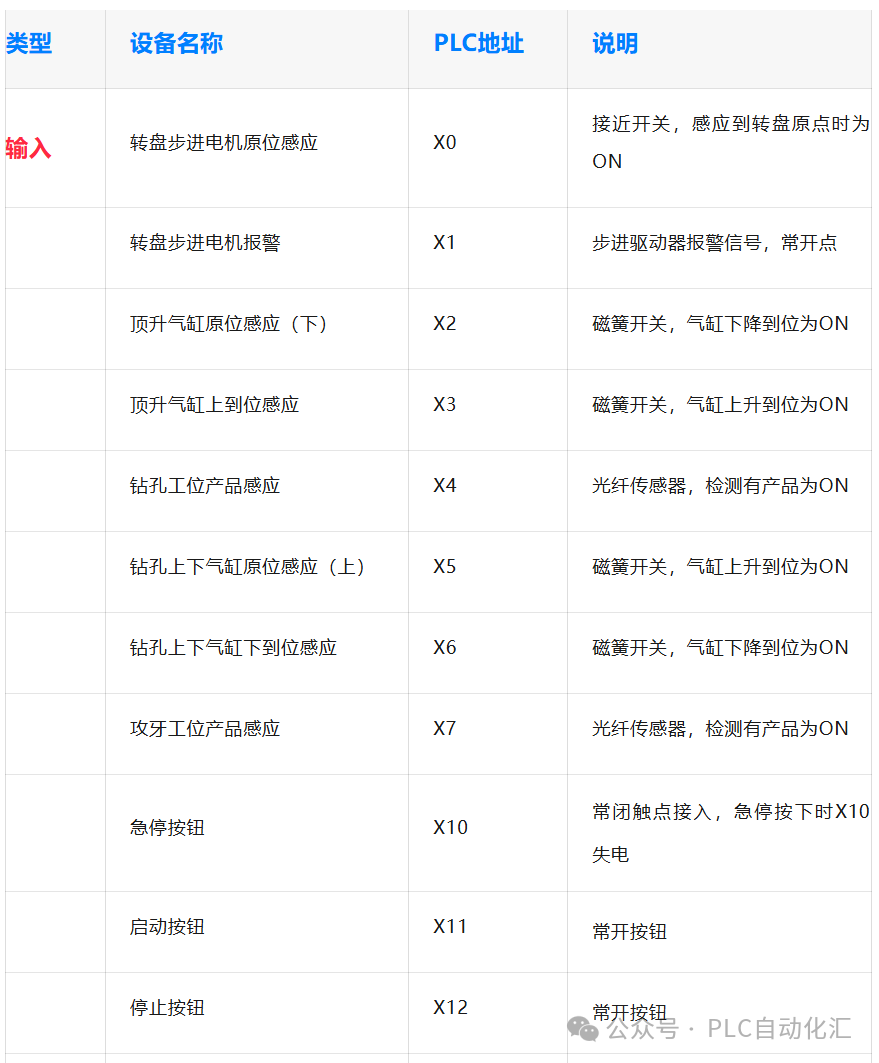
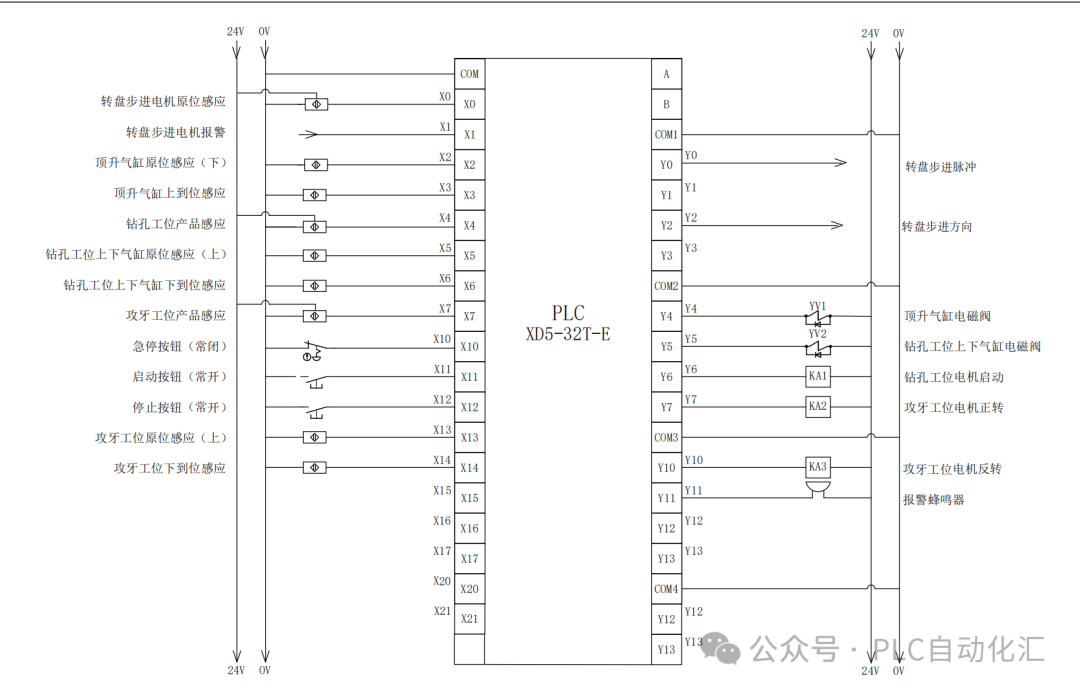
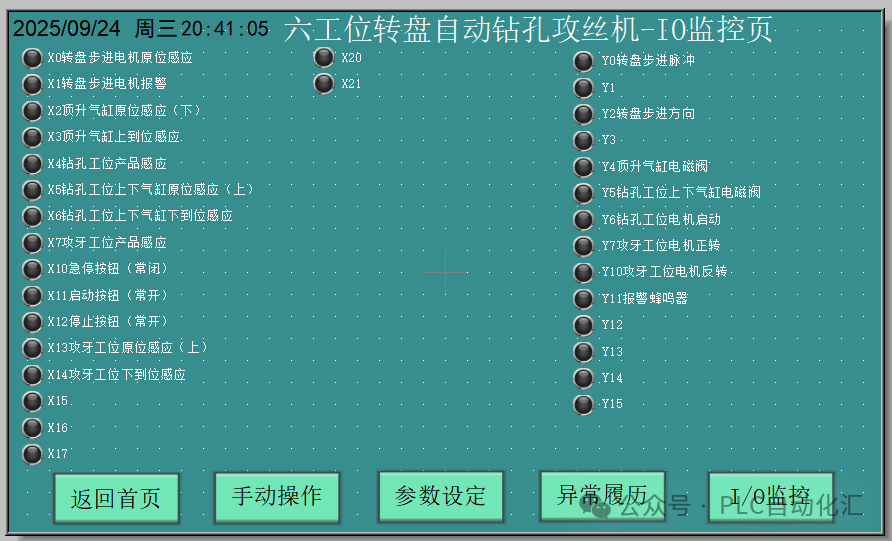
Input Signals (X Points): A total of 13 digital inputs, including various sensors and buttons.
-
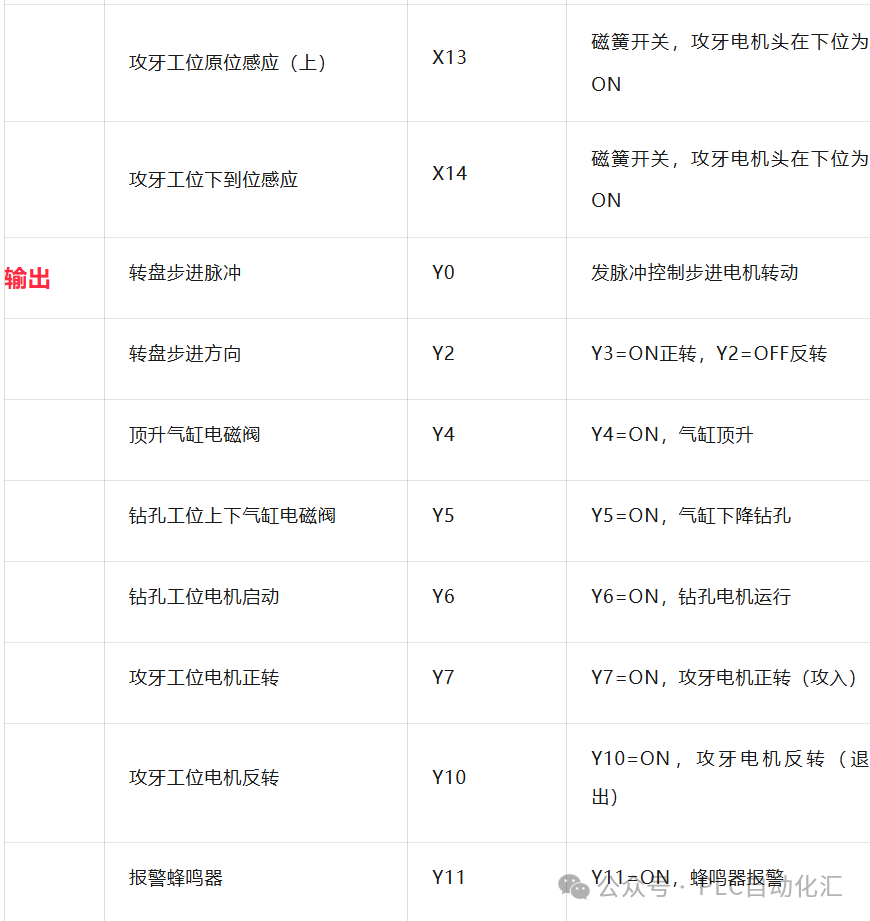
Output Signals (Y Points): A total of 9 digital outputs, controlling solenoids, motors, and buzzers.
I/O Point Allocation Table (Planning)
2. Circuit Diagram Design
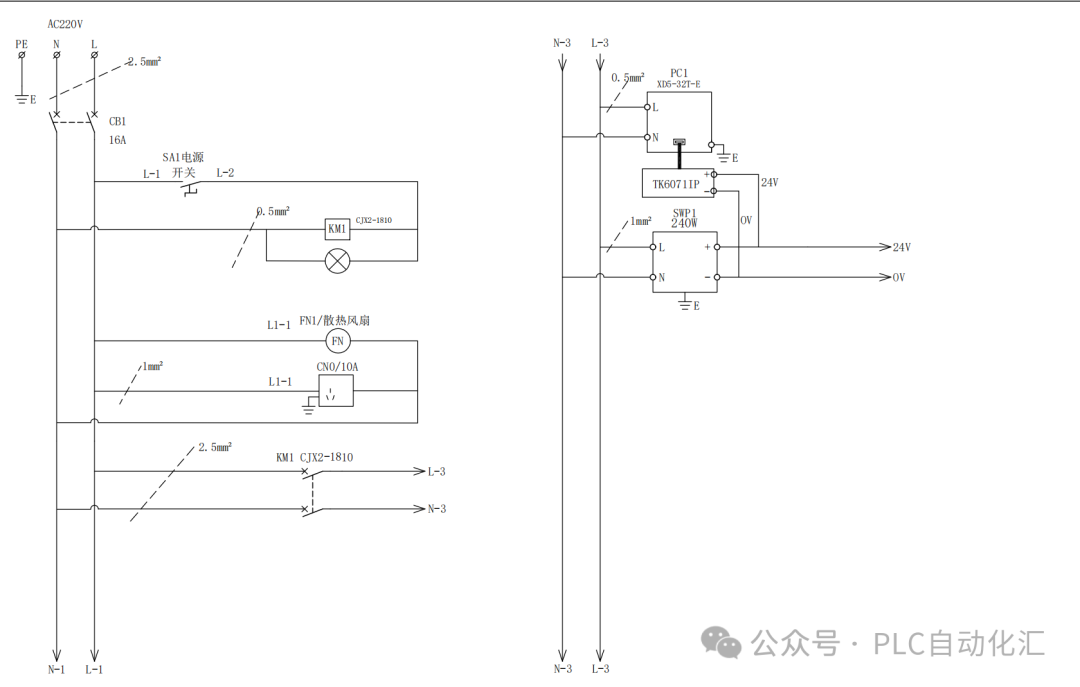
The circuit design is the cornerstone of the system’s stable operation, mainly including the main circuit and control circuit.
1. Main Circuit Design
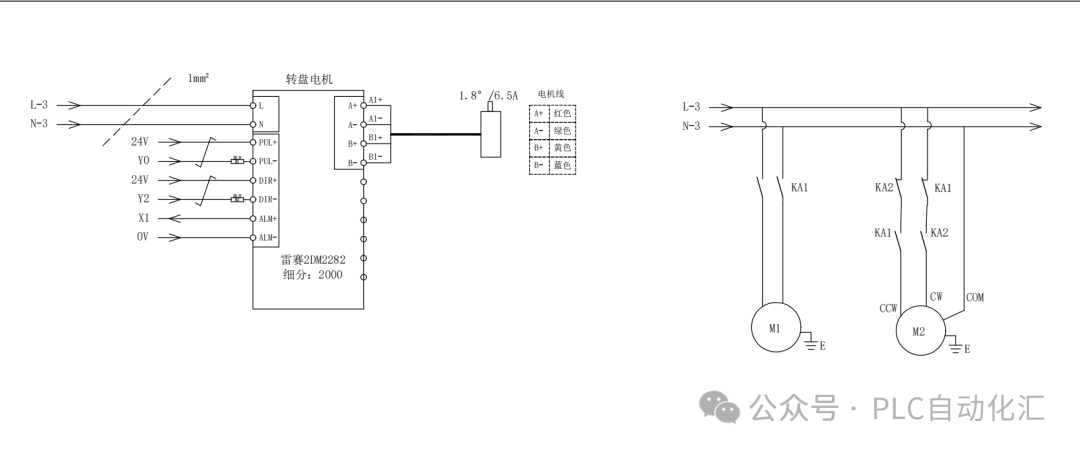
2. Control Circuit Design (PLC Wiring)
3. PLC Program Design (Xinjie PLC Programming)
The program adopts a structured design, mainly including overall control, alarm buzzer, alarm reset, lifting rotary table control, drilling station and alarm, tapping station and alarm, and production statistics.
1. Program Structure Framework
-
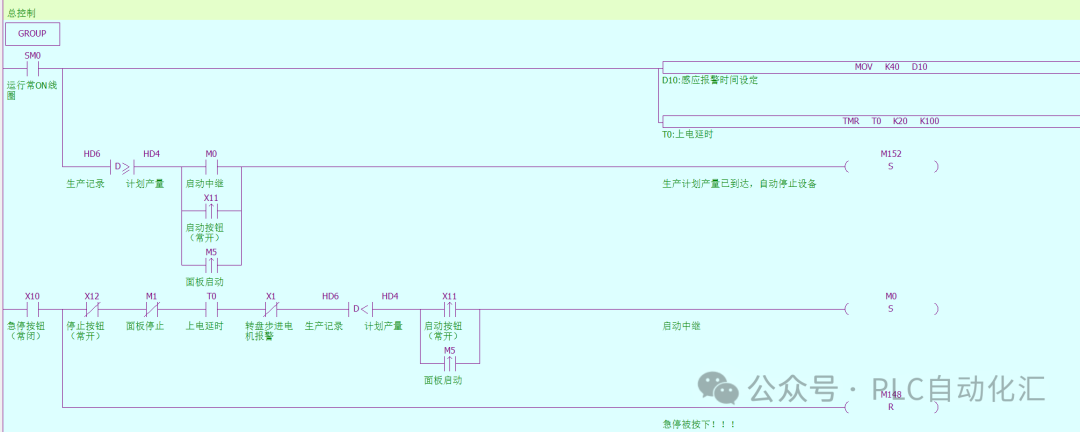
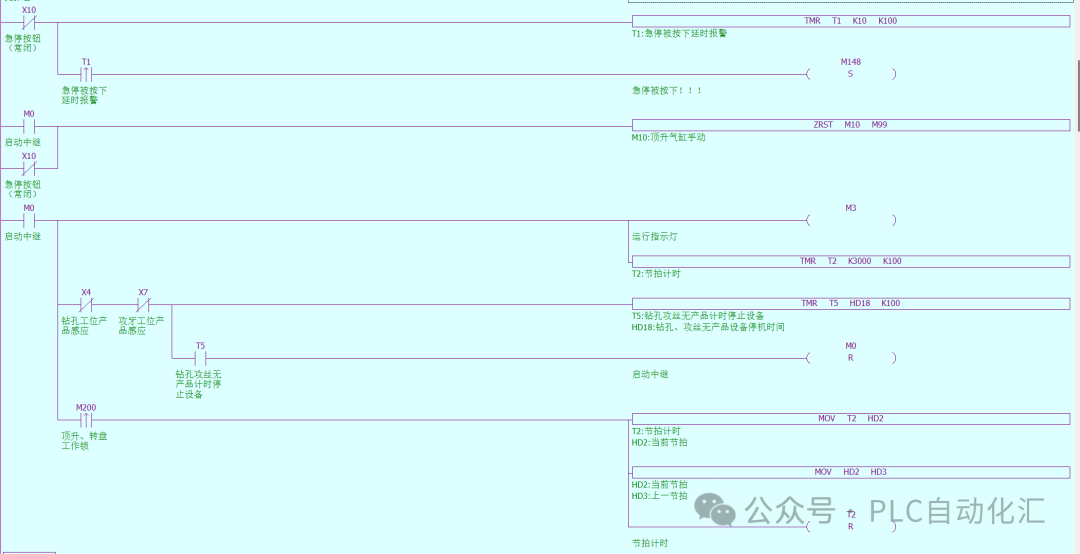
Overall Control: Start, stop, reset, and cycle control; when the start button is pressed, the system enters automatic operation mode.
-
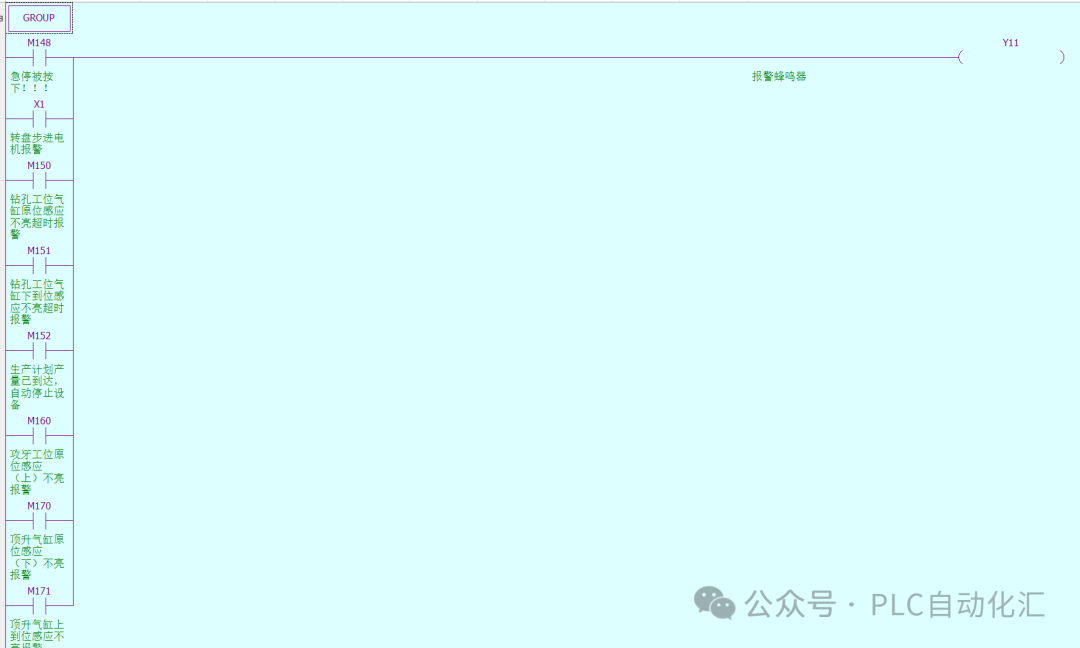
Alarm Buzzer: Activate the buzzer for alarms.
-
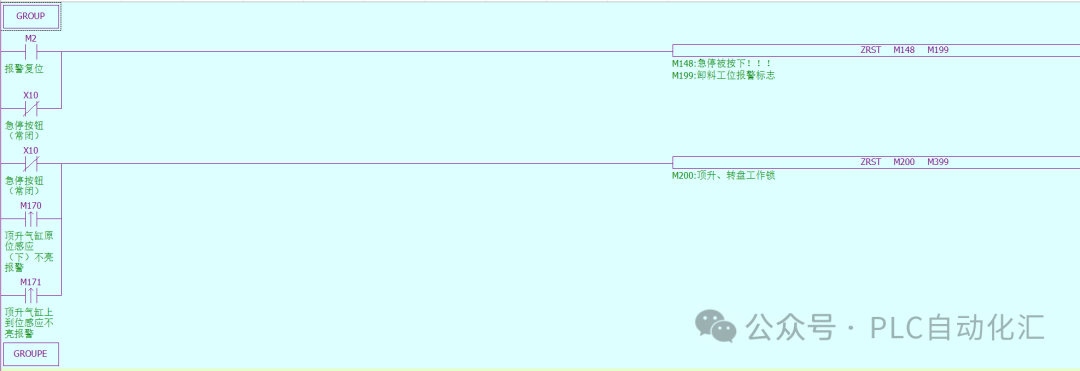
Alarm Reset: Reset the alarm state.
-
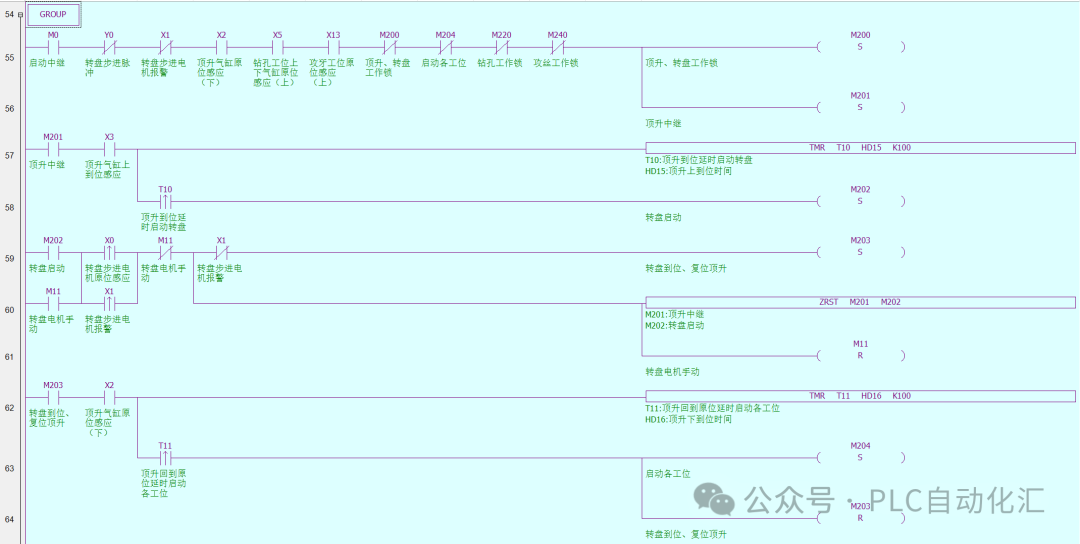
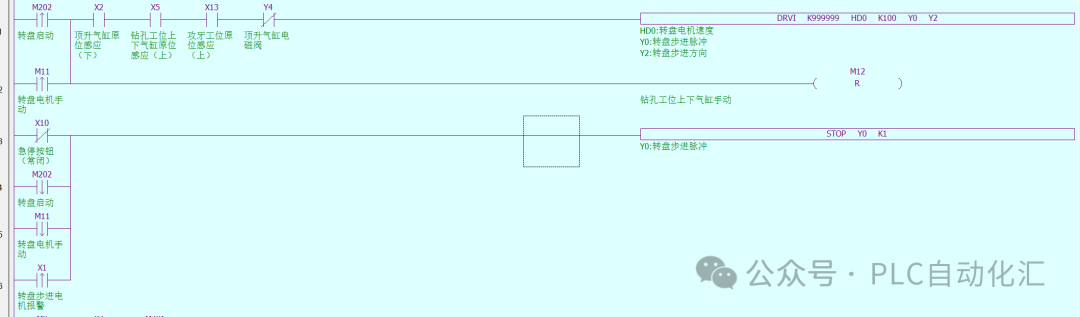
Lifting Rotary Table Control:
-
Lower the lifting cylinder (Y4=OFF) to the bottom (X2=ON).
-
Start the stepper motor (drive Y0 with pulses via the DRVI instruction).
-
After the rotary table reaches position, stop the pulses.
-
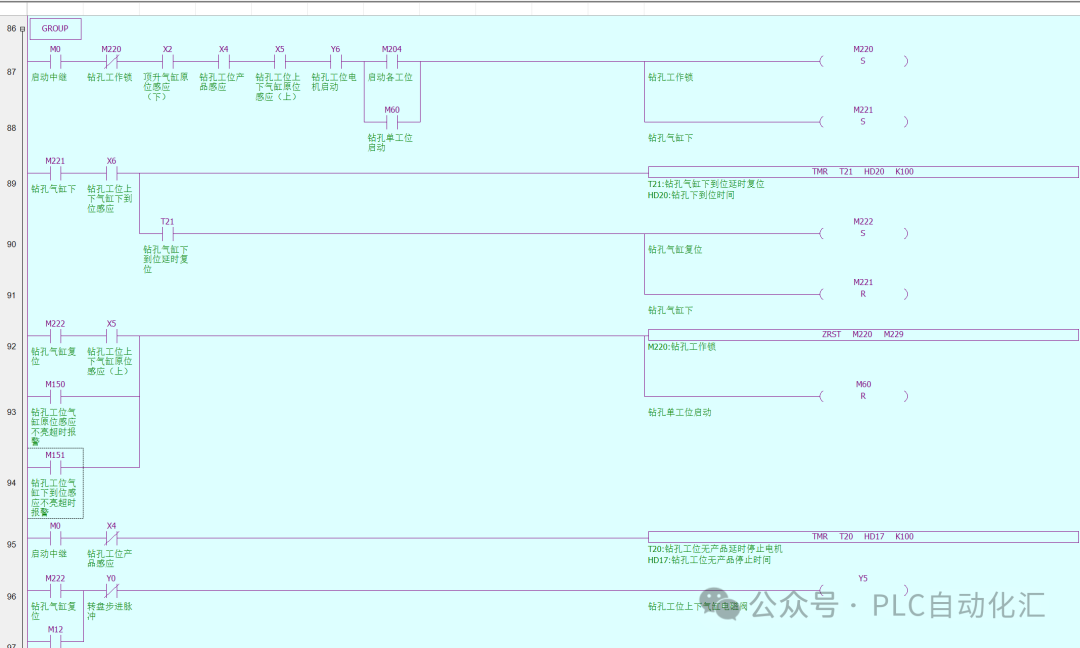
Drilling Station and Alarm:
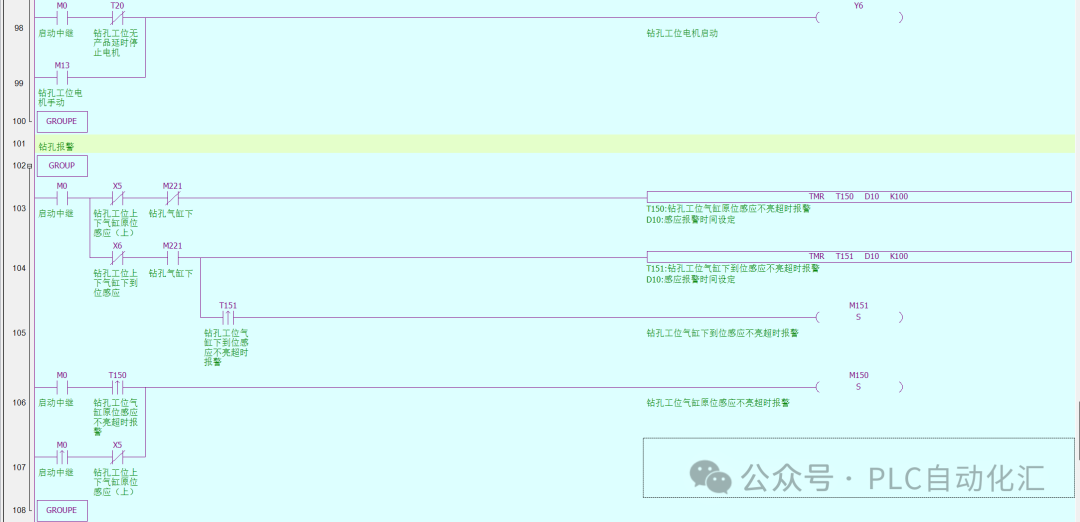
-
Tapping Station and Alarm:
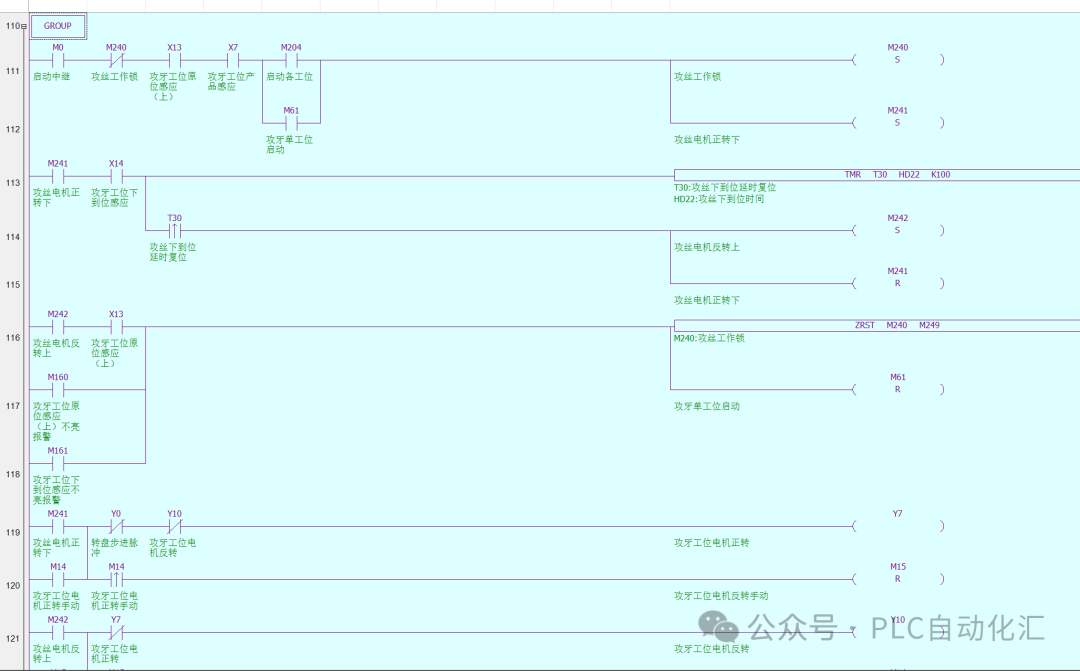
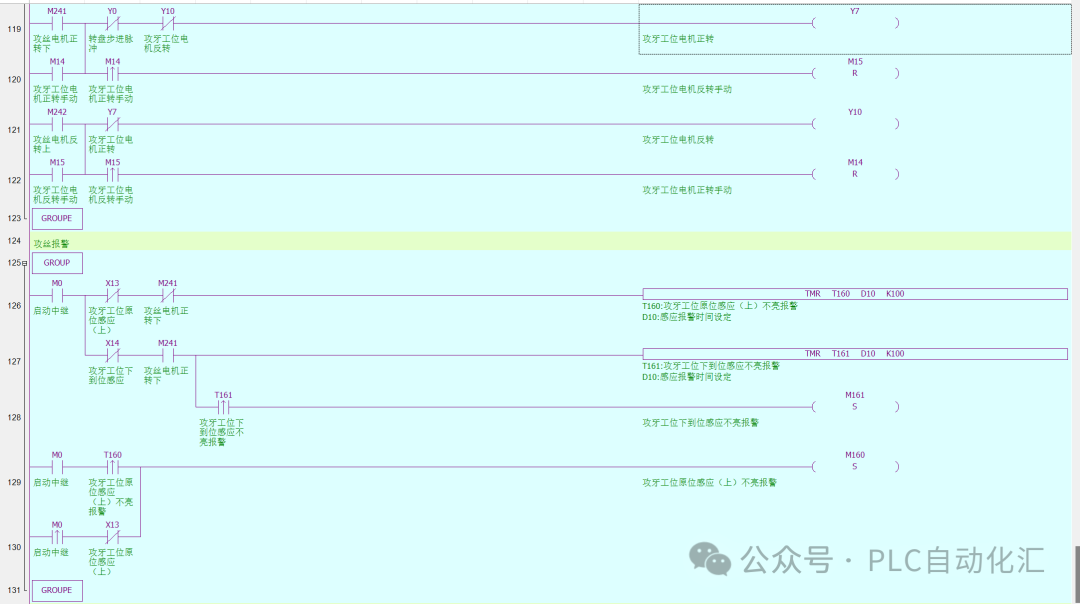
-
Production Statistics:

Key Programming Techniques:
-
Interlocking: The forward and reverse rotation of the tapping motor (Y7 and Y10) must include hardware interlocking (relay interlocking) and software interlocking.
-
State Holding: Use auxiliary relays (M points) to mark the status of each station (e.g., “Processing Complete”).
-
Alarm Handling: When the stepper driver alarms (X1 is activated) or the emergency stop is pressed, immediately stop all outputs and trigger the buzzer (Y7).
4. HMI Program Design
1. Main Monitoring Screen:
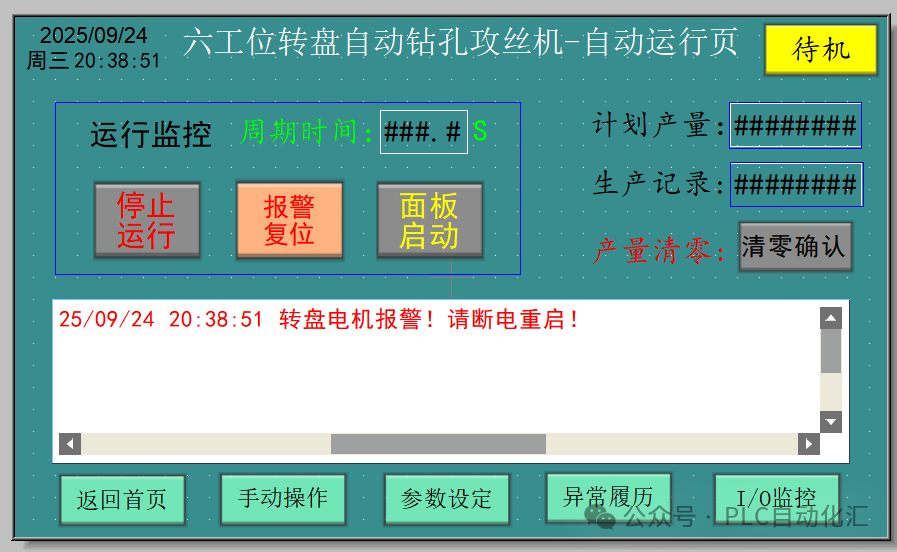
2. Manual Operation Screen:
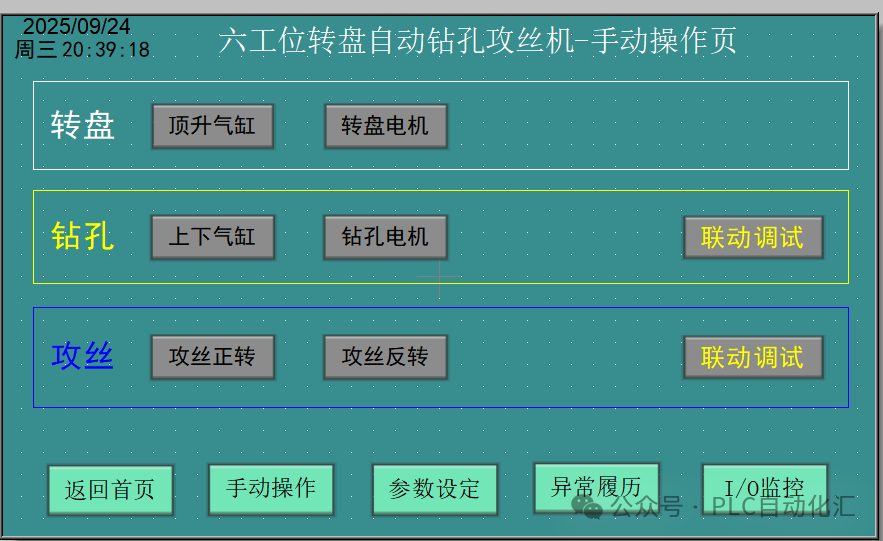
3. Parameter Setting Screen:
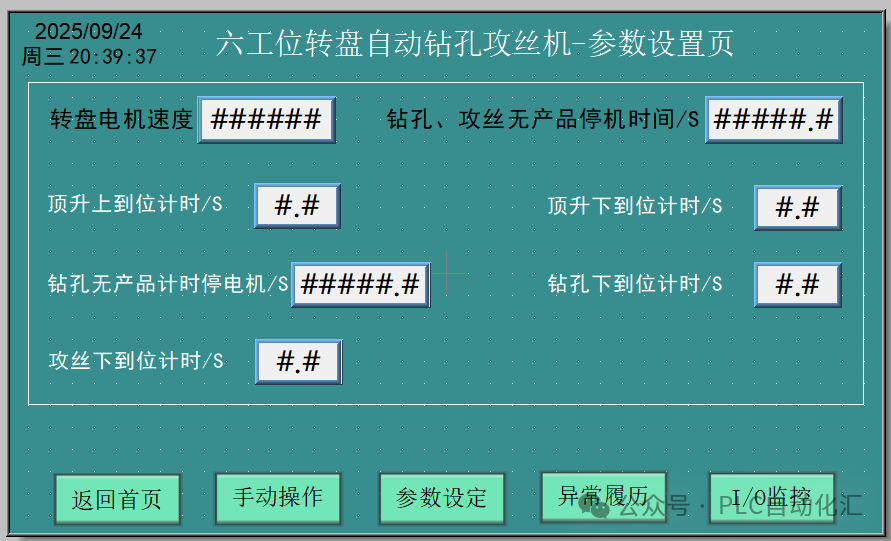
4. Alarm History Screen:
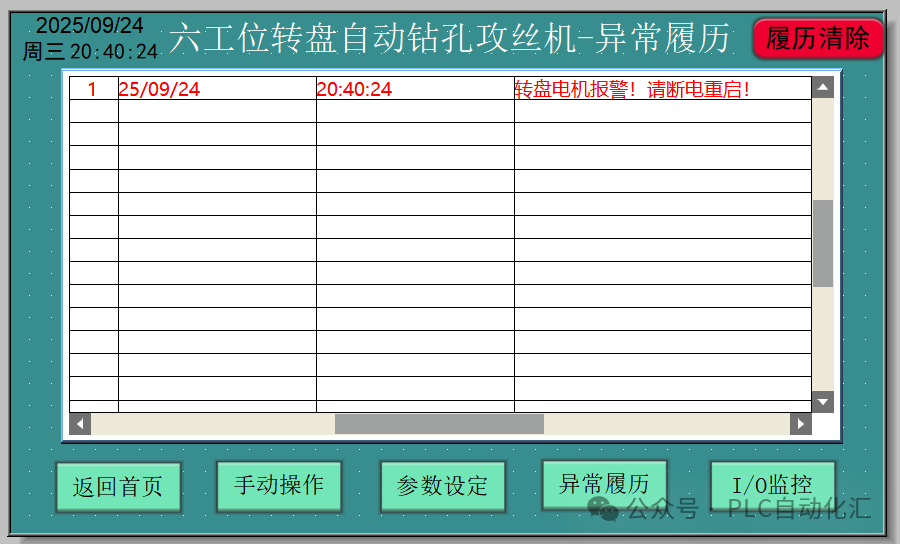
5. IO Monitoring Screen:
5. Conclusion
Through this case, we systematically completed the electrical control system design for the 6-station rotary table drilling and tapping machine.Xinjie PLC with its stable performance and rich instruction set perfectly implements complex sequential control logic. A clear circuit diagram serves as a reliable guide for hardware connections, while a structured PLC program ensures efficient and safe operation of the equipment, and a user-friendly HMI interface greatly enhances the usability and maintainability of the equipment.
This design approach has high versatility and can be slightly modified for application in other multi-station rotary table devices, such as inspection, assembly, and dispensing, making it a valuable practical reference for automation engineers.
I have shared the “Xinjie PLC 6-Station Rotary Table Drilling and Tapping System” with you via Quark Cloud Disk. Click the link or copy the entire content to open the “Quark APP” to access it.
/~936638QBf2~:/
Link: https://pan.quark.cn/s/28be0a41dbba
Warm Reminder:
-
In actual projects, please be sure to adjust the instructions and addresses according to the specific manual of the selected PLC model (such as Xinjie XD3, XD5).
-
Before wiring and debugging, please ensure power is off for safety.
I hope this case analysis can be helpful to you! Feel free to discuss in the comments section.
Recommended Reading:
- Exerting all efforts! Nine-step guide to stable operation of Siemens PLC
- Siemens S7-1500 PLC Troubleshooting: Transforming into an industrial “doctor” to quickly “cure” production line downtime!
- [10 Years of Siemens PLC Veteran Upgrade Path] From screwing modules to mastering communication architecture: My blood and tears technical stack guide
- The “Three Weapons” of Servo Motors: Detailed explanation of position/speed/torque control (with practical Siemens SCL code)
- Core Secrets of Siemens PLC Programming: What are FB, FC, DB, OB? You will understand after reading this!
- Why can’t Siemens PLC engineers with a monthly salary of 20,000 retain talent? The “career burnout” behind high salaries is consuming this industry!
- Siemens PLC Programming: Ladder Diagram vs SCL, which one is for you? A beginner’s guide with practical code!
- Say goodbye to “spaghetti code”! Siemens PLC sequential programming “three-step method” doubles efficiency without pitfalls!
- Siemens SCL Communication Heartbeat Monitoring: Practical guide for industrial-grade heartbeat programs
- Siemens 1200 and Weicon Communication: Say goodbye to manual address filling, this “smart translator” speeds up debugging by 3 times!
- Siemens SCL Practical: Step-by-step guide to writing station control function blocks
- Siemens S7-1200 Mixed Programming Practice: The golden combination rules of SCL and LAD
- Electrical Automation Encirclement: Ten years of hard work for this heartfelt industry experience summary
- Siemens SCL Workstation Control Program: Start-stop control + three-color light + buzzer alarm
- Mitsubishi FX3U PLC Dual Pump Constant Pressure Water Supply Explained: Frequency + Industrial Frequency Intelligent Switching + Safety Emergency Stop System
- Electrical Automation Major Graduation Guide:
- Employment direction and salary prospects fully analyzed
- Electrical Automation College Graduates: Starting salary not inferior to undergraduates? Full disclosure of the technical counterattack roadmap!
- Siemens S7-200 SMART Free Port Communication Explained: Introduction to flexible serial communication solutions
- Siemens SCL Full-Function Servo Control Ultimate Solution: 8 motion modes + 5 levels of safety protection
- Let data speak! A scientific guide for choosing majors for science vs. liberal arts students (with employment salary & trend analysis)
Share to let more people see

Like
Collect
Share