
0. Background Introduction
The RK3399 development board we have comes with U-Boot version 2017.09 from the factory.
U-Boot 2017.09 (Sep 26 2021 - 08:53:15 +0000)

Model: Forlinx OK3399 Evaluation Board
PreSerial: 2
DRAM:  2 GiB
Sysmem: init
Relocation Offset is: 7dbe9000
Using default environment
Based on this, we are porting a new version of U-Boot, which is U-Boot 2022.01, for this development board.
1. U-Boot Loading Method
U-Boot is essentially a bootloader that serves two main purposes: initializing the operating system’s runtime environment, which includes initializing the CPU, memory, and serial port, and loading the operating system image file, typically the operating system kernel image. However, for U-Boot SPL, it can also load the U-Boot image file.
For now, we will not concern ourselves with how to load the operating system image file, as the purpose of this article is to successfully run the new version of U-Boot on this board.
Since U-Boot is a bootloader, it is crucial to understand the program loading process after the chip powers on. For RK3399, please refer to the previous article:
Program Loading Process After CPU Power On | Based on RK3399
RK3399 provides an external bootloader loading roadmap, as shown in the figure below:
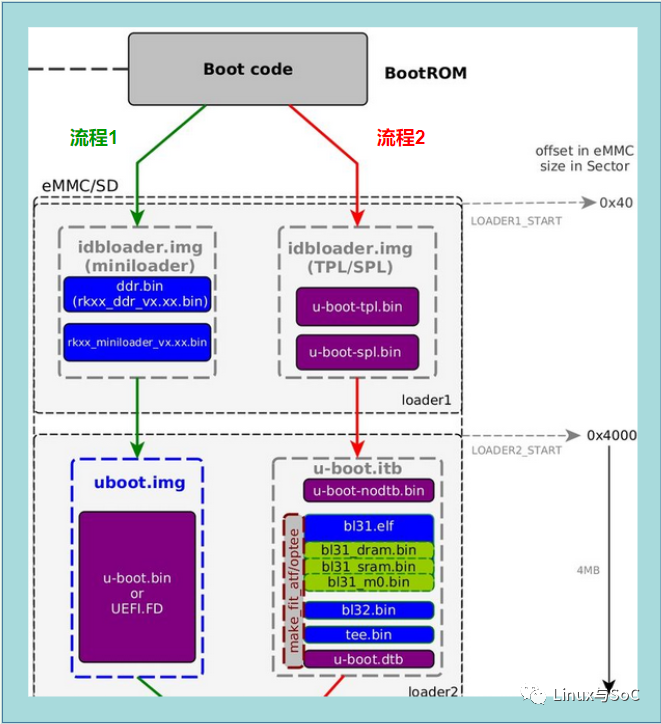
According to the roadmap, we will discuss it in two parts: the official firmware and TPL/SPL loading U-Boot.
1.1 Official Firmware Loading
Process 1 is implemented based on RK’s official components ddr.bin and miniloader.bin, which can be obtained from RK’s GitHub.
[email protected]:rockchip-linux/rkbin.git
This repository not only contains the above two files but also includes the bl31.elf file mentioned in Process 2.
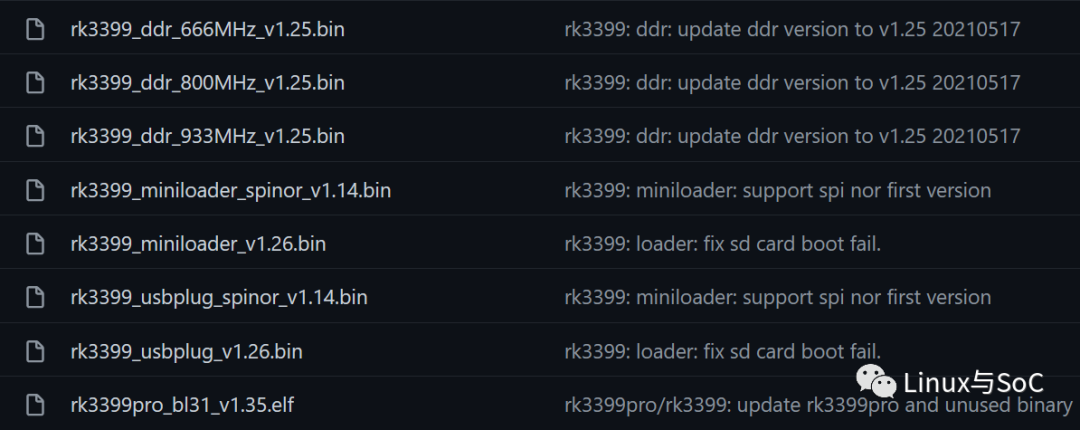
Using mkimage, package the official ddr.bin and rkxx.bin into a file idbloader.img that is recognizable by the Bootrom program and has an ID Block header.
tools/mkimage -n rkxxxx -T rksd -d rkxx_ddr_vx.xx.bin idbloader.img
cat rkxx_miniloader_vx.xx.bin >> idbloader.img
Once idbloader.img is packaged, rkxx_miniloader_xxx.bin will load the u-boot.img file from it.
Additionally, based on Process 1’s boot method, it is necessary to generate trust.img, which will be loaded by rkxx_miniloader_xxx.bin.
Since this boot method is based on official firmware, code modifications are not possible, making it impractical to generate idbloader.img this way.
1.2 TPL/SPL Loading
In boot process 2, we can compile TPL/SPL based on U-Boot, where TPL is responsible for DDR initialization. After TPL initialization is complete, it will return to the bootrom program, which continues to load SPL, and SPL loads the u-boot.itb file.
Package TPL/SPL into idbloader.img with the following command.
tools/mkimage -n rkxxxx -T rksd -d tpl/u-boot-tpl.bin idbloader.img
cat spl/u-boot-spl.bin >> idbloader.img
It is recommended to use Process 2 to load U-Boot.img because you can compile TPL/SPL from the U-Boot source code and modify various configurations independently.
2. U-Boot Package
From the RK3399 boot flowchart, we can see that the U-Boot package contains not only the u-boot.dtb and u-boot-nodtb.bin files compiled from U-Boot source code but also includes bl31.elf, bl32.bin, tee.bin, and other ARM trust firmware. Among them, bl31.elf is essential, while bl32.bin and tee.bin are optional and can be omitted.
In embedded devices using TrustZone technology, it is unavoidable to address the issue of switching from the non-secure side to the secure side. To accomplish this switch, a dedicated firmware is required to handle the context switching between non-secure and secure contexts, which is generally referred to as ARM trust firmware. The complete code can be downloaded from the official GitHub maintained by ARM.
https://github.com/ARM-software/arm-trusted-firmware
Of course, RK also provides the bl31.elf file, saving us the time and effort to compile it. It can be downloaded from Rockchip’s official GitHub.
https://github.com/rockchip-linux/rkbin/tree/master/bin/rk33
Based on the above analysis, the required files are summarized as follows:
idbloader.img <--------U-Boot TPL/SPL
u-boot.itb <-----------U-Boot and bl31.elf
3. Porting U-Boot
– step1
Obtain the U-Boot source code as follows:
git clone https://gitlab.denx.de/u-boot/u-boot.git
The U-Boot source code version obtained is 2022.01.
# SPDX-License-Identifier: GPL-2.0+

VERSION = 2022
PATCHLEVEL = 01
SUBLEVEL =
EXTRAVERSION =
NAME =
– step2
Prepare the bl31.elf file as follows:
git clone [email protected]:rockchip-linux/rkbin.git
Enter the U-Boot folder and set the path for the bl31.elf file.
rk@ubuntu:~/porting/u-boot$ ls ..
rk3399_bl31_v1.35.elf  u-boot
rk@ubuntu:~/porting/u-boot$ export BL31=../rk3399_bl31_v1.35.elf
– step3
Compile the xxx_defconfig file, which I do not have for this board, but I found many other xxx_defconfig files from the U-Boot source code.
rk@ubuntu:u-boot$ ls configs/ | grep 3399
evb-rk3399_defconfig
ficus-rk3399_defconfig
firefly-rk3399_defconfig
khadas-edge-captain-rk3399_defconfig
khadas-edge-rk3399_defconfig
khadas-edge-v-rk3399_defconfig
leez-rk3399_defconfig
anopc-t4-rk3399_defconfig
nanopi-m4-2gb-rk3399_defconfig
nanopi-m4b-rk3399_defconfig
nanopi-m4-rk3399_defconfig
nanopi-neo4-rk3399_defconfig
nanopi-r4s-rk3399_defconfig
orangepi-rk3399_defconfig
pinebook-pro-rk3399_defconfig
puma-rk3399_defconfig
rock960-rk3399_defconfig
rock-pi-4c-rk3399_defconfig
rock-pi-4-rk3399_defconfig
rock-pi-n10-rk3399pro_defconfig
rockpro64-rk3399_defconfig
roc-pc-mezzanine-rk3399_defconfig
roc-pc-rk3399_defconfig
rk@ubuntu:u-boot$
From the log records, evb-rk3399_defconfig appears to be submitted by RK, so I will choose this xxx_defconfig file as the default config.
rk@ubuntu:~/porting/u-boot$ git log configs/evb-rk3399_defconfig
...
commit 4473a1c4d648a0567c46333b81533d1030345e12
Author: Yifeng Zhao <[email protected]>
Date:   Tue Jun 29 16:24:43 2021 +0800

    rockchip: config: evb-rk3399: add hs400 and SDMA support

    This enable hs400 and SDMA support for emmc on evb-rk3399.

    Signed-off-by: Yifeng Zhao <[email protected]>
    Reviewed-by: Kever Yang <[email protected]>
...
commit 5c5435093a6c0a6995351b64c6b8b08fe7d6bf59
Author: Kever Yang <[email protected]>
Date:   Tue Aug 11 14:47:01 2020 +0800

    rockchip: config: evb-rk3399: Add rockchip dwmmc support

    This enable support for SD card on evb-rk3399.

    Signed-off-by: Kever Yang <[email protected]>
...
Generate the default configuration file as follows:
make evb-rk3399_defconfig
Compile U-Boot, using the cross-compilation toolchain that came with the development board. It is not a global environment variable, so I am too lazy to change it and will use it directly. Of course, everyone can use their own cross-compilation toolchain.
# The cross-compilation toolchain needs to be specified
make CROSS_COMPILE=xxxx/aarch64-linux-gnu-
Compilation results:
...
  AR      tpl/fs/built-in.o
  LD      tpl/u-boot-tpl
  OBJCOPY tpl/u-boot-tpl-nodtb.bin
  CAT     tpl/u-boot-tpl-dtb.bin
  COPY    tpl/u-boot-tpl.bin
  SYM     tpl/u-boot-tpl.sym
  MKIMAGE u-boot-dtb.img
./"arch/arm/mach-rockchip/make_fit_atf.py"
arch/arm/dts/rk3399-evb.dtb > u-boot.its
  MKIMAGE u-boot.itb
  MKIMAGE tpl/u-boot-tpl-rockchip.bin
  CAT     idbloader.img
  CAT     u-boot-rockchip.bin
rk@ubuntu:~/porting/u-boot$
At this point, we have obtained the necessary idbloader.img and u-boot.itb files.
– step4
Flash the development board to boot from eMMC, following RK’s official requirements to flash idbloader.img to sector 0x40 of the eMMC and u-boot.itb to sector 0x4000.
+--------+----------------+----------+-------------+---------+
| Boot   | Terminology #1 | Actual   | Rockchip    | Image   |
| stage  |                | program  |  Image      | Location|
| number |                | name     |   Name      | (sector)|
+--------+----------------+----------+-------------+---------+
| 2      |  Secondary     | U-Boot   |idbloader.img| 0x40    |
|        |  Program       | TPL/SPL  |             |         |
|        |  Loader (SPL)  |          |             |         |
|        |                |          |             |         |
| 3      |  -             | U-Boot   | u-boot.itb  | 0x4000  |
|        |                |          | uboot.img   |         |
+--------+----------------+----------+-------------+---------+
There are two methods for flashing: one is using RK’s official flashing tool AndroidTool.exe, and the other is directly flashing the eMMC on the development board.
The official AndroidTool.exe is implemented based on recovery mode, so if your board has a recovery button, you can use this method.
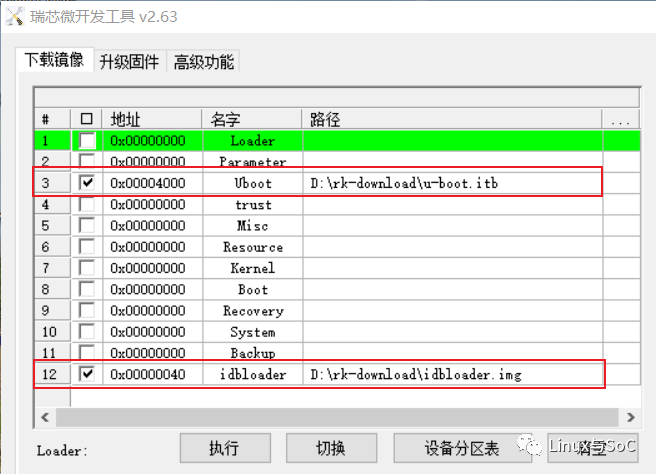
Directly flashing eMMC on the development board can be done by loading the files to be flashed through the network or serial port.
[root@rk3399:/]# lrz
lrz waiting to receive.
Starting zmodem transfer.  Press Ctrl+C to cancel.
Transferring idbloader.img...
  100%     138 KB     138 KB/sec    00:00:01       0 Errors
Transferring u-boot.itb...
  100%     751 KB     150 KB/sec    00:00:05       0 Errors
[root@rk3399:/]#
When flashing, be sure to execute the sync operation after flashing; otherwise, it may fail.
[root@rk3399:/]# dd if=idbloader.img of=/dev/mmcblk2 seek=64
277+1 records in
277+1 records out
142034 bytes (142 kB, 139 KiB) copied, 0.00497 s, 28.6 MB/s
[root@rk3399:/]#
[root@rk3399:/]# dd if=u-boot.itb of=/dev/mmcblk2 seek=16384
1503+1 records in
1503+1 records out
769952 bytes (770 kB, 752 KiB) copied, 0.0608755 s, 12.6 MB/s
[root@rk3399:/]# sync
– step5
Restart the development board, and the U-Boot version and compilation timestamp confirm that the new U-Boot 2022.01 has been successfully loaded and executed:
U-Boot 2022.01-00450-g25711b07ca (Jan 14 2022 - 09:37:38 +0800)

SoC: Rockchip rk3399
Reset cause: RST
Model: Rockchip RK3399 Evaluation Board
DRAM:  2 GiB
PMIC:  RK808
Core:  245 devices, 24 uclasses, devicetree: separate
MMC:   mmc@fe320000: 1, mmc@fe330000: 0
Loading Environment from MMC... OK
In:    serial
Out:   serial
Err:   serial
Model: Rockchip RK3399 Evaluation Board
Net:   eth0: ethernet@fe300000
Hit any key to stop autoboot:  0
......
Finally, I want to mention that I am not worried about bricking the development board firmware, as there is Maskrom mode that can restore it to factory settings.
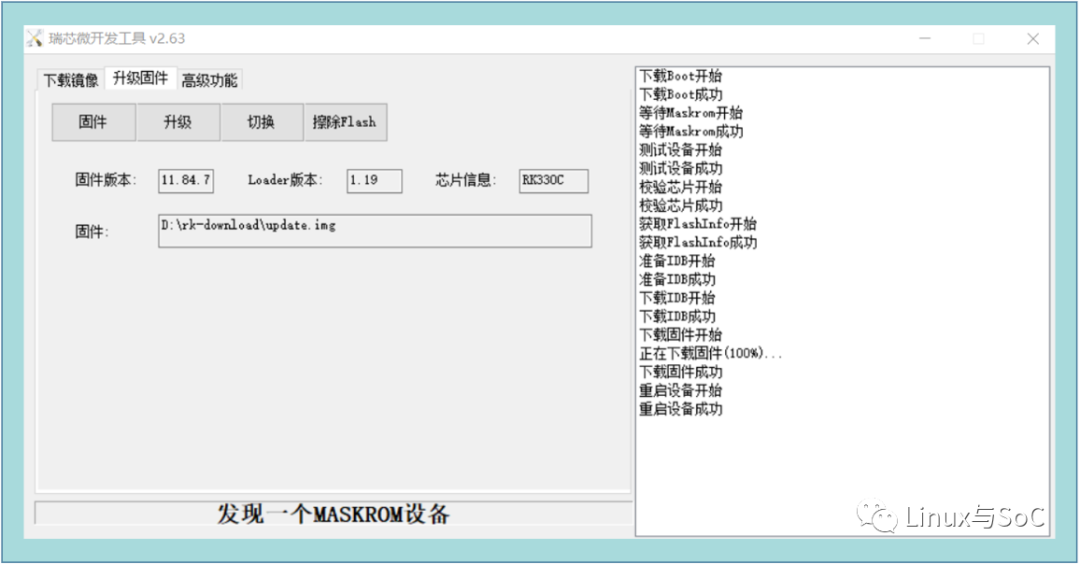
Moreover, the ported U-Boot is based on the evb-rk3399_defconfig generated configuration file, which will be further modified later.
 Scan to add me on WeChat


Welcome to like, share, and follow, 