Learning PLC programming is most satisfying when you can implement the “light flashing logic”! Today, we will break down the tower flashing light case, from requirement analysis to program writing, guiding you step by step to achieve it, even beginners can follow along~
1. Requirement Analysis: How Does the Light Flash? Clarify the Steps First
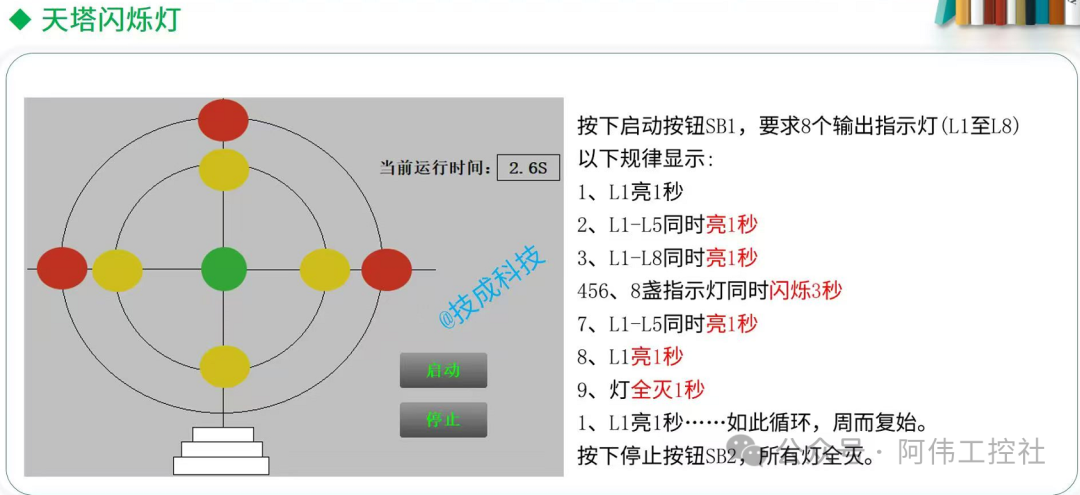
Press the start button SB1, and the 8 lights (L1 – L8) will cycle through the following process:
- L1 on for 1 second → 2. L1 – L5 on for 1 second → 3. L1 – L8 on for 1 second → 4 – 6. All 8 lights flash for 3 seconds → 7. L1 – L5 on for 1 second → 8. L1 on for 1 second → 9. All off for 1 second → back to step 1…
Core Logic: Trigger different groups of lights in sequence, using a timer to control the time!
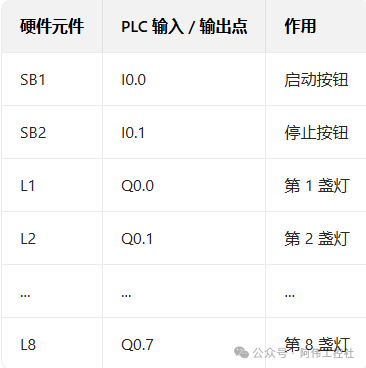
2. I/O Allocation: Connect the Wires to the PLC Properly
3. Program Design: Implementing with “Sequential Control”
In PLC programming, this kind of step-by-step execution logic is most conveniently implemented using Sequential Control Relays (SCR)!
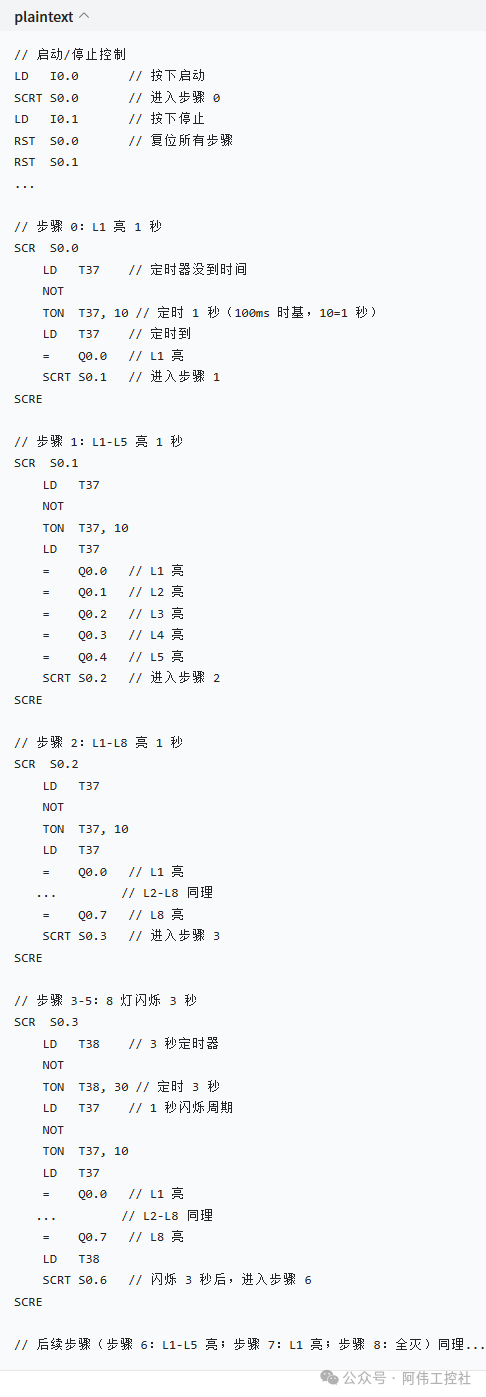
1. Timer Planning
- T37: 1-second timer (controls the time for each light to be on);
- T38: 3-second timer (controls the flashing time).
2. Program Framework (using Siemens S7-200 as an example)
4. Debugging Techniques
- Step-by-step Testing: Replace
<span>SCRT</span>with<span>SET</span>, manually trigger each step to see if the lights turn on according to the logic; - Timer Check: Monitor the current values of T37 and T38 to confirm the timing is correct;
- Flashing Logic: During flashing, T37 should toggle every 1 second (achieved using
<span>TON</span>+<span>NOT</span>).
5. Pitfall Guide
- Missing Light Groups: Ensure all L1 – L8 lights are on in step 2, do not miss any light;
- Timer Reset: Remember to reset the timer using
<span>RST T37</span>after each step, otherwise it will keep accumulating; - Stop Button: When stopping, use
<span>RST</span>on all SCRs to ensure that restarting begins from step 0.