Devices that can “speak offline” have always been highly valuable in smart homes, voice broadcasting, and alert systems. However, common Text-to-Speech (TTS) solutions often rely on cloud services, which not only require an internet connection but may also introduce delays and privacy risks.
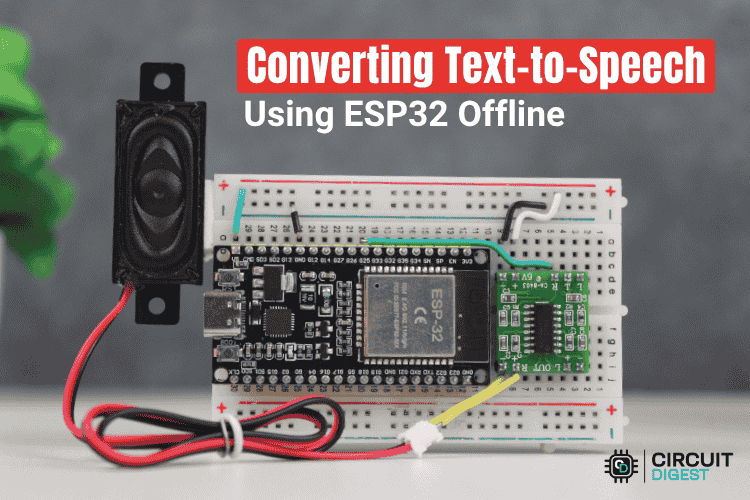
This project utilizes ESP32 + a free and open-source TTS library to create a truly offline voice synthesis system: no WiFi, no servers, real-time local voice synthesis, with the generated voice played directly through a small speaker.
Whether you want to create a voice prompt device, a custom broadcasting device, or develop a larger voice interaction system, this project can be easily replicated.
Project Highlights
-
Completely Offline: Voice synthesis and playback are completed locally on the ESP32, without relying on the internet/cloud services, avoiding issues like network delays and instability.
-
Simple Hardware: Only an ESP32 board + a small amplifier (PAM8403) + a regular speaker are needed to build the system. No complex audio chips or additional complicated wiring are required.
-
Lightweight Voice Engine: Uses the Talkie library + LPC (Linear Predictive Coding) format sound data. Although the sound quality is not high-fidelity, it is clear enough for reminders, alarms, instructions, and educational scenarios.
-
Expandable Vocabulary: As long as the corresponding LPC data exists, new words can be added to the vocabulary without modifying the main program. This is suitable for customizing vocabulary based on project needs.
-
Beginner / Maker Friendly: Simple wiring and clear code structure allow anyone with basic knowledge of Arduino/ESP32 to quickly get started.
Hardware and Connections
| Hardware | Purpose |
|---|---|
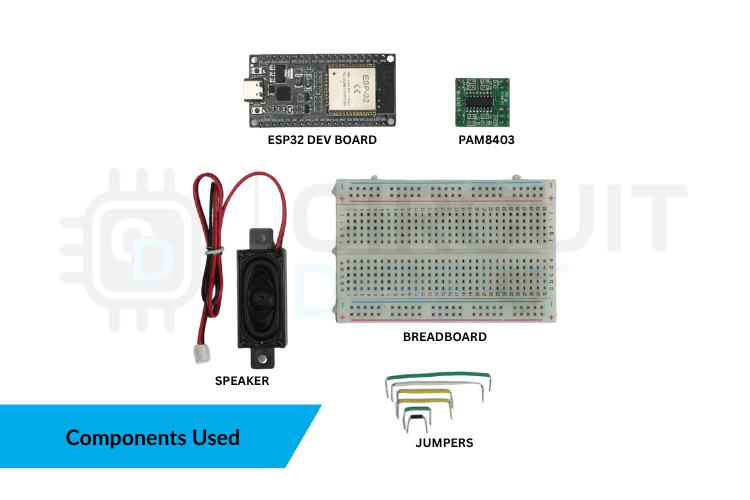
| ESP32 Development Board (1 piece) | Main controller + voice synthesis / DAC output |
| PAM8403 Audio Amplifier (1 piece) | Amplifies the audio signal output from the ESP32’s DAC |
| Speaker (4–8 Ω, 1 piece) | Outputs audible voice |
| Breadboard + Jumper Wires + USB Cable | For building / powering / programming |
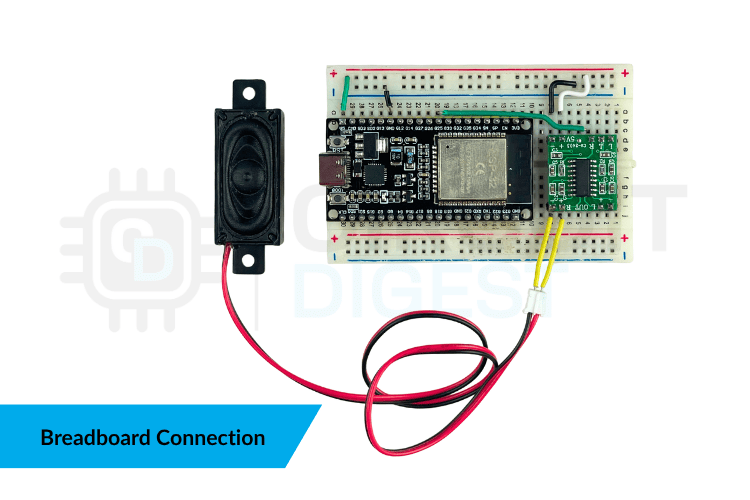
Among them, the two DAC pins of the ESP32 (GPIO25 or GPIO26) can be used to output analog audio signals. The tutorial uses GPIO25, which is connected to the Audio In (R) input of the PAM8403. The PAM8403 is connected to the speaker and powered with 5V and common ground (GND).
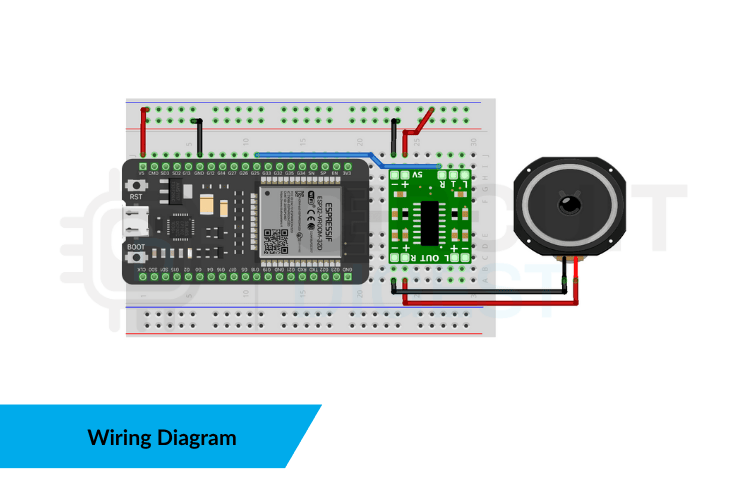
The connection can be simplified as follows:
-
ESP32 GPIO25 → PAM8403 Audio In (R)
-
PAM8403 VCC → 5V
-
PAM8403 GND → GND (Common ground for ESP32 & power supply)
-
PAM8403 Output → Speaker
Implementation Principle
The system plays LPC voice data stored in the vocabulary using the Talkie library. The ESP32 receives input text via serial communication, tokenizes it, and matches the corresponding LPC data for each word. Talkie decodes locally, and the DAC outputs analog audio, which is amplified by the PAM8403 to drive the speaker, achieving a completely offline, low-cost text-to-speech system.
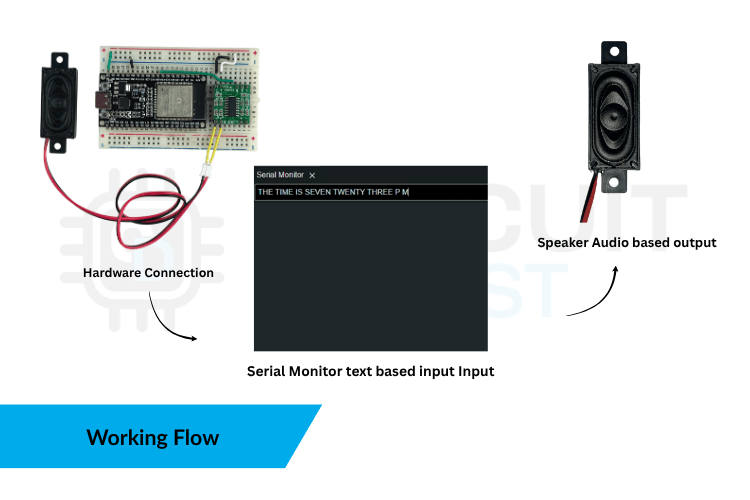
Key Processes:
-
Read text → Tokenization
-
Match LPC vocabulary voice data
-
Talkie local decoding generates audio waveform
-
DAC (GPIO25) outputs analog audio
-
PAM8403 amplifies and drives the speaker for playback
Software Design
The program is written in the Arduino environment and builds the entire offline TTS system based on the Talkie voice library and a large LPC vocabulary file. Below are key structures and functional descriptions from the original code.
#include <Talkie.h>#include "Vocab_US_Large.h"Import the Talkie voice library and the vocabulary file containing a large amount of LPC data; voice playback relies on the data provided by both.
Talkie voice;Define the voice playback object; all subsequent voice outputs are completed through voice.say().
struct WordMap { const char* text; const unsigned char* lpc;};Create a structure that binds “word text” to “corresponding LPC voice data” as the basic format for the dictionary.
WordMap words[] = { {"ZERO", sp2_ZERO}, {"ONE", sp2_ONE}, {"TWO", sp2_TWO}, {"THREE", sp2_THREE}, // ...};A dictionary array that maps recognizable English words to corresponding LPC voice data entries.
void speakWord(const char* w) { for (int i = 0; i < wordCount; i++) { if (strcasecmp(w, words[i].text) == 0) { voice.say(words[i].lpc); return; } } Serial.print("Word not found in vocab: "); Serial.println(w);}Search for a match in the dictionary based on the input word; if found, play the voice; if not, output a prompt message.
Serial.begin(9600);Serial.println("Type your sentence in capital letters...");Initialize the serial port at startup and prompt the user to input a capitalized sentence for the system to read.
String line = Serial.readStringUntil('\n');line.trim();line.toUpperCase();Read a whole line of serial input and convert it to uppercase to match the dictionary format.
for (int i = 0; i <= line.length(); i++) { if (i == line.length() || line[i] == ' ') { String w = line.substring(start, i); speakWord(w.c_str()); start = i + 1; }}Extract words sequentially by spaces and call the reading function, achieving playback of the entire sentence in word order.
START MACHINECHECK TEMPERATUREPOWER ALERTTesting ESP32 Text-to-Speech Output
Actual Testing Results
-
The system can successfully convert English words or short phrases input via serial into speech and play it back instantly.
-
Using the ESP32’s DAC output combined with the PAM8403 amplifier, the speaker can clearly play the synthesized voice.
-
The voice effect is a typical LPC mechanical sound, clear and distinguishable, suitable for prompts or instruction broadcasts.
-
Broadcast response is fast, with no delay, and can operate stably in offline environments.
Code File: https://github.com/bharanidharanrangaraj/converting_text_to_speech_offline_using_esp32
Applications & Considerations
Suitable for:
-
Voice reminder / alarm systems (e.g., temperature alarms, access control prompts…)
-
Automation devices / panel feedback (control systems issuing voice prompts)
-
Educational / teaching tools (reading, prompts, voice feedback)
-
Any embedded project that cannot connect to the internet but requires voice output
Notes / Limitations:
-
Voice is limited to words already in the vocabulary — does not support arbitrary text reading
-
Pronunciation / voice sounds quite “mechanical”, not suitable for scenarios seeking a natural human voice experience
-
Speaker and amplifier selection & wiring must be correct; otherwise, there may be no sound or distortion
Conclusion
With this ESP32 + PAM8403 + Talkie combination, even just a few cheap, common components can make the board “speak”. Although the voice is not very natural, it is a very practical low-cost, offline, and fast-response voice output solution. For Makers, hobbyists, hardware enthusiasts, or engineering projects that require offline voice prompts/feedback, this is undoubtedly a worthwhile “brick-moving level attempt” solution.
Note: The above content has been summarized and generated by AI. Feel free to click “Read the original text” to replicate it yourself.
Click to read the original text for more