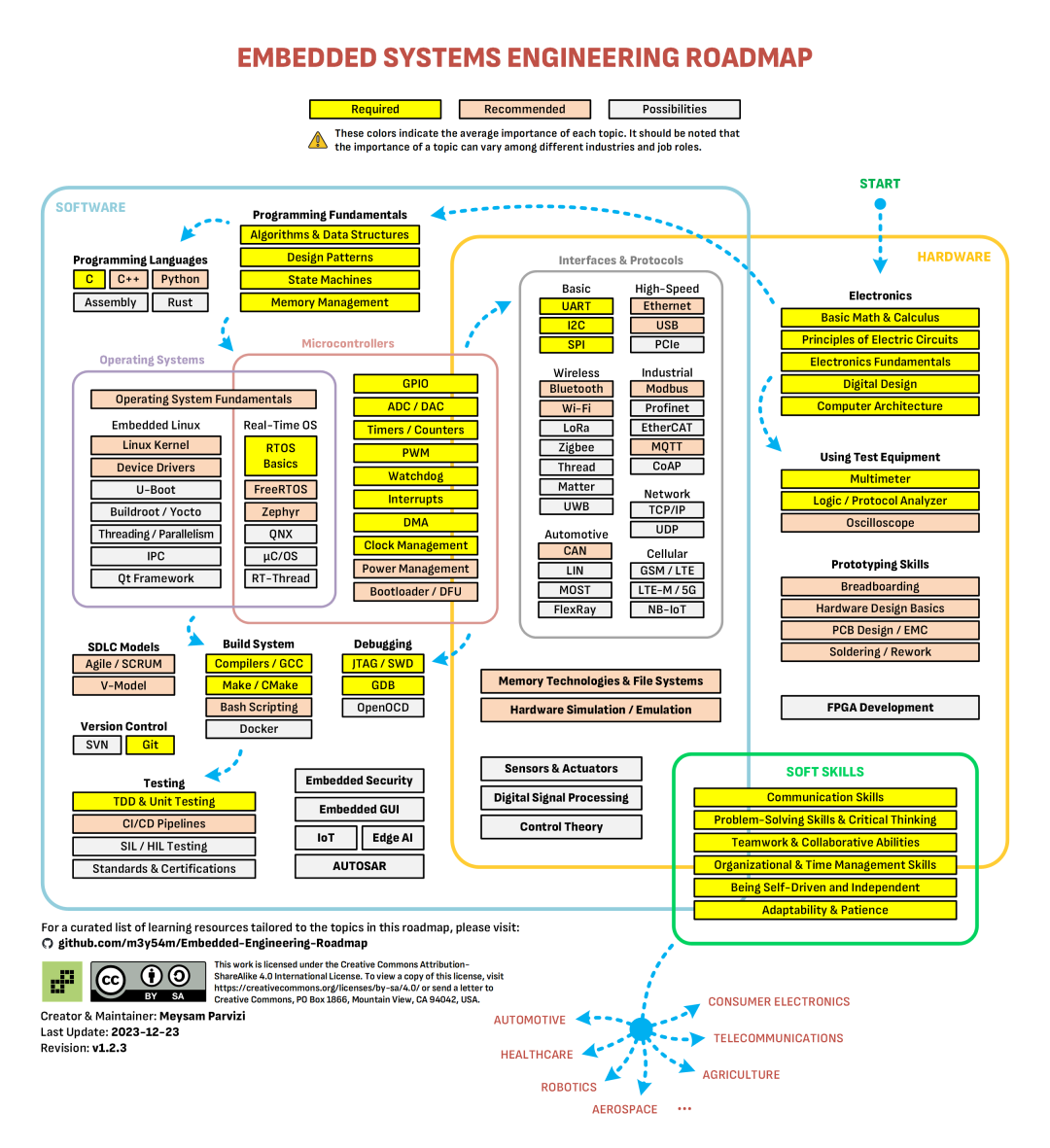
This open-source project is a ‘panoramic roadmap’ that connects ‘hardware’ + ‘software’ + ‘soft skills’, helping you navigate from a beginner to an ’embedded expert’ on your own.
🧐 What is this all about?
The Embedded-Engineering-Roadmap (hereinafter referred to as Roadmap) is an open-source Markdown/Visio document that categorizes common job requirements, essential knowledge points, and learning resources (books, videos, articles) in the embedded industry into hierarchical levels.
- • Hardware: Circuits, MCUs, PCBs, debugging tools, etc.;
- • Software: C/C++, RTOS, drivers, Linux, AI/IoT, etc.;
- • Soft Skills: Project management, team communication, version control, testing processes, etc.
It is not just a ‘technology tree’, but also a ‘roadmap from beginner to advanced’, clearly laying out ‘what I should learn’ and ‘how I should learn’.
⚙️ Installation & Usage Instructions
- 1. Clone the repository (as long as you have Git)
git clone https://github.com/m3y54m/Embedded-Engineering-Roadmap.git cd Embedded-Engineering-Roadmap - 2. Open the document
- • Markdown version: Open
<span>ROADMAP.md</span>directly with VS Code, Typora, or a browser, and the navigation links will automatically redirect. - • Visio version: Download
<span>roadmap.vsdx</span>and open it with Microsoft Visio or the free draw.io (supports .vsdx) to view the complete visualization.
- • Check the ‘Job’ tags on the left side; clicking on them will expand the corresponding software/hardware/soft skills categories.
- • Each entry has icons like ‘📘 Book’, ‘🎞️ Video’, ‘📝 Article’, etc., which link to resources.
- • There are often ‘project’ links at the bottom of the chapters (e.g., Arduino Blink, STM32 FreeRTOS examples); click to open the README and follow the steps.
- • It is recommended to use PlatformIO or STM32CubeIDE, as the Roadmap provides the corresponding toolchain configuration.
Tip: Export
<span>ROADMAP.md</span>to PDF using<span>markdown-pdf</span>and print it as a ‘study manual’ to carry with you for easy reference.
👍 Quick Review of Pros and Cons
| Pros | Cons |
| Panoramic structure: Software, hardware, and soft skills presented all at once, saving the trouble of piecing it together yourself. | Large amount of information: The first time you open it, it may feel like an ‘information bomb’, requiring gradual filtering. |
| Clear resource marking: 👶, 💎 help both beginners and experienced users quickly locate resources. | Reliance on external resources: Links to tutorials and books may sometimes be broken, requiring manual checks. |
| Community-driven: Fast updates, and everyone can PR to add new technologies. | Lack of official certification: Not ‘official teaching material’, so the learning path still needs to be verified for suitability. |
| Project practice support: Examples from ‘Blink’ to ‘RTOS’ make learning more engaging. | Diverse toolchains: Configuration methods vary slightly across different platforms (Keil, IAR, GCC), requiring adaptation. |
🚀 Summary & How to Get Started
- • First, identify: Open
<span>ROADMAP.md</span>and select a position you want to pursue (e.g., ‘Embedded Linux Engineer’), expanding the corresponding three major areas (hardware, software, soft skills). - • Learn in stages: First, go through the 👶 resources to complete a minimal runnable project (Blink, UART), then choose 💎 for in-depth learning (RTOS, drivers, Linux).
- • Practice + document: After completing each project, write down key code and troubleshooting experiences in your own Git repository, developing a good habit of dual-track recording (‘code + documentation’).
- • Join the community: GitHub Issues, Discord, Reddit r/embedded have active discussions; if you hit a roadblock, ask questions directly instead of struggling alone.
As long as you spend 30 minutes each day following the Roadmap, you can upgrade from ‘only knowing how to turn on a light’ to being able to ‘write bare-metal drivers + Linux applications’ in about six months. Remember, hardware is hard, software is soft, and soft skills are soft; all three are essential. Wishing you smooth sailing on your embedded journey 🚀!
Project address: https://github.com/m3y54m/Embedded-Engineering-Roadmap