1. Why Choose Mac mini M4?
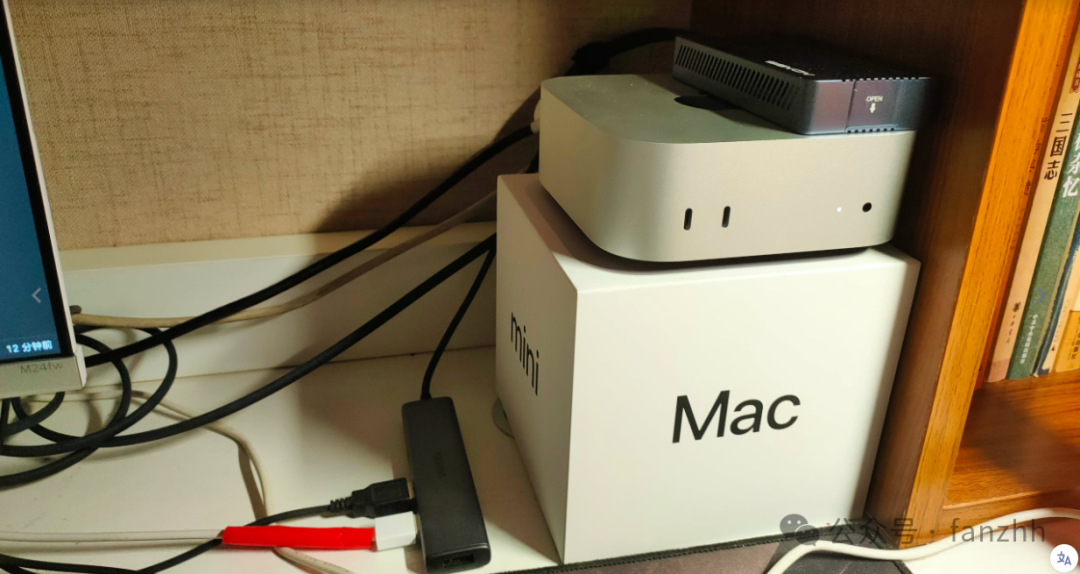
This March, I acquired an Apple Mac mini M4 (16GB+256GB), and after more than a month of intensive use, it has completely changed my perception of home servers—low power consumption, zero noise, and high performance. Combined with external network penetration and external storage solutions, it has achieved:✅Download Server (qBittorrent) ✅Home Media Center (Kodi + FTP) ✅Local Large Model (Ollama + LLM) ✅Development Environment (Jupyter + SSH) ✅Photo Management (Immich Private Cloud) ✅Remote Control (Web Terminal)
Final cost:
- Mac mini M4 (Student Discount) ¥3749
- External Storage Solution (USB4 SSD + Enclosure) ¥1620
- Cyber Bodhisattva CL Internal Network Penetration (No Public IP) Free
2. Hardware Configuration and Optimization
1. Is the Basic Version Sufficient?
I chose the 16GB+256GB version, purchased offline for ¥3749 (using my daughter’s student discount). Although 256GB storage is relatively small, it is perfectly resolved with an external SSD:
- Akasis USB4.0 Enclosure (¥543) + SK Hynix P44 Pro 2TB SSD (¥1077)
- Installing macOS on the external hard drive runs smoothly without lag, and the temperature is controllable.
💡 Pitfall Reminder: Initially, I tried the Orico 2T hard drive dock (¥1699), but the plastic casing + loud fan noise severely affected the experience, and I ultimately returned it.
2. Why Keep It On 24/7?
- Standby power consumption is only 10W (≈ phone charger)
- Completely silent operation, suitable for long-term use in bedrooms/studies
3. Software Solutions and Practical Applications
1. External Network Access: Cyber Bodhisattva CL Internal Network Penetration
No public IP is needed; remote access is achieved through independent domain name + HTTP/SSH tunnel, with simple configuration:
|
2. Download Server: qBittorrent + WebUI
<span><span>brew install qbittorrent</span></span>- Configure WebUI password and map subdomain through CL
- Add tasks anytime from mobile/external network, watch them at home
3. Home Media: Kodi + FTP
The Xiaomi TV cannot directly access the Mac shared folder, so the final solution is:
- Install FileZilla Server on Mac
- Kodi connects via FTP protocol, smoothly playing 4K resources
4. Local Large Model: Ollama + Multi-Model Comparison
Installed 5 mainstream models: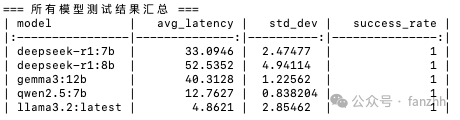
Expose WebUI through CL, allowing external access to local LLM!
5. Development and Operations
- Jupyter Notebook: Interactive programming, tunnel mapping ports
- Web Terminal: CL configures SSH tunnel, but the web version has high latency; direct terminal connection is recommended
6. Private Album: Immich
- Mac serves as the server, with mobile/tablet clients for backup
- Alternative to iCloud/Google Photos, excellent privacy
4. Conclusion: The Perfect Positioning of Mac mini M4
✔️ Suitable Audience::
- Users needing a low-power, silent home server
- Geeks looking to integrate download/NAS/AI/development
- Those with privacy concerns regarding photo backup
❌ Limitations::
- Storage expansion relies on external solutions
- Some applications (like direct TV connection) require workarounds
If you seek “worry-free + versatile”, the Mac mini M4 is an ideal choice. 🚀